Solved Blank worksheetsng happens

terraerm

New member
Local time
6:07 PM
Messages
15
hi I have a continuing problem with opening excel and word docs. when dbl clicking , nothing happens. i know what the problem is an and how to fix it, in XP. How the F$^$#@^@$%$, does one add parameters to excel. yes i'm pissed. a simple fix in xp, becomes a major task in 7... i need to change how excel handles file openings, where the hell is it now. thx
 

My Computer My Computer

At a glance

Win 7 Home Premium x64
OS
Win 7 Home Premium x64
Start here:

Control Panel > All Control Panel Items > Default Programs > Set Default Programs

Regards,
GEWB
 

My Computer My Computer

At a glance

Linux Mint / XP / Win7 Home, Pro, Ultimate / ...
Computer type
PC/Desktop
Computer Manufacturer/Model Number
(7 different computers booting up to 10 systems)
OS
Linux Mint / XP / Win7 Home, Pro, Ultimate / Win8.1 / Win10
Other Info
Four desktops, two laptops, one notebook and one tablet
what i'm trying to find is where to change parameters for file types. in XP it was Tools>Folder Options, then select the "File Types Tab", from there you can change advanced parameters as to how are files handled. in 7, no idea? i have found a cpl of programs, that will do it, but i would rather do it thru W7
 

My Computer My Computer

At a glance

Win 7 Home Premium x64
OS
Win 7 Home Premium x64
Based on your initial post, I understood you couldn't open an Excel spreadsheet by double clicking it - you thought the file association was not set. I replied pointing you to the place in Win 7 to do this. I guess I need to be a little more specific, so here goes.

1. Click the Windows 7 Start orb in the lower left corner of your screen
2. Click on Control Panel in the right column. If it isn't there, let me know and I'll post an alternate method.
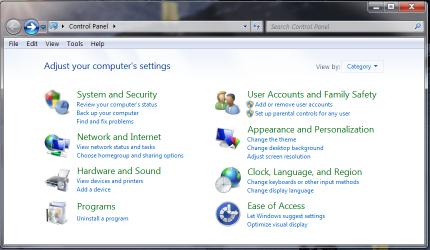
3. The abreviated Control Panel window opens.
1.PNG

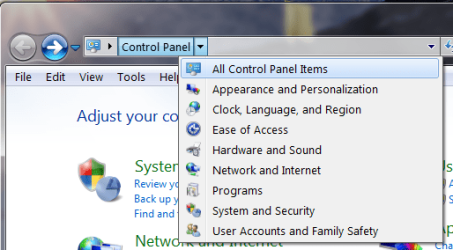
4. In the top navigation box, click the right arrow next to "Control Panel" and select All Control Panel Items.
2.PNG

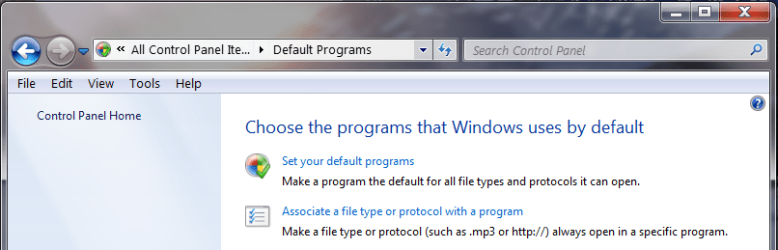
5. Locate and click on Default Programs.
3.PNG

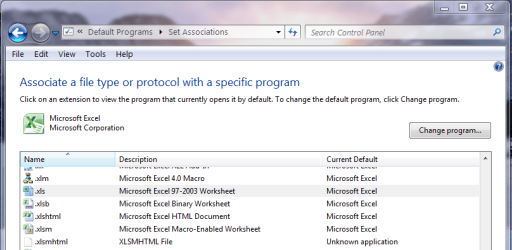
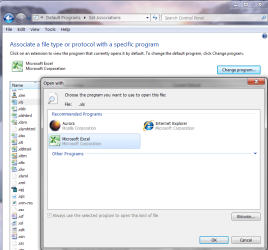
6. Click on Associate a file type or protocol with a program.
4.PNG

7. Scroll down and select the file extension desired. For an Excel spread sheet, you need to do this twice: once for .xls and one for .xlsx - note there are other types as well, please reference MS Office info.
5.PNG

8. Click the Change program... button.
6.PNG

9. Select Excel.
10. Click OK.
11. Click the Close button.

I hope this is what you were looking for.

Regards,
GEWB
 

My Computer My Computer

At a glance

Linux Mint / XP / Win7 Home, Pro, Ultimate / ...
Computer type
PC/Desktop
Computer Manufacturer/Model Number
(7 different computers booting up to 10 systems)
OS
Linux Mint / XP / Win7 Home, Pro, Ultimate / Win8.1 / Win10
Other Info
Four desktops, two laptops, one notebook and one tablet
hi

I understand what you mean, but not exctely what i'm looking for.

What I am looking for is where to add/change parameters for Excel and/or Word
See the highlighted part.

"C:\Program Files\Microsoft Office\Office12\WINWORD.EXE" /e "%1"

There are other parameters that can be changed also, but that's in the advanced settings also, as above.
 

My Computer My Computer

At a glance

Win 7 Home Premium x64
OS
Win 7 Home Premium x64
hi

I understand what you mean, but not exctely what i'm looking for.

What I am looking for is where to add/change parameters for Excel and/or Word
See the highlighted part.

"C:\Program Files\Microsoft Office\Office12\WINWORD.EXE" /e "%1"

There are other parameters that can be changed also, but that's in the advanced settings also, as above.

Ah, that's a much better description of your question, thanks. Not sure about the solution but I'll look into it.

Regards,
GEWB
 

My Computer My Computer

At a glance

Linux Mint / XP / Win7 Home, Pro, Ultimate / ...
Computer type
PC/Desktop
Computer Manufacturer/Model Number
(7 different computers booting up to 10 systems)
OS
Linux Mint / XP / Win7 Home, Pro, Ultimate / Win8.1 / Win10
Other Info
Four desktops, two laptops, one notebook and one tablet
hi

I understand what you mean, but not exctely what i'm looking for.

What I am looking for is where to add/change parameters for Excel and/or Word
See the highlighted part.

"C:\Program Files\Microsoft Office\Office12\WINWORD.EXE" /e "%1"

There are other parameters that can be changed also, but that's in the advanced settings also, as above.

OK, got some answers - not what you want to hear. MS removed that Windows functionality starting with Vista. There are two solutions:

  • Edit the registry
  • Use a third party program

I just tried "Default Programs Editor" and it seems to be OK - you can do exactly what you requested. See:

Default Programs Editor

Regards,
GEWB
 

My Computer My Computer

At a glance

Linux Mint / XP / Win7 Home, Pro, Ultimate / ...
Computer type
PC/Desktop
Computer Manufacturer/Model Number
(7 different computers booting up to 10 systems)
OS
Linux Mint / XP / Win7 Home, Pro, Ultimate / Win8.1 / Win10
Other Info
Four desktops, two laptops, one notebook and one tablet
hi

I understand what you mean, but not exctely what i'm looking for.

What I am looking for is where to add/change parameters for Excel and/or Word
See the highlighted part.

"C:\Program Files\Microsoft Office\Office12\WINWORD.EXE" /e "%1"

There are other parameters that can be changed also, but that's in the advanced settings also, as above.
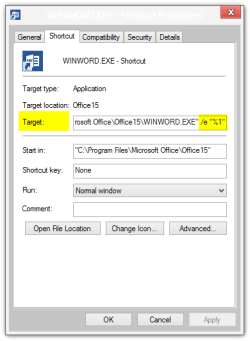
  • Create a shortcut for Word (or any other application)
  • Right click the newly created shortcut
  • Select Properties
  • Open Shortcut tab
  • Add parameters to Target:
    .
    WINWORD.EXE - Shortcut Properties.png
    .
  • Click OK to save shortcut settings
Now whenever you double click the shortcut, the application is opened with parameters told in Target.

Kari
 

My Computer My Computer

At a glance

Windows 10 Pro x64 EN-GB1.6 GHz Intel Core i7-720QM Processor6 GBATI Mobility Radeon HD 5850 Graphics
Computer type
Laptop
Computer Manufacturer/Model Number
HP ENVY 17-1150eg
OS
Windows 10 Pro x64 EN-GB
CPU
1.6 GHz Intel Core i7-720QM Processor
Memory
6 GB
Graphics Card(s)
ATI Mobility Radeon HD 5850 Graphics
Sound Card
Beats sound system with integrated subwoofer
Monitor(s) Displays
17" laptop display, 22" LED and 32" Full HD TV through HDMI
Screen Resolution
1600*900 (1), 1920*1080 (2&3)
Hard Drives
Internal: 2 x 500 GB SATA Hard Disk Drive 7200 rpm
External: 2TB for backups, 3TB USB3 network drive for media
Cooling
As Envy runs a bit warm, I have it on a Cooler Master pad
Keyboard
Logitech diNovo Media Desktop Laser (bluetooth)
Mouse
Logitech Performance Mouse MX
Internet Speed
50/10 Mbps VDSL
Antivirus
Windows Defender 4.3.9431.0
Browser
Maxthon 3.5.2., IE11
  • Create a shortcut for Word (or any other application)
  • Right click the newly created shortcut
  • Select Properties
  • Open Shortcut tab
  • Add parameters to Target:
  • Click OK to save shortcut settings
Now whenever you double click the shortcut, the application is opened with parameters told in Target.

Kari

Great solution!

Regards,
GEWB
 

My Computer My Computer

At a glance

Linux Mint / XP / Win7 Home, Pro, Ultimate / ...
Computer type
PC/Desktop
Computer Manufacturer/Model Number
(7 different computers booting up to 10 systems)
OS
Linux Mint / XP / Win7 Home, Pro, Ultimate / Win8.1 / Win10
Other Info
Four desktops, two laptops, one notebook and one tablet
Hi all i used defualts program editor, to do the job. Thx!!! GEWB, for all your efforts Thx! Kari...for alternate method
 

My Computer My Computer

At a glance

Win 7 Home Premium x64
OS
Win 7 Home Premium x64
Back
Top