Bloatware

whs

New member
Guru
Gold Member
VIP
Local time
9:01 AM
Messages
26,200
Location
Florida in winter, Black Forest/Germany
Many people voice complaints about the so called „Bloatware“ that is being put on preinstalled systems. I have a more positive attitude towards some of those programs and like to invite you for a discussion.

A) The 3 months trials for security programs such as Norton or McAfee are very useful for the majority of the users. Many first time PC buyers would probably not install a security program until they had their first “incident”. The 3 month trial gives them at least an initial protection until they have learned the basics and acquired an appreciation for the need for a security program.

B) The trials for Office and alike is very useful for experimenting with these programs. Who likes to dish out $149 before they had a chance to see whether these are programs that fit their needs.


C) Older programs like Works, etc. are always the first that I delete. But I know several people that make good use of them for their daily office needs.

D) OEM system management tool such as HP Updater or diverse system management tools from the OEM will usually not survive very long on my systems. But again, I know people that make good use of them.

E) Program for basic functions like Adobe PDF reader or Roxio are very useful to execute the functions they provide. I replace Adobe with Foxit, but a program like Roxio I keep because it does everything I need for basic CD burning.

F) Games – I delete those asap because I do not use them. But many people like those games and use them.

I am sure you will come up with more categories. These are only a few examples to show that the so called bloatware may be useful for many people. There is certainly a commercial interest on the part of the OEM and Microsoft. But there is also an interest by the consumer. After all, not everybody is a Geek and knows what to do with their new PC at the first hours. The bloatware helps to sort out some areas.
 

My Computer

Computer Manufacturer/Model Number
HP, Dell, Gateway, Toshiba - 4 laptops and 2 desktops
OS
Vista, Windows7, Mint Mate, Zorin, Windows 8
CPU
from 1.6GHz Duo to i7
Monitor(s) Displays
2x HP w2207
Hard Drives
5x HDD, 7x SSD, 12x Externals
Keyboard
with trackball - no mices
Mouse
Trackball mice
Internet Speed
DSL 6000
Right on! I can understand where you are coming from. I hate she reinstalled stuff but I can see where it could help some out.

I have purchased only 2 computers which are laptops that have had bloatware on them. I immediately installed a fresh copy of Windows on them both.
 

My Computer

Computer Manufacturer/Model Number
Toshiba L505
OS
Windows 7 64x
CPU
AMD Turion II Dual-Core Mobile M520 2.30 GHz
Memory
4GB
Graphics Card(s)
ATI Radeon HD 4200
I can't really say I've had any problems with bloatware, because I've been building my own systems and installing only what I need since my first 386 computer, and I follow that same rule when building for customers.

However, when I provide a laptop, I usually leave it "as-is", and allow the customer to decide which software is necessary or not, with one exception: Anti-virus. I adjust the cost of my laptops to include anti-virus software, usually Kaspersky, but sometimes also Norton.

I started doing this because I noticed that if I didn't, then the "3-month trial" ended up giving most customers a false sense of security. Normally because the software has expired and the customer was unaware of this fact. So during the initial setup phase, I'd remove whatever time limited anti-virus software is pre-installed, and replace it with something else.

In some very rare intances where a laptop is provided with seperate OS, Drivers and Applications disks, I'd reload the entire OS and install only what is absolutely necessary, but then also only if the customer wants this to be done.
 

My Computer

Computer type
PC/Desktop
Computer Manufacturer/Model Number
Virtual Machine
OS
Windows 7 Professional 32-bit SP1
CPU
AMD A4/A6
Motherboard
Intel Corporation 440BX Desktop Reference Platform
Memory
3.00GB EDO
Graphics Card(s)
VMware SVGA 3D
Sound Card
High Definition Audio Device
Monitor(s) Displays
Generic Non-PnP Monitor on VMware SVGA 3D
Screen Resolution
1440x900
Hard Drives
1 x 60GB VMware Virtual SATA Hard Drive ATA Device
Antivirus
Kaspersky Total Security
Bloatware is a revenue stream for the OEMs and the companies that write that software so its unlikely its going away very soon. Those of us with the skills to configure the way we want, OK, but what about those who dont?

I also find it deplorable that most major manufacturers dont provide clean, reinstall disks. Only Dell and i think Gateway (before Acer acquired it) did. When one has paid for the OS, why is one not entitled to the disk? Nowadays, one just gets the bloatware filled recovery dvds. I once spent several days researching how to do an OS+drivers only install from recovery dvds. The trick apparently is to force a reboot the moment the crap starts to install but the process was so iffy, i gave up after a while. The ostensible reason for not giving out disks is that it helps tech support when they know what they are dealing with. But i think its that same old MS trying to harass pirates and ending up harassing legit users.

BTW, reinstalling from a generic disk (downloaded off the web, where else?) and installing drivers and apps really makes the machine run much smoother, IMO. But same problem, what about the average Joe?
 

My Computer

Computer Manufacturer/Model Number
Too many to describe...
OS
Windows 7 x64 pro/ Windows 7 x86 Pro/ XP SP3 x86
Found this a while ago and looks like it could fall under D,

junkab9.jpg


nothing like overloading it with a bunch of junk that is already built-in to Windows. Any recent VAIO owners, does it still come like that?
 

My Computer

Computer type
PC/Desktop
Computer Manufacturer/Model Number
Me
OS
Win 7 Ultimate x64
CPU
FX-8350 @ 4.6 GHz so far
Motherboard
Asus M5A97 EVO
Memory
ADATA XPG V1 Series Black 8GB DDR3 1600
Graphics Card(s)
Sapphire R9 270x Dual-X
Sound Card
Xonar DGX w/ Corsair Vengence 1300
Monitor(s) Displays
Acer S232HL Abid
Screen Resolution
1920x1080
Hard Drives
120 GB OCZ Vertex 3
500 GB Seagate 7200.12
PSU
Antec Earthwatts 650W Green
Case
Antec Three Hundred
Cooling
Cooler Master 212 EVO
Keyboard
Logitech G510
Mouse
Logitech G500s
Internet Speed
35000/3000
Found this a while ago and looks like it could fall under D,

junkab9.jpg


nothing like overloading it with a bunch of junk that is already built-in to Windows. Any recent VAIO owners, does it still come like that?
:rofl:
 

My Computer

OS
Windows XP - Now Windows 7 Home Premium (64-bit).
Yes very hard to know, choose which one had to be deleted...

-I decided not to keep the Office Home & Student 2007 trial, as MS Works 9.0 is already install and Open Office set pretty good next to it.

-Some Bloatwaresare installed for the purpose of computer's management and better not be uninstalled...or buy a pc desktop instead of a laptop!

-"Media Suite" are always good as you can upgrade for a cheap price as they're are pre-installed.

-Some other Bloatwares/Games can be easily removed and you could always restore them in case with the restore tool from the manufacturer (a bloatware exemple not to remove)

-Always do your restore CDs if not provided in the package, you'll save time & money!
 

My Computer

Computer type
PC/Desktop
Computer Manufacturer/Model Number
Custom Build
OS
Windows 7 Professional SP1 - x64 [Non-UEFI Boot]
CPU
Ivy Bridge Core i5 3570K (Delidded)
Motherboard
Asus P8Z77-V LE PLUS
Memory
G.Skill "Ares" DDR3 PC3-12800 - 1600MHz (16Gb)
Graphics Card(s)
Asus Dual-RX480-O4G
Sound Card
Creative Sound Blaster Z w/5.1 sound system
Monitor(s) Displays
Asus IPS 23"
Screen Resolution
16/9
Hard Drives
Internal:
500Go Sata 6Gb/s (x2)
500Go Sata 3Gb/s (x2)
SSD 60Go Sata 6Gb/s
PSU
In Win C 900W Series 80+ Platinum
Case
Thermaltake Chaser A71
Cooling
Custom Water Cooling Loop
Keyboard
Cooler Master QuickFire XTi
Mouse
Razer Imperator 2012 (4G)
Antivirus
MSE
Browser
IE 11.0.xxx Rtm
Other Info
"Raid0" with Intel Smart Response Technology (HDD/SSD)
-I decided not to keep the Office Home & Student 2007 trial
For me it was convenient to find it on the system. I bought my legit copy in 2007 (key for 3 systems) and on the 2 systems I bought after that, I just activated the trial version with my key. No need to reinstall it.
 

My Computer

Computer Manufacturer/Model Number
HP, Dell, Gateway, Toshiba - 4 laptops and 2 desktops
OS
Vista, Windows7, Mint Mate, Zorin, Windows 8
CPU
from 1.6GHz Duo to i7
Monitor(s) Displays
2x HP w2207
Hard Drives
5x HDD, 7x SSD, 12x Externals
Keyboard
with trackball - no mices
Mouse
Trackball mice
Internet Speed
DSL 6000
-I decided not to keep the Office Home & Student 2007 trial
For me it was convenient to find it on the system. I bought my legit copy in 2007 (key for 3 systems) and on the 2 systems I bought after that, I just activated the trial version with my key. No need to reinstall it.

Only one computer was, so it was quite off for me...between 109 euros to 139 euros to buy.:)
 

My Computer

Computer type
PC/Desktop
Computer Manufacturer/Model Number
Custom Build
OS
Windows 7 Professional SP1 - x64 [Non-UEFI Boot]
CPU
Ivy Bridge Core i5 3570K (Delidded)
Motherboard
Asus P8Z77-V LE PLUS
Memory
G.Skill "Ares" DDR3 PC3-12800 - 1600MHz (16Gb)
Graphics Card(s)
Asus Dual-RX480-O4G
Sound Card
Creative Sound Blaster Z w/5.1 sound system
Monitor(s) Displays
Asus IPS 23"
Screen Resolution
16/9
Hard Drives
Internal:
500Go Sata 6Gb/s (x2)
500Go Sata 3Gb/s (x2)
SSD 60Go Sata 6Gb/s
PSU
In Win C 900W Series 80+ Platinum
Case
Thermaltake Chaser A71
Cooling
Custom Water Cooling Loop
Keyboard
Cooler Master QuickFire XTi
Mouse
Razer Imperator 2012 (4G)
Antivirus
MSE
Browser
IE 11.0.xxx Rtm
Other Info
"Raid0" with Intel Smart Response Technology (HDD/SSD)
I promptly uninstalled all of the bloatware on my wife's netbook except for Acer management programs and MS Office trial. I added a free anti-virus. I also added a firewall since we use her netbook in public places.
 

My Computer

Computer Manufacturer/Model Number
Home built
OS
Windows 7 Ultimate 32 bit
CPU
Intel(R) Pentium(R) 4 CPU 3.00GHz
Motherboard
ASUS P4P800-VM Motherboard Chipset: Intel 865G + ICH5
Memory
2.50 GB RAM
Graphics Card(s)
NVIDIA GeForce 7600 GS
Sound Card
SoundMax Integrated Digital Audio (Chip)
Monitor(s) Displays
ViewSonic VX 1962 wm
Screen Resolution
1680 X 1050
Hard Drives
Seagate Barracuda 7200.10 80 GB
ST380215A ATA Device 18.6 GB
Western Digital "My Book" external hard drive 750 GB
Cooling
Fan based
Keyboard
Microsoft Comfort Curve Keyboard 2000 v10 USB
Mouse
Logitec optic USB
Internet Speed
3.01 Mb/s download 0.64 Mb/s upload
I promptly uninstalled all of the bloatware on my wife's netbook except for Acer management programs and MS Office trial. I added a free anti-virus. I also added a firewall since we use her netbook in public places.

Acer management programs are quite sensible if they are used for Power Plan Management, the graphic card and the eRecovery management! It's kind of handcuff around the laptop!!!

That's why i did created those 3 restore Dvds straight away, in case one program fail
 

My Computer

Computer type
PC/Desktop
Computer Manufacturer/Model Number
Custom Build
OS
Windows 7 Professional SP1 - x64 [Non-UEFI Boot]
CPU
Ivy Bridge Core i5 3570K (Delidded)
Motherboard
Asus P8Z77-V LE PLUS
Memory
G.Skill "Ares" DDR3 PC3-12800 - 1600MHz (16Gb)
Graphics Card(s)
Asus Dual-RX480-O4G
Sound Card
Creative Sound Blaster Z w/5.1 sound system
Monitor(s) Displays
Asus IPS 23"
Screen Resolution
16/9
Hard Drives
Internal:
500Go Sata 6Gb/s (x2)
500Go Sata 3Gb/s (x2)
SSD 60Go Sata 6Gb/s
PSU
In Win C 900W Series 80+ Platinum
Case
Thermaltake Chaser A71
Cooling
Custom Water Cooling Loop
Keyboard
Cooler Master QuickFire XTi
Mouse
Razer Imperator 2012 (4G)
Antivirus
MSE
Browser
IE 11.0.xxx Rtm
Other Info
"Raid0" with Intel Smart Response Technology (HDD/SSD)
Bloatware is a revenue stream for the OEMs and the companies that write that software so its unlikely its going away very soon. Those of us with the skills to configure the way we want, OK, but what about those who dont?

I also find it deplorable that most major manufacturers dont provide clean, reinstall disks. Only Dell and i think Gateway (before Acer acquired it) did. When one has paid for the OS, why is one not entitled to the disk? Nowadays, one just gets the bloatware filled recovery dvds. I once spent several days researching how to do an OS+drivers only install from recovery dvds. The trick apparently is to force a reboot the moment the crap starts to install but the process was so iffy, i gave up after a while. The ostensible reason for not giving out disks is that it helps tech support when they know what they are dealing with. But i think its that same old MS trying to harass pirates and ending up harassing legit users.

BTW, reinstalling from a generic disk (downloaded off the web, where else?) and installing drivers and apps really makes the machine run much smoother, IMO. But same problem, what about the average Joe?


My asus came with OEM re-install discs....I was quite suprised. I dont know if they are "clean" though. i am sure all of the "Bloat-ware" is installed during re-install as well.....
 

My Computer

Computer type
Laptop
Computer Manufacturer/Model Number
ASUS G60-RBBX05
OS
Win7 Home Premium 64x
CPU
Intel Core 2 Duo P7450 / 2.13 GHz (2.29 with Extreme Turbo)
Memory
4 GB PC-6400 Hyundai (2X2) at 800Mhz
Graphics Card(s)
NVIDIA GeForce GTX 260M 1GB DDR3 VRAM
Monitor(s) Displays
16" LED Backlit
Screen Resolution
1366 x 768 on laptop 1600x1050 max res on 22" external mon
Hard Drives
OCZ Agility 3 60GB SSD / 320 GB - Serial ATA-150 - 7200 rpm
PSU
6-cell Lithium ion { lasts 1.5 hours }
Case
ASUS G60 Laptop
Keyboard
Chicklet type back-lit (white light) keyboard
Mouse
Logitech G9 Laser Mouse 3200dpi and 1000 reports per minute
Internet Speed
Comcast 8.60mb/s up - 3.11mb/s down
Antivirus
MSE
Browser
Firefox
Other Info
General mid-budget gaming Comp. Low batterylife - High FrameRates - currently overheating problems :(

2nd Rig: Case: Rosewill BLACKHAWK Gaming ATX Mid Tower Computer Case

Mobo: GIGABYTE GA-990FXA-UD3
CPU: AMD FX-6200 Zambezi 3.8GHz (4.1GHz Turbo)
Heatsink: COOLER MASTER V8 CPU Cooler
RAM: Patriot Viper 3 8GB (2 x 4GB) 240-Pin DDR3 SDRAM 1866 (PC3 15000)
GPU: SAPPHIRE Radeon HD 6850 1GB 2
Bloatware is a revenue stream for the OEMs and the companies that write that software so its unlikely its going away very soon. Those of us with the skills to configure the way we want, OK, but what about those who dont?

I also find it deplorable that most major manufacturers dont provide clean, reinstall disks. Only Dell and i think Gateway (before Acer acquired it) did. When one has paid for the OS, why is one not entitled to the disk? Nowadays, one just gets the bloatware filled recovery dvds. I once spent several days researching how to do an OS+drivers only install from recovery dvds. The trick apparently is to force a reboot the moment the crap starts to install but the process was so iffy, i gave up after a while. The ostensible reason for not giving out disks is that it helps tech support when they know what they are dealing with. But i think its that same old MS trying to harass pirates and ending up harassing legit users.

BTW, reinstalling from a generic disk (downloaded off the web, where else?) and installing drivers and apps really makes the machine run much smoother, IMO. But same problem, what about the average Joe?


My asus came with OEM re-install discs....I was quite suprised. I dont know if they are "clean" though. i am sure all of the "Bloat-ware" is installed during re-install as well.....

They must be as they are provided directly...

On 3 restore Dvds I made, one is only bloatwares Apps and main drivers...so it will be up to me the day i reinstall.

But you should be able not install them in your case, as it might ask you after the system reinstall, if you do want reinstall Apps & Drivers...

Unfortunatly you'll only know it the day you'll....!
 

My Computer

Computer type
PC/Desktop
Computer Manufacturer/Model Number
Custom Build
OS
Windows 7 Professional SP1 - x64 [Non-UEFI Boot]
CPU
Ivy Bridge Core i5 3570K (Delidded)
Motherboard
Asus P8Z77-V LE PLUS
Memory
G.Skill "Ares" DDR3 PC3-12800 - 1600MHz (16Gb)
Graphics Card(s)
Asus Dual-RX480-O4G
Sound Card
Creative Sound Blaster Z w/5.1 sound system
Monitor(s) Displays
Asus IPS 23"
Screen Resolution
16/9
Hard Drives
Internal:
500Go Sata 6Gb/s (x2)
500Go Sata 3Gb/s (x2)
SSD 60Go Sata 6Gb/s
PSU
In Win C 900W Series 80+ Platinum
Case
Thermaltake Chaser A71
Cooling
Custom Water Cooling Loop
Keyboard
Cooler Master QuickFire XTi
Mouse
Razer Imperator 2012 (4G)
Antivirus
MSE
Browser
IE 11.0.xxx Rtm
Other Info
"Raid0" with Intel Smart Response Technology (HDD/SSD)
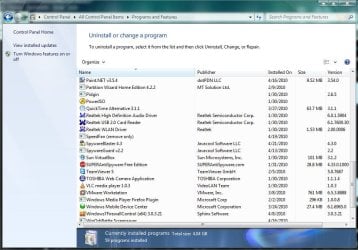
Got rid of all but the camera management software on this Toshiba.
 

Attachments

  • Capture.JPG
    Capture.JPG
    100.5 KB · Views: 48

My Computer

Computer Manufacturer/Model Number
Toshiba L505
OS
Windows 7 64x
CPU
AMD Turion II Dual-Core Mobile M520 2.30 GHz
Memory
4GB
Graphics Card(s)
ATI Radeon HD 4200
Run PCDecrapifier once on a new or fairly new computer and it will work with a list of common bloatware apps to target and remove the ones you select. And of course Revo Uninstaller for other things.
 

My Computer

OS
Windows 7 Enterprise 64-bit
CPU
AMD Phenom II X4 3.0GHz
Motherboard
ASUS M5A97
Memory
8GB G-Skill Ripjaws DDR3 1333
Graphics Card(s)
PNY GeForce 460 GTX 1GB OC - Enthusiast Edition
Sound Card
VIA High Definition Audio
Monitor(s) Displays
Dell 19"
Screen Resolution
1280x1024
Hard Drives
1TB - Primary
160GB - Secondary
250GB - External backup for important files
PSU
OCZ Fata1ty 700W Modular PSU
Case
ASUS
Keyboard
Microsoft Wireless Keyboard 2000
Mouse
Microsoft Wireless Mouse 2000
Internet Speed
3 Mbps/768 kbps
While I agree with B, C and E, the rest can go. In my years of working with computers if you use it the way the vendor set it up you are guarantee that within 6 months to a year you will be having issues with the computer. Every computer I left loaded from the vendor had problems. When I get a computer I format the drive and do a fresh install of the OS and then the programs. (i.e. Anti-Virus, Office {Full or Trial}, Adobe Reader, CD Burning software - that is about it.). All the computers I have setup this way run for years without issues. I have several machines that have been running Windows XP for 7 years now without an issue. (Note: these are good users. Bad users mess them up no matter what you do.)
 

My Computer

Computer type
PC/Desktop
Computer Manufacturer/Model Number
Dell OP7010
OS
Windows 7 Enterprise (x64); Windows Server 2008 R2 (x64)
Memory
16GB
Monitor(s) Displays
4 Dell 24" LCD
Screen Resolution
1280x1024
Keyboard
Dell
Mouse
Dell Optical
Internet Speed
40meg
  • Like
Reactions: JMH
Back
Top