Block Facebook

Bladeforce

New member
Member
Local time
12:02 AM
Messages
25
Hi, may I ask how I can block facebook between certain hours on certain days? I know how to block sites completely but at certain times I am finding this hard. Family safety will just block the site completely as do k9 protection and inet (the others i have tried)

Is it that hard to have an option to schedule a website block inside windows?
 

My Computer

OS
Windows 7

My Computer

Computer type
PC/Desktop
Computer Manufacturer/Model Number
Bruce ... somewhere in his 40's
OS
Windows 7 Ultimate 32bit SP1
CPU
Intel(R) Core(TM)2 Quad CPU @ 2.40GHz, 2400 MHz
Motherboard
INTEL/D975XBX2
Memory
4 GB
Graphics Card(s)
ATI Radeon HD 2600 Pro
Monitor(s) Displays
Samsung SyncMaster 914v
Screen Resolution
1280 x 1024
Hard Drives
2/500GB each ... ST3500630AS ATA Device.
One is not connected
PSU
Rocketfish 700 W
Case
G.Skill Gigabyte Chassis
Keyboard
Standard PS/2 Keyboard
Mouse
Microsoft PS/2 Mouse
Internet Speed
DSL
Antivirus
Avira Internet Security
Browser
IE 11
Other Info
ATI HDMI Audio
As Jacee has stated. Google is your friend..
:)
 

My Computer

Computer type
Laptop
Computer Manufacturer/Model Number
Toshiba Laptop Qosimo X870
OS
Windows 7 Pro x64 SP1
CPU
Intel Core I7
Motherboard
Toshiba Qosmio
Memory
16 Gigs
Graphics Card(s)
NVIDIA GeForce GTX 670M
Monitor(s) Displays
17.7" laptop
Screen Resolution
1600 x 900
Hard Drives
256 Gig SanDisk SSD for C
256 Gig Intel SSD for D
Internet Speed
50/25 FIOS
Antivirus
Vipre (all you can eat for 10 machines)
Browser
IE and FF
Other Info
I have dos 6.22, wfwg 3.11, win98, 2000 and xp VHD's available for testing. MS's Virtual PC works great.
Believe me i've googled ALL DAY and found nothing that does exactly this!

the first one on my firewall doesnt even have advanced tab to state the times to apply the rule (Comodo)
The 2nd one doesnt cover all the browsers as you can still log in through chrome
 

My Computer

OS
Windows 7
More google:
FB Limiter software features:

* Block facebook and youtube access on your computer to anyone who uses it (Simple Lock)
* Limit facebook and youtube access to specific times during the week (e.g. Allow your kids to use facebook only one hour a day) (Time Lock)
* Block facebook and youtube access to yourself for specific time duration. In cases when you are too much distracted and want to be sure you will not get a chance to use facebook or youtube. (Total Lock)

In order to block facebook, FB Limiter has implemented following features:
Password protection feature:

* Application is password protected so nobody except you can start it
* Uninstalling application will require password so nobody can uninstall/install application in order to reset any protection settings

Normal lock feature:

* block facebook or youtube by one click
* blocks access to any facebook or youtube proxy and the list of those proxies is auto updated reducing chance to open facebook from another websites

Time lock feature:

* block facebook or youtube at specific times during the week
* half an hour precision for time blocking (e.g. you can enable facebook during lunch hour in your company)

Total lock feature:

* Lock facebook for specific time duration (1 hour - 7 days) without chance to unlock it during that period
* No password or anything can unlock facebook or youtube during that period.
* It will expire in cases when trial period is over

Block Facebook
 

My Computer

Computer Manufacturer/Model Number
Micro-Star International/MS-7529
OS
Windows 7 Ultimate x32
CPU
DualCore Intel Pentium E2200, 2218 MHz (11 x 202)
Motherboard
MSI G31M3 V2 (MS-7529) (2 PCI, 1 PCI-E x16,2 DDR2 DIMM)
Memory
2 GB DDR2-800 DDR2 SDRAM
Graphics Card(s)
nVIDIA GeForce 9500GT 1GB
Sound Card
Realtek ALC888/1200 @ Intel 82801GB ICH7
Monitor(s) Displays
Samsung SyncMaster 2253BW (Digital) 22'' LCD
Screen Resolution
1680x1050
Hard Drives
SAMSUNG HD322IJ ATA Device (298 GB , IDE)
Tried FB limiter didnt block the site at requested times just blocked completely even after trying to set times in options
 

My Computer

OS
Windows 7

My Computer

Computer Manufacturer/Model Number
Micro-Star International/MS-7529
OS
Windows 7 Ultimate x32
CPU
DualCore Intel Pentium E2200, 2218 MHz (11 x 202)
Motherboard
MSI G31M3 V2 (MS-7529) (2 PCI, 1 PCI-E x16,2 DDR2 DIMM)
Memory
2 GB DDR2-800 DDR2 SDRAM
Graphics Card(s)
nVIDIA GeForce 9500GT 1GB
Sound Card
Realtek ALC888/1200 @ Intel 82801GB ICH7
Monitor(s) Displays
Samsung SyncMaster 2253BW (Digital) 22'' LCD
Screen Resolution
1680x1050
Hard Drives
SAMSUNG HD322IJ ATA Device (298 GB , IDE)
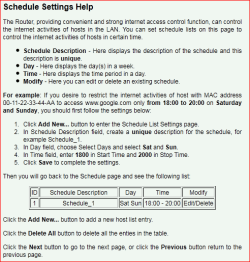
Using a router? If so check what if any access control it has. Mine (TP-Link TL-WR741) has the option for limiting access to sites based on time of day,

routersetting.PNG
 

My Computer

Computer type
PC/Desktop
Computer Manufacturer/Model Number
Me
OS
Win 7 Ultimate x64
CPU
FX-8350 @ 4.6 GHz so far
Motherboard
Asus M5A97 EVO
Memory
ADATA XPG V1 Series Black 8GB DDR3 1600
Graphics Card(s)
Sapphire R9 270x Dual-X
Sound Card
Xonar DGX w/ Corsair Vengence 1300
Monitor(s) Displays
Acer S232HL Abid
Screen Resolution
1920x1080
Hard Drives
120 GB OCZ Vertex 3
500 GB Seagate 7200.12
PSU
Antec Earthwatts 650W Green
Case
Antec Three Hundred
Cooling
Cooler Master 212 EVO
Keyboard
Logitech G510
Mouse
Logitech G500s
Internet Speed
35000/3000
I'm having better luck in a different area funnily enough. I have managed to set up a script that will overwrite my hosts file with one that has facebook blocked (using 127.0.0.1) what i do is have task scheduler initiate this script at 5.30pm then have another script that kicks in at 7.30pm to overwrite the "adopted" hosts file with the original hosts file (so to unblock facebook). The only problem I have is that google (in all their wisdom) store cached web pages so when you search for facebook and clicking the direct link it is blocked but when you clcik the cached link next to it, it loads the log in screen. Any way of getting past this and i think i may have it cracked? Everything works fine apart from this little bit ;)

Edit...My router is a linksys wag54gs in the options i select access restrictions and add a policy name, add the computer (to be restricted) IP address and MAC then set up allow internet access between 5.30 and 7.30 but have facebook blocked, which funnily enough works fine for the 2 hours, problem is, after the 2 hours i have internet access but the block is still in place!! In essence it is permanantly blocking facebook even though it is only assigned to the 1 policy between 5.30 and 7.30
 

My Computer

OS
Windows 7
I'm having better luck in a different area funnily enough. I have managed to set up a script that will overwrite my hosts file with one that has facebook blocked (using 127.0.0.1) what i do is have task scheduler initiate this script at 5.30pm then have another script that kicks in at 7.30pm to overwrite the "adopted" hosts file with the original hosts file


bingo! thats the first thing I thought of too. glad you got it set up....

as for the second part, you could have the browser clear cache when it closes. you could also delete the temp files, but I don't know which ones for which browser. you would have to research this more to find the specific paths.
 

My Computer

Computer type
Laptop
Computer Manufacturer/Model Number
ASUS G60-RBBX05
OS
Win7 Home Premium 64x
CPU
Intel Core 2 Duo P7450 / 2.13 GHz (2.29 with Extreme Turbo)
Memory
4 GB PC-6400 Hyundai (2X2) at 800Mhz
Graphics Card(s)
NVIDIA GeForce GTX 260M 1GB DDR3 VRAM
Monitor(s) Displays
16" LED Backlit
Screen Resolution
1366 x 768 on laptop 1600x1050 max res on 22" external mon
Hard Drives
OCZ Agility 3 60GB SSD / 320 GB - Serial ATA-150 - 7200 rpm
PSU
6-cell Lithium ion { lasts 1.5 hours }
Case
ASUS G60 Laptop
Keyboard
Chicklet type back-lit (white light) keyboard
Mouse
Logitech G9 Laser Mouse 3200dpi and 1000 reports per minute
Internet Speed
Comcast 8.60mb/s up - 3.11mb/s down
Antivirus
MSE
Browser
Firefox
Other Info
General mid-budget gaming Comp. Low batterylife - High FrameRates - currently overheating problems :(

2nd Rig: Case: Rosewill BLACKHAWK Gaming ATX Mid Tower Computer Case

Mobo: GIGABYTE GA-990FXA-UD3
CPU: AMD FX-6200 Zambezi 3.8GHz (4.1GHz Turbo)
Heatsink: COOLER MASTER V8 CPU Cooler
RAM: Patriot Viper 3 8GB (2 x 4GB) 240-Pin DDR3 SDRAM 1866 (PC3 15000)
GPU: SAPPHIRE Radeon HD 6850 1GB 2
I have tried FB Limiter and it works for me. Perhaps have they meanwhile launched a new version.
Block facebook
 

My Computer

OS
7 Home Premium 32bit
I've used both Block Limiter and Block Facebook and I found blockfacebook.net's version way better to temporarily block people from using Facebook
 

My Computer

Computer type
PC/Desktop
OS
windows 7
Back
Top