Solved Blue Flags on video icons

gamer dude

New member
Member
Local time
2:10 PM
Messages
47
Location
Wales, UK
Hello,

Today these blue flags have appeared on the icons of all of my videos (I've never noticed them before), I was just wondering if anyone knows what they are? and if there's a way to get rid of them.

Thanks

Owain

screenshot:
T6LCNtX.jpg
 

My Computer My Computer

Computer type
PC/Desktop
Computer Manufacturer/Model Number
Custom Build by me :D
OS
Windows 7 Home Premium 64bit
CPU
AMD Phenom II X6 Black Edition (6 core)
Motherboard
Asus M4A88TD-V EVO/USB3
Memory
16GB (2x8GB) Corsair DDR3 Vengeance Pro Series Gold (2400)
Graphics Card(s)
Sapphire Nitro+ Radeon RX480 8GB
Monitor(s) Displays
LG IPS LED 23EA63 HDMI (Primary), NEC 17inch (Secondary)
Screen Resolution
1920 X 1080 (Primary), 1280 X 1024 (Secondary)
Hard Drives
- Seagate ST500DM002 Barracuda (500GB) =System=
- Seagate ST3500418AS Barracuda (500GB) =Backup=
- Seagate ST2000DM001 Barracuda (2TB) =steam games=
PSU
MODXSTREAM-PRO 600W
Case
Novatech Galaxy III Case
Cooling
1xCPU FAN, 3xCASE FANS (1 side, 1 back, 1 front)
Keyboard
cyborg v7 gaming keyboard
Mouse
logitech M205 wireless
Browser
Google Chrome
I suspect it's an icon for a media player you've installed? I don't know which one.

Right click on a video/Properties and check what it opens with.

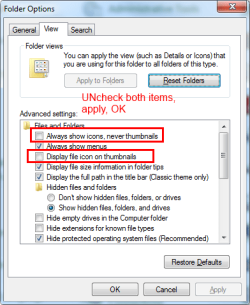
This should get rid of it, go to Control Panel\All Control Panel Items and click Folder Options, View tab. Uncheck the items shown below, Apply/OK.

File Opt.png
 

My Computer My Computer

Computer type
PC/Desktop
Computer Manufacturer/Model Number
Home Built Desktop By DataTech
OS
Windows 7 Ultimate X64 SP1
CPU
Intel i5-2550K, Differing ~4.4-4.8GHz No built in GPU
Motherboard
ASUS P8Z68-V PRO/GEN3
Memory
16GB G.Skill Sniper 1866MHz @ 2133MHz 2x8GB
Graphics Card(s)
ASUS GTX650TIB-DC2OC-2GD5, (650TI Boost)
Sound Card
Onboard Realtek 5-1
Monitor(s) Displays
Samsung P2570HD
Screen Resolution
1920x1080
Hard Drives
Samsung 840 Pro 256GB SSD for OS, 500GB Seagate Constellation (Enterprise drive) for Data
PSU
Corsair HX650W
Case
Inwin Dragon Rider
Cooling
Hyper 212 EVO w/two Noctua fans, push-pull, @1300 RPM
Keyboard
E-Z Eyes, bright yellow keys with large characters
Mouse
steelseries SENSEI Laser Pro Gaming
Internet Speed
48-51Mbs Mbs down, 11 Mbs up Xfinity Cable
Antivirus
Norton Internet Security 2013
Browser
IE 10, Opera, Pale Moon if needed
Other Info
4 case fans, LG BluRay-RE, ASUS DVD-RW, Mr. Fusion power supply, 1.21 gigawatts.
Which program is associated with MP4 files ?? You can check that here: Control Panel\Programs\Default Programs\Set Associations. The flags probably belong to that program.
 

My Computer My Computer

Computer Manufacturer/Model Number
HP, Dell, Gateway, Toshiba - 4 laptops and 2 desktops
OS
Vista, Windows7, Mint Mate, Zorin, Windows 8
CPU
from 1.6GHz Duo to i7
Monitor(s) Displays
2x HP w2207
Hard Drives
5x HDD, 7x SSD, 12x Externals
Keyboard
with trackball - no mices
Mouse
Trackball mice
Internet Speed
DSL 6000
I suspect it's an icon for a media player you've installed? I don't know which one.

Right click on a video/Properties and check what it opens with.

This should get rid of it, go to Control Panel\All Control Panel Items and click Folder Options, View tab. Uncheck the items shown below, Apply/OK.

View attachment 319003

Thanks that got rid of them :)
Now I'm just wondering what they meant :/

Which program is associated with MP4 files ?? You can check that here: Control Panel\Programs\Default Programs\Set Associations. The flags probably belong to that program.

I have Windows Media Player set as the default for MP4's
 

My Computer My Computer

Computer type
PC/Desktop
Computer Manufacturer/Model Number
Custom Build by me :D
OS
Windows 7 Home Premium 64bit
CPU
AMD Phenom II X6 Black Edition (6 core)
Motherboard
Asus M4A88TD-V EVO/USB3
Memory
16GB (2x8GB) Corsair DDR3 Vengeance Pro Series Gold (2400)
Graphics Card(s)
Sapphire Nitro+ Radeon RX480 8GB
Monitor(s) Displays
LG IPS LED 23EA63 HDMI (Primary), NEC 17inch (Secondary)
Screen Resolution
1920 X 1080 (Primary), 1280 X 1024 (Secondary)
Hard Drives
- Seagate ST500DM002 Barracuda (500GB) =System=
- Seagate ST3500418AS Barracuda (500GB) =Backup=
- Seagate ST2000DM001 Barracuda (2TB) =steam games=
PSU
MODXSTREAM-PRO 600W
Case
Novatech Galaxy III Case
Cooling
1xCPU FAN, 3xCASE FANS (1 side, 1 back, 1 front)
Keyboard
cyborg v7 gaming keyboard
Mouse
logitech M205 wireless
Browser
Google Chrome
You're welcome. I could not find anything relating to the icon.
 

My Computer My Computer

Computer type
PC/Desktop
Computer Manufacturer/Model Number
Home Built Desktop By DataTech
OS
Windows 7 Ultimate X64 SP1
CPU
Intel i5-2550K, Differing ~4.4-4.8GHz No built in GPU
Motherboard
ASUS P8Z68-V PRO/GEN3
Memory
16GB G.Skill Sniper 1866MHz @ 2133MHz 2x8GB
Graphics Card(s)
ASUS GTX650TIB-DC2OC-2GD5, (650TI Boost)
Sound Card
Onboard Realtek 5-1
Monitor(s) Displays
Samsung P2570HD
Screen Resolution
1920x1080
Hard Drives
Samsung 840 Pro 256GB SSD for OS, 500GB Seagate Constellation (Enterprise drive) for Data
PSU
Corsair HX650W
Case
Inwin Dragon Rider
Cooling
Hyper 212 EVO w/two Noctua fans, push-pull, @1300 RPM
Keyboard
E-Z Eyes, bright yellow keys with large characters
Mouse
steelseries SENSEI Laser Pro Gaming
Internet Speed
48-51Mbs Mbs down, 11 Mbs up Xfinity Cable
Antivirus
Norton Internet Security 2013
Browser
IE 10, Opera, Pale Moon if needed
Other Info
4 case fans, LG BluRay-RE, ASUS DVD-RW, Mr. Fusion power supply, 1.21 gigawatts.
Back
Top