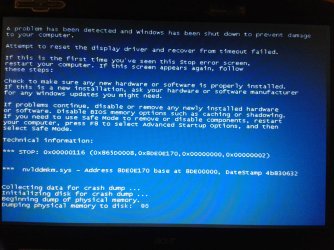
Blue screen nvlddmkm.sys

juuki

New member
Local time
5:09 PM
Messages
27
Helo, i have Acer Aspire 5720zg (with windows 7) 5 years for now and i think this is my first hardware problem so far.
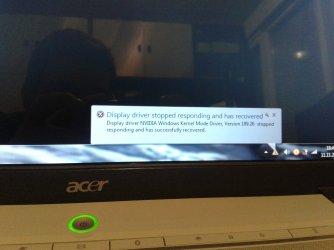
I start my computer today and blue screen show with nvlddmkm.sys blue screen (snap in attac.). I found solution online, start in safe mode and change nvlddmkm.sys to nvlddmkm.sys.old restart and start windows normally. It start normally but i notice small red dots on screen, i open web browser and it shows me message "Display driver stopped respoding and has recoverd" (snap in attac.) and black screen shows. After restart blue screen shows again. So i reinstall windows (clean install), and after installing nvidia drivers same problem happend me again first with message and blue screen after that.
So what is problem? How to fix it?


Here is log file after i start windows in safe mode:

Problem signature:
Problem Event Name: BlueScreen
OS Version: 6.1.7601.2.1.0.256.1
Locale ID: 1050

Additional information about the problem:
BCCode: 116
BCP1: 865D0008
BCP2: 8DE0E170
BCP3: 00000000
BCP4: 00000002
OS Version: 6_1_7601
Service Pack: 1_0
Product: 256_1

Files that help describe the problem:
C:\Windows\Minidump\111213-39265-01.dmp
C:\Users\JuJu\AppData\Local\Temp\WER-53383-0.sysdata.xml

Read our privacy statement online:
Windows 7 Privacy Statement - Microsoft Windows

If the online privacy statement is not available, please read our privacy statement offline:
C:\Windows\system32\en-US\erofflps.txt


Here is link to .dmp and .xml file: https://app.box.com/s/07u060ffcrgwdruojeyu
 

Attachments
  • 20131112_002109.jpg
    20131112_002109.jpg
    407.6 KB · Views: 1
  • 20131111_184016.jpg
    20131111_184016.jpg
    256.3 KB · Views: 1

My Computer My Computer

OS
Windows 7 Ultimate, 32bit, SP1
Hi, had the same problem, when you connect the laptop to a tv or a separate screen you will notice the red dots are gone, but you will get a new error stating "drive device not supported", I took mine in, the screen connector is not making contact with the graphics card, this could be becasue of overheating, dropped it, or old age etc. So best bet would be to take it in, and ask them to test the gfx and screen seperatly. Or if you have the skills, you can open it yourself, usually this voids warrenty etc, but the see if all is connected and no seizure markings or sighns of burn damidge etc. Unfortuanatly its not software, upgrading windows, drivers etc wont fix the isue, it will however remove the bluescreen (if your luck, worked for me).

Also you can do the safely recover, I think on Acer its F8 in the boot screen option, this will divert all to default, this got me a few months of extra playtime on laptop, but after a while the screen just wont come on anymore, so my advice take it in, they will most likely need to replace the gfx card if sepparate, mine wasnt, had to get a new laptop:mad:
 

My Computer My Computer

Computer type
PC/Desktop
Computer Manufacturer/Model Number
Custom built
OS
64bit Windows 10
CPU
Intel i9
Motherboard
MSI X299 Carbon pro
Memory
64g-8x8gig DDR4 3600
Graphics Card(s)
Asus ROg Strix 1080ti
Monitor(s) Displays
Samsung 49" Odyssey g9
Screen Resolution
5210x1440
Hard Drives
1 x 512GB m.2 OS Drive
2 x 512gb ssd
1 x 2tb

4x 1TB's
PSU
Corsair AX1200w
Case
Silverstone TJ11 B-W
Cooling
AIC
Keyboard
Asus Rog Claymore 2
Mouse
Asus Rog Apatha
Internet Speed
1gb Fibre
ill try replace graphic card. is there any shop to buy laptop graphic card?
 

My Computer My Computer

OS
Windows 7 Ultimate, 32bit, SP1
No, unfortunately most laptop graphic cards are integrated in to the mainboard - you can buy one separately. To replace the GPU you need to replace the entire mainboard.

Considering the age of your laptop, you may need to purchase a new one.
 

My Computer My Computer

Computer type
PC/Desktop
Computer Manufacturer/Model Number
Systems by SmartEyeball
OS
8 Pro x64
CPU
i7 3770K 4.6GHz
Motherboard
ASUS P8Z77 WS
Memory
16GB G.Skill Trident X 2666mhz
Graphics Card(s)
x2 EVGA 780 Ti Superclocked SLI
Sound Card
SB X-FI Surround 5.1 PRO USB / ATH-AD900 Headphones
Monitor(s) Displays
x3 Dell U2410 / 58" Samsung
Screen Resolution
5760*1200/ 1920*1200
Hard Drives
2x Intel 520 240GB (RAID 0) * 2x WD Caviar Blacks 2TB (RAID 0) * 2TB WD Caviar Black * Sony Optirac DVD
PSU
Silverstone Strider Evolution 1200W
Case
Thermaltake Level 10 GT Snow Edition
Cooling
Noctua NH-D14
Keyboard
Topre Realforce // Ducky Shine MX Black // Filco Ninja TKL
Mouse
Thermaltake Theron (Highly Recommended) + Razer Imperator
Antivirus
MSE
Browser
IE, FF, WaterFox
Other Info
GT Extreme V2 Sim Racing Cockpit + 40" LCD and K/B Mouse stand ▼
Fanatec CSR Elite Wheel + Clubsport V1 Pedals + CSR shifter/7G-H ▼Saitek X52 Pro ▼ TrackIR 5 Pro
Buttkicker v2 Seat Rumbler with Dedicated 5.1 and Sub Woofer attached to frame ▼
=
Bloody Big Grin
No, unfortunately most laptop graphic cards are integrated in to the mainboard - you can buy one separately. To replace the GPU you need to replace the entire mainboard.

Considering the age of your laptop, you may need to purchase a new one.


how to check if graphic card of my Acer Aspire 5720zg is integrated to the mainboard?

but i love my old laptop :D
 

My Computer My Computer

OS
Windows 7 Ultimate, 32bit, SP1
Asked google and Unfortunatly it seems it has a built in gfx card, as smarty said, it would be better to replace laptop. Sorry but it happens
 

My Computer My Computer

Computer type
PC/Desktop
Computer Manufacturer/Model Number
Custom built
OS
64bit Windows 10
CPU
Intel i9
Motherboard
MSI X299 Carbon pro
Memory
64g-8x8gig DDR4 3600
Graphics Card(s)
Asus ROg Strix 1080ti
Monitor(s) Displays
Samsung 49" Odyssey g9
Screen Resolution
5210x1440
Hard Drives
1 x 512GB m.2 OS Drive
2 x 512gb ssd
1 x 2tb

4x 1TB's
PSU
Corsair AX1200w
Case
Silverstone TJ11 B-W
Cooling
AIC
Keyboard
Asus Rog Claymore 2
Mouse
Asus Rog Apatha
Internet Speed
1gb Fibre
Ok, well "http://laptop4me.eu/Laptops/PDF/Acer/Acer%20Aspire%205720.pdf" is the pdf manual, it seems to differ, and say it has an integrated graphics card, so goodluck.
 

My Computer My Computer

Computer type
PC/Desktop
Computer Manufacturer/Model Number
Custom built
OS
64bit Windows 10
CPU
Intel i9
Motherboard
MSI X299 Carbon pro
Memory
64g-8x8gig DDR4 3600
Graphics Card(s)
Asus ROg Strix 1080ti
Monitor(s) Displays
Samsung 49" Odyssey g9
Screen Resolution
5210x1440
Hard Drives
1 x 512GB m.2 OS Drive
2 x 512gb ssd
1 x 2tb

4x 1TB's
PSU
Corsair AX1200w
Case
Silverstone TJ11 B-W
Cooling
AIC
Keyboard
Asus Rog Claymore 2
Mouse
Asus Rog Apatha
Internet Speed
1gb Fibre
its not built in gfx card. i found online this video: replacing video card in Acer Aspire Laptop 77xx.3gp - YouTube that is just like my 5720zg so i try to replace it.

That's a completely different laptop from yours is it not? A much newer higher specced model?

Some laptops like mine do have interchangeable GPU's - however others like yours do not. It's far more common to have integrated GPU's than interchangeable ones.

They are a chip soldiered to the mainboard. To replace the chip, they usually replace the entire mainboard.


From your laptops Spec PDF linked above said:
Mobile Intel GM965 Express Chipset with integrated 3D Graphics

This means it is not replaceable.

If you wish to keep your current laptop you either try and find the exact model mainboard part (which considering it's 5+yr age) is a big ask. A laptop repairer "may" be able to source the parts, or they may not. The other alternative is to de-solder and re-solder the replacement chip into place. This is something only an experienced tech should undertake.

Sorry if it's not what you want to hear, but unfortunately you change the facts.
 

My Computer My Computer

Computer type
PC/Desktop
Computer Manufacturer/Model Number
Systems by SmartEyeball
OS
8 Pro x64
CPU
i7 3770K 4.6GHz
Motherboard
ASUS P8Z77 WS
Memory
16GB G.Skill Trident X 2666mhz
Graphics Card(s)
x2 EVGA 780 Ti Superclocked SLI
Sound Card
SB X-FI Surround 5.1 PRO USB / ATH-AD900 Headphones
Monitor(s) Displays
x3 Dell U2410 / 58" Samsung
Screen Resolution
5760*1200/ 1920*1200
Hard Drives
2x Intel 520 240GB (RAID 0) * 2x WD Caviar Blacks 2TB (RAID 0) * 2TB WD Caviar Black * Sony Optirac DVD
PSU
Silverstone Strider Evolution 1200W
Case
Thermaltake Level 10 GT Snow Edition
Cooling
Noctua NH-D14
Keyboard
Topre Realforce // Ducky Shine MX Black // Filco Ninja TKL
Mouse
Thermaltake Theron (Highly Recommended) + Razer Imperator
Antivirus
MSE
Browser
IE, FF, WaterFox
Other Info
GT Extreme V2 Sim Racing Cockpit + 40" LCD and K/B Mouse stand ▼
Fanatec CSR Elite Wheel + Clubsport V1 Pedals + CSR shifter/7G-H ▼Saitek X52 Pro ▼ TrackIR 5 Pro
Buttkicker v2 Seat Rumbler with Dedicated 5.1 and Sub Woofer attached to frame ▼
=
Bloody Big Grin
Back
Top