Bluetooth Module can't find devices

lostprophet

New member
Local time
3:59 PM
Messages
3
Location
Kent, UK
Hi there, first time post so be gentle with me..

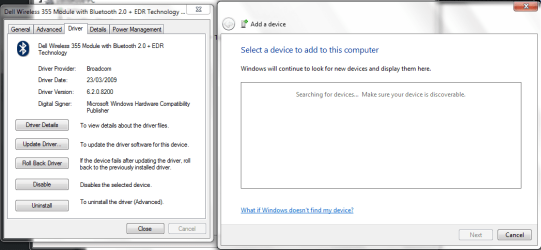
I have an issue that is making me tear my hair out. I have an XPS M1530 with a dell 355 bluetooth module in it, an dI have recently installed Windows 7 RC1. When I did, the drivers automagically installed for my bluetooth module, and didn't throw any complaints. The problem is that it says it is working fine, but it never finds any device when I search for them, it just can't see anything.

I have tried installing the latest drivers from windows update, the Dell website, a patch from the website and the latest drivers from the broadcomm website, and it still behaves in exactaly the same mannor with all of these. The module worked fine before the win 7 install, and I am at a total loss as to where to go next. Can anyone help?
 

My Computer

OS
Windows Vista Ultimate x64
CPU
Intel Core Quad Q9450 (Oc'd 3.2Ghz)
Motherboard
DFI Lan Party DK X48-TR2
Memory
8GB OCZ Gold Series DDR2
Graphics Card(s)
2x ATi 4870 1GB
Monitor(s) Displays
2 x 22" Samsung 223BW
Screen Resolution
3360 x 1050
Hard Drives
2 x 320GB Hitachi Deskstar T7K500 (RAID 0)
1 x 1TB WD Caviar Green (Backup Drive)
PSU
PC Power & Cooling Silencer 750w
Case
Antec P182
Cooling
Arctic Cooling Freezer 7 Pro
Keyboard
Microsoft Natural Ergonomic Keyboard 4000
Mouse
Logitech MX 400 Performance Laser Mouse
Internet Speed
Rubbish
Other Info
My Laptop - Dell XPS M1530 Tuxedo Black
Intel Core 2 Duo T7500 2.20GHz
Display 15.4" WXGA (1280x800)
2GB 667MHz DDR2
256MB (GDDR3) GeForce 8600M GT
160GB 5400rpm (Upgrading to 200GB 7200rpm)
Go into Computer Management\Services and start Bluetooth Service. Set it to start automatically, reboot and you should be good to go. I spent hours yesterday with three clean installs before I figured it out. I have a Kensington dongle, the drivers were installed but I couldn't get it to work with my Treo 755p until I started the Service.
 

My Computer

OS
Win 7
Go into Computer Management\Services and start Bluetooth Service. Set it to start automatically, reboot and you should be good to go. I spent hours yesterday with three clean installs before I figured it out. I have a Kensington dongle, the drivers were installed but I couldn't get it to work with my Treo 755p until I started the Service.

Thanks, but I already checked the services are running, and they are (according to the services menu). I've tried the mouse on a couple of other computers and it works fine, so it's definatly the computer
 

My Computer

OS
Windows Vista Ultimate x64
CPU
Intel Core Quad Q9450 (Oc'd 3.2Ghz)
Motherboard
DFI Lan Party DK X48-TR2
Memory
8GB OCZ Gold Series DDR2
Graphics Card(s)
2x ATi 4870 1GB
Monitor(s) Displays
2 x 22" Samsung 223BW
Screen Resolution
3360 x 1050
Hard Drives
2 x 320GB Hitachi Deskstar T7K500 (RAID 0)
1 x 1TB WD Caviar Green (Backup Drive)
PSU
PC Power & Cooling Silencer 750w
Case
Antec P182
Cooling
Arctic Cooling Freezer 7 Pro
Keyboard
Microsoft Natural Ergonomic Keyboard 4000
Mouse
Logitech MX 400 Performance Laser Mouse
Internet Speed
Rubbish
Other Info
My Laptop - Dell XPS M1530 Tuxedo Black
Intel Core 2 Duo T7500 2.20GHz
Display 15.4" WXGA (1280x800)
2GB 667MHz DDR2
256MB (GDDR3) GeForce 8600M GT
160GB 5400rpm (Upgrading to 200GB 7200rpm)
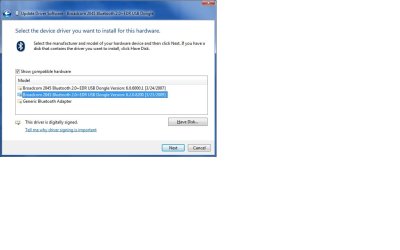
Just tried thoses drivers, left it searchign for five minutes... still nothing :mad:

This is driving me nuts! I'm ALMOST considering going back to vista... (not quite that bad yet :D)
 

Attachments

  • Untitled-1.png
    Untitled-1.png
    28.7 KB · Views: 661

My Computer

OS
Windows Vista Ultimate x64
CPU
Intel Core Quad Q9450 (Oc'd 3.2Ghz)
Motherboard
DFI Lan Party DK X48-TR2
Memory
8GB OCZ Gold Series DDR2
Graphics Card(s)
2x ATi 4870 1GB
Monitor(s) Displays
2 x 22" Samsung 223BW
Screen Resolution
3360 x 1050
Hard Drives
2 x 320GB Hitachi Deskstar T7K500 (RAID 0)
1 x 1TB WD Caviar Green (Backup Drive)
PSU
PC Power & Cooling Silencer 750w
Case
Antec P182
Cooling
Arctic Cooling Freezer 7 Pro
Keyboard
Microsoft Natural Ergonomic Keyboard 4000
Mouse
Logitech MX 400 Performance Laser Mouse
Internet Speed
Rubbish
Other Info
My Laptop - Dell XPS M1530 Tuxedo Black
Intel Core 2 Duo T7500 2.20GHz
Display 15.4" WXGA (1280x800)
2GB 667MHz DDR2
256MB (GDDR3) GeForce 8600M GT
160GB 5400rpm (Upgrading to 200GB 7200rpm)
first, easy question.
does the peripheal device have discovery enabled, for the bluetooth to find and pair up?
 

My Computer

Computer Manufacturer/Model Number
CUSTOM
OS
XP/win7 x86 build 7127
CPU
Athlon64 X2 DUAL 4200+ 2.21ghz
Motherboard
ASUS K8 PRO SLI
Memory
2GB Dual Chan DDR2 Corsair
Graphics Card(s)
Nvidia 6800GT
Sound Card
nvidia
Monitor(s) Displays
19' LCD
Screen Resolution
1280x1024
Hard Drives
WD 250, 2x500, 2x1TB IDE/USB
WD 250 SATA (system)
SEAGATE 120 Sata
PSU
coolermaster 450
Case
SUPERFLOWER
Cooling
1 HDD bay fan, 5x80mm Case Fans, AEROGATE II Fan/Temp
Keyboard
MS wireless
Mouse
MS Wireless
Internet Speed
fassssssssst
Windows says:
Download and install the driver for your Bluetooth adapter
Your Bluetooth adapter is missing a driver.
The model name of your Bluetooth adapter is Bluetooth Device.
arrow.gif
Click to download the new driver from the Broadcom Corporation website


I did download the driver, but right toward the end of the installation it says:
"Device not supported Please contact Dell"


I am trying to get my XPS 1530 connect to Motorola S9 headphones. I am using Windows 7.
 

My Computer

OS
w7
go to action center, maintenance, check for solutions. Hopefully that setup.exe is on that report, even if not, send the info outbound. You possibly could get some feedback on the problem. This has worked now 3 times for me, a camera, usb wireless adapter, and now a printer that only had half of the recognized driver for 7. Keep checking back and sending reports, as you may find to your surprise one day that MS will send you info/feedback/solution to your problems.
 

My Computer

Computer Manufacturer/Model Number
CUSTOM
OS
XP/win7 x86 build 7127
CPU
Athlon64 X2 DUAL 4200+ 2.21ghz
Motherboard
ASUS K8 PRO SLI
Memory
2GB Dual Chan DDR2 Corsair
Graphics Card(s)
Nvidia 6800GT
Sound Card
nvidia
Monitor(s) Displays
19' LCD
Screen Resolution
1280x1024
Hard Drives
WD 250, 2x500, 2x1TB IDE/USB
WD 250 SATA (system)
SEAGATE 120 Sata
PSU
coolermaster 450
Case
SUPERFLOWER
Cooling
1 HDD bay fan, 5x80mm Case Fans, AEROGATE II Fan/Temp
Keyboard
MS wireless
Mouse
MS Wireless
Internet Speed
fassssssssst
I went to the Dell drivers website downloaded the original bluetooth driver installed it, and its working :D
 

My Computer

OS
w7
1.Go to Computer Managament --> Services
2.Under the Bluetooth Service there is one called something like Bluetooth Supporting Service
3.Right click --> Enable
4.Wait till it's enabling
5.Right click again --> Properties
6.Set Start Type to Automaticaly start when Windows starts

Hope this helped. :D
 

My Computer

OS
Windows 7 Ultimate 32bit
Back
Top