- Local time
- 10:40 PM
- Messages
- 41
Support for most anything Windows 7 related these days is tough to come by. It's good to see these forums still up and running.
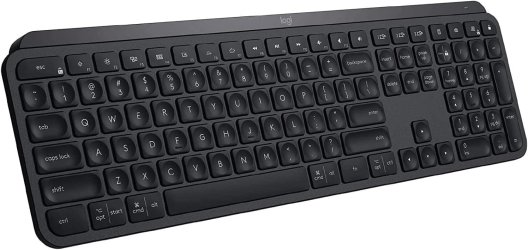
I bought this wonderful Logitech MX Keys Advanced Wireless Keyboard on Amazon that features input from 3 devices in both Windows and Mac OSs. Bluetooth pairing to my Windows 10 notebook and Mac Mini M1 went quickly & easily. But I can't get the Logi 'Bolt' / USB dongle for Bluetooth connectivity working in my trusty old Windows 7 PC I still use a lot.
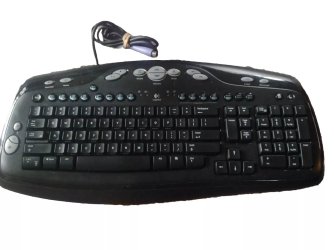
The instructions on the box the Logitech keyboard came in (as well as their online support pages) say to plug the USB dongle into the computer's USB port, turn on the keyboard, and press fn+P on the PC. But none of my 4 old keyboards have a fn key on them.
Their support pages say it can be connected via their Logi Options+ software. But there only seems to be a Windows 10 version.
I tried running the Logitech Connection Utility some search results recommended. It ran in Windows 7, but it couldn't find the dongle after I plugged it in.
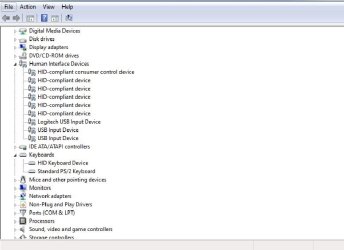
The dongle does pop up in Device Manager under 'Human Interface Devices' as 'Logitech USB Input Device', and 'Keyboards and Universal Serial Bus controllers' as 'HID Keyboard Device'. But I see no way to have it recognized as a Bluetooth device.
I also tried enabling and starting the 'Bluetooth Support Service' in 'Services' under 'Administrative Tools' with no effect, though I'm getting a bit out of my wheelhouse and grasping at straws at that point.
Would anyone know if there may be some other method for getting this keyboard / dongle working with my old Win7 PC? I submitted this issue to Logitech support a few days back, but have yet to get a reply.
Or if that's not an option, would it be possible to buy a different dongle that would work? Or might this keyboard just too Logitech specific?
Thanks ever so much for any/all feedback on this folks.
TS
I bought this wonderful Logitech MX Keys Advanced Wireless Keyboard on Amazon that features input from 3 devices in both Windows and Mac OSs. Bluetooth pairing to my Windows 10 notebook and Mac Mini M1 went quickly & easily. But I can't get the Logi 'Bolt' / USB dongle for Bluetooth connectivity working in my trusty old Windows 7 PC I still use a lot.
The instructions on the box the Logitech keyboard came in (as well as their online support pages) say to plug the USB dongle into the computer's USB port, turn on the keyboard, and press fn+P on the PC. But none of my 4 old keyboards have a fn key on them.
Their support pages say it can be connected via their Logi Options+ software. But there only seems to be a Windows 10 version.
I tried running the Logitech Connection Utility some search results recommended. It ran in Windows 7, but it couldn't find the dongle after I plugged it in.
The dongle does pop up in Device Manager under 'Human Interface Devices' as 'Logitech USB Input Device', and 'Keyboards and Universal Serial Bus controllers' as 'HID Keyboard Device'. But I see no way to have it recognized as a Bluetooth device.
I also tried enabling and starting the 'Bluetooth Support Service' in 'Services' under 'Administrative Tools' with no effect, though I'm getting a bit out of my wheelhouse and grasping at straws at that point.
Would anyone know if there may be some other method for getting this keyboard / dongle working with my old Win7 PC? I submitted this issue to Logitech support a few days back, but have yet to get a reply.
Or if that's not an option, would it be possible to buy a different dongle that would work? Or might this keyboard just too Logitech specific?
Thanks ever so much for any/all feedback on this folks.
TS
My Computer
At a glance
Microsoft Windows 7 Ultimate 64-bit 7601 Mult...Intel(R) Core(TM)2 Quad CPU Q6600 @ 2.40GHz8.00 GBAMD Radeon HD 5570
- Computer type
- PC/Desktop
- Computer Manufacturer/Model Number
- Custom: MSI G41M-P28 Motherboard
- OS
- Microsoft Windows 7 Ultimate 64-bit 7601 Multiprocessor Free Service Pack 1
- CPU
- Intel(R) Core(TM)2 Quad CPU Q6600 @ 2.40GHz
- Motherboard
- MSI G41M-P28 (MS-7592)
- Memory
- 8.00 GB
- Graphics Card(s)
- AMD Radeon HD 5570
- Sound Card
- Onboard MB 1: AMD HDMI Output 2: VIA High Definition Audio
- Monitor(s) Displays
- Planar PX2710MW, Samsung MU6290 Model UN55MU6290FXZA HDTV
- Screen Resolution
- 1920 x 1080 x 32 bits (4294967296 colors) @ 60 Hz
- Hard Drives
- (1) Hitachi HDS5C3020ALA632 ATA Device (2) ST1000DM003-1CH162 ATA Device (3) WDC WD10EZEX-08WN4A0 ATA Device
- PSU
- 750w
- Internet Speed
- 66mbps
- Antivirus
- Avast 18.8.2341 build 18.5.3931.338
- Browser
- Firefox, Chrome, Internet Explorer, Opera