Solved Bluetooth not detected in windows, or in the bios

impulzer

New member
Local time
8:56 PM
Messages
7
Hi there!

I've been trying to get my bluetooth working for the past few weeks with no luck. The device doesn't appear in Device Manager, and the drivers that I've tried (both from dell, and apart from dell since they only support Vista and XP with Studio 1535) all have given me the response of no device detected.

In my bios, in the Device Info section, there are no WPAN detected, which I understood was my bluetooth.

My spec's are:
Windows 7 - 32 bit
Studio 1535

In Device Manager, I have two "Base System Device"
Hardware ID of first:
PCI\VEN_1180&DEV_0592&SUBSYS_02541028&REV_12
PCI\VEN_1180&DEV_0592&SUBSYS_02541028
PCI\VEN_1180&DEV_0592&CC_088000
PCI\VEN_1180&DEV_0592&CC_0880
Hardware ID of second:
PCI\VEN_1180&DEV_0843&SUBSYS_02541028&REV_12
PCI\VEN_1180&DEV_0843&SUBSYS_02541028
PCI\VEN_1180&DEV_0843&CC_088000
PCI\VEN_1180&DEV_0843&CC_0880
_______________________________________________

Could anyone have an insight on how to fix my bluetooth device? Any efforts are appreciated :)
 

My Computer My Computer

At a glance

Windows 7 32 bit
Computer type
Laptop
Computer Manufacturer/Model Number
Dell 1535
OS
Windows 7 32 bit
*It's a built in bluetooth device*
 

My Computer My Computer

At a glance

Windows 7 32 bit
Computer type
Laptop
Computer Manufacturer/Model Number
Dell 1535
OS
Windows 7 32 bit
The first device (0592) is a Ricoh Memory Stick Controller.

The second device (0843) is a Ricoh SD Host Controller.

Is this a "new to you" laptop or did the BT just stop working?

If it's new, you might check to see if it even has a BT card installed.

Your manual is here: Manuals and Documents for Studio 1535 | Dell US
 

Attachments

  • Card Slots.JPG
    Card Slots.JPG
    34.7 KB · Views: 2

My Computer My Computer

At a glance

Windows 7 Pro-x64i7-2600 3.4GHz - 3.8GHz Turbo8Gb - 2x4GB, Muskin 991770 PC3-1333Integrated Intel HD 2000
Computer type
PC/Desktop
Computer Manufacturer/Model Number
Built 2/11/2011
OS
Windows 7 Pro-x64
CPU
i7-2600 3.4GHz - 3.8GHz Turbo
Motherboard
Intel DH67BL-B3
Memory
8Gb - 2x4GB, Muskin 991770 PC3-1333
Graphics Card(s)
Integrated Intel HD 2000
Sound Card
Integrated Intel 10.1 HD, RealTek ALC892
Monitor(s) Displays
Asus LCD VH222H, Haier HL24XSL2a
Screen Resolution
1920x1080, 1920x1080
Hard Drives
Crucial SSD C300-128Gb,
Western Digital WD5002AALX - 500Gb,
Western Digital WD7501AALS - 750Gb
PSU
Seasonic 650W 80+ Gold Modular
Case
Rosewill Defender
Cooling
Stock CPU, Four 120mm case fans, PCH fan added
Keyboard
Logitech EX100 Y-RBH94 Wireless
Mouse
Logitech EX100 M-RCE95 Wireless
Internet Speed
3.0/1.5 Mbs
Antivirus
Microsoft Security Essentials
Browser
Microsoft Internet Explorer 11
Other Info
Antec Veris Premier-Multimedia IR Station,
Cyber Accoustics-3602 Speakers,
AFT XM-5U Card Reader,
Hauppauge TV-HVR-2250,
Sony LX300 USB Turntable
Not quite I've had this laptop since 2008. I imagine it would work if I switched to Vista, but I don't want Vista, I rather find the problem and keep working with Windows 7. Could it be that it is disabled in the bios? I went through my bios already and didn't find an option for "bluetooth" in particular. I suspect there might be a sub-menu, for device configurations?

I'll take a look at that manual and post a reply if I have any progress.
 

My Computer My Computer

At a glance

Windows 7 32 bit
Computer type
Laptop
Computer Manufacturer/Model Number
Dell 1535
OS
Windows 7 32 bit
Oh I read your post too fast, yeah I suppose I could remove the cover and such to see if it has a bluetooth card, but from what I remember it was working back when I was running Vista, I don't have the best memory though. Would I have any other options before I start dismantling my laptop?
 

My Computer My Computer

At a glance

Windows 7 32 bit
Computer type
Laptop
Computer Manufacturer/Model Number
Dell 1535
OS
Windows 7 32 bit
I'm suspecting it could also be a bad hardware connection, I've been having problems with my soundcard when I move the port with an audio plug. It could be there's a loose connection like my soundcard, I'll take it apart in the next few hours and post my progress!
 

My Computer My Computer

At a glance

Windows 7 32 bit
Computer type
Laptop
Computer Manufacturer/Model Number
Dell 1535
OS
Windows 7 32 bit
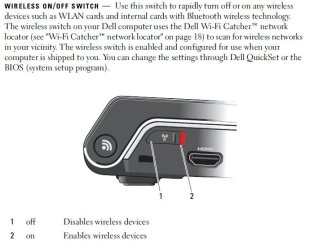
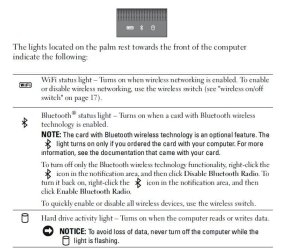
Remove the battery before checking the card(s). Try reseating. Also check to make sure the wireless switch is enabled. Do you have a BT status indicator on your palm pad?
 

Attachments

  • Wireless Switch.JPG
    Wireless Switch.JPG
    51.7 KB · Views: 5
  • Status Lights.JPG
    Status Lights.JPG
    77.2 KB · Views: 2

My Computer My Computer

At a glance

Windows 7 Pro-x64i7-2600 3.4GHz - 3.8GHz Turbo8Gb - 2x4GB, Muskin 991770 PC3-1333Integrated Intel HD 2000
Computer type
PC/Desktop
Computer Manufacturer/Model Number
Built 2/11/2011
OS
Windows 7 Pro-x64
CPU
i7-2600 3.4GHz - 3.8GHz Turbo
Motherboard
Intel DH67BL-B3
Memory
8Gb - 2x4GB, Muskin 991770 PC3-1333
Graphics Card(s)
Integrated Intel HD 2000
Sound Card
Integrated Intel 10.1 HD, RealTek ALC892
Monitor(s) Displays
Asus LCD VH222H, Haier HL24XSL2a
Screen Resolution
1920x1080, 1920x1080
Hard Drives
Crucial SSD C300-128Gb,
Western Digital WD5002AALX - 500Gb,
Western Digital WD7501AALS - 750Gb
PSU
Seasonic 650W 80+ Gold Modular
Case
Rosewill Defender
Cooling
Stock CPU, Four 120mm case fans, PCH fan added
Keyboard
Logitech EX100 Y-RBH94 Wireless
Mouse
Logitech EX100 M-RCE95 Wireless
Internet Speed
3.0/1.5 Mbs
Antivirus
Microsoft Security Essentials
Browser
Microsoft Internet Explorer 11
Other Info
Antec Veris Premier-Multimedia IR Station,
Cyber Accoustics-3602 Speakers,
AFT XM-5U Card Reader,
Hauppauge TV-HVR-2250,
Sony LX300 USB Turntable
If it worked with Vista, it should work with 7 since they both use the same driver type.

Either the Bluetooth is switched off or there is no Bluetooth hardware installed.

If no Bluetooth is installed, you can get a tiny little USB dongle for very little money and they work great.
 

My Computer My Computer

At a glance

W10 Pro desktop, W11 laptop, W11 Pro tablet (...3.7Ghz 8700K i7, i7-11800H, i7-1065G716G desktop, 16G laptop, 4G tabletAMD Radeon RX580, RTX 3060, Intel Iris Plus
Computer type
PC/Desktop
Computer Manufacturer/Model Number
Home Built desktop, Dell G15 5511 Gaming laptop,MS Surface Pro 7 tablet
OS
W10 Pro desktop, W11 laptop, W11 Pro tablet (all 64-bit)
CPU
3.7Ghz 8700K i7, i7-11800H, i7-1065G7
Motherboard
ASUS TUF Z370-Pro Gaming in desktop
Memory
16G desktop, 16G laptop, 4G tablet
Graphics Card(s)
AMD Radeon RX580, RTX 3060, Intel Iris Plus
Sound Card
High Definition Audio (Built-in to mobo)
Monitor(s) Displays
Samsung U32J59 32" (2x), 15.6", 12"
Screen Resolution
3840x2160, 3840x2160, 1920x1080, 2160x1440
Hard Drives
500G SSD for OS; 2T, 10T & 15T HDDs for Data on Desktop, 1TB SSD laptop, 128G SSD tablet.
PSU
Corsair CX 750M
Case
Antec 100
Cooling
CM 212+
Keyboard
IBM Model M - used continuously since 1986
Mouse
Microsoft Pro IntelliMouse
Internet Speed
400M down 8M up
Antivirus
Windows Defender
Browser
FireFox
Other Info
Built my first computer (8Mhz 8088cpu, 640K RAM, 20MB HDD, 2 360K floppy drives) in 1985 and have been building them for myself, relatives and friends ever since.
I like that idea carwiz of reseating the card, at the moment my guess is that there's a poor connection. I can confirm that the wireless switch has remained on throughout my diagnosis, and the bluetooth indicator is there. Thank you carwiz and strollin for your tips and input! I'll be back shortly!
 

My Computer My Computer

At a glance

Windows 7 32 bit
Computer type
Laptop
Computer Manufacturer/Model Number
Dell 1535
OS
Windows 7 32 bit
Turns out the port for a bluetooth card "WPAN" is empty, I have no bluetooth card! I assume the problem will be fixed once I install one, thanks again carwiz and strollin! Cheers!
 

My Computer My Computer

At a glance

Windows 7 32 bit
Computer type
Laptop
Computer Manufacturer/Model Number
Dell 1535
OS
Windows 7 32 bit
Back
Top