Solved Bluetooth not working on Dell Inspiron N5110

noddy90

New member
Local time
4:56 AM
Messages
48
Location
Mission BC
Hi there, I can't find the bluetooth icon, I had done a clean reinstall a few months ago, so I may not have the driver. I tried to download it from Dell site, won't allow me, as I am not under warranty now.

Please help, thnks
 

My Computer My Computer

At a glance

Windows 7 Home Premium
Computer type
Laptop
Computer Manufacturer/Model Number
Dell Inspiron N5110
OS
Windows 7 Home Premium
Browser
Fire Fox, Chrome and IE

My Computer My Computer

At a glance

windows 7 home 64bitINTEL-CORE I716GB
Computer Manufacturer/Model Number
W530-3630QM1
OS
windows 7 home 64bit
CPU
INTEL-CORE I7
Memory
16GB
Hard Drives
750GB
Browser
Chrome
Hi Maxie,

If the driver is not the issue, how will the problem be solved/ resolved??

thnx
 

My Computer My Computer

At a glance

Windows 7 Home Premium
Computer type
Laptop
Computer Manufacturer/Model Number
Dell Inspiron N5110
OS
Windows 7 Home Premium
Browser
Fire Fox, Chrome and IE
Try the Driver and then report back
 

My Computer My Computer

At a glance

windows 7 home 64bitINTEL-CORE I716GB
Computer Manufacturer/Model Number
W530-3630QM1
OS
windows 7 home 64bit
CPU
INTEL-CORE I7
Memory
16GB
Hard Drives
750GB
Browser
Chrome
Sure
 

My Computer My Computer

At a glance

Windows 7 Home Premium
Computer type
Laptop
Computer Manufacturer/Model Number
Dell Inspiron N5110
OS
Windows 7 Home Premium
Browser
Fire Fox, Chrome and IE
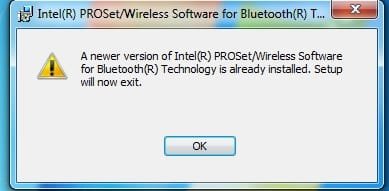
See the screen shot :(

You were right............. now please help me resolve it.

I may go off line, as am having net issues too.

Thanks
 

Attachments

  • Bluetooth.jpg
    Bluetooth.jpg
    12.1 KB · Views: 18

My Computer My Computer

At a glance

Windows 7 Home Premium
Computer type
Laptop
Computer Manufacturer/Model Number
Dell Inspiron N5110
OS
Windows 7 Home Premium
Browser
Fire Fox, Chrome and IE
Try Installing the Chipset and the Intel Management Engine Interface Drivers ...
 

My Computer My Computer

At a glance

windows 7 home 64bitINTEL-CORE I716GB
Computer Manufacturer/Model Number
W530-3630QM1
OS
windows 7 home 64bit
CPU
INTEL-CORE I7
Memory
16GB
Hard Drives
750GB
Browser
Chrome
Ok........
 

My Computer My Computer

At a glance

Windows 7 Home Premium
Computer type
Laptop
Computer Manufacturer/Model Number
Dell Inspiron N5110
OS
Windows 7 Home Premium
Browser
Fire Fox, Chrome and IE
Chipset driver installed and my machine already has a newer driver for Intel Management Engine Interface.

What next?
 

My Computer My Computer

At a glance

Windows 7 Home Premium
Computer type
Laptop
Computer Manufacturer/Model Number
Dell Inspiron N5110
OS
Windows 7 Home Premium
Browser
Fire Fox, Chrome and IE
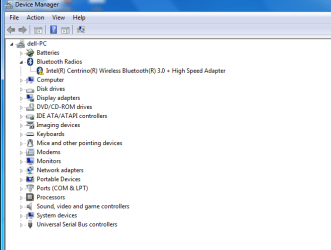
Does the Bluetooth show in the Device Manager ? Is there any errors in the Device Manager ?
 

My Computer My Computer

At a glance

windows 7 home 64bitINTEL-CORE I716GB
Computer Manufacturer/Model Number
W530-3630QM1
OS
windows 7 home 64bit
CPU
INTEL-CORE I7
Memory
16GB
Hard Drives
750GB
Browser
Chrome
Please see the screen shot..........
 

Attachments

  • Device Manager Blue.png
    Device Manager Blue.png
    16.2 KB · Views: 11

My Computer My Computer

At a glance

Windows 7 Home Premium
Computer type
Laptop
Computer Manufacturer/Model Number
Dell Inspiron N5110
OS
Windows 7 Home Premium
Browser
Fire Fox, Chrome and IE
Is your Function Keys working Fn+F2 to enable ?
 

My Computer My Computer

At a glance

windows 7 home 64bitINTEL-CORE I716GB
Computer Manufacturer/Model Number
W530-3630QM1
OS
windows 7 home 64bit
CPU
INTEL-CORE I7
Memory
16GB
Hard Drives
750GB
Browser
Chrome
Fn+F2 are working to enable/disable WiFi Technology Hardware radio switch. But the same message is there even after turning it off and on..........
 

My Computer My Computer

At a glance

Windows 7 Home Premium
Computer type
Laptop
Computer Manufacturer/Model Number
Dell Inspiron N5110
OS
Windows 7 Home Premium
Browser
Fire Fox, Chrome and IE
What message or error do you get ?
 

My Computer My Computer

At a glance

windows 7 home 64bitINTEL-CORE I716GB
Computer Manufacturer/Model Number
W530-3630QM1
OS
windows 7 home 64bit
CPU
INTEL-CORE I7
Memory
16GB
Hard Drives
750GB
Browser
Chrome
When I turn it off the bluetooth icon on device manager disappears and when I turn it on the driver seems ok, but after a few seconds it turns like its in the screen shot posted earlier.....
 

My Computer My Computer

At a glance

Windows 7 Home Premium
Computer type
Laptop
Computer Manufacturer/Model Number
Dell Inspiron N5110
OS
Windows 7 Home Premium
Browser
Fire Fox, Chrome and IE
When I turn it off the bluetooth icon on device manager disappears and when I turn it on the driver seems ok, but after a few seconds it turns like its in the screen shot posted earlier.....
By default, DevMgr only displays connected devices. is why the icon disappears. Don't know if i can help with error but let's have a look. While the error appears in DevMgr
  • Click Start->Run, enter: msinfo32. Click the + sign next to Components to expand it
  • Click Problem Devices. Anything appear?
  • If yes, click on it, Ctrl-A to select all, Ctrl-C to copy it, Ctrl-V to paste into next post
  • On the other hand, if no devices are listed, tell me so

/* EDIT */
While you're at it, look in CtlPnl -> Programs and Features. Is there an uninstaller entry for BT in there?
 

My Computer My Computer

At a glance

Desk 1: Win 7 Pro x32; Desk 2: Windows 10 x64
Computer type
PC/Desktop
Computer Manufacturer/Model Number
Dell Optiplex 360 and Optiplex 755
OS
Desk 1: Win 7 Pro x32; Desk 2: Windows 10 x64
Hard Drives
500GB Crucial SSD in both Desktops
Other Info
Buffalo 6TB NAS, Raid 1
Hi Computer Geek, this is what I got............Intel(R) Centrino(R) Wireless Bluetooth(R) 3.0 + High Speed Adapter USB\VID_8086&PID_0189\6&58952F4&0&4 This device is working properly.

Nothing about bluetooth........

@ Maxie, thnx, I'll go through the older Dell thread.
 

My Computer My Computer

At a glance

Windows 7 Home Premium
Computer type
Laptop
Computer Manufacturer/Model Number
Dell Inspiron N5110
OS
Windows 7 Home Premium
Browser
Fire Fox, Chrome and IE
.Intel(R) Centrino(R) Wireless Bluetooth(R) 3.0 + High Speed Adapter USB\VID_8086&PID_0189\6&58952F4&0&4 This device is working properly.

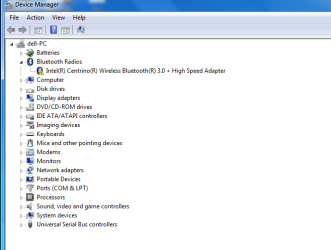
Are you sure the yellow icon was showing in DevMgr at the time? Message "Device working properly" should indicate no yellow icon at the time

Try it one more time.
 

My Computer My Computer

At a glance

Desk 1: Win 7 Pro x32; Desk 2: Windows 10 x64
Computer type
PC/Desktop
Computer Manufacturer/Model Number
Dell Optiplex 360 and Optiplex 755
OS
Desk 1: Win 7 Pro x32; Desk 2: Windows 10 x64
Hard Drives
500GB Crucial SSD in both Desktops
Other Info
Buffalo 6TB NAS, Raid 1
Yeah see the screen shot, still the same..........
 

Attachments

  • Device Manager Blue.png
    Device Manager Blue.png
    16.2 KB · Views: 8

My Computer My Computer

At a glance

Windows 7 Home Premium
Computer type
Laptop
Computer Manufacturer/Model Number
Dell Inspiron N5110
OS
Windows 7 Home Premium
Browser
Fire Fox, Chrome and IE
Back
Top