Solved Bluetooth Peripheral Device Driver Device Unplugged/Not Found

2manyAPPLES

New member
Local time
2:45 PM
Messages
2
Hello!

So I did some searching for a way to fix this problem but I believe that my problem is different than the Bluetooth Peripheral Device problem that most people have.

I am NOT trying to connect a cell phone to my laptop. I am not trying to connect anything I don't think (unless my bluetooth mouse counts?).

I have no idea what a Bluetooth Peripheral Device is. I took some screenshots of the messages I receive every time a wake my computer up or turn it on. (1st, smaller picture)

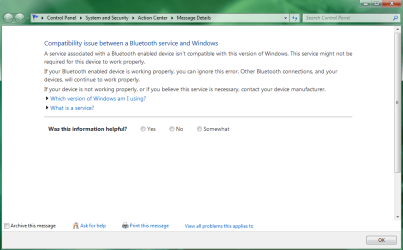
It tries to update a driver but always fails and gives me this. (2nd, larger picture)

The suggestion my laptop gives me is this


There may be an easy solution to this, but I feel really lost right now.

Thanks in advance!
 

Attachments

  • BluetoothPeripheralDevice.png
    BluetoothPeripheralDevice.png
    10.6 KB · Views: 372
  • BluetoothPeripheralDevice2.png
    BluetoothPeripheralDevice2.png
    30.4 KB · Views: 709

My Computer

Computer Manufacturer/Model Number
Dell Studio 1555
OS
Windows 7 64 bit
Welcome to SF.

Go to Dell Support
Welcome to Dell Technical Support

Select drivers

Choose whichever option you want to located your 1555 notebook.

Select network
Select Dell Application R226750.exe
This applies to the Wireless 370 mini bluetooth card

And yes, your bluetooth mouse would be a bluetooth peripheral.

Let us know how that goes for you.
 

My Computer

Computer Manufacturer/Model Number
Dell and Custom
OS
Systems 1 and 2: Windows 7 Enterprise x64, Win 8 Developer
CPU
System 1: i7 [email protected], System 2: AMD FX-4100 Zambezi 3.6G
Motherboard
System 1:Dell 06NWYK System 2: ASUS M5A97 AM3+
Memory
System 1: 8GB System 2: 8GB
Graphics Card(s)
System 1: ATI FirePro V4800 System 2: Radeon HD 6850
Sound Card
System 1: onboard System 2: onboard
Monitor(s) Displays
System1: Viewsonic HDMI 24"
Screen Resolution
System 1: 1920x1080 System 2: 1920x1080
Hard Drives
System 1: Mirrored .5B drives System 2: Seagate Barracuda ST1000DM003 1TB 7200 RPM 64MB Cache SATA 6.0Gb/s
Case
System 1: Dell System 2: Cooler Master
Internet Speed
10 MBPS
Problem solved! Thanks a lot!
 

My Computer

Computer Manufacturer/Model Number
Dell Studio 1555
OS
Windows 7 64 bit
Glad to help!
 

My Computer

Computer Manufacturer/Model Number
Dell and Custom
OS
Systems 1 and 2: Windows 7 Enterprise x64, Win 8 Developer
CPU
System 1: i7 [email protected], System 2: AMD FX-4100 Zambezi 3.6G
Motherboard
System 1:Dell 06NWYK System 2: ASUS M5A97 AM3+
Memory
System 1: 8GB System 2: 8GB
Graphics Card(s)
System 1: ATI FirePro V4800 System 2: Radeon HD 6850
Sound Card
System 1: onboard System 2: onboard
Monitor(s) Displays
System1: Viewsonic HDMI 24"
Screen Resolution
System 1: 1920x1080 System 2: 1920x1080
Hard Drives
System 1: Mirrored .5B drives System 2: Seagate Barracuda ST1000DM003 1TB 7200 RPM 64MB Cache SATA 6.0Gb/s
Case
System 1: Dell System 2: Cooler Master
Internet Speed
10 MBPS
Glad to help!

Maybe you can help me then. I am experiencing this same error, however I downloaded and installed the file from Dell, and it does not fix it. After I installed the driver it said that the Bluetooth Peripheral Device failed to install.

How can I fix this?
 

My Computer

Computer Manufacturer/Model Number
Dell Studio 1555
OS
Windows 7 x64
CPU
Intel Duo Core
Memory
8GB
Graphics Card(s)
ATI Mobility Radeon 4570
Also, it says the Bluetooth Peripheral Device is unplugged.
 

My Computer

Computer Manufacturer/Model Number
Dell Studio 1555
OS
Windows 7 x64
CPU
Intel Duo Core
Memory
8GB
Graphics Card(s)
ATI Mobility Radeon 4570
Back
Top