- Local time
- 8:47 PM
- Messages
- 75
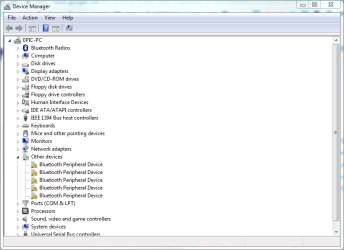
Whenever I connect a bluetooth device to my PC (such as my phone) I always get this list of peripheral devices with yellow exclamation signs (see attached image).
I have tried right-clicking on them and choosing to update each one, but that never works. I have also tried deleting/disabling them and they always come back.
Any advice on how to fix this would be appreciated.
Thanks.
I have tried right-clicking on them and choosing to update each one, but that never works. I have also tried deleting/disabling them and they always come back.
Any advice on how to fix this would be appreciated.
Thanks.
Attachments
My Computer
At a glance
Windows 7 Home Premium 64BitIntel Core 2 Quad Q6600G.Skill PC2-6400 DDR2 8GBASUS NVIDIA GeForce 9600 GSO
- Computer type
- PC/Desktop
- OS
- Windows 7 Home Premium 64Bit
- CPU
- Intel Core 2 Quad Q6600
- Motherboard
- GIGABYTE P35-DS4
- Memory
- G.Skill PC2-6400 DDR2 8GB
- Graphics Card(s)
- ASUS NVIDIA GeForce 9600 GSO
- Sound Card
- Diamond XS51 Xtreme 5.1
- Monitor(s) Displays
- (2) DELL S2340M 23" HD LEDs
- Hard Drives
- Seagate ST1000DM003-1ER162 1TB | Seagate ST500DM002-1BD142 500GB | ASUS DRW-24B1ST DVD+R DL
- PSU
- PC Power & Cooling Silencer 610
- Case
- Ultra m998
- Cooling
- ThermalRight Ultra 120E
- Keyboard
- Logitech K811, K360
- Mouse
- Logitech Performance MX