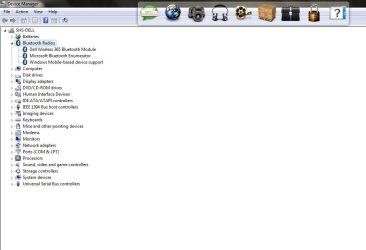
Bluetooth Peripheral Drivers get auto Installed at every Boot.

sanjayhsoni99

New member
Local time
11:36 AM
Messages
12
Hi All at the forum,

Lately my Studio 1558 consistently loads few Bluetooth Peripheral Drivers at every Boot, I've even tried uninstall & reinstall of the Bluetooth Driver (Dell Wireless 365 Bluetooth Module, v.6.2.0.9603, A03-1 ; BROADCOM) with correct procedures of the Win 7 x64 OS involved with no success, What could the problem be ??
Why the Bluetooth Peripheral Drivers reinstalls or reloads at every boot, Please Help me troubleshoot the same.
Thanks.
 

Attachments
  • Untitled 1.jpg
    Untitled 1.jpg
    51.5 KB · Views: 1
Last edited:

My Computer My Computer

Computer type
Laptop
Computer Manufacturer/Model Number
Dell
OS
Windows 7, Home Premium, x64,
CPU
I 5
Motherboard
Dell
Memory
DDR 3
Graphics Card(s)
ATI
Hard Drives
500 GB
Antivirus
MS Essentials
Browser
IE 11
Hi All at the forum,

Lately my Studio 1558 consistently loads few Bluetooth Peripheral Drivers at every Boot, I've even tried uninstall & reinstall of the Bluetooth Driver (Dell Wireless 365 Bluetooth Module, v.6.2.0.9603, A03-1 ; BROADCOM) with correct procedures of the Win 7 x64 OS involved with no success, What could the problem be ??
Why the Bluetooth Peripheral Drivers reinstalls or reloads at every boot, Please Help me troubleshoot the same.
Thanks.

Hi sanjayhsoni99,

We truly regret the inconvenience that has been caused to you. These are bluetooth devices which should be installed on the system and you would not be able to pair any devices if these drivers are not installed.

So if possible let us know why you don't wish these drivers to not load. Also, if you don't wish them to install automatically then you can disable the same:

http://www.sevenforums.com/drivers/5010-how-stop-win-7-driver-software-installation.html

Keep us posted with the results so we can advise you further.
 

My Computer My Computer

Computer type
PC/Desktop
OS
Winndows 7 32 bit
BlueTooth auto installs Drivers .........

Hi Sandeep,
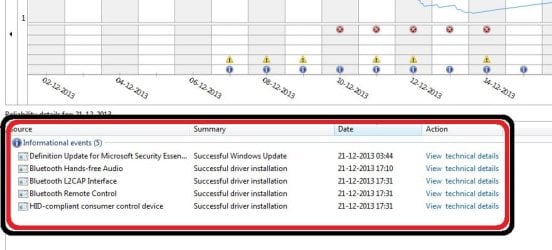
It took me a while to respond excuse me for that, Thanks for the reply, appreciate the same friend, Well It's not that I don't want default drivers to load which is required for proper start-up & correct functioning as understood, What I'm concerned here is that its installation (BT drivers) is done automatically over and again in a systematic time loop kind of cycle where I have no control over the incidents meaning it don't ever show yellow exclamation mark in the Device Manager window, the system also acknowledges these fresh installations each day by way of Action Centre Logs (click here for images) also please read the text below for clearer description, virtually every aspect & function of Bluetooth on the system works well except RELOADs at every start-up which makes OS too lame & longer booting time, Seems as though system keeps on forgetting about the drivers, >>


Hi All at the forum,


Lately my DELL Studio 1558 consistently & automatically loads & does not give me any chance or control at that time, while a few Bluetooth Peripheral Drivers install at every Boot since the past 15+ days,


Listed below are drivers that load either together or individually at boot each time the machine is switched on,

- Bluetooth Handsfree Audio
- Bluetooth L2CAP Interface
- Bluetooth Remote Control
- HID-compliant consumer control device


When the problem initiated a full scan was run with MS Essentials & Safety Scanner, & also with Malawarebytes and a few bugs
were cleared by both AV Wares, a full scan run yesterday shows the system as Clean.


I've even tried uninstalling & reinstall the Bluetooth Drivers (Dell Wireless 365 Bluetooth Module, v.6.2.0.9603, A03-1 ; BROADCOM) with correct
procedures of the Win 7 x64 OS involved with proper restart with no success at least twice,


I'd also like to inquire for my understanding & not as a solution; that can a System Restore Help ? & how good the chances for elimination of problem do I have with Restore on system's created Restore Point; I meant will the concerned drivers be taken care off during RESTOREs ?


& roll back wont help cause the main BT Drivers was installed & reinstalled at least twice.


What could the problem be ?? Why the Bluetooth Peripheral Drivers reinstall or reload at each & every boot, Please Help troubleshoot the same. Thanks.

Please Reply, Thank You.

Sandeep Please Help Provide a Solution, Thanks.
 

My Computer My Computer

Computer type
Laptop
Computer Manufacturer/Model Number
Dell
OS
Windows 7, Home Premium, x64,
CPU
I 5
Motherboard
Dell
Memory
DDR 3
Graphics Card(s)
ATI
Hard Drives
500 GB
Antivirus
MS Essentials
Browser
IE 11
Hi sanjayhsoni99,

Thank you for your reply. Can you confirm that bluetooth drivers load everytime when you start the system. As when the drivers are loaded once it should not search and install everytime.

Also, please confirm if you disabled for windows updates to install the driver automatically and use the driver installed already.

Kindly confirm these details so we can assist you further.
 

My Computer My Computer

Computer type
PC/Desktop
OS
Winndows 7 32 bit
Hi Sandeep,
Yes I confirm that Bluetooth drivers load Everytime I start the system. & Yes Sandeep, ideally once when the drivers are loaded / installed it should Not search and install Everytime, but system does this (loading) everytime, I've also run a complete Dell Hardware Test which had passed thrice (done at that time).
And I have never disabled windows update ever, It is set to notify hence at every updates I have diligently been Updating all & every single update,
Please, Awaiting Reply, Thanks.

p.s ( hope you seen the link to images ).
 
Last edited:

My Computer My Computer

Computer type
Laptop
Computer Manufacturer/Model Number
Dell
OS
Windows 7, Home Premium, x64,
CPU
I 5
Motherboard
Dell
Memory
DDR 3
Graphics Card(s)
ATI
Hard Drives
500 GB
Antivirus
MS Essentials
Browser
IE 11
Hi Sandeep,
Yes I confirm that Bluetooth drivers load Everytime I start the system. & Yes Sandeep, ideally once when the drivers are loaded / installed it should Not search and install Everytime, but system does this (loading) everytime, I've also run a complete Dell Hardware Test which had passed thrice (done at that time).
And I have never disabled windows update ever, It is set to notify hence at every updates I have diligently been Updating all & every single update,
Please, Awaiting Reply, Thanks.

p.s ( hope you seen the link to images ).

Hi sanjayhsoni99,

Thanks for providing this information. Kindly open device manager and remove the bluetooth drivers from the system. And then check mark this setting to ensure windows never install the driver for any device:

http://www.sevenforums.com/tutorials/82137-drivers-turn-off-automatic-driver-installation.html

http://www.sevenforums.com/tutorials/2803-device-installation-settings.html

Then restart the system and let me know if it tried to install the driver again. Keep us posted with the results so we can advise you further.
 

My Computer My Computer

Computer type
PC/Desktop
OS
Winndows 7 32 bit
BT Drivers

Hello Sandeep,
Kindly please advice, precisely which Bluetooth Driver or Drivers has to be Uninstalled ??


Thanks ..


.
 

Attachments

  • BT issues 1.JPG
    BT issues 1.JPG
    49.4 KB · Views: 3

My Computer My Computer

Computer type
Laptop
Computer Manufacturer/Model Number
Dell
OS
Windows 7, Home Premium, x64,
CPU
I 5
Motherboard
Dell
Memory
DDR 3
Graphics Card(s)
ATI
Hard Drives
500 GB
Antivirus
MS Essentials
Browser
IE 11
Hello Sandeep,
Kindly please advice, precisely which Bluetooth Driver or Drivers has to be Uninstalled ??


Thanks ..


.

Hi sanjayhsoni99,

Kindly remove the Dell 365 Bluetooth and it should remove the other ones as well. If it does not then make remove all the devices listed under bluetooth to ensure no drivers for bluetooth are installed.

Then you can follow the steps for not allowing windows to install drivers for the devices automatically. Keep us posted with the results so we can advise you further.
 

My Computer My Computer

Computer type
PC/Desktop
OS
Winndows 7 32 bit
Hi Sandeep,
The Drivers again began loading as before only after 3 ~ 4 boots after performing steps as
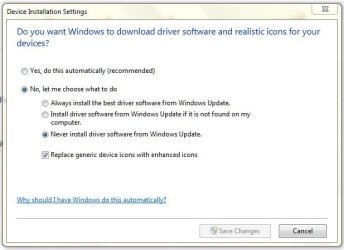
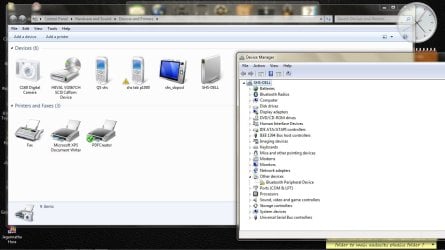
was advised, the description in detail from here, first the Dell 365 Bluetooth was Uninstalled together with it complete uninstallation was done of other BT drivers, immediately next the Device Installation setting was set to Not download drivers automatically (last image), then a restart was done following which Dell 365 Bluetooth & other drivers in BT were reloaded automatically with only one Peripheral Device Driver for my GT P1000 tab was not loaded with code 28 (first image); now here I went for a web search on xda forum & advised to manually add com port with Microsoft driver already on the system following which the Peripheral Driver yellow mark disappeared (well, we could do the procedure all over again if I wasn't on correct track, Please Advice on it), well until now all seemed well & booted fine at least thrice but it came as a surprise when today the same old problem surfaced again RELOADING the Remote; L2CAP; & Hands-free Audio drivers AUTO Loaded again; also the default setting for driver download was already now on a new default set to Never Install from Win Updates; so it hasn't worked & we're back to square again standing exactly where we started; need assistance,

Thanking You.

-
 

Attachments

  • BT Reloads 0.JPG
    BT Reloads 0.JPG
    37.3 KB · Views: 41
  • Device Peripheral Problem 1.jpg
    Device Peripheral Problem 1.jpg
    100.7 KB · Views: 0

My Computer My Computer

Computer type
Laptop
Computer Manufacturer/Model Number
Dell
OS
Windows 7, Home Premium, x64,
CPU
I 5
Motherboard
Dell
Memory
DDR 3
Graphics Card(s)
ATI
Hard Drives
500 GB
Antivirus
MS Essentials
Browser
IE 11
Hi Sandeep,
I also tried the sfc /scannow 4 times with restarts, this too hasn't helped, I had an Old backed-up registry backup which I restored but again no avail, I understand that now I have only two options either to Repair Install or Format then Clean Install.

I'd like to know will I require Windows Activation Key if I Repair Install the system ?

Please Advice .........
 

My Computer My Computer

Computer type
Laptop
Computer Manufacturer/Model Number
Dell
OS
Windows 7, Home Premium, x64,
CPU
I 5
Motherboard
Dell
Memory
DDR 3
Graphics Card(s)
ATI
Hard Drives
500 GB
Antivirus
MS Essentials
Browser
IE 11
Hi Sandeep,
I also tried the sfc /scannow 4 times with restarts, this too hasn't helped, I had an Old backed-up registry backup which I restored but again no avail, I understand that now I have only two options either to Repair Install or Format then Clean Install.

I'd like to know will I require Windows Activation Key if I Repair Install the system ?

Please Advice .........
 

My Computer My Computer

Computer type
Laptop
Computer Manufacturer/Model Number
Dell
OS
Windows 7, Home Premium, x64,
CPU
I 5
Motherboard
Dell
Memory
DDR 3
Graphics Card(s)
ATI
Hard Drives
500 GB
Antivirus
MS Essentials
Browser
IE 11
Hi Sandeep,
I also tried the sfc /scannow 4 times with restarts, this too hasn't helped, I had an Old backed-up registry backup which I restored but again no avail, I understand that now I have only two options either to Repair Install or Format then Clean Install.

I'd like to know will I require Windows Activation Key if I Repair Install the system ?

Please Advice .........

Hi sanjayhsoni99,

I appreciate the time and effort that you took to troubleshoot the issue. If you would use dell media then it would not ask for a product key.

Request Backup Disks

Also, prior to that you should create a new username and check if the similar issue occurs in the new user name as well:

http://www.sevenforums.com/tutorials/181024-user-account-create.html

Keep us posted with the results so we can advise you further.
 

My Computer My Computer

Computer type
PC/Desktop
OS
Winndows 7 32 bit

Hi Sandeep,
I’d ask you how do you rate on a scale of 10 the chances of the reloading BT Drivers issue to correct itself by creating a new profile ? alternately also tell me can I ascertain or check & verify this issue by logging into the Guest Profile (old) on the system, (i doubt it to work as this won’t be with administrative rights).

What to do next if the above won’t work ?

Also a few doubts I'd ask; can I repair system with Dell media disc copied to a pen-drive ? as the on-board optical drive is a little unreliable at use; also currently the system is in upgraded state to Service Pack-1 since the Jan 2011 (system was bought around Feb 2010), so can the OG Dell media actually help in Repair Install ?

meanwhile I have already complied the requisites needed to Repair Install from the links you advised
a) Windows 7 Home Premium x64 SP1 U (media refresh) X17-58997.iso
b) Windows 7 USB/DVD Download Tool for bootable USB media
c) Windows Activation Key (my OG)

Also i understand Repair Install will skip for me the trouble associated with the Setting Up & Preferences Settings as they will be unchanged,

Not that i’m eager to Repair Install, But Advice what next .........
 

My Computer My Computer

Computer type
Laptop
Computer Manufacturer/Model Number
Dell
OS
Windows 7, Home Premium, x64,
CPU
I 5
Motherboard
Dell
Memory
DDR 3
Graphics Card(s)
ATI
Hard Drives
500 GB
Antivirus
MS Essentials
Browser
IE 11

Hi Sandeep,
I’d ask you how do you rate on a scale of 10 the chances of the reloading BT Drivers issue to correct itself by creating a new profile ? alternately also tell me can I ascertain or check & verify this issue by logging into the Guest Profile (old) on the system, (i doubt it to work as this won’t be with administrative rights).

What to do next if the above won’t work ?

Also a few doubts I'd ask; can I repair system with Dell media disc copied to a pen-drive ? as the on-board optical drive is a little unreliable at use; also currently the system is in upgraded state to Service Pack-1 since the Jan 2011 (system was bought around Feb 2010), so can the OG Dell media actually help in Repair Install ?

meanwhile I have already complied the requisites needed to Repair Install from the links you advised
a) Windows 7 Home Premium x64 SP1 U (media refresh) X17-58997.iso
b) Windows 7 USB/DVD Download Tool for bootable USB media
c) Windows Activation Key (my OG)

Also i understand Repair Install will skip for me the trouble associated with the Setting Up & Preferences Settings as they will be unchanged,

Not that i’m eager to Repair Install, But Advice what next .........

Hi sanjayhsoni99,

If the issue is caused due to a corrupt user profile then it would work fine on a different user name. You should create a new user name with admin rights and if issue doesn't persist then you can migrate the data to the new user.

Check this tutorial for performing the repair install:

http://www.sevenforums.com/tutorials/3413-repair-install.html

You cannot use a OEM Windows 7 "Factory" Restore/Recovery type of installation disc that came with or created from a store bought computer to do a repair install with. These can only be used do a clean install instead.

You can do a repair install on a factory OEM installation with the latest official Windows 7 with SP1 ISO file here: Microsoft: Windows 7 Direct Download Links, and use Windows 7 USB-DVD Download Tool to create a bootable DVD or USB flash drive with the ISO to do the repair install from within Windows 7.

Dell OEM disc could be used to do a clean install of windows on the system if required in future.

Keep us posted with the results so we can advise you further.
 

My Computer My Computer

Computer type
PC/Desktop
OS
Winndows 7 32 bit
Hi Sandeep,
Many thanks to you & I appreciate the time & effort you are giving to help me trouble-shoot machine's problems.
As you advised on the last query of creating a New USER Profile, here's I'd like to get to your attention that the (old) Guest Profile Account on the system too does exactly the same thing (reloading) as the Main User Profile, so if other profile too behaves similarly is it worth trying create a New Account ?

Also if we have to proceed with a Repair Install, kindly advice which Activation Key must I use A) the one currently installed on system (extract via key retrieving ware Belarc) or
B) the Microsoft Sticker Key, pasted inside the Battery Pack compartment ?

I understand both are perfectly legal but all these years it (MS Sticker Label) hasn't been used/registered yet hence, Please Advise .........


.
 

My Computer My Computer

Computer type
Laptop
Computer Manufacturer/Model Number
Dell
OS
Windows 7, Home Premium, x64,
CPU
I 5
Motherboard
Dell
Memory
DDR 3
Graphics Card(s)
ATI
Hard Drives
500 GB
Antivirus
MS Essentials
Browser
IE 11
Hi Sandeep,
Many thanks to you & I appreciate the time & effort you are giving to help me trouble-shoot machine's problems.
As you advised on the last query of creating a New USER Profile, here's I'd like to get to your attention that the (old) Guest Profile Account on the system too does exactly the same thing (reloading) as the Main User Profile, so if other profile too behaves similarly is it worth trying create a New Account ?

Also if we have to proceed with a Repair Install, kindly advice which Activation Key must I use A) the one currently installed on system (extract via key retrieving ware Belarc) or
B) the Microsoft Sticker Key, pasted inside the Battery Pack compartment ?

I understand both are perfectly legal but all these years it (MS Sticker Label) hasn't been used/registered yet hence, Please Advise .........


.

Hi sanjayhsoni99,

As it exhibits the same issue on Guest user more likely issue would come in a new user with admin access as well. But it is worth giving a shot.

Also, while doing a repair install if it asks for the product key you can try using both of them it should work fine on the system.

Keep us posted with the results so we can advise you further.
 

My Computer My Computer

Computer type
PC/Desktop
OS
Winndows 7 32 bit
Hi Sandeep,
This is REALLY REALLY getting frustrating & Time consuming here, after the repair install the PROBLEM HAS NOT GONE they (BT drivers) still LOAD diligintly & religiously, also keep getting & recieving "Error 0000" at each startup,
What COULD be the PROBLEM ?? What to Do ??
 

My Computer My Computer

Computer type
Laptop
Computer Manufacturer/Model Number
Dell
OS
Windows 7, Home Premium, x64,
CPU
I 5
Motherboard
Dell
Memory
DDR 3
Graphics Card(s)
ATI
Hard Drives
500 GB
Antivirus
MS Essentials
Browser
IE 11
Could a corrupt MS.Net installation be the reason ??

cause similarly a year ago re-installation of MS.Net corrected similar type of repeated Updations of the Same KB-article over & over again in MS Security Essentials running on the system ..
 

My Computer My Computer

Computer type
Laptop
Computer Manufacturer/Model Number
Dell
OS
Windows 7, Home Premium, x64,
CPU
I 5
Motherboard
Dell
Memory
DDR 3
Graphics Card(s)
ATI
Hard Drives
500 GB
Antivirus
MS Essentials
Browser
IE 11
Hello Sandeep,
I've trouble-shot the "Error 0000" issue by reinstalling R230426 Motion Sensor Accelerometer, Error issue has Stopped now ..

Pl Advice ..
 

My Computer My Computer

Computer type
Laptop
Computer Manufacturer/Model Number
Dell
OS
Windows 7, Home Premium, x64,
CPU
I 5
Motherboard
Dell
Memory
DDR 3
Graphics Card(s)
ATI
Hard Drives
500 GB
Antivirus
MS Essentials
Browser
IE 11
Back
Top