Bluetooth

Windows 7 Troub

New member
Local time
9:48 AM
Messages
20
I just wanted to clear a few things up about bluetooth on the above pc.

1. Does it actually have bluetooth? I.e can I transfer files from the pc to my mobile phone?

When looking through my pc I can see the bluetooth icon but when I click on it I can't see my mobiole phone (phone has bluetooth on) in other words it is greyed out.
Can a pc have the software for bluetooth and not the hardware?

2. If it does how do I actually get it to work?

I have been trying all day any help would be appreciated and if you have not noticed I am a pc novice.


Thanks
 

My Computer

OS
Windows 7
Please complete your system specifications, without this we're unable to help you, as we can't guess at your hardware... ;)
 

My Computer

Computer Manufacturer/Model Number
Custom built machine
OS
W7 x64
CPU
Intel Q9300 2.5Ghz Quad LGA775 (Would like Q9650)
Motherboard
Gigabyte GA-EP45T-UD3R (F6 Bios)
Memory
4Gb OCZ Gold 1,333Mhz
Graphics Card(s)
Palit HD4850 O/C Sonic 512Mb DDR3, Dual DViD's
Sound Card
Azalia to twin Samson 50w Studio Monitors
Monitor(s) Displays
Twin Dell (E-IPS) U2311H 23.6" Screens
Screen Resolution
1920 x 1080 @ 60Hz
Hard Drives
Crucial M4 SSD, archives on twin Western Digital Caviar Black WD2002FAEX, 2TB, 7200rpm HDD's, Samsung Ritemaster CD/DVD Burner...
PSU
OCZ 600w
Case
Lian-Li PC8 acoustifoamed' aluminium tower
Cooling
Scythe 140mm Zipang
Keyboard
Cherry PS/2 custom model
Mouse
Lenovo USB laser "Thinkpad" Mouse
Internet Speed
ADSL2+ @14Mbps downstream & Cat6 Gigabit Ethernet
Antivirus
NOD32
Browser
Opera
Other Info
Silicon Dust HD Homerun Dual FTA (Ethernet) TV Tuners, Dray Tek Vigor 2850Vn router and 8x HP Gigabit Switch. Lian-Li CR26 Card Reader, Canon MF4430 iSensys laser printer/scanner.
I just wanted to clear a few things up about bluetooth on the above pc.

1. Does it actually have bluetooth? I.e can I transfer files from the pc to my mobile phone?

When looking through my pc I can see the bluetooth icon but when I click on it I can't see my mobiole phone (phone has bluetooth on) in other words it is greyed out.
Can a pc have the software for bluetooth and not the hardware?

2. If it does how do I actually get it to work?

I have been trying all day any help would be appreciated and if you have not noticed I am a pc novice.


Thanks

1)

You could check your BIOS to see if it's there.
You can check in Device Manager
Look around the for the symbol on the panel somewhere. Might not be light up if you have it disabled.

images


Or you could search for the model of your machine on the manufacturer's website for the system specs. It should be listed.

2) After you have enabled BT, installed drivers etc. Launch the application, and you need to setup your BT on your system to allow others to see you as a BT device. You then do a search for other BT devices and connect.
 

My Computer

Computer Manufacturer/Model Number
Lenovo ThinkPad T60
OS
Windows 7 Ultimate 64Bit
CPU
GenuineIntel Intel(R) Core(TM) DuoCore T2400 @ 1.83GHz
Motherboard
Intel(R) 82801G (ICH7 Family)
Memory
2.00 GB
Graphics Card(s)
Mobile Intel(R) 945 Express Chipset
Sound Card
SoundMAX Integrated Digital HD Audio
Monitor(s) Displays
ThinkPad Display
Screen Resolution
1400x1050
Hard Drives
100Gb SATA
Keyboard
Standard Keyboard
Mouse
HID-compliant Mouse
Internet Speed
Cable Broadband - 54Mbps
Other Info
Intel(R) PRO/1000 PL Network Connection
11a/b/g Wireless LAN Mini PCI Express Adapter
I just wanted to clear a few things up about bluetooth on the above pc.

1. Does it actually have bluetooth? I.e can I transfer files from the pc to my mobile phone?

When looking through my pc I can see the bluetooth icon but when I click on it I can't see my mobiole phone (phone has bluetooth on) in other words it is greyed out.
Can a pc have the software for bluetooth and not the hardware?

2. If it does how do I actually get it to work?

I have been trying all day any help would be appreciated and if you have not noticed I am a pc novice.


Thanks

1)

You could check your BIOS to see if it's there.
You can check in Device Manager
Look around the for the symbol on the panel somewhere. Might not be light up if you have it disabled.

images


Or you could search for the model of your machine on the manufacturer's website for the system specs. It should be listed.

2) After you have enabled BT, installed drivers etc. Launch the application, and you need to setup your BT on your system to allow others to see you as a BT device. You then do a search for other BT devices and connect.

Thanks
I have checked device manager and I don't seem to be able to see it but I can see the blue icon when I click on start but like I said when I click on it is greyed out I can't do anything to it. How would I enable it?
 

My Computer

OS
Windows 7
Then you might need to install a BT driver. What's your make and model of your machine?

You might also want to check the BIOS to see if it is turned on.
 

My Computer

Computer Manufacturer/Model Number
Lenovo ThinkPad T60
OS
Windows 7 Ultimate 64Bit
CPU
GenuineIntel Intel(R) Core(TM) DuoCore T2400 @ 1.83GHz
Motherboard
Intel(R) 82801G (ICH7 Family)
Memory
2.00 GB
Graphics Card(s)
Mobile Intel(R) 945 Express Chipset
Sound Card
SoundMAX Integrated Digital HD Audio
Monitor(s) Displays
ThinkPad Display
Screen Resolution
1400x1050
Hard Drives
100Gb SATA
Keyboard
Standard Keyboard
Mouse
HID-compliant Mouse
Internet Speed
Cable Broadband - 54Mbps
Other Info
Intel(R) PRO/1000 PL Network Connection
11a/b/g Wireless LAN Mini PCI Express Adapter
Please complete your system specifications, without this we're unable to help you, as we can't guess at your hardware... ;)
Please see belowhttp://support.packardbell.com/uk/item/index.php?sn=PWU440200494400AD16900&t=1418Core
Chassis
Expansion
dot.gif

dot.gif

dot.gif
dot.gif
dot.gif
dot.gif
dot.gif
dot.gif
Core
dot.gif
dot.gif
OneTwo L Mainboard Specifications
Intel G45 Express chipset with MXM3.0 Graphics
10-11-2009
dot.gif
dot.gif
dot.gif
dot.gif
dot.gif
dot.gif
dot.gif
dot.gif
dot.gif
CPU
dot.gif
dot.gif
Intel Core 2 Quad Q8200S
dot.gif
dot.gif
dot.gif
dot.gif
dot.gif
dot.gif
dot.gif
dot.gif
dot.gif
Display
dot.gif
dot.gif
23" LCD Panel
23 inch, 1920 x 1080, touchscreen
10-11-2009
dot.gif
dot.gif
dot.gif
dot.gif
dot.gif
dot.gif
dot.gif
dot.gif
dot.gif
Storage Components
dot.gif
dot.gif
Sony AD-7643S DVD±RW SuperMulti Drive
DVD±RW SuperMulti Dual Layer Drive
10-11-2009
dot.gif
dot.gif
dot.gif
dot.gif
Western Digital Caviar Green Hard Disk (1 TB)
Manufacturer: Western Digital
Name: Caviar Green
Type: 3.5-inch Serial ATA
Speed: 5400 rpm
Cache: 16 MB
22-09-2009
dot.gif
dot.gif
dot.gif
dot.gif
dot.gif
dot.gif
dot.gif
dot.gif
dot.gif
Network
dot.gif
dot.gif
802.11n Wireless LAN


10-06-2009
dot.gif
dot.gif
dot.gif
dot.gif
dot.gif
dot.gif
dot.gif
dot.gif
dot.gif
Multi Media Components
dot.gif
dot.gif
1.3 MPixel Integrated Camera


20-05-2009
dot.gif
dot.gif
dot.gif
dot.gif
dot.gif
dot.gif
dot.gif
dot.gif
dot.gif
Core
dot.gif
dot.gif
Specifications


10-08-2009
dot.gif
dot.gif
dot.gif
dot.gif
TouchSuite
If your computer includes a touchscreen, a suite of touch-optimized applications are installed.
06-08-2009
dot.gif
dot.gif
dot.gif
dot.gif
dot.gif
dot.gif
dot.gif
dot.gif
dot.gif
Chassis
dot.gif
dot.gif
Tour
An introduction to your computer, this section describes each side and the external features of your computer.
05-08-2009
dot.gif
dot.gif
dot.gif
dot.gif
oneTwo L series


05-08-2009
dot.gif
dot.gif
dot.gif
dot.gif
dot.gif
dot.gif
dot.gif
dot.gif
dot.gif
Expansion
dot.gif
dot.gif
Ports and Connectors
Identify the ports and connectors on your computer to help attach devices to your computer
10-08-2009
dot.gif
dot.gif
dot.gif
 

My Computer

OS
Windows 7
Then you might need to install a BT driver. What's your make and model of your machine?

You might also want to check the BIOS to see if it is turned on.


please the post above for make and model

How do I check BIOS
 

My Computer

OS
Windows 7

My Computer

Computer Manufacturer/Model Number
Custom built machine
OS
W7 x64
CPU
Intel Q9300 2.5Ghz Quad LGA775 (Would like Q9650)
Motherboard
Gigabyte GA-EP45T-UD3R (F6 Bios)
Memory
4Gb OCZ Gold 1,333Mhz
Graphics Card(s)
Palit HD4850 O/C Sonic 512Mb DDR3, Dual DViD's
Sound Card
Azalia to twin Samson 50w Studio Monitors
Monitor(s) Displays
Twin Dell (E-IPS) U2311H 23.6" Screens
Screen Resolution
1920 x 1080 @ 60Hz
Hard Drives
Crucial M4 SSD, archives on twin Western Digital Caviar Black WD2002FAEX, 2TB, 7200rpm HDD's, Samsung Ritemaster CD/DVD Burner...
PSU
OCZ 600w
Case
Lian-Li PC8 acoustifoamed' aluminium tower
Cooling
Scythe 140mm Zipang
Keyboard
Cherry PS/2 custom model
Mouse
Lenovo USB laser "Thinkpad" Mouse
Internet Speed
ADSL2+ @14Mbps downstream & Cat6 Gigabit Ethernet
Antivirus
NOD32
Browser
Opera
Other Info
Silicon Dust HD Homerun Dual FTA (Ethernet) TV Tuners, Dray Tek Vigor 2850Vn router and 8x HP Gigabit Switch. Lian-Li CR26 Card Reader, Canon MF4430 iSensys laser printer/scanner.
If your hardware has Bluetooth... then take note that Win 7 does not have Bluetooth service enabled by default... you will almost certainly have to go into services.msc to enable it before anything will work on that front, no matter what... ;)

p7sqq.png


However if you don't see Bluetooth in device manager and if it's an option in the BIOS you would have to also enable it at BIOS level too of course...
 

My Computer

Computer Manufacturer/Model Number
Custom built machine
OS
W7 x64
CPU
Intel Q9300 2.5Ghz Quad LGA775 (Would like Q9650)
Motherboard
Gigabyte GA-EP45T-UD3R (F6 Bios)
Memory
4Gb OCZ Gold 1,333Mhz
Graphics Card(s)
Palit HD4850 O/C Sonic 512Mb DDR3, Dual DViD's
Sound Card
Azalia to twin Samson 50w Studio Monitors
Monitor(s) Displays
Twin Dell (E-IPS) U2311H 23.6" Screens
Screen Resolution
1920 x 1080 @ 60Hz
Hard Drives
Crucial M4 SSD, archives on twin Western Digital Caviar Black WD2002FAEX, 2TB, 7200rpm HDD's, Samsung Ritemaster CD/DVD Burner...
PSU
OCZ 600w
Case
Lian-Li PC8 acoustifoamed' aluminium tower
Cooling
Scythe 140mm Zipang
Keyboard
Cherry PS/2 custom model
Mouse
Lenovo USB laser "Thinkpad" Mouse
Internet Speed
ADSL2+ @14Mbps downstream & Cat6 Gigabit Ethernet
Antivirus
NOD32
Browser
Opera
Other Info
Silicon Dust HD Homerun Dual FTA (Ethernet) TV Tuners, Dray Tek Vigor 2850Vn router and 8x HP Gigabit Switch. Lian-Li CR26 Card Reader, Canon MF4430 iSensys laser printer/scanner.
It's a Desktop, do all desktops comes with BT?

I'm a laptop-er, i can't remember when i last had a desktop.
 

My Computer

Computer Manufacturer/Model Number
Lenovo ThinkPad T60
OS
Windows 7 Ultimate 64Bit
CPU
GenuineIntel Intel(R) Core(TM) DuoCore T2400 @ 1.83GHz
Motherboard
Intel(R) 82801G (ICH7 Family)
Memory
2.00 GB
Graphics Card(s)
Mobile Intel(R) 945 Express Chipset
Sound Card
SoundMAX Integrated Digital HD Audio
Monitor(s) Displays
ThinkPad Display
Screen Resolution
1400x1050
Hard Drives
100Gb SATA
Keyboard
Standard Keyboard
Mouse
HID-compliant Mouse
Internet Speed
Cable Broadband - 54Mbps
Other Info
Intel(R) PRO/1000 PL Network Connection
11a/b/g Wireless LAN Mini PCI Express Adapter
Hav you tried looking in the BIOS to see if it exists?
 

My Computer

Computer Manufacturer/Model Number
Lenovo ThinkPad T60
OS
Windows 7 Ultimate 64Bit
CPU
GenuineIntel Intel(R) Core(TM) DuoCore T2400 @ 1.83GHz
Motherboard
Intel(R) 82801G (ICH7 Family)
Memory
2.00 GB
Graphics Card(s)
Mobile Intel(R) 945 Express Chipset
Sound Card
SoundMAX Integrated Digital HD Audio
Monitor(s) Displays
ThinkPad Display
Screen Resolution
1400x1050
Hard Drives
100Gb SATA
Keyboard
Standard Keyboard
Mouse
HID-compliant Mouse
Internet Speed
Cable Broadband - 54Mbps
Other Info
Intel(R) PRO/1000 PL Network Connection
11a/b/g Wireless LAN Mini PCI Express Adapter
It's a Desktop, do all desktops comes with BT?

I'm a laptop-er, i can't remember when i last had a desktop.
not all, I remember my Dad's C2D iMac didn't.
tho it seems to be near de facto standard by now.
 

My Computer

Computer type
PC/Desktop
Computer Manufacturer/Model Number
Apple 17" iMac MA199LL (Early 2006)
OS
Windows 8 Pro (32-bit)
CPU
1.83GHz Intel Core Duo
Memory
2GB 667MHz DDR2 SDRAM (PC2-5300) (upgrade)
Graphics Card(s)
ATI Radeon X1600 with 128MB GDDR3 memory
Monitor(s) Displays
17-inch TFT active-matrix LCD, millions of colors
Screen Resolution
1440 x 900
Hard Drives
Hitachi 320GB HDT721032SLA360 7200RPM SATA II (upgrade)
Keyboard
Microsoft Wired Keyboard 600
Mouse
Microsoft Basic Optical Mouse v2.0
Internet Speed
4 Mbps
Antivirus
Microsoft Security Essentials
Browser
Google Chrome
Other Info
WEI:
Base Score: 3.9 Processor: 4.4 Memory 4.7
Graphics: 3.9 Gaming Graphics: 4.1 Primary HD: 5.9
When you restart your machine, Press F1, or Esc to get into your BIOS. From there browse around for Bluetooth device. The BIOS is different for everyone?
 

My Computer

Computer Manufacturer/Model Number
Lenovo ThinkPad T60
OS
Windows 7 Ultimate 64Bit
CPU
GenuineIntel Intel(R) Core(TM) DuoCore T2400 @ 1.83GHz
Motherboard
Intel(R) 82801G (ICH7 Family)
Memory
2.00 GB
Graphics Card(s)
Mobile Intel(R) 945 Express Chipset
Sound Card
SoundMAX Integrated Digital HD Audio
Monitor(s) Displays
ThinkPad Display
Screen Resolution
1400x1050
Hard Drives
100Gb SATA
Keyboard
Standard Keyboard
Mouse
HID-compliant Mouse
Internet Speed
Cable Broadband - 54Mbps
Other Info
Intel(R) PRO/1000 PL Network Connection
11a/b/g Wireless LAN Mini PCI Express Adapter
Out of curiosity I started Bluetooth Services on my desktop (the one shown in my specs on here...) because it has NO Bluetooth devices installed.

The minute I did it Win 7 created a 'Send to' Bluetooth shortcut in my right-click context menu... so it sounds very much like you have a system with the Bluetooth service running when it shouldn't be - because there's no Bluetooth card or dongle present... :zip:
 

My Computer

Computer Manufacturer/Model Number
Custom built machine
OS
W7 x64
CPU
Intel Q9300 2.5Ghz Quad LGA775 (Would like Q9650)
Motherboard
Gigabyte GA-EP45T-UD3R (F6 Bios)
Memory
4Gb OCZ Gold 1,333Mhz
Graphics Card(s)
Palit HD4850 O/C Sonic 512Mb DDR3, Dual DViD's
Sound Card
Azalia to twin Samson 50w Studio Monitors
Monitor(s) Displays
Twin Dell (E-IPS) U2311H 23.6" Screens
Screen Resolution
1920 x 1080 @ 60Hz
Hard Drives
Crucial M4 SSD, archives on twin Western Digital Caviar Black WD2002FAEX, 2TB, 7200rpm HDD's, Samsung Ritemaster CD/DVD Burner...
PSU
OCZ 600w
Case
Lian-Li PC8 acoustifoamed' aluminium tower
Cooling
Scythe 140mm Zipang
Keyboard
Cherry PS/2 custom model
Mouse
Lenovo USB laser "Thinkpad" Mouse
Internet Speed
ADSL2+ @14Mbps downstream & Cat6 Gigabit Ethernet
Antivirus
NOD32
Browser
Opera
Other Info
Silicon Dust HD Homerun Dual FTA (Ethernet) TV Tuners, Dray Tek Vigor 2850Vn router and 8x HP Gigabit Switch. Lian-Li CR26 Card Reader, Canon MF4430 iSensys laser printer/scanner.
As far as BIOS IS CONCERNED i DON'T KNOW WHEN i AM IN bios, WILL IT ACTUALLLY SAY bios or something else? In any even I have had a looked at System Iformation and found the below information


bthenum Bluetooth Request Block Driver c:\windows\system32\drivers\bthenum.sys Kernel Driver No Manual Stopped OK Normal No No
bthmodem Bluetooth Serial Communications Driver c:\windows\system32\drivers\bthmodem.sys Kernel Driver No Manual Stopped OK Normal No No
bthpan Bluetooth Device (Personal Area Network) c:\windows\system32\drivers\bthpan.sys Kernel Driver No Manual Stopped OK Normal No No
bthport Bluetooth Port Driver c:\windows\system32\drivers\bthport.sys Kernel Driver No Manual Stopped OK Normal No No
bthusb Bluetooth Radio USB Driver c:\windows\system32\drivers\bthusb.sys Kernel
 

My Computer

OS
Windows 7
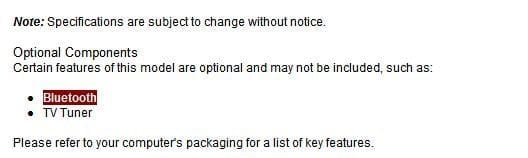
Well it seems this is an optional device. If it comes with BT, you should see it in the BIOS.
 

Attachments

  • Noname.jpg
    Noname.jpg
    10.2 KB · Views: 12

My Computer

Computer Manufacturer/Model Number
Lenovo ThinkPad T60
OS
Windows 7 Ultimate 64Bit
CPU
GenuineIntel Intel(R) Core(TM) DuoCore T2400 @ 1.83GHz
Motherboard
Intel(R) 82801G (ICH7 Family)
Memory
2.00 GB
Graphics Card(s)
Mobile Intel(R) 945 Express Chipset
Sound Card
SoundMAX Integrated Digital HD Audio
Monitor(s) Displays
ThinkPad Display
Screen Resolution
1400x1050
Hard Drives
100Gb SATA
Keyboard
Standard Keyboard
Mouse
HID-compliant Mouse
Internet Speed
Cable Broadband - 54Mbps
Other Info
Intel(R) PRO/1000 PL Network Connection
11a/b/g Wireless LAN Mini PCI Express Adapter
Well it seems this is an optional device. If it comes with BT, you should see it in the BIOS.

Perhaps the OP never had the damn book of words... ;)
 

My Computer

Computer Manufacturer/Model Number
Custom built machine
OS
W7 x64
CPU
Intel Q9300 2.5Ghz Quad LGA775 (Would like Q9650)
Motherboard
Gigabyte GA-EP45T-UD3R (F6 Bios)
Memory
4Gb OCZ Gold 1,333Mhz
Graphics Card(s)
Palit HD4850 O/C Sonic 512Mb DDR3, Dual DViD's
Sound Card
Azalia to twin Samson 50w Studio Monitors
Monitor(s) Displays
Twin Dell (E-IPS) U2311H 23.6" Screens
Screen Resolution
1920 x 1080 @ 60Hz
Hard Drives
Crucial M4 SSD, archives on twin Western Digital Caviar Black WD2002FAEX, 2TB, 7200rpm HDD's, Samsung Ritemaster CD/DVD Burner...
PSU
OCZ 600w
Case
Lian-Li PC8 acoustifoamed' aluminium tower
Cooling
Scythe 140mm Zipang
Keyboard
Cherry PS/2 custom model
Mouse
Lenovo USB laser "Thinkpad" Mouse
Internet Speed
ADSL2+ @14Mbps downstream & Cat6 Gigabit Ethernet
Antivirus
NOD32
Browser
Opera
Other Info
Silicon Dust HD Homerun Dual FTA (Ethernet) TV Tuners, Dray Tek Vigor 2850Vn router and 8x HP Gigabit Switch. Lian-Li CR26 Card Reader, Canon MF4430 iSensys laser printer/scanner.
Back
Top