Solved Boot\ BCD error 0xc0000098 cannot find windows installation

opeacemakero

New member
Local time
1:36 PM
Messages
7
Hi, I got a virus on my laptop lastnight. Everytime I boot, try safemode, or the recovery partition I recieve BCD error 0xc0000098. I attempted to run /rebuildbcd from the command prompt of the repair disc, it scanned for windows installation and was unable to find any. If I select load drivers I see something odd. It shows HDDRecovery as C: 594mb free of 12gb, local disk D: (has no space info), System E: 1.27gb free of 1.46, and boot X: 29mb free of 31.4 mb. My laptop has one 600gb hard drive in it. Local disk used to be C: and the recovery partition was D:. I'm a little confused by the other two partitions showing up and no space info for the local disk wich is now D:. From what I've read the pc is looking for the boot file on c:, but can't find it because c: is now d:. Any info would be appreciated. Thank you.
 

My Computer

Computer Manufacturer/Model Number
Toshiba a665-s5170
OS
Windows 7 Home Premium x64
CPU
intel i3
Download Knoppix Live CD iso and burn it to cd using image burn. Boot laptop from it and see what it shows in filesystem (if it matches what you have). You can also attempt to repair your windows installation with it.
 

My Computer

Computer Manufacturer/Model Number
Antec/custom
OS
Windows 7 Professional x64
CPU
Sempron 145 2.8Ghz(Unlocked to an Athlon II x2 4450e 3.4Ghz)
Motherboard
ASRock 880gm-le
Memory
8GB Corsair Vengeance LP 1600Mhz
Graphics Card(s)
EVGA Geforce GTX 280
Sound Card
Creative
Monitor(s) Displays
Envision 22", Dell 17"
Screen Resolution
1680x1050, 1280x1024
Hard Drives
WDC WD1200BEVS-75LAT0 2.5inch 120GB
WDC WD5000AAKS-00V2B0 3.5inch 500GB
PSU
Cooler Master 750w
Case
Antec
Cooling
Air
Keyboard
MS 1000
Mouse
MS wireless 2000
Internet Speed
15 Mbps down, 4.7 Mbps up
Thank you I'm doing that right now and will post as soon as finished
 

My Computer

Computer Manufacturer/Model Number
Toshiba a665-s5170
OS
Windows 7 Home Premium x64
CPU
intel i3
Its downloading right now, should have it in about 15 minutes. Could you explain how to repair windows using knoppix. I've never used linux before.
 

My Computer

Computer Manufacturer/Model Number
Toshiba a665-s5170
OS
Windows 7 Home Premium x64
CPU
intel i3
Its downloading right now, should have it in about 15 minutes. Could you explain how to repair windows using knoppix. I've never used linux before.

The desktop is pretty self explanatory. If I remember correctly there will be an icon for filesystem on the desktop, or in system, or in computer.
It's been awhile since I messed with it.
Look HERE and see if it helps.

Linux is not that scary (-;
 
Last edited:

My Computer

Computer Manufacturer/Model Number
Antec/custom
OS
Windows 7 Professional x64
CPU
Sempron 145 2.8Ghz(Unlocked to an Athlon II x2 4450e 3.4Ghz)
Motherboard
ASRock 880gm-le
Memory
8GB Corsair Vengeance LP 1600Mhz
Graphics Card(s)
EVGA Geforce GTX 280
Sound Card
Creative
Monitor(s) Displays
Envision 22", Dell 17"
Screen Resolution
1680x1050, 1280x1024
Hard Drives
WDC WD1200BEVS-75LAT0 2.5inch 120GB
WDC WD5000AAKS-00V2B0 3.5inch 500GB
PSU
Cooler Master 750w
Case
Antec
Cooling
Air
Keyboard
MS 1000
Mouse
MS wireless 2000
Internet Speed
15 Mbps down, 4.7 Mbps up
Okay so I'm downloading again. I'm guessing the DE at the end of the file stands for Denmark, cause it looks like german or something. Argh, so i'm downloading the version with EN at the end of it now. I looked at the site you posted, very informative. It looks like its going to give me access to the desktop and files, but I'm not sure how it will repair windows, guess I should wait till I have english and can take a look at it though.
 

My Computer

Computer Manufacturer/Model Number
Toshiba a665-s5170
OS
Windows 7 Home Premium x64
CPU
intel i3
Deutsch

Not bilingual huh? I've done that before and it sucks if you have a slow connection. I gave you a link and was reading about it and I am not sure how much it will be able to help you repair your system (being Windows 7), but it will at least let you compare your partitions with what you already have.
It is a brand new release, so it may.
 

My Computer

Computer Manufacturer/Model Number
Antec/custom
OS
Windows 7 Professional x64
CPU
Sempron 145 2.8Ghz(Unlocked to an Athlon II x2 4450e 3.4Ghz)
Motherboard
ASRock 880gm-le
Memory
8GB Corsair Vengeance LP 1600Mhz
Graphics Card(s)
EVGA Geforce GTX 280
Sound Card
Creative
Monitor(s) Displays
Envision 22", Dell 17"
Screen Resolution
1680x1050, 1280x1024
Hard Drives
WDC WD1200BEVS-75LAT0 2.5inch 120GB
WDC WD5000AAKS-00V2B0 3.5inch 500GB
PSU
Cooler Master 750w
Case
Antec
Cooling
Air
Keyboard
MS 1000
Mouse
MS wireless 2000
Internet Speed
15 Mbps down, 4.7 Mbps up
So I'm bugged out now. It shows three drives the top is Knoppix_fs, hddrecovery, and Ti106045woc. I believe the last is the drive with windows. However when I attempt to pull up its contents i recieve, "Did not recieve a reply. Possible causes include: the remote application did not send a reply, the message bus security policy blocked the reply, the reply timeout expired, or the network connection was broken." From looking at the files on Knoppix_fs, I believe this is the one being recognized by the windows repair as E: system. I'm thinking I could delete that partition, format the main partition and install windows using my windows install disk and once windows is running.... access the recovery partition to restore it to factory settings. What are your thoughts?
 

My Computer

Computer Manufacturer/Model Number
Toshiba a665-s5170
OS
Windows 7 Home Premium x64
CPU
intel i3
Oh and i'm sure the knoppix_fs isn't the disc running cause directly below it I have Knoppix with the disc Icon.
 

My Computer

Computer Manufacturer/Model Number
Toshiba a665-s5170
OS
Windows 7 Home Premium x64
CPU
intel i3
So I was way off. The knoppix_fs was just the knoppix running. It simply did not show the third partition in the list when I was in knoppix. So after deleting the E: system partition and formatting the main partition, while leaving the recovery partition intact... I installed windows to the main. When I try to do the recovery now that windows is running, it fails to load some file. I can't tell what it is, cause it goes by so fast. Looks like I'm gonna have to order the install disks to get it back to factory setttings. In the meantime I need to go track down the drivers for everything on the laptop, can't even connect to the internet with it right now. In hiensight, I think if I had just installed windows to the main partition that was completly empty without deleting the E: partition, I might have been successfull. Why oh why didn't it show up in knoppix? Anyways... thankyou for showing me that tool. I can see where it would come in very handy.
 

My Computer

Computer Manufacturer/Model Number
Toshiba a665-s5170
OS
Windows 7 Home Premium x64
CPU
intel i3
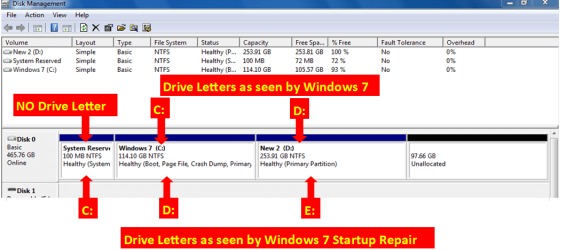
If I select load drivers I see something odd. It shows HDDRecovery as C: 594mb free of 12gb, local disk D: (has no space info), System E: 1.27gb free of 1.46,

This is not odd, it is correct.

RP Delete001.PNG

If the partition HDDRecovery is not damaged, mark ACTIVE & reboot, on reboot Toshiba Recovery will boot.
http://www.sevenforums.com/tutorials/71432-partition-mark-active.html?ltr=P

   Information
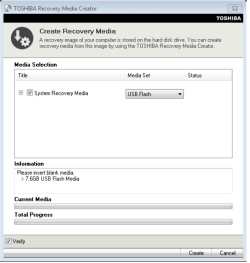
We always assume you have made your Recovery Disks using the OEM manufacturer's Recovery Media Creator app the first day you had your new PC.
& made the Startup Repair CD.
startup repair disc-create


Did you make the OEM manufacturer's Recovery Disks?

Toshiba USB.PNG

How to use Toshiba Recovery.
How to use the Toshiba HDD Recovery Utility

You can order Toshiba Recovery disks from here:
https://www.csd.toshiba.com/cgi-bin/tais/support/jsp/serviceUnitVerification.jsp
 

My Computer

OS
ME/XP/Vista/Win7
Sorry I ditched out on you last night, It was passed my bedtime (-;
All you need is a windows 7 DVD iso, (because you have your key). I have downloaded it before, just check the MD5 hash value(s).
All Windows 7 DVDs contain all versions of Windows 7, i.e. basic, home, home premium, professional, etc. it will load which ever version your key matches.
 

My Computer

Computer Manufacturer/Model Number
Antec/custom
OS
Windows 7 Professional x64
CPU
Sempron 145 2.8Ghz(Unlocked to an Athlon II x2 4450e 3.4Ghz)
Motherboard
ASRock 880gm-le
Memory
8GB Corsair Vengeance LP 1600Mhz
Graphics Card(s)
EVGA Geforce GTX 280
Sound Card
Creative
Monitor(s) Displays
Envision 22", Dell 17"
Screen Resolution
1680x1050, 1280x1024
Hard Drives
WDC WD1200BEVS-75LAT0 2.5inch 120GB
WDC WD5000AAKS-00V2B0 3.5inch 500GB
PSU
Cooler Master 750w
Case
Antec
Cooling
Air
Keyboard
MS 1000
Mouse
MS wireless 2000
Internet Speed
15 Mbps down, 4.7 Mbps up
Drivers

You can get your system drivers HERE.
 

My Computer

Computer Manufacturer/Model Number
Antec/custom
OS
Windows 7 Professional x64
CPU
Sempron 145 2.8Ghz(Unlocked to an Athlon II x2 4450e 3.4Ghz)
Motherboard
ASRock 880gm-le
Memory
8GB Corsair Vengeance LP 1600Mhz
Graphics Card(s)
EVGA Geforce GTX 280
Sound Card
Creative
Monitor(s) Displays
Envision 22", Dell 17"
Screen Resolution
1680x1050, 1280x1024
Hard Drives
WDC WD1200BEVS-75LAT0 2.5inch 120GB
WDC WD5000AAKS-00V2B0 3.5inch 500GB
PSU
Cooler Master 750w
Case
Antec
Cooling
Air
Keyboard
MS 1000
Mouse
MS wireless 2000
Internet Speed
15 Mbps down, 4.7 Mbps up
Back
Top