Boot errors,shutdown errors, wake errors.

ariel5345

New member
Member
Local time
2:52 PM
Messages
59
Location
Austin
Wake from sleep is slow and I loose control over curser for 10 sec.

These are most of the errors and their numbers that I have been getting over the past 5 days.

Boot duration 100,101,109,103
Stanby duration 300


Driver caused delay
351 Thumbdrive driver delay
302 Peer-to-Peer Tunneling Protocol
302 RAS SSTP Miniport Call Manager
302 NVIDIA MCP Networking Function Driver
351 ACPI Driver for NT
302 RICOH SD/MMC Driver
Shut down delay 200, 201
Shut down caused by Services delays 203 many different services


I have done the boot and shutdown trace (http://www.sevenforums.com/tutorial...down-sleep-hibernate-reboot-trace.html?filter[2]=Performance%20Maintenance) and have pm'ed you the link.

I am doing a clean install and would like to get these errors handled before I make an Image.
Thanks for your help!
 

My Computer

Computer Manufacturer/Model Number
Hp presario v6620us 6500notebook series.
OS
7 professional
CPU
Your Processor type and speed - AMD ATHLON(tm) 64X2 DUAL-COR
Motherboard
Quanta 30CF
Memory
2.5gb
Graphics Card(s)
NVIDIA GeForce 7150/nForce 64MB
Sound Card
conextant smartaudio hd2
Hard Drives
FUJITSU PLATA 160GB IDE
PSU
Wth? is this
Case
The judge threw it out. Not enough evidence.
Cooling
sometimes.
Keyboard
Yep
Mouse
Nope
Internet Speed
fast
Those numbers are in milliseconds, so all of them added up isn't going to amount to anything. Your trace didn't merge (you have a kmode and a umode .etl file), so I'm merging this manually (meaning I may be missing some portion of the data - I would hope not, but it is possible). There are a couple of things here (the nvidia driver is causing network stack delays during boot, disk fragmentation is apparent, especially in the MFT, Windows Defender is enabled and scanning, heavily, during boot, etc), but I did find something interesting. the xmarks IE add-in seems to cause about a 10 second driver request at about the same time csc is loading, which also occurs at around the same time that an svchost is doing a scan of the registry (and a lot of random writes during read). I also notice that the system spends a lot of time on D:, but the disk information says the partition is C: on a Fujitsu MHW2160BH - that seems a bit odd, so I'm wondering which is which.

Ultimately, however, I am not sure it's anything you've done, per se, but it's a convergence of things here that are conspiring to slow your system. It might make sense to do a few things:

  1. Stop/Disable Windows Defender, and replace it with an actual antivirus/antimalware product like Avast, MSE, etc.
  2. Disable/remove xmarks temporarily - it's not doing you any favors
  3. Run a manual disk defragmentation pass, and then defragment free space as well with defrag.exe (see /? for options)
  4. Make sure your nvidia drivers are up to date - they aren't doing you any favors either, although you may not be able to do much about the perf hit they'll give during boot/resume, unfortunately

The delays here appear to be too many cooks in the disk I/O kitchen at the same time on a slow disk - that Fujitsu is a 5400RPM disk with only 8MB of cache (1st gen SATA, and designed for reductions in power consumption, not speed), which would explain two things - one, why it's I/O performance is slow, and two, why the cache is flushing so frequently. Ultimately, the disk is *really* slow in today's technological parlance, and it is especially important that be noted given all the I/O being thrown at it.
 

My Computer

Computer type
PC/Desktop
Computer Manufacturer/Model Number
Custom
OS
Windows 10 Pro x64
CPU
Intel Core i7 4790K @ 4.5GHz
Motherboard
Asus Maximus Hero VII
Memory
32GB DDR3
Graphics Card(s)
Nvidia GeForce GTX970
Sound Card
Realtek HD Audio
Screen Resolution
1920x1200
Hard Drives
1x Samsung 250GB SSD
4x WD RE 2TB (RAIDZ)
PSU
Corsair AX760i
Case
Fractal Design Define R4
Cooling
Noctua NH-D15
This is similar to the trace Clue read last year on a Dell with 2 minute startup. Turns out it had a 5400 rpm HD on a Core 2 Duo! Another reason the Dell Dude got fired.

Getting the System files defragged at boot cut the time to a minute, the slow HD is the rest of it.
 
Last edited:
There are a couple of things here (the nvidia driver is causing network stack delays during boot, disk fragmentation is apparent, especially in the MFT,
Windows did all of my driver installs. Is the problem enough for me to look for another? If it is... what Nvidea driver is it? The whole driver naming confuses the heck out of me.


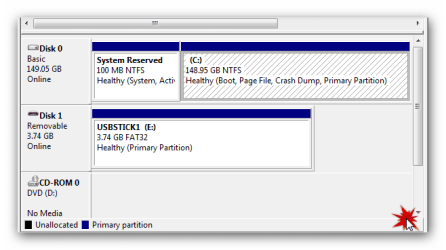
I also notice that the system spends a lot of time on D:, but the disk information says the partition is C: on a Fujitsu MHW2160BH - that seems a bit odd, so I'm wondering which is which.

D: is my dvd disk. No cd or dvd in it. There is a hidden partician for Mbr and whatever for the install. Here is a picture.Disk partician.png
I also just recently erased an A: partician that I had made for data.


  1. Stop/Disable Windows Defender, and replace it with an actual antivirus/antimalware product like Avast, MSE, etc.
  2. Disable/remove xmarks temporarily - it's not doing you any favors
  3. Run a manual disk defragmentation pass, and then defragment free space as well with defrag.exe (see /? for options)
  4. Make sure your nvidia drivers are up to date - they aren't doing you any favors either, although you may not be able to do much about the perf hit they'll give during boot/resume, unfortunately

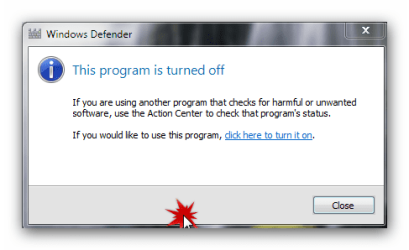
1. I already have MSE installed. It has been having side by side errors #72. I looked it up. Many others also have the same errors, yet no solutions yet. Defender was auto shut off by MSE when I installed. I checked.
defender.png

2. Uninstalled X-marks. Don't really need it.

3. Done.

4. Which Nvidea drivers?
I have such a hard time w/names and device manager is not much help, and driver scanners use different names and well I think it's a conspiracy :sarc: to keep me from searching for my own drivers. Hp will only support Vista drivers for my system. I think they Frankenstien built my hardware and don't want anyone to update drivers on their own. :cry:
 

Attachments

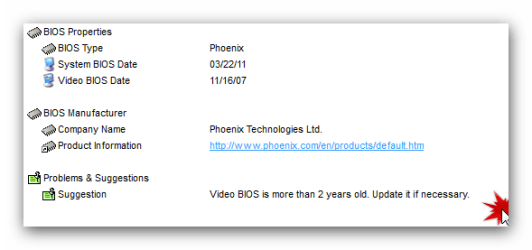
  • bios .png
    bios .png
    7.1 KB · Views: 5

My Computer

Computer Manufacturer/Model Number
Hp presario v6620us 6500notebook series.
OS
7 professional
CPU
Your Processor type and speed - AMD ATHLON(tm) 64X2 DUAL-COR
Motherboard
Quanta 30CF
Memory
2.5gb
Graphics Card(s)
NVIDIA GeForce 7150/nForce 64MB
Sound Card
conextant smartaudio hd2
Hard Drives
FUJITSU PLATA 160GB IDE
PSU
Wth? is this
Case
The judge threw it out. Not enough evidence.
Cooling
sometimes.
Keyboard
Yep
Mouse
Nope
Internet Speed
fast
That's really interesting - all of the files/folders accessed in the trace are D:\. Hopefully that's just an artifact of having to do the merge on my machine, rather than the tool doing it as it should have done on yours automatically.

In fact, this is all very interesting. Ultimately though, the main problem is with the speed of the disk (or should I say, lack thereof).
  • Get the Nvidia drivers for your card from Nvidia directly (your specs say it's a GeForce 7150 - drivers for this chipset here)
  • I must have looked and seen the processes and assumed Defender rather than MSE - my fault ;)
  • Consider upgrading that hard drive to at least a 7200RPM model with at least 16MB of cache (that will add at least 33% more I/O speed to your machine, and sometimes more if it's a hybrid drive)
Otherwise, you're stuck fighting physics at this point, and you'll lose every time ;).
 

My Computer

Computer type
PC/Desktop
Computer Manufacturer/Model Number
Custom
OS
Windows 10 Pro x64
CPU
Intel Core i7 4790K @ 4.5GHz
Motherboard
Asus Maximus Hero VII
Memory
32GB DDR3
Graphics Card(s)
Nvidia GeForce GTX970
Sound Card
Realtek HD Audio
Screen Resolution
1920x1200
Hard Drives
1x Samsung 250GB SSD
4x WD RE 2TB (RAIDZ)
PSU
Corsair AX760i
Case
Fractal Design Define R4
Cooling
Noctua NH-D15

My Computer

Computer Manufacturer/Model Number
Hp presario v6620us 6500notebook series.
OS
7 professional
CPU
Your Processor type and speed - AMD ATHLON(tm) 64X2 DUAL-COR
Motherboard
Quanta 30CF
Memory
2.5gb
Graphics Card(s)
NVIDIA GeForce 7150/nForce 64MB
Sound Card
conextant smartaudio hd2
Hard Drives
FUJITSU PLATA 160GB IDE
PSU
Wth? is this
Case
The judge threw it out. Not enough evidence.
Cooling
sometimes.
Keyboard
Yep
Mouse
Nope
Internet Speed
fast
Back
Top