boot from drives and format

maifs

maifs
Member
VIP
Local time
2:32 PM
Messages
133
Location
Lahore
hi
i want to boot windows7 from my harddisk which i am using .
i mean to say that not from external hard disk drive.

i will try to explain again, actually i have a pc on which i am working at this time (internal or primary harddisk drive of it ). i want to reboot my system and when its bootsup then it should be stating setup of win7 from one of my harddisk drive. for example from d: drive (D:/win7)

and also want to fromat my c drive.
 

My Computer

Computer Manufacturer/Model Number
Gericom/755CI
OS
windows7
CPU
mobile AMD Athlon(tm) XP-M 2600+, 1514 Mhz, 1 Core(s), 1 Log
Motherboard
Gericom 755CI 1.0,BIOS: American Megatrends Inc. 1.04G 07/09
Memory
768 MB
Monitor(s) Displays
15 inches TFT(XGA 1024x786)
Screen Resolution
1024x786
Hard Drives
40GB
Keyboard
compaq
Mouse
IBM
Internet Speed
512KB
When installing Windows 7, during the setup, just choose where you want it installed.

I think i misinterpreted your post though...
 

My Computer

Computer type
PC/Desktop
Computer Manufacturer/Model Number
DELL VOSTRO 3650
OS
Windows 8.1 PRO
CPU
3rd Generation Intel Core i7‐3612QM CPU @ 2.10GHZ
Memory
8GB DDR3
Graphics Card(s)
NVIDIA GeForce GT 525M (128 bit), 1GB Grpahics
Screen Resolution
1920X1080
Hard Drives
750GB 5400RPM
Copy Windows 7 setup files to the external disk drive.

Run Windows 7 setup from the external drive.

Be VERY careful to select the INTERNAL drive as the install location.

When you select the INTERNAL drive as the install location, click the DRIVE OPTIONS.

You can format the C drive at that time.
 
i dont have any external drive.
i want to boot from my internal drive ( windows7 backup is resided in my internal drive).
mean to say drive is same.


1ds.png


2ds.png


path is this :

D:\windows7\7100.0.090421-1700_x86fre_client_en-us_retail_ultimate-grc1culfrer_en_dvd
i want to boot from this
 
Last edited:

My Computer

Computer Manufacturer/Model Number
Gericom/755CI
OS
windows7
CPU
mobile AMD Athlon(tm) XP-M 2600+, 1514 Mhz, 1 Core(s), 1 Log
Motherboard
Gericom 755CI 1.0,BIOS: American Megatrends Inc. 1.04G 07/09
Memory
768 MB
Monitor(s) Displays
15 inches TFT(XGA 1024x786)
Screen Resolution
1024x786
Hard Drives
40GB
Keyboard
compaq
Mouse
IBM
Internet Speed
512KB
Last edited:

My Computer

Computer Manufacturer/Model Number
Too many to list.
OS
XP, Seven, 2008R2
CPU
AMD, Intel, VIA
Motherboard
Various
Memory
Corsair, Kingston, etc.
Graphics Card(s)
ATI, NVIDIA
Monitor(s) Displays
Samsung
Hard Drives
Maxtor, Western Digital
Keyboard
qwerty
Internet Speed
22 Mb/s @ home, 1 Gb/s @ server
Other Info
All of my systems still run fastest on XP 32-bit for the most part. Win7 is fun to play with, but I still prefer XP for raw speed, security, and functionality.
Could you elaborate something more on what do you exactly want?
 

My Computer

Computer Manufacturer/Model Number
Samsung NP530U4B-S02IN
OS
Windows® 8 Pro (64-bit)
CPU
Intel® Core™ i5 Processor 2467M (1.60GHz, 3MB L3 Cache)
Motherboard
Samsung Electronics
Memory
6GB DDR3 System Memory at 1,333MHz (on BD 4GB + 2GB x 1)
Graphics Card(s)
AMD Radeon™ HD7550M 1GB DDR3 (Ext. Graphic)
Sound Card
Realtek High Definition Audio
Monitor(s) Displays
35.56cm (14.0) SuperBright 300nit HD LED Display
Screen Resolution
1366x768
Hard Drives
1TB S-ATA II Hard Drive (5400RPM) with ExpressCache 16GB SSD
Internet Speed
sucks
Antivirus
Microsoft Security Essentials
Browser
Google Chrome (Sync enabled)
i want to install windows7 from hard dirve but from booting process , like when we try to install from a DVD , we just started computer and go into the option of booting process and setup continuies. liike this.
i want to do it from my same harddrive instead of DVD.
 

My Computer

Computer Manufacturer/Model Number
Gericom/755CI
OS
windows7
CPU
mobile AMD Athlon(tm) XP-M 2600+, 1514 Mhz, 1 Core(s), 1 Log
Motherboard
Gericom 755CI 1.0,BIOS: American Megatrends Inc. 1.04G 07/09
Memory
768 MB
Monitor(s) Displays
15 inches TFT(XGA 1024x786)
Screen Resolution
1024x786
Hard Drives
40GB
Keyboard
compaq
Mouse
IBM
Internet Speed
512KB
mehmood, I am confused about your "Windows7 backup" I believe that I saw you over at MaxPC when you installed the beta. Are you trying to save your data - and do an upgrade?

Or - do you have the install ISO (Windows7 backup) on the D drive and want to install to C or install to D?

I'm sorry. I do not speak Urdu or this would be a bit easier.
 
You can install 7 to either drive. I think you are asking what to do with the ISO.
 
no dear.

i mean to say that i want to install windows7 in c drive .

windows7 setup is on d drive. i want to install it from this one.

i have a quetion now. tell me one thing ?

when we try to install windowsXP ,

we have two options to installing it.
1 ) When we log on
2) When Computer starts.

in winows7, it follows 2 way or not?
i want to run from 2nd option.
but not from DVD drive (want to from my D drive when my PC starts)
 
Last edited:

My Computer

Computer Manufacturer/Model Number
Gericom/755CI
OS
windows7
CPU
mobile AMD Athlon(tm) XP-M 2600+, 1514 Mhz, 1 Core(s), 1 Log
Motherboard
Gericom 755CI 1.0,BIOS: American Megatrends Inc. 1.04G 07/09
Memory
768 MB
Monitor(s) Displays
15 inches TFT(XGA 1024x786)
Screen Resolution
1024x786
Hard Drives
40GB
Keyboard
compaq
Mouse
IBM
Internet Speed
512KB

My Computer

Computer Manufacturer/Model Number
Too many to list.
OS
XP, Seven, 2008R2
CPU
AMD, Intel, VIA
Motherboard
Various
Memory
Corsair, Kingston, etc.
Graphics Card(s)
ATI, NVIDIA
Monitor(s) Displays
Samsung
Hard Drives
Maxtor, Western Digital
Keyboard
qwerty
Internet Speed
22 Mb/s @ home, 1 Gb/s @ server
Other Info
All of my systems still run fastest on XP 32-bit for the most part. Win7 is fun to play with, but I still prefer XP for raw speed, security, and functionality.
Easy.

Navigate to your install files on D.

Run Setup.exe

The setup routine will ask you -
Upgrade - keeps all your files on C (creates windows.old folder)
or
Advanced - wipes out all your files on C (a "clean" install)

The installer will take you to a screen, eventually, where you will choose the C drive as the install location.
 
Maifs, please read this slowly and carefully:

You can not do it like you want to. You have two options now: burn this Windows 7 install folder to a bootable DVD, or install it from hard drive where you now have these installation files and folders.

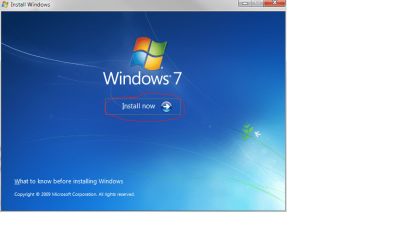
To do this, first double click the "SETUP" icon in installation folder. (image 1). The Windows 7 installation application opens. Click "INSTALL NOW" (image 2) and follow the instructions Windows Installation gives to you.

Kari

Image 1:

Win_install_from_harddrive_1.PNG

Image 2:

Win_install_from_harddrive_2.PNG

EDIT: Didn't notice Sup3rsprt and Antman already told you how to do this. This is the only way to install Windows from hard drive.
 

My Computer

Computer type
Laptop
Computer Manufacturer/Model Number
HP ENVY 17-1150eg
OS
Windows 10 Pro x64 EN-GB
CPU
1.6 GHz Intel Core i7-720QM Processor
Memory
6 GB
Graphics Card(s)
ATI Mobility Radeon HD 5850 Graphics
Sound Card
Beats sound system with integrated subwoofer
Monitor(s) Displays
17" laptop display, 22" LED and 32" Full HD TV through HDMI
Screen Resolution
1600*900 (1), 1920*1080 (2&3)
Hard Drives
Internal: 2 x 500 GB SATA Hard Disk Drive 7200 rpm
External: 2TB for backups, 3TB USB3 network drive for media
Cooling
As Envy runs a bit warm, I have it on a Cooler Master pad
Keyboard
Logitech diNovo Media Desktop Laser (bluetooth)
Mouse
Logitech Performance Mouse MX
Internet Speed
50/10 Mbps VDSL
Antivirus
Windows Defender 4.3.9431.0
Browser
Maxthon 3.5.2., IE11
i think i couldn' t explain well.

i am currently using windows7 which is installed in C drive.

now i want to uninstall windows7 from C drive and then again install a fresh new copy of windows7 in same C drive.

i dont have Usb, External Hard Drive and DVD Rom so how can i do this?

kindly tell me , you are getting my point now or not?
 

My Computer

Computer Manufacturer/Model Number
Gericom/755CI
OS
windows7
CPU
mobile AMD Athlon(tm) XP-M 2600+, 1514 Mhz, 1 Core(s), 1 Log
Motherboard
Gericom 755CI 1.0,BIOS: American Megatrends Inc. 1.04G 07/09
Memory
768 MB
Monitor(s) Displays
15 inches TFT(XGA 1024x786)
Screen Resolution
1024x786
Hard Drives
40GB
Keyboard
compaq
Mouse
IBM
Internet Speed
512KB
Hi maifs, without a USB drive, external hard drive and DVD ROM, it looks kinda impossible to do a clean install. However, as suggested by other members here, if you have all the contents of the Win7 DVD, you can double click the setup file and run the installation.

Hope this helps,
Dinesh. :)
 

My Computer

Computer Manufacturer/Model Number
Samsung NP530U4B-S02IN
OS
Windows® 8 Pro (64-bit)
CPU
Intel® Core™ i5 Processor 2467M (1.60GHz, 3MB L3 Cache)
Motherboard
Samsung Electronics
Memory
6GB DDR3 System Memory at 1,333MHz (on BD 4GB + 2GB x 1)
Graphics Card(s)
AMD Radeon™ HD7550M 1GB DDR3 (Ext. Graphic)
Sound Card
Realtek High Definition Audio
Monitor(s) Displays
35.56cm (14.0) SuperBright 300nit HD LED Display
Screen Resolution
1366x768
Hard Drives
1TB S-ATA II Hard Drive (5400RPM) with ExpressCache 16GB SSD
Internet Speed
sucks
Antivirus
Microsoft Security Essentials
Browser
Google Chrome (Sync enabled)
i think i couldn' t explain well.

i am currently using windows7 which is installed in C drive.

now i want to uninstall windows7 from C drive and then again install a fresh new copy of windows7 in same C drive.

i dont have Usb, External Hard Drive and DVD Rom so how can i do this?

kindly tell me , you are getting my point now or not?

Your pic indicates a DVD R/W drive as ( G: ).

You could also boot a W7 "Installation DVD" from there, and install W7.
 

My Computer

Computer Manufacturer/Model Number
Gateway GT5056
OS
XP_Pro, W7_7201, W7RC.vhd, SciLinux5.3, Fedora12, Fedora9_2x, OpenSolaris_09-06
CPU
AMD 64x2
Motherboard
Yes
Memory
1 gig
Graphics Card(s)
Dunno
Sound Card
Realtek something
Monitor(s) Displays
Samsung SyncMaster 940MW w/TV
Screen Resolution
1280x1024
Hard Drives
250 GB WD, USB Seagate Freedesk 1.5 T
Internet Speed
Cable modem
Other Info
1 + 1 = 10b,
7 + 7 = 16o,
a + b = 15h.
My DVD ROm doesnt give respond so.........

i know, thanks i thought that perhaps there is something invented now through win7.
now i made a usb bootable of win7.
but i am facing a problem right now.
i have made this one from the web: www.maketecheasier.com
but when i restarted my system go into the bios.
and from bios, go into Advanced CMOS Setup.
and then select First boot device as USB.

now here are some more similar things to USB.
for example:
IDE-0,CD/DVD-0,Intel UNDI,
USB FDD,
USB CDROM,
USB HDD,
USB RMD-FDD,
USB RMD-HDD.


which one should i have to choose.?
i selected USB-FDD but there is an error when i am trying to restart : "a Disk Read-Error Occured, Press Ctrl+Alt+Del"


kindly tell me how to ?
and what sequence of boot devices should be?
 

My Computer

Computer Manufacturer/Model Number
Gericom/755CI
OS
windows7
CPU
mobile AMD Athlon(tm) XP-M 2600+, 1514 Mhz, 1 Core(s), 1 Log
Motherboard
Gericom 755CI 1.0,BIOS: American Megatrends Inc. 1.04G 07/09
Memory
768 MB
Monitor(s) Displays
15 inches TFT(XGA 1024x786)
Screen Resolution
1024x786
Hard Drives
40GB
Keyboard
compaq
Mouse
IBM
Internet Speed
512KB
anyone can help me please?
 

My Computer

Computer Manufacturer/Model Number
Gericom/755CI
OS
windows7
CPU
mobile AMD Athlon(tm) XP-M 2600+, 1514 Mhz, 1 Core(s), 1 Log
Motherboard
Gericom 755CI 1.0,BIOS: American Megatrends Inc. 1.04G 07/09
Memory
768 MB
Monitor(s) Displays
15 inches TFT(XGA 1024x786)
Screen Resolution
1024x786
Hard Drives
40GB
Keyboard
compaq
Mouse
IBM
Internet Speed
512KB
what should i have to do?
 

My Computer

Computer Manufacturer/Model Number
Gericom/755CI
OS
windows7
CPU
mobile AMD Athlon(tm) XP-M 2600+, 1514 Mhz, 1 Core(s), 1 Log
Motherboard
Gericom 755CI 1.0,BIOS: American Megatrends Inc. 1.04G 07/09
Memory
768 MB
Monitor(s) Displays
15 inches TFT(XGA 1024x786)
Screen Resolution
1024x786
Hard Drives
40GB
Keyboard
compaq
Mouse
IBM
Internet Speed
512KB
I seriously do not see the problem here.

Run Setup.exe from where it is. Period.

TGSoldier.
- he has the setup files on D: (HDD)
- wants clean install on C:

Am I missing something?
 
Back
Top