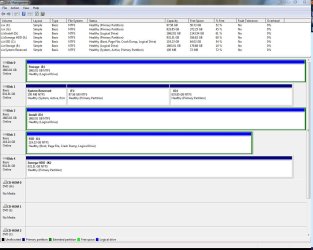
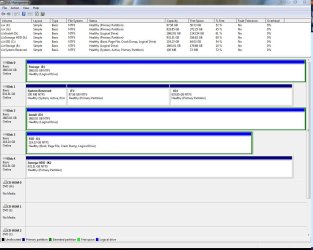
When i installed windows I made the mistake of leaving all my old drives plugged in, as such the boot manager for my current windows os is located on my old failing drive(disk 1). From this image View attachment 164385 you can see that the boot manager is located on disk 1 on the system reserved section. I need to move/install/repair it to the SSD drive (disk 3/C drive). However after trying the a few ways i am at a loss what to do.
What i have tried
1. Disconnecting all the other drives and running windows repair off the windows disc 4 times
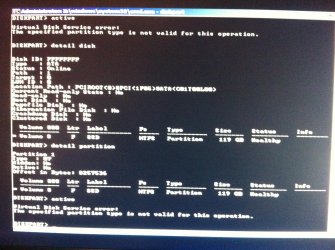
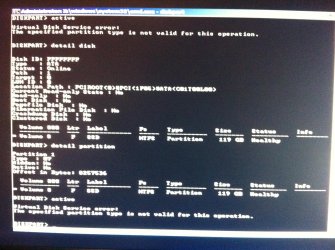
2. Marking the SSD drive as active get this error View attachment 164386 sorry for the fuzzy picture it says "the specified partition is not valid for this operation" i used this guide
I tried both ways inside cmd off the windows disc and through disk management.
3. converting the ssd from a logical drive to a primary drive using Easeus partition manager
4. resizing the partition to create unallocated space to create into a primary partition agian using Easeus partition manager, wouldn't resize
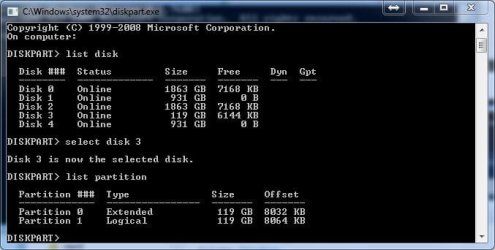
As i understand it the problem may be that the SSD is a "logical drive" and not a primary one as reported by windows as that's the only difference i can see, if this is the case can it be fixed? ( I need to reformat disk 1 hence the need to move the boot manager)
Any ideas?
edit: images Disk management
error message
What i have tried
1. Disconnecting all the other drives and running windows repair off the windows disc 4 times
2. Marking the SSD drive as active get this error View attachment 164386 sorry for the fuzzy picture it says "the specified partition is not valid for this operation" i used this guide
HTML:
http://www.sevenforums.com/tutorials/71432-partition-mark-active.html?ltr=P3. converting the ssd from a logical drive to a primary drive using Easeus partition manager
4. resizing the partition to create unallocated space to create into a primary partition agian using Easeus partition manager, wouldn't resize
As i understand it the problem may be that the SSD is a "logical drive" and not a primary one as reported by windows as that's the only difference i can see, if this is the case can it be fixed? ( I need to reformat disk 1 hence the need to move the boot manager)
Any ideas?
edit: images Disk management
error message
Last edited:
My Computer
At a glance
Windows 7 Professional 64bitIntel i7 920 OC 3.8ghz20gb Kingston DDR3Gtx 460 1gb x2 SLI
- Computer type
- PC/Desktop
- Computer Manufacturer/Model Number
- Custom
- OS
- Windows 7 Professional 64bit
- CPU
- Intel i7 920 OC 3.8ghz
- Motherboard
- Asus P6T
- Memory
- 20gb Kingston DDR3
- Graphics Card(s)
- Gtx 460 1gb x2 SLI
- Sound Card
- Realtek HD audio inbuilt 7.1 surround
- Monitor(s) Displays
- SyncMaster 2333
- Screen Resolution
- 1920*1080
- Hard Drives
- Seagate es2 barracuda 1TB,
Kingston 128gb SSD,
3 WD 2TB green drives ,
- PSU
- 1200 watt
- Cooling
- Trition 81