Solved Boot manger located on old drive

thepower99

New member
Member
Local time
6:41 AM
Messages
41
Location
Aus
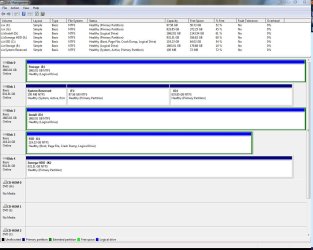
When i installed windows I made the mistake of leaving all my old drives plugged in, as such the boot manager for my current windows os is located on my old failing drive(disk 1). From this image View attachment 164385 you can see that the boot manager is located on disk 1 on the system reserved section. I need to move/install/repair it to the SSD drive (disk 3/C drive). However after trying the a few ways i am at a loss what to do.
What i have tried

1. Disconnecting all the other drives and running windows repair off the windows disc 4 times
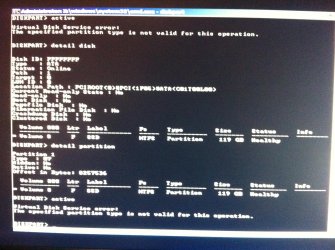
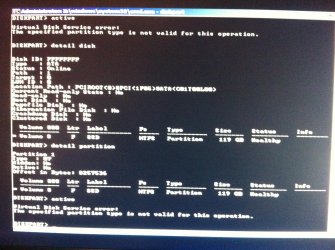
2. Marking the SSD drive as active get this error View attachment 164386 sorry for the fuzzy picture it says "the specified partition is not valid for this operation" i used this guide
HTML:
http://www.sevenforums.com/tutorials/71432-partition-mark-active.html?ltr=P
I tried both ways inside cmd off the windows disc and through disk management.
3. converting the ssd from a logical drive to a primary drive using Easeus partition manager
4. resizing the partition to create unallocated space to create into a primary partition agian using Easeus partition manager, wouldn't resize

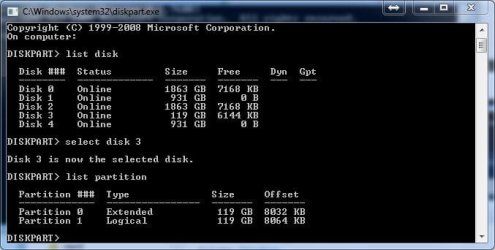
As i understand it the problem may be that the SSD is a "logical drive" and not a primary one as reported by windows as that's the only difference i can see, if this is the case can it be fixed? ( I need to reformat disk 1 hence the need to move the boot manager)

Any ideas?

edit: images Disk management
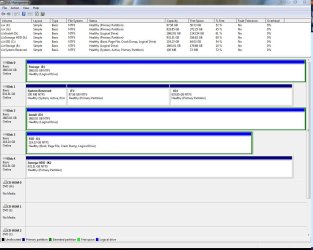
disk1.JPG

error message
iphone 222.jpg
 
Last edited:

My Computer My Computer

At a glance

Windows 7 Professional 64bitIntel i7 920 OC 3.8ghz20gb Kingston DDR3Gtx 460 1gb x2 SLI
Computer type
PC/Desktop
Computer Manufacturer/Model Number
Custom
OS
Windows 7 Professional 64bit
CPU
Intel i7 920 OC 3.8ghz
Motherboard
Asus P6T
Memory
20gb Kingston DDR3
Graphics Card(s)
Gtx 460 1gb x2 SLI
Sound Card
Realtek HD audio inbuilt 7.1 surround
Monitor(s) Displays
SyncMaster 2333
Screen Resolution
1920*1080
Hard Drives
Seagate es2 barracuda 1TB,
Kingston 128gb SSD,
3 WD 2TB green drives ,
PSU
1200 watt
Cooling
Trition 81
HOW TO POST A SNAPSHOT OF DISK MANAGEMENT DISPLAY

Run disk management:
WIN | type DISKMGMT.MSC | ENTER
WIN is the key with the wavy flag.

Maximize the output of Disk Management:
ALT-Spacebar key combo (this pops up a menu) |
X key (selects Maximize) |
Drag the field separators (such as between Status and Capacity) to show entire field. This is very important, otherwise, needed info is not visible.

Make a snapshot:
WIN | type SNIPPING | ENTER
Click the New button.
Drag the cursor around the area you want to snip.
File | Save as | select save location and name | Save button

Post the snapshot:
· Click on the paperclip icon in that row of icons at the top of the message box.
· Click on a BROWSE button. There are 5 of them.
· Navigate to the folder containing the snapshot.
· Click on the snapshot.
· Click on the OPEN button.
· Click on the UPLOAD button adjacent to the 5th BROWSE button.
· Close the MANAGE ATTACHMENTS window.
· Position the cursor at the spot in the message where you want the
snapshot to appear.
· Click on the PaperClip again.
· Click on the file which you want to insert
· Attach code will be inserted into your message.
 

My Computer My Computer

At a glance

MS Windows 7 Ultimate SP1 64-bitAMD A10-4600M6.00 GB Dual-Channel DDR3 @ 798MHz (11-11-12-28)AMD Radeon HD 7660G
Computer Manufacturer/Model Number
Toshiba Satellite S875D-S7239 laptop
OS
MS Windows 7 Ultimate SP1 64-bit
CPU
AMD A10-4600M
Motherboard
AMD Pumori (Socket FT1)
Memory
6.00 GB Dual-Channel DDR3 @ 798MHz (11-11-12-28)
Graphics Card(s)
AMD Radeon HD 7660G
Sound Card
High Definition Audio Device
Monitor(s) Displays
Generic PnP Monitor (1600x900@60Hz)
Screen Resolution
1600x900@60Hz
Hard Drives
SSD 119GB Corsair CSSD-V128GB2 ATA Device
Keyboard
Standard PS/2 Keyboard
Mouse
HP Wireless Optical Mobile Mouse Model FHA-3410
Internet Speed
What the local pub, local coffee shop offers.
Other Info
Optical Drive:MATSHITA BD-CMB UJ160B ATA Device


Also have an Asus ha1002xp netbook with Win 7 Ultimate installed.
Cannot see your screenshot. Please post another using Snipping Tool in Start Menu.

Sounds like you have a Logical drive on the SSD which cannot host boot files. You'll need to convert it to Primary using free Partition Wizard bootable CD. If there are other Logical sub-partitions they will have to have the data moved off to delete them as it will only convert one within the Logical extended.

Once you've converted, mark Active and run Startup Repair 3 times with reboots to write the System boot files to Win7 Primary Active partition.

Partition - Mark as Active (Method Two)
Startup Repair - Run 3 Separate Times
 
Sorry about the images i have edited the post but they are located here as well
Disk management
disk1.JPG

Error Message
iphone 222.jpg

better image of ssd partitions
disk2.JPG
 

My Computer My Computer

At a glance

Windows 7 Professional 64bitIntel i7 920 OC 3.8ghz20gb Kingston DDR3Gtx 460 1gb x2 SLI
Computer type
PC/Desktop
Computer Manufacturer/Model Number
Custom
OS
Windows 7 Professional 64bit
CPU
Intel i7 920 OC 3.8ghz
Motherboard
Asus P6T
Memory
20gb Kingston DDR3
Graphics Card(s)
Gtx 460 1gb x2 SLI
Sound Card
Realtek HD audio inbuilt 7.1 surround
Monitor(s) Displays
SyncMaster 2333
Screen Resolution
1920*1080
Hard Drives
Seagate es2 barracuda 1TB,
Kingston 128gb SSD,
3 WD 2TB green drives ,
PSU
1200 watt
Cooling
Trition 81
You need to make C: Primary Drive, as system boot file will not install to Logical Drive.

& move to Disk0 & first boot in BIOS.
 

My Computer My Computer

At a glance

ME/XP/Vista/Win7
OS
ME/XP/Vista/Win7
Unplug all HD's, plug SSD into DISK0, set it first to boot in BIOS setup.

Boot free Partition Wizard bootable CD, rightclick on C to Modify>Convert to Primary, OK.

Next highlight the C HD, from Disk tab choose Rebuild MBR, OK. Apply all Steps.

If Win7 doesn't boot, boot into DVD Repair console or Repair CD to run Startup Repair up to 3 separate times with reboots to write the System boot files to C.

Now you can plug back in the other HD's, delete System Reserved using Diskpart "Delete partition override" command: DiskPart Command-Line Options
 
Unplug all HD's, plug SSD into DISK0, set it first to boot in BIOS setup.

Boot free Partition Wizard bootable CD, rightclick on C to Modify>Convert to Primary, OK.

Next highlight the C HD, from Disk tab choose Rebuild MBR, OK. Apply all Steps.

If Win7 doesn't boot, boot into DVD Repair console or Repair CD to run Startup Repair up to 3 separate times with reboots to write the System boot files to C.

Now you can plug back in the other HD's, delete System Reserved using Diskpart "Delete partition override" command: DiskPart Command-Line Options

Thanks the above worked with one addition i had to mark the ssd partition as active using the command prompt in the repair disk, after 3 repairs with the windows disk it worked. I plugged all the drives back in, booted and then inside windows using command prompt marked the other drive inactive. It doesn't list all my OS's anymore but that's ok as i have to format the old drive anyway.

Thanks all
 

My Computer My Computer

At a glance

Windows 7 Professional 64bitIntel i7 920 OC 3.8ghz20gb Kingston DDR3Gtx 460 1gb x2 SLI
Computer type
PC/Desktop
Computer Manufacturer/Model Number
Custom
OS
Windows 7 Professional 64bit
CPU
Intel i7 920 OC 3.8ghz
Motherboard
Asus P6T
Memory
20gb Kingston DDR3
Graphics Card(s)
Gtx 460 1gb x2 SLI
Sound Card
Realtek HD audio inbuilt 7.1 surround
Monitor(s) Displays
SyncMaster 2333
Screen Resolution
1920*1080
Hard Drives
Seagate es2 barracuda 1TB,
Kingston 128gb SSD,
3 WD 2TB green drives ,
PSU
1200 watt
Cooling
Trition 81
I had mentioned marking Active earlier but left it out of the final set. Good catch and good work.
 

My Computer My Computer

At a glance

W 7 64-bit UltimateIntel Q9550 Yorkfield8GB Dominator 8500C5DATI : XFX 5870
Computer Manufacturer/Model Number
* BFK Customs *
OS
W 7 64-bit Ultimate
CPU
Intel Q9550 Yorkfield
Motherboard
ASUS P5Q Pro
Memory
8GB Dominator 8500C5D
Graphics Card(s)
ATI : XFX 5870
Sound Card
Realtek HD Audio 7-1
Monitor(s) Displays
1x 47" LCD HDMI & 3x 26" LCD HDMI
Screen Resolution
1920x1080P & 1920x1200
Hard Drives
1x 80GB Intel X25-M G2 SSD : 1x 500GB & 1x 640GB WD Caviar Black(s)
PSU
Corsair 620HX
Case
Cooler Master RC-690
Cooling
Tuniq Tower 120, 2x 140mm and 3x 120mm case fans
Keyboard
Microsoft 500
Mouse
Razer Diamondback 3G
Internet Speed
14 Mb/s
Other Info
1x Koutech 3Gb/s SATA HDD Hot Swap Rack

My Computer My Computer

At a glance

Windows 7 Professional 64bitIntel i7 920 OC 3.8ghz20gb Kingston DDR3Gtx 460 1gb x2 SLI
Computer type
PC/Desktop
Computer Manufacturer/Model Number
Custom
OS
Windows 7 Professional 64bit
CPU
Intel i7 920 OC 3.8ghz
Motherboard
Asus P6T
Memory
20gb Kingston DDR3
Graphics Card(s)
Gtx 460 1gb x2 SLI
Sound Card
Realtek HD audio inbuilt 7.1 surround
Monitor(s) Displays
SyncMaster 2333
Screen Resolution
1920*1080
Hard Drives
Seagate es2 barracuda 1TB,
Kingston 128gb SSD,
3 WD 2TB green drives ,
PSU
1200 watt
Cooling
Trition 81
My pleasure mate!
 

My Computer My Computer

At a glance

W 7 64-bit UltimateIntel Q9550 Yorkfield8GB Dominator 8500C5DATI : XFX 5870
Computer Manufacturer/Model Number
* BFK Customs *
OS
W 7 64-bit Ultimate
CPU
Intel Q9550 Yorkfield
Motherboard
ASUS P5Q Pro
Memory
8GB Dominator 8500C5D
Graphics Card(s)
ATI : XFX 5870
Sound Card
Realtek HD Audio 7-1
Monitor(s) Displays
1x 47" LCD HDMI & 3x 26" LCD HDMI
Screen Resolution
1920x1080P & 1920x1200
Hard Drives
1x 80GB Intel X25-M G2 SSD : 1x 500GB & 1x 640GB WD Caviar Black(s)
PSU
Corsair 620HX
Case
Cooler Master RC-690
Cooling
Tuniq Tower 120, 2x 140mm and 3x 120mm case fans
Keyboard
Microsoft 500
Mouse
Razer Diamondback 3G
Internet Speed
14 Mb/s
Other Info
1x Koutech 3Gb/s SATA HDD Hot Swap Rack
Back
Top