Roy, that log might have been from when I was attempting a start up repair from a boot disk, which I now do not have in the drive. Would the "d" in the log make sense in that case? I will put that disk back in and run start up repair again if you like.
My Computer
At a glance
Microsoft Windows 7 Home Premium 64-bit 7601 ...Intel(R) Core(TM) i3-2310M CPU @ 2.10GHz8.00 GBIntel(R) HD Graphics 3000
Computer type
Laptop
Computer Manufacturer/Model Number
Acer Aspire 5750 refurbished
OS
Microsoft Windows 7 Home Premium 64-bit 7601 Multiprocessor Free Service Pack 1
CPU
Intel(R) Core(TM) i3-2310M CPU @ 2.10GHz
Motherboard
Acer JE50_HR
Memory
8.00 GB
Graphics Card(s)
Intel(R) HD Graphics 3000
Sound Card
(1) High Definition Audio Device (2) High Definition Audio
Screen Resolution
1366x768
Hard Drives
ST500LT012-1DG142 ATA Device
Fixed hard disk media
2 partitions
serial number: 2020202020202020202020203353505033564538
465.76 GB
Just two cents worth now as I have had Kaspersky for the last six years and know some of it's quirky ways I would suggest disabling that and then reboot - for a try.
The beeping I am not sure after reading all through is that still going on?
My other suggestion is a clean install with an ISO on a bootable disk or stick - I prefer a disk but the choice is yours if you want to go down that road.
One other Desktop (tester) and spare Toshba laptop both with SSD's
Running Kaspersky 2016 ISS on all machines config'd identically
Logitec audio stereo systems on each machine (x3)
Canon MG5250MFC
Router/modem TP-Link running WPA2SK
Actually Jack makes me wonder how that drive was prepared before the system was installed too as I don'y like a plain format myself but that is just me.
My Computer
At a glance
Desk1 7 Home Prem / Desk2 10 Pro / Main lap A...Desk1 i5 3750K / Laptop i7 GTX 860M / Desk2 i...Desk1 8GB (1866) / Desk2 16GB (1333) / Laptop...Desk 1& 2NVidia GTX 650 & Laptops on board Intel
Computer type
PC/Desktop
Computer Manufacturer/Model Number
Own build (new) Desk1 / Asus ROG Win 7 / Desk2 1st build
OS
Desk1 7 Home Prem / Desk2 10 Pro / Main lap Asus ROG 10 Pro 2 laptop Toshiba 7 Pro Asus P2520 7 & 10
One other Desktop (tester) and spare Toshba laptop both with SSD's
Running Kaspersky 2016 ISS on all machines config'd identically
Logitec audio stereo systems on each machine (x3)
Canon MG5250MFC
Router/modem TP-Link running WPA2SK
I have uninstalled the kaperski antivirus software (and will later install Microsoft Security Essentials).
The boot menu that looks like this has not appeared the last five or so times I have restarted the computer, so maybe Malcom's recommendation to "run an elevated command prompt in windows and put: bcdedit /set optionsedit No" worked?
Upon start up, it is still beeping and displaying "starting windows" for minutesbefore windows successfully starts--but not in safe mode.
And... I cannot complete the Disk Management - Post a Screen Capture Imagetutorial because windows will not allow me to access any right click menus for anything, even while in safe mode using the computers' touch pad or a mouse that works just fine on my other computer.
That rabbit hole got a bit deeper. Weee. Thank you to everyone whose come onto this thread.
Last edited:
My Computer
At a glance
Microsoft Windows 7 Home Premium 64-bit 7601 ...Intel(R) Core(TM) i3-2310M CPU @ 2.10GHz8.00 GBIntel(R) HD Graphics 3000
Computer type
Laptop
Computer Manufacturer/Model Number
Acer Aspire 5750 refurbished
OS
Microsoft Windows 7 Home Premium 64-bit 7601 Multiprocessor Free Service Pack 1
CPU
Intel(R) Core(TM) i3-2310M CPU @ 2.10GHz
Motherboard
Acer JE50_HR
Memory
8.00 GB
Graphics Card(s)
Intel(R) HD Graphics 3000
Sound Card
(1) High Definition Audio Device (2) High Definition Audio
Screen Resolution
1366x768
Hard Drives
ST500LT012-1DG142 ATA Device
Fixed hard disk media
2 partitions
serial number: 2020202020202020202020203353505033564538
465.76 GB
Microsoft Security Essentials is up and running now that Kapersky has been uninstalled. I scanned with it and Malwarebytes and nothing was detected.
Upon start up, it is still beeping and displaying "starting windows" for minutesbefore windows successfully starts--but not in safe mode,suggesting maybe it is not a keyboard issue? I also removed the battery and it still beeps....
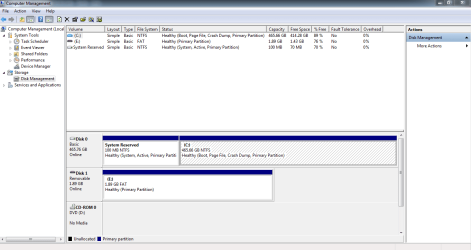
I haven't a clue what I fiddled with to get the right clicking to work everywhere but have attached a capture image of my disk management screen.
Attachments
Capture.PNG
26.4 KB
· Views: 5
My Computer
At a glance
Microsoft Windows 7 Home Premium 64-bit 7601 ...Intel(R) Core(TM) i3-2310M CPU @ 2.10GHz8.00 GBIntel(R) HD Graphics 3000
Computer type
Laptop
Computer Manufacturer/Model Number
Acer Aspire 5750 refurbished
OS
Microsoft Windows 7 Home Premium 64-bit 7601 Multiprocessor Free Service Pack 1
CPU
Intel(R) Core(TM) i3-2310M CPU @ 2.10GHz
Motherboard
Acer JE50_HR
Memory
8.00 GB
Graphics Card(s)
Intel(R) HD Graphics 3000
Sound Card
(1) High Definition Audio Device (2) High Definition Audio
Screen Resolution
1366x768
Hard Drives
ST500LT012-1DG142 ATA Device
Fixed hard disk media
2 partitions
serial number: 2020202020202020202020203353505033564538
465.76 GB
One other Desktop (tester) and spare Toshba laptop both with SSD's
Running Kaspersky 2016 ISS on all machines config'd identically
Logitec audio stereo systems on each machine (x3)
Canon MG5250MFC
Router/modem TP-Link running WPA2SK
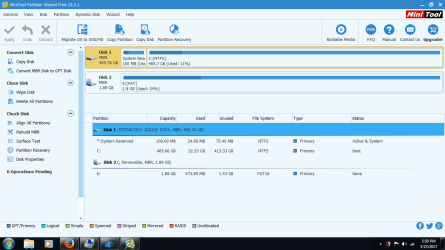
I honestly haven't a clue. I just followed the Disk Management - Post a Screen Capture Image tutorial and posted the results. I just checked it again the same way and it's still showing E with the same stats.
Here's what we got from Mini Partition Wizard.
Attachments
Capture2.png
35.3 KB
· Views: 2
My Computer
At a glance
Microsoft Windows 7 Home Premium 64-bit 7601 ...Intel(R) Core(TM) i3-2310M CPU @ 2.10GHz8.00 GBIntel(R) HD Graphics 3000
Computer type
Laptop
Computer Manufacturer/Model Number
Acer Aspire 5750 refurbished
OS
Microsoft Windows 7 Home Premium 64-bit 7601 Multiprocessor Free Service Pack 1
CPU
Intel(R) Core(TM) i3-2310M CPU @ 2.10GHz
Motherboard
Acer JE50_HR
Memory
8.00 GB
Graphics Card(s)
Intel(R) HD Graphics 3000
Sound Card
(1) High Definition Audio Device (2) High Definition Audio
Screen Resolution
1366x768
Hard Drives
ST500LT012-1DG142 ATA Device
Fixed hard disk media
2 partitions
serial number: 2020202020202020202020203353505033564538
465.76 GB
Ok can you right click on that E: drive partition and go to "Explore" let us know what is there because it looks like you have a USB stick inserted in the machine because it is coming up a as separate drive.
My Computer
At a glance
Desk1 7 Home Prem / Desk2 10 Pro / Main lap A...Desk1 i5 3750K / Laptop i7 GTX 860M / Desk2 i...Desk1 8GB (1866) / Desk2 16GB (1333) / Laptop...Desk 1& 2NVidia GTX 650 & Laptops on board Intel
Computer type
PC/Desktop
Computer Manufacturer/Model Number
Own build (new) Desk1 / Asus ROG Win 7 / Desk2 1st build
OS
Desk1 7 Home Prem / Desk2 10 Pro / Main lap Asus ROG 10 Pro 2 laptop Toshiba 7 Pro Asus P2520 7 & 10
One other Desktop (tester) and spare Toshba laptop both with SSD's
Running Kaspersky 2016 ISS on all machines config'd identically
Logitec audio stereo systems on each machine (x3)
Canon MG5250MFC
Router/modem TP-Link running WPA2SK
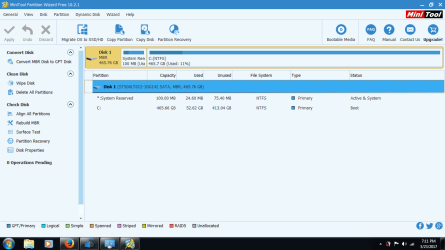
Oh dear. It is an SD card that I forgot was inserted. Duh. I'm sorry. I removed it then restarted the computer and it is still beeping and displaying "starting windows" for minutes before windows successfully starts.
Here's what the mini tool partition wizard show us now.
Attachments
Capture3.png
31.1 KB
· Views: 0
My Computer
At a glance
Microsoft Windows 7 Home Premium 64-bit 7601 ...Intel(R) Core(TM) i3-2310M CPU @ 2.10GHz8.00 GBIntel(R) HD Graphics 3000
Computer type
Laptop
Computer Manufacturer/Model Number
Acer Aspire 5750 refurbished
OS
Microsoft Windows 7 Home Premium 64-bit 7601 Multiprocessor Free Service Pack 1
CPU
Intel(R) Core(TM) i3-2310M CPU @ 2.10GHz
Motherboard
Acer JE50_HR
Memory
8.00 GB
Graphics Card(s)
Intel(R) HD Graphics 3000
Sound Card
(1) High Definition Audio Device (2) High Definition Audio
Screen Resolution
1366x768
Hard Drives
ST500LT012-1DG142 ATA Device
Fixed hard disk media
2 partitions
serial number: 2020202020202020202020203353505033564538
465.76 GB
Where you able to fix the right click issue, and do you have any yellow exclamation points in your device manager? Also is this an Aspire 5750G? Device Manager - Finding Unknown Devices
Perhaps your right click button is what windows thinks is stuck?
Malcolm
My Computer
At a glance
10 Pro x64Ryzen 9 3900X64GB(4x16GB) DDR4EVGA 1080ti FTW3
Hello, Malcom. The right clicking works now. What does have exclamation marks in my device manager is attached. I think it is just an Aspire 5750--no "g". That pesky beeping still happens upon Windows starting up, though.
Attachments
IMG_20170324_175324.jpg
1.7 MB
· Views: 0
My Computer
At a glance
Microsoft Windows 7 Home Premium 64-bit 7601 ...Intel(R) Core(TM) i3-2310M CPU @ 2.10GHz8.00 GBIntel(R) HD Graphics 3000
Computer type
Laptop
Computer Manufacturer/Model Number
Acer Aspire 5750 refurbished
OS
Microsoft Windows 7 Home Premium 64-bit 7601 Multiprocessor Free Service Pack 1
CPU
Intel(R) Core(TM) i3-2310M CPU @ 2.10GHz
Motherboard
Acer JE50_HR
Memory
8.00 GB
Graphics Card(s)
Intel(R) HD Graphics 3000
Sound Card
(1) High Definition Audio Device (2) High Definition Audio
Screen Resolution
1366x768
Hard Drives
ST500LT012-1DG142 ATA Device
Fixed hard disk media
2 partitions
serial number: 2020202020202020202020203353505033564538
465.76 GB
One other Desktop (tester) and spare Toshba laptop both with SSD's
Running Kaspersky 2016 ISS on all machines config'd identically
Logitec audio stereo systems on each machine (x3)
Canon MG5250MFC
Router/modem TP-Link running WPA2SK
Hello, Malcom. The right clicking works now. What does have exclamation marks in my device manager is attached. I think it is just an Aspire 5750--no "g". That pesky beeping still happens upon Windows starting up, though.
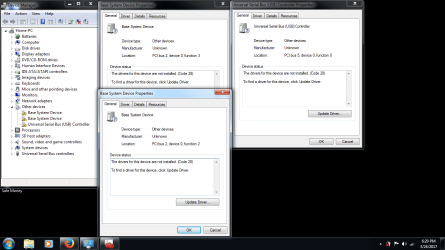
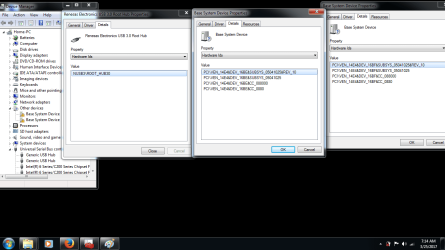
I downloaded and extracted the zip file from the link you provided. Neither "base system device" entries in my device manager would accept the drivers, but "universal serial bus controller (usb)" did grab onto the driver. I have attached a new screenshot of what is listed in my device manager as well as the the property details for the universal serial bus controller (usb) plus the other two base system devices that still show exclamation points in device manager.
Question: where am I supposed to store these driver folders (so I don't accidentally delete them)? Right now this new folder is in my documents.
Attachments
device manager other devices2.png
46.4 KB
· Views: 1
My Computer
At a glance
Microsoft Windows 7 Home Premium 64-bit 7601 ...Intel(R) Core(TM) i3-2310M CPU @ 2.10GHz8.00 GBIntel(R) HD Graphics 3000
Computer type
Laptop
Computer Manufacturer/Model Number
Acer Aspire 5750 refurbished
OS
Microsoft Windows 7 Home Premium 64-bit 7601 Multiprocessor Free Service Pack 1
CPU
Intel(R) Core(TM) i3-2310M CPU @ 2.10GHz
Motherboard
Acer JE50_HR
Memory
8.00 GB
Graphics Card(s)
Intel(R) HD Graphics 3000
Sound Card
(1) High Definition Audio Device (2) High Definition Audio
Screen Resolution
1366x768
Hard Drives
ST500LT012-1DG142 ATA Device
Fixed hard disk media
2 partitions
serial number: 2020202020202020202020203353505033564538
465.76 GB
That was for a Broadcom Memory Stick and it successfully installed. There's only this unknown device left. I tried to install the same driver for the one that was successful into the only one left via properties and it said it was the wrong platform.
Attachments
oneleft.png
47.6 KB
· Views: 2
My Computer
At a glance
Microsoft Windows 7 Home Premium 64-bit 7601 ...Intel(R) Core(TM) i3-2310M CPU @ 2.10GHz8.00 GBIntel(R) HD Graphics 3000
Computer type
Laptop
Computer Manufacturer/Model Number
Acer Aspire 5750 refurbished
OS
Microsoft Windows 7 Home Premium 64-bit 7601 Multiprocessor Free Service Pack 1
CPU
Intel(R) Core(TM) i3-2310M CPU @ 2.10GHz
Motherboard
Acer JE50_HR
Memory
8.00 GB
Graphics Card(s)
Intel(R) HD Graphics 3000
Sound Card
(1) High Definition Audio Device (2) High Definition Audio
Screen Resolution
1366x768
Hard Drives
ST500LT012-1DG142 ATA Device
Fixed hard disk media
2 partitions
serial number: 2020202020202020202020203353505033564538
465.76 GB