Boot options

s0s0

Banned
Local time
5:10 PM
Messages
22
Hey!
I really feel bad about this one.
Looks like I'm attracting all sorts of wired errors/behaviours.
I wanted to change some bootoptions in windows7 professional.
So fireing up msconfig didn't do any good,not able to do anything regarding the boottab.
bcdedit and a manual search for boot.ini turned out negative.
So my question is:
Where is windows7 storing the bootparameters now and how can i change them?
sincerly

s0s0
 

My Computer

OS
Windows 7
Hey!
I really feel bad about this one.
Looks like I'm attracting all sorts of wired errors/behaviours.
I wanted to change some bootoptions in windows7 professional.
So fireing up msconfig didn't do any good,not able to do anything regarding the boottab.
bcdedit and a manual search for boot.ini turned out negative.
So my question is:
Where is windows7 storing the bootparameters now and how can i change them?
sincerly

s0s0

a screen shot on boot tab will help us to help u
 

My Computer

Computer Manufacturer/Model Number
wipro
OS
windows 7
CPU
wipro
Motherboard
intel
Memory
8 gb
Hard Drives
580 gb
27wzm2p.png

Here we go pretty simple there is nothing there.
 

My Computer

OS
Windows 7
If u have more than one OS installed, then there is a possibility of viewing the boot options. If only 7, then I dont think there would be any entries.

Correct me if I am wrong :confused:
 

My Computer

Computer Manufacturer/Model Number
MacBook Pro
OS
Lion
CPU
i5
Memory
4GB
Graphics Card(s)
Intel
Screen Resolution
1200x800
Hard Drives
Seagate FreeAgent GO 250GB Ext. HDD
sadly you are wrong.
At least partialy.
There is no boot.ini.
Therefor I can't view it no matter what.
2nd Where am I supposed to look?
 

My Computer

OS
Windows 7
Windows 7 doesnt use a boot.ini file.
 

My Computer

Computer Manufacturer/Model Number
MacBook Pro
OS
Lion
CPU
i5
Memory
4GB
Graphics Card(s)
Intel
Screen Resolution
1200x800
Hard Drives
Seagate FreeAgent GO 250GB Ext. HDD
ok back to my original question where are the bootinformations stored then?
 

My Computer

OS
Windows 7

My Computer

Computer Manufacturer/Model Number
DIY
OS
W7x64 Pro, SuSe 12.1/** W7 x64 Pro, XP MCE
CPU
Phenom II 1090T w/Noctua NH-D14 /**4400+ X2 w/CM Hyper TX 3
Motherboard
ASRock 890FX Deluxe 4/**A8N-SLI
Memory
2 x 2GB Patriot PGS34g1600LLKA/**4x1GB Corsair VS
Graphics Card(s)
EVGA GTX460 SC/**EVGA 8800GTS
Sound Card
Asus Xonar D2X/**Xonar D1
Monitor(s) Displays
Acer X233H, Dell E152FPc /**LG M237-WD
Screen Resolution
1920x1080 & 1024x768/**1980x1080
Hard Drives
WDC 2TB, 1.5TB, 1TB, 500GB,Seagate 500GB , Maxtor 80GB /**500GB Seagate & WDC 1TB Black
PSU
CM RS600 w/ APC BX1000G/**Antec 500 TP w/ APC BX1000
Case
HAF922/**Antec 1040IIB
Cooling
3x200mm, 1x140 and 1x120mm/**5x80mm fans
Keyboard
Logitech Media USB/**Saitek Eclipse
Mouse
Cordless Trackman Wheel/**Ditto
Internet Speed
3.3Mbps
Other Info
SB 560 5.1 w/ Sennheiser RS140/**Creative T20 speakers, Dvico FusionHDTV7 Gold RT, Cisco E3000, HP 5510V AIO, Linksys E3000, Belkin F5U237 hub and **F5D8055 adapter
(** = 2nd rig)
I don't know.
read a bit about it documentation is missing which is bad.
There was some talk about restoring the mbr.
see here Windows no longer starts after you install an earlier version of the Windows operating system in a dual-boot configuration

Problem with this is that :
a. it only restores the MBR,as set by win7 hence destroying multibootcapabilities into linux
environment
b.gives no information about where the location of the boot configuration datafile (bcd) is at.

Last one would bring me a step closer to solving my problem though

Right now I'm not in a windowsenviroment nor am I at my system, so if this EasyBCD is also establishing a fresh bcd in case of not finding the old one,it is what Im looking for otherwise it won't help me because then it is nothing but a GUI-frontend for the bcdedit command,regarding changes to the bcd-file.
 

My Computer

OS
Windows 7
Hey!
I really feel bad about this one.
Looks like I'm attracting all sorts of wired errors/behaviours.
I wanted to change some bootoptions in windows7 professional.
So fireing up msconfig didn't do any good,not able to do anything regarding the boottab.
bcdedit and a manual search for boot.ini turned out negative.
So my question is:
Where is windows7 storing the bootparameters now and how can i change them?
sincerly

s0s0

Hello s0s0,

I'm not sure what you are wanting to change, but maybe this can help for now.
Hope this helps,
Shawn
 

My Computer

Computer type
PC/Desktop
Computer Manufacturer/Model Number
Self built custom
OS
64-bit Windows 11 Pro for Workstations
CPU
Intel i7-8700K OC'd to 5 GHz
Motherboard
ASUS ROG Maximus XI Formula Z390
Memory
64 GB (4x16GB) G.SKILL TridentZ RGB DDR4 3600 MHz
Graphics Card(s)
ASUS ROG-STRIX-GTX1080TI-O11G-GAMING
Sound Card
Integrated
Monitor(s) Displays
2 x Samsung Odyssey G7 27"
Screen Resolution
2560x1440
Hard Drives
1TB Samsung 990 PRO M.2,
4TB Samsung 990 PRO PRO M.2,
TerraMaster F8 SSD Plus NAS
PSU
Seasonic Prime Titanium 850W
Case
Thermaltake Core P3
Cooling
Corsair Hydro H115i
Keyboard
Logitech wireless K800
Mouse
Logitech MX Master 4
Internet Speed
2 Gb/s Download and 100 Mb/s Upload
Antivirus
Malwarebyte Anti-Malware Premium
Browser
Google Chrome
Other Info
Logitech Z625 speaker system,
Logitech BRIO 4K Pro webcam,
HP Color LaserJet Pro MFP M477fdn,
APC SMART-UPS RT 1000 XL - SURT1000XLI,
Galaxy S23 Plus phone
Hey!
First of all great thanks for the support.
The dualboot tutorial is known to me.
At least the content.
Got to know Supergrub which is pretty cool, that way I don't have to wait for the installerdisk to do it's job when recovering grubentries.

I don't want to actually change anything to my system I just want to change some bootparameters, interesting list though.


Now:
I did a little bit of research myself.
Thanks to EasyBCD and the fact that it wanted to overwrite my entire MBR and setting up a bootstore(location of the BCD-File) all at once made me look a little bit closer at bcdedit.
And I found an interesting option.
This option beeing bcdedit /create tmpbcd.
This option creates a bootstore.
So I was all set.
Went good so far.
They even supplied a template for the bcdfile.
Now I wanted to import this but everyoperation i use says that they can't find the main bootstore, and setting the bootstore to another file seems impossible so far.
BTW:
Could that be due to the fact that non of my partitions is marked as active?(Yes I felt the same way when I saw my diskmanagement).

So bcdedit is all confused printing

The volum does not contain a recognized file system.
Please make sure that all required file system dirvers are loaded and that the volume is not corrupted.

Filesystemcheck came back negative, I have no INTEL-drivers installed everything purely MS-Drivers.
Which brings me to the following questions:

1.Is a hdd able to hold more than 1 active partition?(giving the circumstances that the filesystems are incompatible for the different OS's)
2.If no partition recognized by windows is beeing active how did windows boot?
3.For my CONFIRMATION:changing C:\'s status to active would NOT wreck my system by not beeing bootable next time i throw the switch right?
4.Is Windows7 an EFI or a BIOS system?
I tend to EFI but I'm not sure, and following this steps Modify the BCD Store Template
they are different for EFI and BIOS and I only got one shot.
If no one knows how can I determin which one I got, for my grub got both entries don't know which one is the used one haven't had time to figgure that one out myself.

sincerly

s0s0
//edit
Just so you now what I want to do:
I want to enable the /debug option while booting.

 

My Computer

OS
Windows 7
You can mark any primary partition as active in Disk Management, but should on be done so on one containing an OS.
 

My Computer

Computer Manufacturer/Model Number
DIY
OS
W7x64 Pro, SuSe 12.1/** W7 x64 Pro, XP MCE
CPU
Phenom II 1090T w/Noctua NH-D14 /**4400+ X2 w/CM Hyper TX 3
Motherboard
ASRock 890FX Deluxe 4/**A8N-SLI
Memory
2 x 2GB Patriot PGS34g1600LLKA/**4x1GB Corsair VS
Graphics Card(s)
EVGA GTX460 SC/**EVGA 8800GTS
Sound Card
Asus Xonar D2X/**Xonar D1
Monitor(s) Displays
Acer X233H, Dell E152FPc /**LG M237-WD
Screen Resolution
1920x1080 & 1024x768/**1980x1080
Hard Drives
WDC 2TB, 1.5TB, 1TB, 500GB,Seagate 500GB , Maxtor 80GB /**500GB Seagate & WDC 1TB Black
PSU
CM RS600 w/ APC BX1000G/**Antec 500 TP w/ APC BX1000
Case
HAF922/**Antec 1040IIB
Cooling
3x200mm, 1x140 and 1x120mm/**5x80mm fans
Keyboard
Logitech Media USB/**Saitek Eclipse
Mouse
Cordless Trackman Wheel/**Ditto
Internet Speed
3.3Mbps
Other Info
SB 560 5.1 w/ Sennheiser RS140/**Creative T20 speakers, Dvico FusionHDTV7 Gold RT, Cisco E3000, HP 5510V AIO, Linksys E3000, Belkin F5U237 hub and **F5D8055 adapter
(** = 2nd rig)
Unfortunatly didn't change a reboot the situation after marking C:\ as active.
Meaning I still got no bcd-file.
 

My Computer

OS
Windows 7

My Computer

Computer type
PC/Desktop
Computer Manufacturer/Model Number
Self built custom
OS
64-bit Windows 11 Pro for Workstations
CPU
Intel i7-8700K OC'd to 5 GHz
Motherboard
ASUS ROG Maximus XI Formula Z390
Memory
64 GB (4x16GB) G.SKILL TridentZ RGB DDR4 3600 MHz
Graphics Card(s)
ASUS ROG-STRIX-GTX1080TI-O11G-GAMING
Sound Card
Integrated
Monitor(s) Displays
2 x Samsung Odyssey G7 27"
Screen Resolution
2560x1440
Hard Drives
1TB Samsung 990 PRO M.2,
4TB Samsung 990 PRO PRO M.2,
TerraMaster F8 SSD Plus NAS
PSU
Seasonic Prime Titanium 850W
Case
Thermaltake Core P3
Cooling
Corsair Hydro H115i
Keyboard
Logitech wireless K800
Mouse
Logitech MX Master 4
Internet Speed
2 Gb/s Download and 100 Mb/s Upload
Antivirus
Malwarebyte Anti-Malware Premium
Browser
Google Chrome
Other Info
Logitech Z625 speaker system,
Logitech BRIO 4K Pro webcam,
HP Color LaserJet Pro MFP M477fdn,
APC SMART-UPS RT 1000 XL - SURT1000XLI,
Galaxy S23 Plus phone
Do you have "Hide protected operating system files" disabled in Folder Options>View? If not the Boot folder won't appear. If you do, you should find the BCD file in C:\Boot. I'm not sure how much good it will do, because it is not readable with an ordinary text viewer, but it would confirm it's existence.
 

My Computer

Computer Manufacturer/Model Number
DIY
OS
W7x64 Pro, SuSe 12.1/** W7 x64 Pro, XP MCE
CPU
Phenom II 1090T w/Noctua NH-D14 /**4400+ X2 w/CM Hyper TX 3
Motherboard
ASRock 890FX Deluxe 4/**A8N-SLI
Memory
2 x 2GB Patriot PGS34g1600LLKA/**4x1GB Corsair VS
Graphics Card(s)
EVGA GTX460 SC/**EVGA 8800GTS
Sound Card
Asus Xonar D2X/**Xonar D1
Monitor(s) Displays
Acer X233H, Dell E152FPc /**LG M237-WD
Screen Resolution
1920x1080 & 1024x768/**1980x1080
Hard Drives
WDC 2TB, 1.5TB, 1TB, 500GB,Seagate 500GB , Maxtor 80GB /**500GB Seagate & WDC 1TB Black
PSU
CM RS600 w/ APC BX1000G/**Antec 500 TP w/ APC BX1000
Case
HAF922/**Antec 1040IIB
Cooling
3x200mm, 1x140 and 1x120mm/**5x80mm fans
Keyboard
Logitech Media USB/**Saitek Eclipse
Mouse
Cordless Trackman Wheel/**Ditto
Internet Speed
3.3Mbps
Other Info
SB 560 5.1 w/ Sennheiser RS140/**Creative T20 speakers, Dvico FusionHDTV7 Gold RT, Cisco E3000, HP 5510V AIO, Linksys E3000, Belkin F5U237 hub and **F5D8055 adapter
(** = 2nd rig)
That was the first thing I did.
I even unchecked hide protected operating system files.
It isn't there.

But speaking of it:
The 100Mb volume I was talking about earlier,isn't empty.
It's just that I can't view the content.
Approx. 24Mb are taken.
 

My Computer

OS
Windows 7
That was the first thing I did.
I even unchecked hide protected operating system files.
It isn't there.

But speaking of it:
The 100Mb volume I was talking about earlier,isn't empty.
It's just that I can't view the content.
Approx. 24Mb are taken.
s0s0;

You will need to go to Disk Management in Windows 7 and assign the 100MB partition a drive letter like S:

Then you can view the bootmgr files in the partition. BTW, it needs to be the "Active" partiton if the boot files are there.

Cheers!
Robert
 

My Computer

OS
...
^^
I should've been more specifiy.
I can't view the content in the Explorer,AFTER assigning it a letter.

I thought about marking this partition as active as well but decided not to since I don't know is taking up the place.
 

My Computer

OS
Windows 7
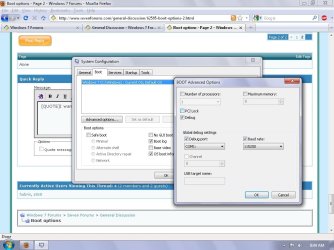
I want to enable the /debug option while booting.
don't know for sure but may help. surprised no system shows in msconfig:confused:
 

Attachments

  • Untitled.jpg
    Untitled.jpg
    93.6 KB · Views: 8

My Computer

Computer Manufacturer/Model Number
Self
OS
W7, Xp Pro
CPU
AMD Sempron 2600+
Motherboard
K8V-MX
Memory
1GB
Graphics Card(s)
Radeon HD3650
Sound Card
Soundmax
Monitor(s) Displays
17" HP CRT
Screen Resolution
1024x768
Hard Drives
1x WDC WD800BB
1x HDS728080
PSU
? 460W
Case
Coolermaster
Cooling
enough
Keyboard
M$S
Mouse
Optical
Internet Speed
1500kbs
Other Info
OLD!!! does the job i need.
Back
Top