Boot problem

After I posted that last one I realized what you want, you want to make " Z " boot independently using the BIOS, correct, as in, having only disk 1 connected at boot?


If that's what you want then you got the answer in my post #4


If this isn't right I quit on this thread.
 

My Computer

Computer Manufacturer/Model Number
* BFK Customs *
OS
W 7 64-bit Ultimate
CPU
Intel Q9550 Yorkfield
Motherboard
ASUS P5Q Pro
Memory
8GB Dominator 8500C5D
Graphics Card(s)
ATI : XFX 5870
Sound Card
Realtek HD Audio 7-1
Monitor(s) Displays
1x 47" LCD HDMI & 3x 26" LCD HDMI
Screen Resolution
1920x1080P & 1920x1200
Hard Drives
1x 80GB Intel X25-M G2 SSD : 1x 500GB & 1x 640GB WD Caviar Black(s)
PSU
Corsair 620HX
Case
Cooler Master RC-690
Cooling
Tuniq Tower 120, 2x 140mm and 3x 120mm case fans
Keyboard
Microsoft 500
Mouse
Razer Diamondback 3G
Internet Speed
14 Mb/s
Other Info
1x Koutech 3Gb/s SATA HDD Hot Swap Rack

My Computer

Computer Manufacturer/Model Number
* BFK Customs *
OS
W 7 64-bit Ultimate
CPU
Intel Q9550 Yorkfield
Motherboard
ASUS P5Q Pro
Memory
8GB Dominator 8500C5D
Graphics Card(s)
ATI : XFX 5870
Sound Card
Realtek HD Audio 7-1
Monitor(s) Displays
1x 47" LCD HDMI & 3x 26" LCD HDMI
Screen Resolution
1920x1080P & 1920x1200
Hard Drives
1x 80GB Intel X25-M G2 SSD : 1x 500GB & 1x 640GB WD Caviar Black(s)
PSU
Corsair 620HX
Case
Cooler Master RC-690
Cooling
Tuniq Tower 120, 2x 140mm and 3x 120mm case fans
Keyboard
Microsoft 500
Mouse
Razer Diamondback 3G
Internet Speed
14 Mb/s
Other Info
1x Koutech 3Gb/s SATA HDD Hot Swap Rack

My Computer

OS
Windows 7 Ultimate x32
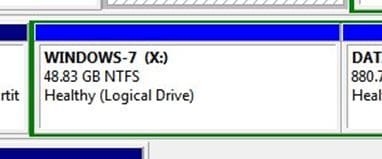
My bad, I did write Z when I meant X, this is the one you want to boot independently? you have "how" now.


Capture222.JPG
 

My Computer

Computer Manufacturer/Model Number
* BFK Customs *
OS
W 7 64-bit Ultimate
CPU
Intel Q9550 Yorkfield
Motherboard
ASUS P5Q Pro
Memory
8GB Dominator 8500C5D
Graphics Card(s)
ATI : XFX 5870
Sound Card
Realtek HD Audio 7-1
Monitor(s) Displays
1x 47" LCD HDMI & 3x 26" LCD HDMI
Screen Resolution
1920x1080P & 1920x1200
Hard Drives
1x 80GB Intel X25-M G2 SSD : 1x 500GB & 1x 640GB WD Caviar Black(s)
PSU
Corsair 620HX
Case
Cooler Master RC-690
Cooling
Tuniq Tower 120, 2x 140mm and 3x 120mm case fans
Keyboard
Microsoft 500
Mouse
Razer Diamondback 3G
Internet Speed
14 Mb/s
Other Info
1x Koutech 3Gb/s SATA HDD Hot Swap Rack
It's not as big a deal as it looks; be sure to post back after you've finished with an update.
 

My Computer

Computer Manufacturer/Model Number
* BFK Customs *
OS
W 7 64-bit Ultimate
CPU
Intel Q9550 Yorkfield
Motherboard
ASUS P5Q Pro
Memory
8GB Dominator 8500C5D
Graphics Card(s)
ATI : XFX 5870
Sound Card
Realtek HD Audio 7-1
Monitor(s) Displays
1x 47" LCD HDMI & 3x 26" LCD HDMI
Screen Resolution
1920x1080P & 1920x1200
Hard Drives
1x 80GB Intel X25-M G2 SSD : 1x 500GB & 1x 640GB WD Caviar Black(s)
PSU
Corsair 620HX
Case
Cooler Master RC-690
Cooling
Tuniq Tower 120, 2x 140mm and 3x 120mm case fans
Keyboard
Microsoft 500
Mouse
Razer Diamondback 3G
Internet Speed
14 Mb/s
Other Info
1x Koutech 3Gb/s SATA HDD Hot Swap Rack
My bad, I did write Z when I meant X, this is the one you want to boot independently? you have "how" now.


But I am still confused why should I covert it to primary and make active? It worked in this configuration until I messed up the MBR (as i suspect).
 

My Computer

OS
Windows 7 Ultimate x32
When you overwrote XP you deleted the System MBR for the DISK1 Dual Boot which was on XP partition.

It allowed you to install Win7 to a Logical drive in the first place only because Win7 configured the dual boot placing the System MBR on the first active partition (XP) since a Logical partition cannot be marked Active or made System drive.

So now that you have deleted the System partition, in order to repair Win7 to boot on its own you must mark it Active to run Startup Repair X3 to recover the System MBR into Win7 partition. But that cannot be done on a Logical partition, hence the reason you must convert it to Primary first.

Feel free to ask any further questions to clear this up and proceed..

Again, you will have far less problems booting Ubuntu and both Win7 if you place them on separate HD's and boot via BIOS rather than using GRUB where it can interfere with Win7.
 
When you overwrote XP you deleted the System MBR for the DISK1 Dual Boot which was on XP partition.

It allowed you to install Win7 to a Logical drive in the first place only because Win7 configured the dual boot placing the System MBR on the first active partition (XP) since a Logical partition cannot be marked Active or made System drive.

So now that you have deleted the System partition, in order to repair Win7 to boot on its own you must mark it Active to run Startup Repair X3 to recover the System MBR into Win7 partition. But that cannot be done on a Logical partition, hence the reason you must convert it to Primary first.

Feel free to ask any further questions to clear this up and proceed..

Again, you will have far less problems booting Ubuntu and both Win7 if you place them on separate HD's and boot via BIOS rather than using GRUB where it can interfere with Win7.

Thank you and other folks for detailed explanation. I got it. I'll try later today.

My only concern is not to destroy the information on other partitions during this process (although I have a backup)
 

My Computer

OS
Windows 7 Ultimate x32
Back
Top