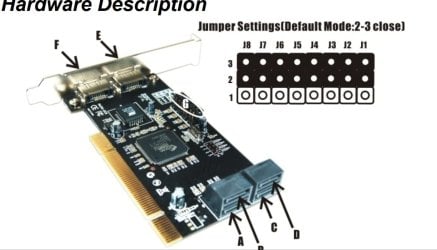
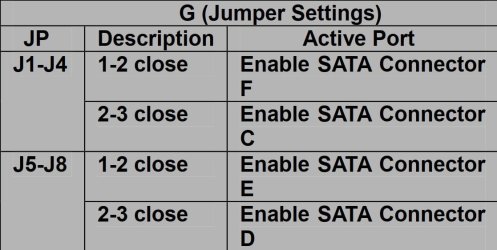
I have had a Vantec PCI 6-port SATA card working flawlessly for years.
Yesterday, I installed a second identical card; Vantec 6-Port SATA II 150 PCI Host Card w/RAID
Model: UGT-ST310R
I don't want any type of RAID; I just want all of my drives to work as independent drives.
Whoever wrote the descriptions and such in the configuration menu was a specialist in confusion and not making common sense.
Once installed, from the get-go, during the boot sequence, I have to "Strike F1", at which point it may go on into Windows and other times my only recourse is a forced shutdown and start over.
It says there are certain disks it cannot find; I don't know why not, they are there and connected.
Somehow, maybe on account of this second card, in RAID Configuration, F4 I think it is, there are four choices and the third choice was selected "RAID on" (as best I remember); nothing else was working, so I changed this selection to "Legacy"; that seemed to help but I still have to press F1 to get past the boot screen and into Windows.
I had some HDDs that, when connected, one at a time or all of them, it would not boot at all and I would have to force shutdown and unplug them to get it to boot.
Still having to press F1 with every boot.
I then tried something with the HDDs whose being connected were not allowing it to boot at all --- I got it booted into Windows --- and then, one by one, I connected them --- sort of Hot Swap style.
Nothing untoward happened, no smoke nor crashing OS.
Each HDD/drive showed up in Explorer as I connected them; the drive letters and names were correct and I could access all data just like normal.
Now, please tell me how I am going to fix this "Strike F1 to continue" business.
Thanks for reading.
- - - Updated - - -
UPDATE after being up all night with it.....
Okay, I kept messing with it until I no longer have to do the "Strike F1 to Continue" thing.
It now boots into Windows no problem --- so long as I have all the HDDs on the new card disconnected during boot.
If the new card has even a single HDD connected, I get 00/1F/2:Error Allocating Upper Memory Block for PCI Device"and the boot progress stops there.
I can force shutdown, unhook the second cards HDDs, and it will then boot fine.
Once Windows is up and running, I can one-by-one reconnect the second cards HDDs, Windows will treat them the same as when I plug in a Flash Drive or Memory Card by opening a new Explorer window to that HDD/drive, complete with the proper assigned letter.
From this point, I can go on with business as usual.
I tried both cards in both slots in all configurations and the behavior is the same; so, I believe I can rule out faulty card or faulty slot.
I searched that Error and the only thing I came up with that makes sense is THIS
The gist of what I found is this: "The error occurs when attempting to use multiple PCI cards of the same type, including video, audio or Network cards. The system is unable to allocate DMA, I/O addresses or IRQ's across the multiple PCI\PCIe devices."
My understanding is that this is a DELL thing.
I have had no luck in finding a way around this behavior when two identical cards are installed.
If anyone knows a solution, I am all ears.
Although somewhat annoying, I do have a workaround = as the second card's HDDs are mounted externally, whenever I need to Restart, I first disconnect those HDDs and then plug them back in one-by-one once the OS is up and running.
Not the best scenario, but I seldom ever Restart.
Thanks for reading.
Yesterday, I installed a second identical card; Vantec 6-Port SATA II 150 PCI Host Card w/RAID
Model: UGT-ST310R
I don't want any type of RAID; I just want all of my drives to work as independent drives.
Whoever wrote the descriptions and such in the configuration menu was a specialist in confusion and not making common sense.
Once installed, from the get-go, during the boot sequence, I have to "Strike F1", at which point it may go on into Windows and other times my only recourse is a forced shutdown and start over.
It says there are certain disks it cannot find; I don't know why not, they are there and connected.
Somehow, maybe on account of this second card, in RAID Configuration, F4 I think it is, there are four choices and the third choice was selected "RAID on" (as best I remember); nothing else was working, so I changed this selection to "Legacy"; that seemed to help but I still have to press F1 to get past the boot screen and into Windows.
I had some HDDs that, when connected, one at a time or all of them, it would not boot at all and I would have to force shutdown and unplug them to get it to boot.
Still having to press F1 with every boot.
I then tried something with the HDDs whose being connected were not allowing it to boot at all --- I got it booted into Windows --- and then, one by one, I connected them --- sort of Hot Swap style.
Nothing untoward happened, no smoke nor crashing OS.
Each HDD/drive showed up in Explorer as I connected them; the drive letters and names were correct and I could access all data just like normal.
Now, please tell me how I am going to fix this "Strike F1 to continue" business.
Thanks for reading.
- - - Updated - - -
UPDATE after being up all night with it.....
Okay, I kept messing with it until I no longer have to do the "Strike F1 to Continue" thing.
It now boots into Windows no problem --- so long as I have all the HDDs on the new card disconnected during boot.
If the new card has even a single HDD connected, I get 00/1F/2:Error Allocating Upper Memory Block for PCI Device"and the boot progress stops there.
I can force shutdown, unhook the second cards HDDs, and it will then boot fine.
Once Windows is up and running, I can one-by-one reconnect the second cards HDDs, Windows will treat them the same as when I plug in a Flash Drive or Memory Card by opening a new Explorer window to that HDD/drive, complete with the proper assigned letter.
From this point, I can go on with business as usual.
I tried both cards in both slots in all configurations and the behavior is the same; so, I believe I can rule out faulty card or faulty slot.
I searched that Error and the only thing I came up with that makes sense is THIS
The gist of what I found is this: "The error occurs when attempting to use multiple PCI cards of the same type, including video, audio or Network cards. The system is unable to allocate DMA, I/O addresses or IRQ's across the multiple PCI\PCIe devices."
My understanding is that this is a DELL thing.
I have had no luck in finding a way around this behavior when two identical cards are installed.
If anyone knows a solution, I am all ears.
Although somewhat annoying, I do have a workaround = as the second card's HDDs are mounted externally, whenever I need to Restart, I first disconnect those HDDs and then plug them back in one-by-one once the OS is up and running.
Not the best scenario, but I seldom ever Restart.
Thanks for reading.
My Computer
At a glance
Windows 7 Pro x64Intel Core Two Duo E8600 3.33 ghz8GBGigabyte Radeon R7 240
- Computer type
- PC/Desktop
- Computer Manufacturer/Model Number
- Dell Optiplex 780m "mini-tower"
- OS
- Windows 7 Pro x64
- CPU
- Intel Core Two Duo E8600 3.33 ghz
- Motherboard
- Whatever DELL put in it
- Memory
- 8GB
- Graphics Card(s)
- Gigabyte Radeon R7 240
- Monitor(s) Displays
- HP 2159m
- PSU
- 750 Watt Corsair CX750
- Keyboard
- Logitech Wireless
- Mouse
- Logitech Wireless
- Browser
- Chrome, Firefox, IE