justalogin
Banned
- Local time
- 2:28 AM
- Messages
- 22
Hi
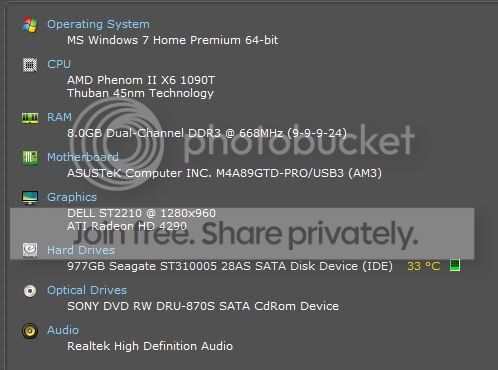
My recently bought store assembled computer is configured like this
I also have a Western Digital 500Gb Ext HDD which isn't permanently connected. My problem is that when the Ext HDD is connected the boot sequence automatically places the WD HDD as first boot device and I get a "NTLDR missing" message.No boot up. If I disconnect it, before boot up - no problems. Tried setting and resetting the boot sequence devices in the bios - problem continues. I'd like to leave the HDD connected during boot up - or not - but that should not affect my boot sequence, right ?
My recently bought store assembled computer is configured like this
I also have a Western Digital 500Gb Ext HDD which isn't permanently connected. My problem is that when the Ext HDD is connected the boot sequence automatically places the WD HDD as first boot device and I get a "NTLDR missing" message.No boot up. If I disconnect it, before boot up - no problems. Tried setting and resetting the boot sequence devices in the bios - problem continues. I'd like to leave the HDD connected during boot up - or not - but that should not affect my boot sequence, right ?
My Computer
- Computer Manufacturer/Model Number
- Store Assembled
- OS
- Win 7
- CPU
- AMD Phenom™ II X6 1090T
- Motherboard
- ASUS M4A89GTD PRO/USB3 with AMD® 890GX/SB850 chipset
- Memory
- 8 GB Corsair (2X4Gb)
- Graphics Card(s)
- Included in AMD® 890GX/SB850 chipset on MB
- Sound Card
- Included in AMD® 890GX/SB850 chipset on MB
- Monitor(s) Displays
- Dell ST 2210 21.5inch LCD
- Hard Drives
- Seagate Barracuda 7200.12 1TB SATA
- PSU
- 500 W
- Case
- Zebronic ATX
- Cooling
- No extra cooling