Boot Sequence problem

justalogin

Banned
Local time
3:49 AM
Messages
22
Hi

My recently bought store assembled computer is configured like this
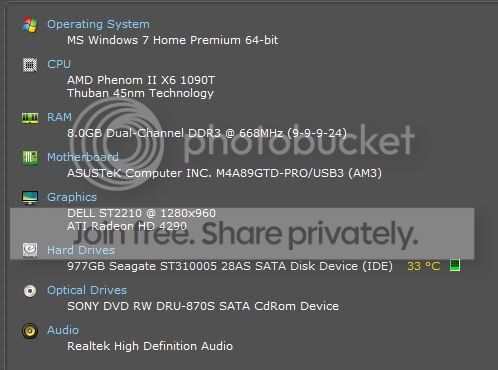
MyComputerconfig.jpg


I also have a Western Digital 500Gb Ext HDD which isn't permanently connected. My problem is that when the Ext HDD is connected the boot sequence automatically places the WD HDD as first boot device and I get a "NTLDR missing" message.No boot up. If I disconnect it, before boot up - no problems. Tried setting and resetting the boot sequence devices in the bios - problem continues. I'd like to leave the HDD connected during boot up - or not - but that should not affect my boot sequence, right ?
 

My Computer

Computer Manufacturer/Model Number
Store Assembled
OS
Win 7
CPU
AMD Phenom™ II X6 1090T
Motherboard
ASUS M4A89GTD PRO/USB3 with AMD® 890GX/SB850 chipset
Memory
8 GB Corsair (2X4Gb)
Graphics Card(s)
Included in AMD® 890GX/SB850 chipset on MB
Sound Card
Included in AMD® 890GX/SB850 chipset on MB
Monitor(s) Displays
Dell ST 2210 21.5inch LCD
Hard Drives
Seagate Barracuda 7200.12 1TB SATA
PSU
500 W
Case
Zebronic ATX
Cooling
No extra cooling
Hi

My recently bought store assembled computer is configured like this

MyComputerconfig.jpg


I also have a Western Digital 500Gb Ext HDD which isn't permanently connected. My problem is that when the Ext HDD is connected the boot sequence automatically places the WD HDD as first boot device and I get a "NTLDR missing" message.No boot up. If I disconnect it, before boot up - no problems. Tried setting and resetting the boot sequence devices in the bios - problem continues. I'd like to leave the HDD connected during boot up - or not - but that should not affect my boot sequence, right ?


Is the external USB, or ide in an enclosure? If Ide is it set to slave or cable detect?

Ken
 

My Computer

Computer Manufacturer/Model Number
HP Pavillion dv-7 1005 Tx
OS
Win 8 Release candidate 8400
CPU
[email protected]
Memory
4 gigs
Graphics Card(s)
Nvidia 9600M
Sound Card
HD built-in
Monitor(s) Displays
17" Wxga
Screen Resolution
1440x900
Cooling
none
Internet Speed
45Mb down 5Mb up
Yes, he tried to change the boot order from what I read. This seems insanely unlikely to me, but did you change the boot order with the drive plugged in. I don't think it would matter, but you never know.
 

My Computer

Computer type
Laptop
Computer Manufacturer/Model Number
Toshiba P775-S7100
OS
Windows 7 Professional SP1 64-bit
CPU
Intel Core i5-2450M @2.5 GHz
Memory
6 GB DDR3 1333MHz
Graphics Card(s)
Intel HD 3000
Monitor(s) Displays
Built-in 17.3" LED; 22" Insignia NS-L22Q-10A
Screen Resolution
1600x900; 1360x768
Hard Drives
750 GB Hitachi
1TB Seagate FreeAgent External
Internet Speed
Verizon DSL Speed(Down/Up): 3360 Kbps / 800 Kbps
Antivirus
MSE and MBAM Pro
Browser
IE10
Sorry, I misread his post, wasn't reading well :P
 

My Computer

Computer Manufacturer/Model Number
Custom Build #2
OS
Windows 7 Ultimate 32-Bit
CPU
Intel Core 2 Duo E6300 O.C.'d to 2.80 GHz (For Now >:) )
Motherboard
Gigabyte P43-ES3G
Memory
4x1GB OCZ Dual Channel RAM
Graphics Card(s)
HIS ATI Radeon HD 5770 1GB
Sound Card
Onboard Sound
Monitor(s) Displays
Asus VH-236
Screen Resolution
1920x1080
Hard Drives
WD Caviar-Blue 250 GB SATA
WD Caviar-Green 1.5 TB SATA
PSU
Raidmax RX-630SS
Case
Apevia X-Dreamer
Cooling
Case: Arctic Cooling CPU:Rosewill RCX Z2
My WD Ext HDD is USB2 connected.

When I try setting boot sequence with the drive connected my bios displays the Ext HDD and my DVD drive as the only available drives ! When the Ext drive is disconnected my internal HDD is displayed. There, I think, is where the problem is.
 
Last edited:

My Computer

Computer Manufacturer/Model Number
Store Assembled
OS
Win 7
CPU
AMD Phenom™ II X6 1090T
Motherboard
ASUS M4A89GTD PRO/USB3 with AMD® 890GX/SB850 chipset
Memory
8 GB Corsair (2X4Gb)
Graphics Card(s)
Included in AMD® 890GX/SB850 chipset on MB
Sound Card
Included in AMD® 890GX/SB850 chipset on MB
Monitor(s) Displays
Dell ST 2210 21.5inch LCD
Hard Drives
Seagate Barracuda 7200.12 1TB SATA
PSU
500 W
Case
Zebronic ATX
Cooling
No extra cooling
In BIOS, on Boot screen:

Boot Device Priority: 1st Optical Drive, 2nd OS HDD, 3rd can be blank

Hard Disc Drives: 1st should be OS

Also, on a reach

Advanced tab: Legacy USB Support- Auto

A Guy
 

My Computer

Computer type
PC/Desktop
OS
Windows 10 Home x64
CPU
INTEL Core i5-750 Quad-Core 3.37GHz
Motherboard
ASUS P7P55D
Memory
HyperX Fury Black Series 8GB (2 x 4GB) 1866Mhz
Graphics Card(s)
EVGA GeForce GTX 750 Superclocked 1GB 128-Bit GDDR5
Monitor(s) Displays
LG 32MA68HY 32" IPS
Screen Resolution
1920 x 1080
Hard Drives
Samsung 840 Evo 120GB, SEAGATE 500GB Barracuda® 7200.12, SATA 3 Gb/s, 7200 RPM, 16MB cache
PSU
ANTEC TruePower New TP-550, 80 PLUS, 550W
Case
ANTEC Three Hundred Illusion
Cooling
COOLER MASTER Hyper 212 Plus, 4 x 120mm 1 x 140mm Noctua's
Internet Speed
85 + Mbps
Antivirus
Avast
Browser
Vivaldi
In BIOS, on Boot screen:

Boot Device Priority: 1st Optical Drive, 2nd OS HDD, 3rd can be blank

Hard Disc Drives: 1st should be OS

Also, on a reach

Advanced tab: Legacy USB Support- Auto

A Guy

To set OS HDD as my 2nd boot device it has to show / be listed - which it doesn't when the Ext HDD is connected. That's my problem
 

My Computer

Computer Manufacturer/Model Number
Store Assembled
OS
Win 7
CPU
AMD Phenom™ II X6 1090T
Motherboard
ASUS M4A89GTD PRO/USB3 with AMD® 890GX/SB850 chipset
Memory
8 GB Corsair (2X4Gb)
Graphics Card(s)
Included in AMD® 890GX/SB850 chipset on MB
Sound Card
Included in AMD® 890GX/SB850 chipset on MB
Monitor(s) Displays
Dell ST 2210 21.5inch LCD
Hard Drives
Seagate Barracuda 7200.12 1TB SATA
PSU
500 W
Case
Zebronic ATX
Cooling
No extra cooling
Boot Device Priority: 1st Optical Drive, 2nd OS HDD, 3rd can be blank

Hard Disc Drives: 1st should be OS

WD needs to be taken out of the first slot under HD's, which may be on a different tab than Boot Order.

Look under HD's everywhere they are listed in BIOS, and you will find the place where they register when plugged in.

Somehow WD is registering in the first slot when plugged in and bumps the OS HD to second, so it needs to be moved to second slot there before you even deal with Boot Order.

Then you can set OS HD to be first HD to boot.
 
Boot Device Priority: 1st Optical Drive, 2nd OS HDD, 3rd can be blank

Hard Disc Drives: 1st should be OS

WD needs to be taken out of the first slot under HD's, which may be on a different tab than Boot Order.

Look under HD's everywhere they are listed in BIOS, and you will find the place where they register when plugged in.

Somehow WD is registering in the first slot when plugged in and bumps the OS HD to second, so it needs to be moved to second slot there before you even deal with Boot Order.

Then you can set OS HD to be first HD to boot.

Yes that seems to be the problem. I have looked in the BIOS but did not find (or recognize) where or how this could be done.
 

My Computer

Computer Manufacturer/Model Number
Store Assembled
OS
Win 7
CPU
AMD Phenom™ II X6 1090T
Motherboard
ASUS M4A89GTD PRO/USB3 with AMD® 890GX/SB850 chipset
Memory
8 GB Corsair (2X4Gb)
Graphics Card(s)
Included in AMD® 890GX/SB850 chipset on MB
Sound Card
Included in AMD® 890GX/SB850 chipset on MB
Monitor(s) Displays
Dell ST 2210 21.5inch LCD
Hard Drives
Seagate Barracuda 7200.12 1TB SATA
PSU
500 W
Case
Zebronic ATX
Cooling
No extra cooling
Is your HD plugged into SATA 1?

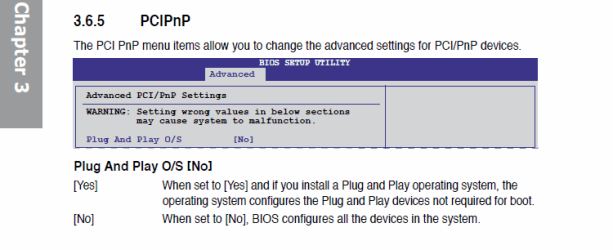
From your manual, look at this setting in BIOS:
View attachment 86650

Read your Manual here: ASUSTeK Computer Inc.-Support-

I downloaded the manual. Thanks for the pointer. Went to PnP setting like you said and changed it to YES from the NO it originally was. Still no joy.

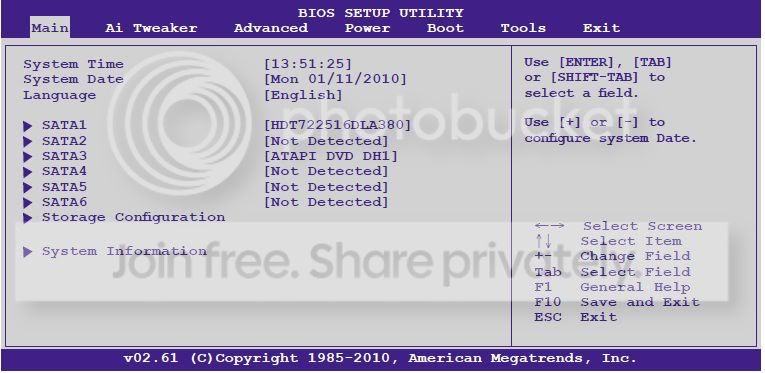
Also about the SATA 1 - The manual says that the "Main" menu in my bios should look like this

Should.jpg


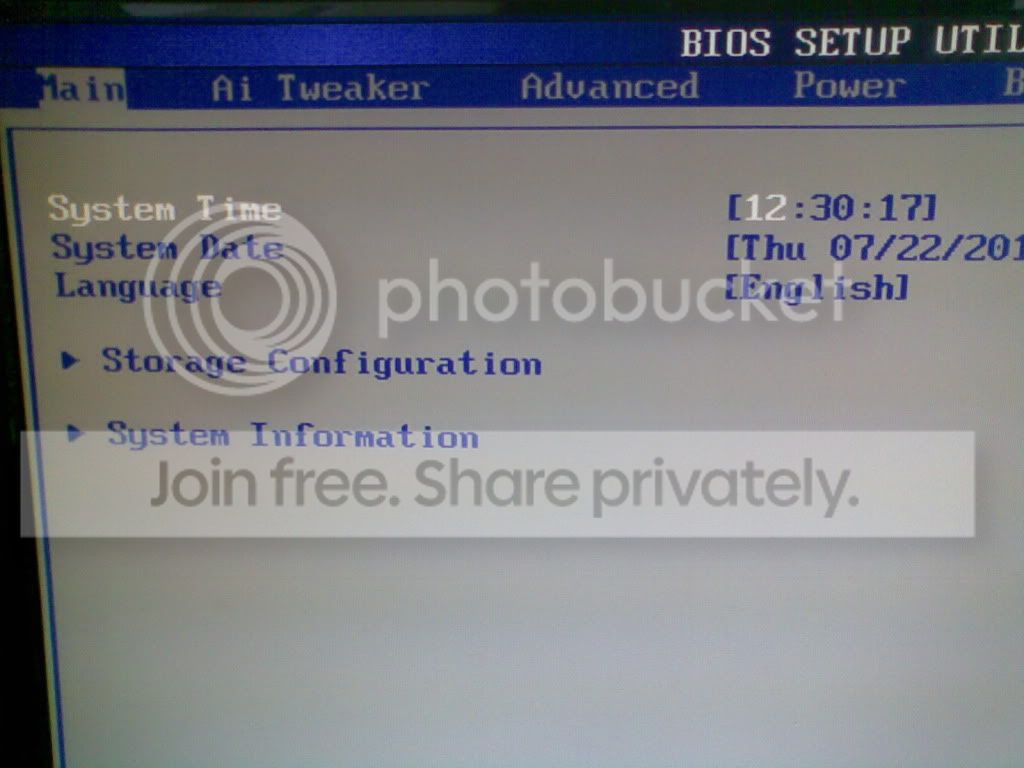
But mine looks like this

Is.jpg


So, as you can see my SATA listing doesn't show. How do I go forward from here?
 

My Computer

Computer Manufacturer/Model Number
Store Assembled
OS
Win 7
CPU
AMD Phenom™ II X6 1090T
Motherboard
ASUS M4A89GTD PRO/USB3 with AMD® 890GX/SB850 chipset
Memory
8 GB Corsair (2X4Gb)
Graphics Card(s)
Included in AMD® 890GX/SB850 chipset on MB
Sound Card
Included in AMD® 890GX/SB850 chipset on MB
Monitor(s) Displays
Dell ST 2210 21.5inch LCD
Hard Drives
Seagate Barracuda 7200.12 1TB SATA
PSU
500 W
Case
Zebronic ATX
Cooling
No extra cooling
Is your HD plugged into SATA 1?

From your manual, look at this setting in BIOS:
View attachment 86650

Read your Manual here: ASUSTeK Computer Inc.-Support-

I downloaded the manual. Thanks for the pointer. Went to PnP setting like you said and changed it to YES from the NO it originally was. Still no joy.

Also about the SATA 1 - The manual says that the "Main" menu in my bios should look like this

Should.jpg


But mine looks like this

Is.jpg


So, as you can see my SATA listing doesn't show. How do I go forward from here?

That is odd, I have an Asus board and mine looks like the first shot. It's going on 1am, so I have to go sorry, I'll look for this thread tomorrow. A Guy
 

My Computer

Computer type
PC/Desktop
OS
Windows 10 Home x64
CPU
INTEL Core i5-750 Quad-Core 3.37GHz
Motherboard
ASUS P7P55D
Memory
HyperX Fury Black Series 8GB (2 x 4GB) 1866Mhz
Graphics Card(s)
EVGA GeForce GTX 750 Superclocked 1GB 128-Bit GDDR5
Monitor(s) Displays
LG 32MA68HY 32" IPS
Screen Resolution
1920 x 1080
Hard Drives
Samsung 840 Evo 120GB, SEAGATE 500GB Barracuda® 7200.12, SATA 3 Gb/s, 7200 RPM, 16MB cache
PSU
ANTEC TruePower New TP-550, 80 PLUS, 550W
Case
ANTEC Three Hundred Illusion
Cooling
COOLER MASTER Hyper 212 Plus, 4 x 120mm 1 x 140mm Noctua's
Internet Speed
85 + Mbps
Antivirus
Avast
Browser
Vivaldi
The hardware should still be covered under 1 year warranty and tech support, so I would call Asus and get help with the issue or RMA the board.

Others may spot the problem who are more familar with the board. You might even post it in Hardware to shake the tree a bit. Just be sure to specify the mobo in title to attract it's familars.
 
I found a solution ! Eureka !

Apparently Asus have a policy of issuing frequent updates to their Bios'. I updated mine and voila my Internal HDD showed up along with the 6 SATA devices listing. After the update, I set my desired boot sequence and tried several restarts with my Ext HDD connected. No Problemo.

Now, for those of you who have an Asus MB. There is in the TOOLS Menu of the BIOS a utility called EZ Flash which is the preferred method of updating the BIOS. Follow the instructions below

Flashingthebios.jpg


Thanks to all of you who took the time and effort to put down your thoughts on the issue. It was while following your suggestions that finally stumbled upon the solution
 

My Computer

Computer Manufacturer/Model Number
Store Assembled
OS
Win 7
CPU
AMD Phenom™ II X6 1090T
Motherboard
ASUS M4A89GTD PRO/USB3 with AMD® 890GX/SB850 chipset
Memory
8 GB Corsair (2X4Gb)
Graphics Card(s)
Included in AMD® 890GX/SB850 chipset on MB
Sound Card
Included in AMD® 890GX/SB850 chipset on MB
Monitor(s) Displays
Dell ST 2210 21.5inch LCD
Hard Drives
Seagate Barracuda 7200.12 1TB SATA
PSU
500 W
Case
Zebronic ATX
Cooling
No extra cooling
Have you tried this?

Cool ! how did you do that ?

Back to your question. Your search only throws up Pre Win7 Solutions. OS' BIOS and Motherboards have changed a lot since then. Besides I already got my solution - in the post just before yours.
 

My Computer

Computer Manufacturer/Model Number
Store Assembled
OS
Win 7
CPU
AMD Phenom™ II X6 1090T
Motherboard
ASUS M4A89GTD PRO/USB3 with AMD® 890GX/SB850 chipset
Memory
8 GB Corsair (2X4Gb)
Graphics Card(s)
Included in AMD® 890GX/SB850 chipset on MB
Sound Card
Included in AMD® 890GX/SB850 chipset on MB
Monitor(s) Displays
Dell ST 2210 21.5inch LCD
Hard Drives
Seagate Barracuda 7200.12 1TB SATA
PSU
500 W
Case
Zebronic ATX
Cooling
No extra cooling
Such attitude at the end of a friendly thread....

Glad you got it justalogin. I don't usually suggest flashing the BIOS, but based on the screenshot, that was looking like the next step. I should go to bed more often as a fix, lol. Good going. A Guy
 

My Computer

Computer type
PC/Desktop
OS
Windows 10 Home x64
CPU
INTEL Core i5-750 Quad-Core 3.37GHz
Motherboard
ASUS P7P55D
Memory
HyperX Fury Black Series 8GB (2 x 4GB) 1866Mhz
Graphics Card(s)
EVGA GeForce GTX 750 Superclocked 1GB 128-Bit GDDR5
Monitor(s) Displays
LG 32MA68HY 32" IPS
Screen Resolution
1920 x 1080
Hard Drives
Samsung 840 Evo 120GB, SEAGATE 500GB Barracuda® 7200.12, SATA 3 Gb/s, 7200 RPM, 16MB cache
PSU
ANTEC TruePower New TP-550, 80 PLUS, 550W
Case
ANTEC Three Hundred Illusion
Cooling
COOLER MASTER Hyper 212 Plus, 4 x 120mm 1 x 140mm Noctua's
Internet Speed
85 + Mbps
Antivirus
Avast
Browser
Vivaldi
Such attitude at the end of a friendly thread....

Glad you got it justalogin. I don't usually suggest flashing the BIOS, but based on the screenshot, that was looking like the next step. I should go to bed more often as a fix, lol. Good going. A Guy

Yeah ! Flashing the Bios seemed quite a daunting and potentially problematic step considering my (lack of) expertise in that area. But the EZ tool makes it very simple and short. I also spoke with my local Asus service people (one very knowledgeable babe actually) and they recommend that this be done about twice a year. Thanks again !
 

My Computer

Computer Manufacturer/Model Number
Store Assembled
OS
Win 7
CPU
AMD Phenom™ II X6 1090T
Motherboard
ASUS M4A89GTD PRO/USB3 with AMD® 890GX/SB850 chipset
Memory
8 GB Corsair (2X4Gb)
Graphics Card(s)
Included in AMD® 890GX/SB850 chipset on MB
Sound Card
Included in AMD® 890GX/SB850 chipset on MB
Monitor(s) Displays
Dell ST 2210 21.5inch LCD
Hard Drives
Seagate Barracuda 7200.12 1TB SATA
PSU
500 W
Case
Zebronic ATX
Cooling
No extra cooling
Always safer to flash your BIOS from Windows.

Sorry we didn't catch it as it was just wrong that those drives didn't show up there.
 
Always safer to flash your BIOS from Windows.

Sorry we didn't catch it as it was just wrong that those drives didn't show up there.


By "from windows" did you mean from within the windows GUI ? How is that done?
 

My Computer

Computer Manufacturer/Model Number
Store Assembled
OS
Win 7
CPU
AMD Phenom™ II X6 1090T
Motherboard
ASUS M4A89GTD PRO/USB3 with AMD® 890GX/SB850 chipset
Memory
8 GB Corsair (2X4Gb)
Graphics Card(s)
Included in AMD® 890GX/SB850 chipset on MB
Sound Card
Included in AMD® 890GX/SB850 chipset on MB
Monitor(s) Displays
Dell ST 2210 21.5inch LCD
Hard Drives
Seagate Barracuda 7200.12 1TB SATA
PSU
500 W
Case
Zebronic ATX
Cooling
No extra cooling
Most maker's have a Windows app to update BIOS as well as (or instead of) the DOS flash utility.
 
Back
Top