boot time questions

jhd17

New member
Local time
11:39 AM
Messages
29
recently my computer seems to have slowed down, a bit insignificantly but it don't want the boot times to increase and increase. Looking in the event viewer and there are lots of cautions and errors. Say things are taking 7 seconds instead of three. Is there a way of repairing this, i read about repair disks, is this write, if so could you put some simple instructions as what to do and i need to be sure it won't corupt the computer in any way.
 

My Computer

Computer Manufacturer/Model Number
Toshiba
OS
windows 7 Home Premium 64-bit
CPU
2.1ghz AMD Sempron Si-42
Memory
3 gb
Graphics Card(s)
Ati Raedon HD 3200
Hard Drives
250gb

My Computer

Computer type
PC/Desktop
Computer Manufacturer/Model Number
Dell XPS 420
OS
Windows 10, Home Clean Install
CPU
Intel Core2 processsor Q8200(2.33Ghz 1333FSB) Quad Core Tech
Motherboard
Dell
Memory
6 gb
Graphics Card(s)
ATI Radeon 256MB HD3650
Sound Card
Intergrated 7.1 Channel Audio
Monitor(s) Displays
Dell SP2009W 20"
Hard Drives
640 GB Serial ATA Hard drive
Cooling
Fan
Keyboard
Dell USB Keyboard
Mouse
Dell Premium Optical USB
Internet Speed
DSL 2.85
Can you put up a screen capture of the errors?
Which programs automatically start? Take a look at the right of your system tray.
Of course run malware and virus scans.
 

My Computer

Computer Manufacturer/Model Number
Dell and Custom
OS
Systems 1 and 2: Windows 7 Enterprise x64, Win 8 Developer
CPU
System 1: i7 [email protected], System 2: AMD FX-4100 Zambezi 3.6G
Motherboard
System 1:Dell 06NWYK System 2: ASUS M5A97 AM3+
Memory
System 1: 8GB System 2: 8GB
Graphics Card(s)
System 1: ATI FirePro V4800 System 2: Radeon HD 6850
Sound Card
System 1: onboard System 2: onboard
Monitor(s) Displays
System1: Viewsonic HDMI 24"
Screen Resolution
System 1: 1920x1080 System 2: 1920x1080
Hard Drives
System 1: Mirrored .5B drives System 2: Seagate Barracuda ST1000DM003 1TB 7200 RPM 64MB Cache SATA 6.0Gb/s
Case
System 1: Dell System 2: Cooler Master
Internet Speed
10 MBPS
I would start with an anti virus scan and download and scan with malwarebytes
If negative try this
http://www.sevenforums.com/tutorials/1538-sfc-scannow-command-system-file-checker.html

Malwarebytes' Anti-Malware: Malwarebytes

Richard has given you the two best methods of making sure your system files are both healthy and intact.

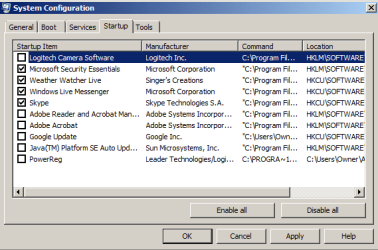
After you do these steps, type msconfig into your search field, click the Start Tab and uncheck all unncessary processes from starting. In most cases, all you need is your security software. Here is a screenie of my System Configuration Startup.
 

Attachments

  • startup.png
    startup.png
    11 KB · Views: 15
Last edited:

My Computer

Computer Manufacturer/Model Number
My own Custom Build: Asus, Corsair, Transcend, AMD, PNY, Ultra
OS
W7 64 Bit
CPU
AMD Phenom x4 4000Mhz
Memory
8 GB DDR-2
Graphics Card(s)
PNY-NVIDIA GeForce GTX 460 1GB GDDR5 PCI-e
Monitor(s) Displays
Dual: Flatron L1942T
Hard Drives
C: Drive (Agility 2 Solid State Drive 60 GB)
D: Drive (HDD Internal Western Digital 640 GB)
PSU
650 Watt
Cooling
Corsair Hydro H6 Liquid Cooler
Internet Speed
25 mbps down - 3 mbps up
I think that your additional information is perfect. I appreciate the kind words, also.
 

My Computer

Computer type
PC/Desktop
Computer Manufacturer/Model Number
Dell XPS 420
OS
Windows 10, Home Clean Install
CPU
Intel Core2 processsor Q8200(2.33Ghz 1333FSB) Quad Core Tech
Motherboard
Dell
Memory
6 gb
Graphics Card(s)
ATI Radeon 256MB HD3650
Sound Card
Intergrated 7.1 Channel Audio
Monitor(s) Displays
Dell SP2009W 20"
Hard Drives
640 GB Serial ATA Hard drive
Cooling
Fan
Keyboard
Dell USB Keyboard
Mouse
Dell Premium Optical USB
Internet Speed
DSL 2.85
Can you put up a screen capture of the errors?
Which programs automatically start? Take a look at the right of your system tray.
Of course run malware and virus scans.
Capture.JPG
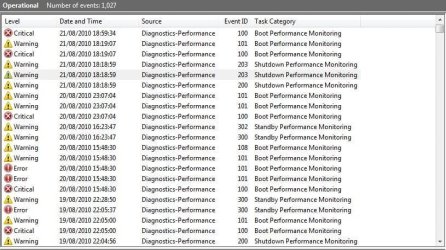
looking at it i think there are 3 warnings for each boot time, the shutdown times seem to mostly be about the antivirus i which i have recently uninstalled as i was testing it for only a few weeks and have gone for microsoft sercurity essentials. Boot time is about 135 seconds seems a bit high but could be worse i suppose. I don't understand why it puts a caution on these as it seems to be ok it say degredation = false which i assume is good any advice would be good
 

My Computer

Computer Manufacturer/Model Number
Toshiba
OS
windows 7 Home Premium 64-bit
CPU
2.1ghz AMD Sempron Si-42
Memory
3 gb
Graphics Card(s)
Ati Raedon HD 3200
Hard Drives
250gb
If you click on most of these Criticals it will probably just be excessive time being logged, not the cause of it. You have to monitor surrounding Errors over time to (hopefully) be clued as to what is hanging the boot, likely either a driver or app needing extra time to load.

You can create a Boot Log by tapping F8 at Bootup to choose it from Advanced Tools list. It will then log your bootup as it loads so you can see what drivers are hanging repeatedly.

Also have a look at this: Trace Windows 7 boot/shutdown/hibernate/standby/resume issues - MSFN Forums
 
Back
Top