soapieKdad
New member
- Local time
- 11:39 PM
- Messages
- 14
Just replaced my laptop's bad mobo (no power, no power light or battery charge light indicators, blank screen, nothing at all) with a used grade A replacement. This was my 1st mobo replacement.
The part numbers matched, and the old and new seem identical, so I feel confident this replacement mobo is correct for my model. Fitment was perfect. Everything lined up. After cleaning heat sink and CPU, applying new thermal paste and re-connecting everything, the laptop powered up just for a second or two (light indicator turned on briefly as well as the only fan) but then turned off. Nothing on screen flashed on at all. After some troubleshooting, I thought I had narrowed it down to a stick of bad RAM. So with just the 4GB stick inserted (and not the "bad" 2GB stick) and with the hard drive, WiFi card and battery disconnected, I got it to power up to the "no boot device detected" screen. Without turning it off, I then connected the hard drive and WiFi card and then restarted computer and it booted up normally. Everything ran great. (it had sat for 5-6 months until just the other day when I got the new mobo.)
Then within 5 -10 minutes I restarted it to go check the BIOS settings and adjust the backlight keyboard settings (only adjustable in BIOS... no convenient hotkey or app to use). When I saved and exited, the same issue repeated (powered up just for a second or two-- power light indicator and fan) but then turned off. Nothing on the screen. Only this time the HD light indicator also came on (as the HD was of course connected). This indicator also turned off as quickly as the other indicator and the fan.
I again tried to get it to boot by disconnecting same things mentioned above. Nada. Then I removed and rotated the 1 RAM stick at least a few times. Nada. (I had the power cord disconnected during all of the connecting/reconnecting, whether a component or RAM. The internal battery was not connected all during any of this.) I also tried numerous hard resets before, during and after the above steps.
After re-seating the RAM in the "successful" slot I got to the no OS detected screen. I again reattached everything and manage to get back into Windows. I restarted again and went into BIOS to check settings once again. Exited and then this same powering on issue repeated.
I left the laptop alone for the night. The next morning I again tried everything described above, plus I removed heat sink, cleaned one day old paste from it and from the CPU, and carefully re-applied fresh thermal paste. Inserted RAM and connected WiFi & HD.. hit power button and nada. Just the 1-2 seconds and then immediately off. So I tried for several attempts to re-seat RAM and hard resets without anything else connected and eventually I got the "no OS device connected" screen. I reattached HD and was back in business again.
I left laptop on for about 3 hours as it downloaded and installed a bunch of Windows updates. Eventually I was prompted to restart and I said WTH and clicked restart. After it restarted at least twice automatically as it finished up with all of the updates, the computer booted up normally and everything seemed great. I decided to try sleep mode. It went to sleep and woke up fine. Then I tried Hibernate. Uh oh. No dice. Same issue returned and I couldn't get it to stay on or display anything on screen after disconnecting the HD and WiFi card, messing with RAM and so on.
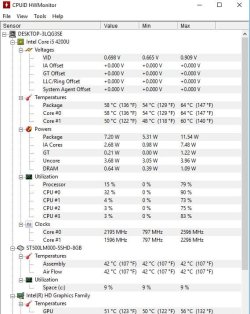
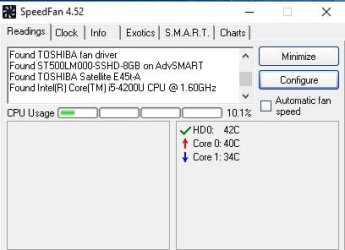
Now this is day 3 since installing mobo and it took me maybe 8 - 12 tries with the RAM and resets before I got it to the "no OS screen detected" screen. It's been on for 3+ hours and it's working great. Everything as I remember last year. I haven't checked CPU temps or anything like that, but the fan seems to be operating a "normal" level. About half the time the laptop has been laying directly on a bed, the rest of the time it's been on a laptop tray. I just felt the bottom and it feels warm but seems normal to me. The machine is running pretty quietly... no unusual sounds. The fan is running as I can feel the air coming out of the exhaust.
So pardon all of the detail but I wanted to be as complete as possible and not leave anything out that may help. Any advice or tips to get this issue resolved would be great! I really don't want to return this motherboard, but I do have a week or 2 left before requesting an RMA.
Computer is:
Toshiba Satellite E45T-A4100 14" Touch Screen Laptop/Ultrabook
4th Gen Intel Core i5-4200U
6GB DDR3L RAM (currently running one 4GB stick)
Windows 10
Thanks very much!
The part numbers matched, and the old and new seem identical, so I feel confident this replacement mobo is correct for my model. Fitment was perfect. Everything lined up. After cleaning heat sink and CPU, applying new thermal paste and re-connecting everything, the laptop powered up just for a second or two (light indicator turned on briefly as well as the only fan) but then turned off. Nothing on screen flashed on at all. After some troubleshooting, I thought I had narrowed it down to a stick of bad RAM. So with just the 4GB stick inserted (and not the "bad" 2GB stick) and with the hard drive, WiFi card and battery disconnected, I got it to power up to the "no boot device detected" screen. Without turning it off, I then connected the hard drive and WiFi card and then restarted computer and it booted up normally. Everything ran great. (it had sat for 5-6 months until just the other day when I got the new mobo.)
Then within 5 -10 minutes I restarted it to go check the BIOS settings and adjust the backlight keyboard settings (only adjustable in BIOS... no convenient hotkey or app to use). When I saved and exited, the same issue repeated (powered up just for a second or two-- power light indicator and fan) but then turned off. Nothing on the screen. Only this time the HD light indicator also came on (as the HD was of course connected). This indicator also turned off as quickly as the other indicator and the fan.
I again tried to get it to boot by disconnecting same things mentioned above. Nada. Then I removed and rotated the 1 RAM stick at least a few times. Nada. (I had the power cord disconnected during all of the connecting/reconnecting, whether a component or RAM. The internal battery was not connected all during any of this.) I also tried numerous hard resets before, during and after the above steps.
After re-seating the RAM in the "successful" slot I got to the no OS detected screen. I again reattached everything and manage to get back into Windows. I restarted again and went into BIOS to check settings once again. Exited and then this same powering on issue repeated.
I left the laptop alone for the night. The next morning I again tried everything described above, plus I removed heat sink, cleaned one day old paste from it and from the CPU, and carefully re-applied fresh thermal paste. Inserted RAM and connected WiFi & HD.. hit power button and nada. Just the 1-2 seconds and then immediately off. So I tried for several attempts to re-seat RAM and hard resets without anything else connected and eventually I got the "no OS device connected" screen. I reattached HD and was back in business again.
I left laptop on for about 3 hours as it downloaded and installed a bunch of Windows updates. Eventually I was prompted to restart and I said WTH and clicked restart. After it restarted at least twice automatically as it finished up with all of the updates, the computer booted up normally and everything seemed great. I decided to try sleep mode. It went to sleep and woke up fine. Then I tried Hibernate. Uh oh. No dice. Same issue returned and I couldn't get it to stay on or display anything on screen after disconnecting the HD and WiFi card, messing with RAM and so on.
Now this is day 3 since installing mobo and it took me maybe 8 - 12 tries with the RAM and resets before I got it to the "no OS screen detected" screen. It's been on for 3+ hours and it's working great. Everything as I remember last year. I haven't checked CPU temps or anything like that, but the fan seems to be operating a "normal" level. About half the time the laptop has been laying directly on a bed, the rest of the time it's been on a laptop tray. I just felt the bottom and it feels warm but seems normal to me. The machine is running pretty quietly... no unusual sounds. The fan is running as I can feel the air coming out of the exhaust.
So pardon all of the detail but I wanted to be as complete as possible and not leave anything out that may help. Any advice or tips to get this issue resolved would be great! I really don't want to return this motherboard, but I do have a week or 2 left before requesting an RMA.
Computer is:
Toshiba Satellite E45T-A4100 14" Touch Screen Laptop/Ultrabook
4th Gen Intel Core i5-4200U
6GB DDR3L RAM (currently running one 4GB stick)
Windows 10
Thanks very much!
Last edited:
My Computer
- Computer type
- PC/Desktop
- Computer Manufacturer/Model Number
- Lenovo Y510P
- OS
- Win 7 Pro 64
- CPU
- i5-4200m
- Memory
- 6GB RAM
- Graphics Card(s)
- dual GT 755M 1GB cards with SLI