Boot windows 7 with no partition marked as Active?

milk79

New member
Local time
5:22 PM
Messages
8
I have windows 7 installed on my primary drive, but my laptop doesn't think there is an OS installed.
I don't know how, but I wonder if its been deactivated..

I was having trouble making a system image backup because windows thought there were system files on my D: drive which is just Steam and about 20 games, as well as my C:Windows. So my backup was about 600gb. I went into Disk Management and wanted to disable my D: somehow to make the backup. I right-clicked the Steam D: and marked as active and I didn't get the usual warning that this should have an OS installed if you mark as active. I deactivated it through command prompt and restarted the laptop. I never touched the C: in Disk Management but now my laptop doesn't think there is an OS installed..

Is there a way I can make the proper partition active or boot windows from a disk without reinstalling?
My Steam D: is made up of 2 harddrives in raid0 with 600gb of games on it and I'm really hoping I don't have to re-install windows.
 

My Computer My Computer

Computer type
Laptop
Computer Manufacturer/Model Number
Ibuypower
OS
win 7 pro 64bit
CPU
i7 4770k
Hard Drives
256gb OS SSD
2x1TB SSHD Steam drive
Does this pc boot up properly ?

Can you post a shot of disk management for us ?


You need to run startup repair with your W7 dvd, but I`m guessing you don`t have one ?
 

My Computer My Computer

Computer type
PC/Desktop
Computer Manufacturer/Model Number
Skylake Special #666
OS
Windows 10 Pro x64
CPU
Intel Core i7 6700K
Motherboard
Asus Sabertooth Z170 Mark 1
Memory
GSkill TridentZ RGB 16GB 3600 16-16-16-36
Graphics Card(s)
EVGA GTX 980 Ti SC x2
Sound Card
Realtek High Definition
Monitor(s) Displays
AOC G2460PG
Screen Resolution
1920 x 1080 144Hz
Hard Drives
Samsung 860 Pro 256GB, Seagate Barracuda 4TB x2
PSU
EVGA 1000 P2, EVGA White Custom Braided Cables
Case
Corsair Vengeance C70 Gunmetal Black
Cooling
Corsair H100i v2, Corsair ML120 x2, Thermal Grizzly Kryonaut
Keyboard
Logitech G910 Orion Spectrum
Mouse
Logitech G700s
Internet Speed
Verizon Fios Quantum Gateway 75/75
Antivirus
Windows Defender, Malwarebytes Free 3.8.3
Browser
Chrome
Other Info
Corsair SP120 x4, LG Blu-ray Drive, Durabrand HT-395 100 Watt Dolby Digital Amp, Corsair H2100 Wireless 7.1 Headset
No It won't boot, It says no operating system found. Try disconnecting any drives that don't contain an operating system.

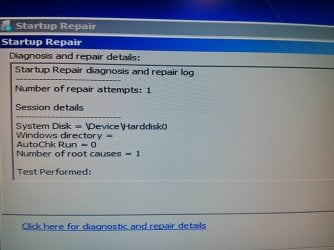
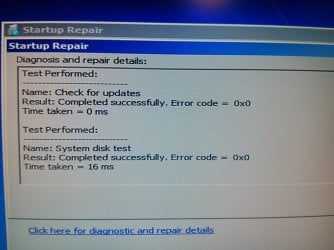
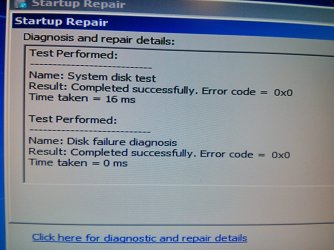
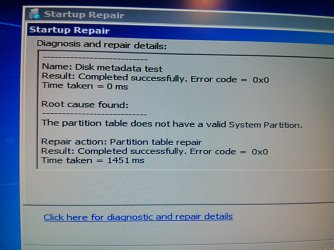
I actually do have a Win 7 cd, and I tried startup repair a couple times but nothing changed.
 

My Computer My Computer

Computer type
Laptop
Computer Manufacturer/Model Number
Ibuypower
OS
win 7 pro 64bit
CPU
i7 4770k
Hard Drives
256gb OS SSD
2x1TB SSHD Steam drive
You better post a picture of your disk situation. Use the bootable CD of Partition Wizard plus a camera. The .iso you find in the last box of this webpage.

If you make images with Windows imaging, it will image all partitions that have bits of the OS - e.g. program files. If you want to image C alone, use free Macrium (it's a lot better anyhow). But make sure you do not forget to image the 100MB system partition at least once. http://www.sevenforums.com/tutorials/73828-imaging-free-macrium.html?ltr=I
 

My Computer My Computer

Computer Manufacturer/Model Number
HP, Dell, Gateway, Toshiba - 4 laptops and 2 desktops
OS
Vista, Windows7, Mint Mate, Zorin, Windows 8
CPU
from 1.6GHz Duo to i7
Monitor(s) Displays
2x HP w2207
Hard Drives
5x HDD, 7x SSD, 12x Externals
Keyboard
with trackball - no mices
Mouse
Trackball mice
Internet Speed
DSL 6000
Could I Mark partition as active through command prompt?
 

Attachments

  • IMG_20131127_205413.jpg
    IMG_20131127_205413.jpg
    161.1 KB · Views: 0
  • IMG_20131127_205431.jpg
    IMG_20131127_205431.jpg
    152.4 KB · Views: 0
  • IMG_20131127_205500.jpg
    IMG_20131127_205500.jpg
    212.8 KB · Views: 0
  • IMG_20131127_205540.jpg
    IMG_20131127_205540.jpg
    182.6 KB · Views: 0

My Computer My Computer

Computer type
Laptop
Computer Manufacturer/Model Number
Ibuypower
OS
win 7 pro 64bit
CPU
i7 4770k
Hard Drives
256gb OS SSD
2x1TB SSHD Steam drive
You can, but you are liable to make an even greater mess without knowing what the situation on the disk really is. That's why I recommended the bootable PW CD.
 

My Computer My Computer

Computer Manufacturer/Model Number
HP, Dell, Gateway, Toshiba - 4 laptops and 2 desktops
OS
Vista, Windows7, Mint Mate, Zorin, Windows 8
CPU
from 1.6GHz Duo to i7
Monitor(s) Displays
2x HP w2207
Hard Drives
5x HDD, 7x SSD, 12x Externals
Keyboard
with trackball - no mices
Mouse
Trackball mice
Internet Speed
DSL 6000
Thanks, I set the system reserved partition as active and ran repair, and it booted right up. Now I just need to figure out why windows thinks there are system files on my Steam Harddrive so i can make a system image of just the C:
 

My Computer My Computer

Computer type
Laptop
Computer Manufacturer/Model Number
Ibuypower
OS
win 7 pro 64bit
CPU
i7 4770k
Hard Drives
256gb OS SSD
2x1TB SSHD Steam drive
Thanks, I set the system reserved partition as active and ran repair, and it booted right up. Now I just need to figure out why windows thinks there are system files on my Steam Harddrive so i can make a system image of just the C:

Just make "system reserved" ACTIVE was enough. No reason to run startup repair afterwards.

Post screenshot of disk management please.
 

My Computer My Computer

Computer type
Laptop
Computer Manufacturer/Model Number
ACER ASPIRE 5742G
OS
Microsoft Windows 7 Home Premium 64-bits 7601 Multiprocessor Free Service Pack 1
CPU
Intel(R) Core(TM) i3 CPU M 370 @ 2.40GHz
Motherboard
Acer Aspire 5742G
Memory
4,00 GB
Graphics Card(s)
ATI Mobility Radeon HD 5400 Series
Sound Card
(1) AMD High Definition Audio Device (2) Realtek High Defi
Screen Resolution
1366 x 768 x 32 bits (4294967296 colors) @ 60 Hz
Hard Drives
WDC WD5000BEVT-22ZAT0
Here it is now
 

Attachments

  • disk management screen.png
    disk management screen.png
    77.6 KB · Views: 6

My Computer My Computer

Computer type
Laptop
Computer Manufacturer/Model Number
Ibuypower
OS
win 7 pro 64bit
CPU
i7 4770k
Hard Drives
256gb OS SSD
2x1TB SSHD Steam drive
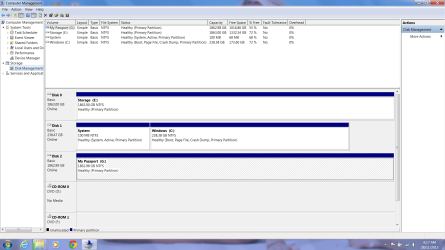
Thanks, I set the system reserved partition as active and ran repair, and it booted right up. Now I just need to figure out why windows thinks there are system files on my Steam Harddrive so i can make a system image of just the C:
What drive letter has steam harddrive? E or G?
 

My Computer My Computer

Computer type
Laptop
Computer Manufacturer/Model Number
ACER ASPIRE 5742G
OS
Microsoft Windows 7 Home Premium 64-bits 7601 Multiprocessor Free Service Pack 1
CPU
Intel(R) Core(TM) i3 CPU M 370 @ 2.40GHz
Motherboard
Acer Aspire 5742G
Memory
4,00 GB
Graphics Card(s)
ATI Mobility Radeon HD 5400 Series
Sound Card
(1) AMD High Definition Audio Device (2) Realtek High Defi
Screen Resolution
1366 x 768 x 32 bits (4294967296 colors) @ 60 Hz
Hard Drives
WDC WD5000BEVT-22ZAT0
E: is the steam drive. G is an external hdd
 

My Computer My Computer

Computer type
Laptop
Computer Manufacturer/Model Number
Ibuypower
OS
win 7 pro 64bit
CPU
i7 4770k
Hard Drives
256gb OS SSD
2x1TB SSHD Steam drive
E drive is not involved in boot process. Can't you unselect that drive during system image backup?
 

My Computer My Computer

Computer type
Laptop
Computer Manufacturer/Model Number
ACER ASPIRE 5742G
OS
Microsoft Windows 7 Home Premium 64-bits 7601 Multiprocessor Free Service Pack 1
CPU
Intel(R) Core(TM) i3 CPU M 370 @ 2.40GHz
Motherboard
Acer Aspire 5742G
Memory
4,00 GB
Graphics Card(s)
ATI Mobility Radeon HD 5400 Series
Sound Card
(1) AMD High Definition Audio Device (2) Realtek High Defi
Screen Resolution
1366 x 768 x 32 bits (4294967296 colors) @ 60 Hz
Hard Drives
WDC WD5000BEVT-22ZAT0
No you can't unselect the E:
It must think there is some system files on it from an installer or something.. I move my whole steam folder and every installed game to an external hard drive now. All thats left on the Drive is 3 MKV movies and about 8 uninstalled ISO's in the games folder.
 

Attachments

  • backup.png
    backup.png
    391.5 KB · Views: 3
  • E drive.png
    E drive.png
    341.4 KB · Views: 1

My Computer My Computer

Computer type
Laptop
Computer Manufacturer/Model Number
Ibuypower
OS
win 7 pro 64bit
CPU
i7 4770k
Hard Drives
256gb OS SSD
2x1TB SSHD Steam drive
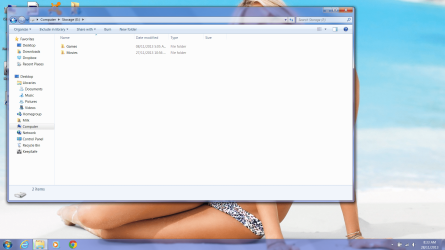
I removed all hidden files and ran ccleaner too
 

My Computer My Computer

Computer type
Laptop
Computer Manufacturer/Model Number
Ibuypower
OS
win 7 pro 64bit
CPU
i7 4770k
Hard Drives
256gb OS SSD
2x1TB SSHD Steam drive
With Windows Imaging you are not going to be able to deselect anything. The OS rules. If you want choice, use free Macrium.
 

My Computer My Computer

Computer Manufacturer/Model Number
HP, Dell, Gateway, Toshiba - 4 laptops and 2 desktops
OS
Vista, Windows7, Mint Mate, Zorin, Windows 8
CPU
from 1.6GHz Duo to i7
Monitor(s) Displays
2x HP w2207
Hard Drives
5x HDD, 7x SSD, 12x Externals
Keyboard
with trackball - no mices
Mouse
Trackball mice
Internet Speed
DSL 6000
Your configuration looks correct, however I would always want the Win7 HD to be DISK0 if your mobo allows plugging it there. Otherwise it is easy to derail the System Active partition to another preceding Primary partition during Repairs or a Reinstall. You can achieve this by swapping their cables. Make sure Win7 HD remains HD set first to boot in BIOS setup.

To clear whatever is making the Win7 imaging app think E is System, I would move the data off to wipe it with Diskpart Clean Command, then repartition it Logical following Partition / Extended : Logical Drives - Windows 7 Forums. Using Logical drives for data precludes problems.
 
Back
Top