Trying to Multi-boot Windows 7 with 10

Tylermc226

New member
Local time
2:11 PM
Messages
19
I only have windows 10 pre-installed on this laptop, and I am trying to currently install this windows 7 os it as well. I only can use the same drive, C:\ drive as a partition. The setup goes directly to the error code "0x0000428" which is a driver signature failure. I've tried to find a way to disable that in my BIOS but my laptop doesn't have the IDE mode, though it does have a Legacy Support mode which I did disable, but to no avail. I don't know how this will end up working, can anyone please help me?
 

My Computer

Computer type
Laptop
Computer Manufacturer/Model Number
Asus/X540SA
OS
Windows 10 edition 64-bit
CPU
N3700 @ 1.60GHZ 1.60GHZ
Motherboard
ASUSTeK COMPUTER INC. X540SA 1.0
Memory
4.00GB
Graphics Card(s)
Intel HD Graphics
Sound Card
Intel(R) Display Audio, Realtek High Definition Audio
Monitor(s) Displays
Generic PnP Monitor
Screen Resolution
1366 x 768
Hard Drives
hgst hts54505a7e680
Keyboard
PC/AT Enhanced PS/2 Keyboard (101/102 Key)
Mouse
Asus Touchpad
Internet Speed
50mbps
Browser
Chrome
Welcome to the forum.

You must edit your profile and add ALL hardware specs.
If the laptop is new and came with Win 10, maybe it's impossible to install win 7 on it.
- To begin with, you must disable fast boot and secure boot (sometimes it has another name) on BIOS.
- New chipsets (Skylake and Kabylake) only have USB 3 ports. Win 7 installation disk doesn't have USB 3 drivers. You will have to add them to the Win 7 installation disk.

After you edit your profile and add ALL hardware specs we can search to find a sulution.
 

My Computers

System One System Two

  • Computer type
    PC/Desktop
    Computer Manufacturer/Model Number
    custom build
    OS
    Windows 7 HP 64
    CPU
    i5 6600K - 800MHz to 4200MHz
    Motherboard
    GA-Z170-HD3P
    Memory
    4+4G GSkill DDR4 3000
    Graphics Card(s)
    IG - Intel 530
    Monitor(s) Displays
    Samsung 226BW
    Screen Resolution
    1680x1050
    Hard Drives
    (1) -1 SM951 – 128GB M.2 AHCI PCIe SSD drive for Windows 7 and Lubuntu
    (2) -1 WD SATA 3 - 1T for Data
    (3) -1 WD SATA 3 - 1T for backup
    PSU
    Thermaltake 450W TR2 gold
    Keyboard
    Old and good Chicony mechanical keyboard
    Mouse
    Logitech mX performance - 9 buttons (had to disable some)
    Internet Speed
    500Mb/s
    Browser
    Firefox 64
    Other Info
    TinyWall firewall
  • Computer type
    Laptop
    System Manufacturer/Model Number
    Asus Q550LF
    OS
    Windows 7 Pro
    CPU
    i7-4500U 800MHz to 3.0GHz
    Motherboard
    Asus Q550LF
    Memory
    (4+4)G DDR3 1600
    Graphics Card(s)
    IG intel 4400 + NVIDIA GeForce GT 745M
    Sound Card
    Realtek
    Monitor(s) Displays
    LG Display LP156WF4-SPH1
    Screen Resolution
    1920 x 1080
    Hard Drives
    BX500 120G SSD for Windows and programs +
    1T HDD for data
    Internet Speed
    500 Mb/s
    Browser
    Firefox
    Other Info
    TinyWall firewall
You have to install th eoldo/s first or it will destroy the new boot sector as it wont understand it. Simple andswer is run 7 as a virtual pc with free Virtual box Downloads – Oracle VM VirtualBox
 

My Computer

Computer type
PC/Desktop
OS
win 8 32 bit
Welcome to the forum.

You must edit your profile and add ALL hardware specs.
If the laptop is new and came with Win 10, maybe it's impossible to install win 7 on it.
- To begin with, you must disable fast boot and secure boot (sometimes it has another name) on BIOS.
- New chipsets (Skylake and Kabylake) only have USB 3 ports. Win 7 installation disk doesn't have USB 3 drivers. You will have to add them to the Win 7 installation disk.

After you edit your profile and add ALL hardware specs we can search to find a sulution.

Hello, I've updated the information on my profile. How do I find out the info about the chipsets in my laptop?
 

My Computer

Computer type
Laptop
Computer Manufacturer/Model Number
Asus/X540SA
OS
Windows 10 edition 64-bit
CPU
N3700 @ 1.60GHZ 1.60GHZ
Motherboard
ASUSTeK COMPUTER INC. X540SA 1.0
Memory
4.00GB
Graphics Card(s)
Intel HD Graphics
Sound Card
Intel(R) Display Audio, Realtek High Definition Audio
Monitor(s) Displays
Generic PnP Monitor
Screen Resolution
1366 x 768
Hard Drives
hgst hts54505a7e680
Keyboard
PC/AT Enhanced PS/2 Keyboard (101/102 Key)
Mouse
Asus Touchpad
Internet Speed
50mbps
Browser
Chrome
Your computer was designed for Win 10. That doesn't mean it can't have Win 7. Depends on your BIOS. If you can't disable Secure boot, win 7 can't be installed.
X540SA | Laptops | ASUS Global


What kind of license is your Win 7 and what brand (Home, HP, Pro or ultimate)?
When you boot from Win 7 installation disk, do you have mouse and keyboard?
 

My Computers

System One System Two

  • Computer type
    PC/Desktop
    Computer Manufacturer/Model Number
    custom build
    OS
    Windows 7 HP 64
    CPU
    i5 6600K - 800MHz to 4200MHz
    Motherboard
    GA-Z170-HD3P
    Memory
    4+4G GSkill DDR4 3000
    Graphics Card(s)
    IG - Intel 530
    Monitor(s) Displays
    Samsung 226BW
    Screen Resolution
    1680x1050
    Hard Drives
    (1) -1 SM951 – 128GB M.2 AHCI PCIe SSD drive for Windows 7 and Lubuntu
    (2) -1 WD SATA 3 - 1T for Data
    (3) -1 WD SATA 3 - 1T for backup
    PSU
    Thermaltake 450W TR2 gold
    Keyboard
    Old and good Chicony mechanical keyboard
    Mouse
    Logitech mX performance - 9 buttons (had to disable some)
    Internet Speed
    500Mb/s
    Browser
    Firefox 64
    Other Info
    TinyWall firewall
  • Computer type
    Laptop
    System Manufacturer/Model Number
    Asus Q550LF
    OS
    Windows 7 Pro
    CPU
    i7-4500U 800MHz to 3.0GHz
    Motherboard
    Asus Q550LF
    Memory
    (4+4)G DDR3 1600
    Graphics Card(s)
    IG intel 4400 + NVIDIA GeForce GT 745M
    Sound Card
    Realtek
    Monitor(s) Displays
    LG Display LP156WF4-SPH1
    Screen Resolution
    1920 x 1080
    Hard Drives
    BX500 120G SSD for Windows and programs +
    1T HDD for data
    Internet Speed
    500 Mb/s
    Browser
    Firefox
    Other Info
    TinyWall firewall
Yes, I can enable/disable secureboot.
 

My Computer

Computer type
Laptop
Computer Manufacturer/Model Number
Asus/X540SA
OS
Windows 10 edition 64-bit
CPU
N3700 @ 1.60GHZ 1.60GHZ
Motherboard
ASUSTeK COMPUTER INC. X540SA 1.0
Memory
4.00GB
Graphics Card(s)
Intel HD Graphics
Sound Card
Intel(R) Display Audio, Realtek High Definition Audio
Monitor(s) Displays
Generic PnP Monitor
Screen Resolution
1366 x 768
Hard Drives
hgst hts54505a7e680
Keyboard
PC/AT Enhanced PS/2 Keyboard (101/102 Key)
Mouse
Asus Touchpad
Internet Speed
50mbps
Browser
Chrome
- On BIOS, disable secure boot and fast boot.
- See if it boots normally on Win 10.
- Make the rescue disks so you can reinstall win 10 if something goes wrong.
- Backup your data on an external disk.

As Win 7 installation disk has no USB 3 drivers, you will need to add them to the installation disk.
Asus, MSI, Gigabyte and Intel has a program to do it.
Download Windows 7* USB 3.0 Creator Utility.
As those programs only install the USB 3.0 drivers to the installation Wizard, you may end with Win 7 installation without mouse and keyboard.

Read my tutorial Create a Windows 7 USB flash installation with new drives for new MB's - Windows 7 Help Forums

When you have a Win 7 installation disk with the drivers, I'll guide you on the installation.
 
Last edited:

My Computers

System One System Two

  • Computer type
    PC/Desktop
    Computer Manufacturer/Model Number
    custom build
    OS
    Windows 7 HP 64
    CPU
    i5 6600K - 800MHz to 4200MHz
    Motherboard
    GA-Z170-HD3P
    Memory
    4+4G GSkill DDR4 3000
    Graphics Card(s)
    IG - Intel 530
    Monitor(s) Displays
    Samsung 226BW
    Screen Resolution
    1680x1050
    Hard Drives
    (1) -1 SM951 – 128GB M.2 AHCI PCIe SSD drive for Windows 7 and Lubuntu
    (2) -1 WD SATA 3 - 1T for Data
    (3) -1 WD SATA 3 - 1T for backup
    PSU
    Thermaltake 450W TR2 gold
    Keyboard
    Old and good Chicony mechanical keyboard
    Mouse
    Logitech mX performance - 9 buttons (had to disable some)
    Internet Speed
    500Mb/s
    Browser
    Firefox 64
    Other Info
    TinyWall firewall
  • Computer type
    Laptop
    System Manufacturer/Model Number
    Asus Q550LF
    OS
    Windows 7 Pro
    CPU
    i7-4500U 800MHz to 3.0GHz
    Motherboard
    Asus Q550LF
    Memory
    (4+4)G DDR3 1600
    Graphics Card(s)
    IG intel 4400 + NVIDIA GeForce GT 745M
    Sound Card
    Realtek
    Monitor(s) Displays
    LG Display LP156WF4-SPH1
    Screen Resolution
    1920 x 1080
    Hard Drives
    BX500 120G SSD for Windows and programs +
    1T HDD for data
    Internet Speed
    500 Mb/s
    Browser
    Firefox
    Other Info
    TinyWall firewall
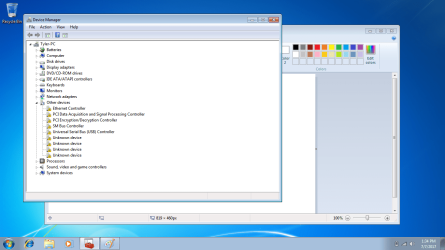
Hello, again. I have installed Windows Home Premium just fine now after enabling CSM in the BIOS.
After I installed a few of the drivers since they were wiped, I went to the mice and other pointing devices... It wasn't there, so I checked for the downloads on the Asus website, and they currently do not support (with my unit at least) Windows 7, so I fear this may have been a waste of time for me unless there is another way that I can use my touchpad without it. The program is called Asus Smart Gesture, only usable on 8, 8.1, and 10.
I don't know if I should just buy an optical mouse for when I use Windows 7 or just forget about it and delete it entirely?
 

My Computer

Computer type
Laptop
Computer Manufacturer/Model Number
Asus/X540SA
OS
Windows 10 edition 64-bit
CPU
N3700 @ 1.60GHZ 1.60GHZ
Motherboard
ASUSTeK COMPUTER INC. X540SA 1.0
Memory
4.00GB
Graphics Card(s)
Intel HD Graphics
Sound Card
Intel(R) Display Audio, Realtek High Definition Audio
Monitor(s) Displays
Generic PnP Monitor
Screen Resolution
1366 x 768
Hard Drives
hgst hts54505a7e680
Keyboard
PC/AT Enhanced PS/2 Keyboard (101/102 Key)
Mouse
Asus Touchpad
Internet Speed
50mbps
Browser
Chrome
- On BIOS, disable secure boot and fast boot.
- See if it boots normally on Win 10.
- Make the rescue disks so you can reinstall win 10 if something goes wrong.
- Backup your data on an external disk.

As Win 7 installation disk has no USB 3 drivers, you will need to add them to the installation disk.
Asus, MSI, Gigabyte and Intel has a program to do it.
Download Windows 7* USB 3.0 Creator Utility.
As those programs only install the USB 3.0 drivers to the installation Wizard, you may end with Win 7installation without mouse and keyboard.

Read my tutorial Create a Windows 7 USB flash installation with new drives for new MB's - Windows 7 Help Forums

When you have a Win 7 installation disk with the drivers, I'll guide you on the installation.

Forgot to press quote, please read my reply above.
 

My Computer

Computer type
Laptop
Computer Manufacturer/Model Number
Asus/X540SA
OS
Windows 10 edition 64-bit
CPU
N3700 @ 1.60GHZ 1.60GHZ
Motherboard
ASUSTeK COMPUTER INC. X540SA 1.0
Memory
4.00GB
Graphics Card(s)
Intel HD Graphics
Sound Card
Intel(R) Display Audio, Realtek High Definition Audio
Monitor(s) Displays
Generic PnP Monitor
Screen Resolution
1366 x 768
Hard Drives
hgst hts54505a7e680
Keyboard
PC/AT Enhanced PS/2 Keyboard (101/102 Key)
Mouse
Asus Touchpad
Internet Speed
50mbps
Browser
Chrome

My Computers

System One System Two

  • Computer type
    PC/Desktop
    Computer Manufacturer/Model Number
    custom build
    OS
    Windows 7 HP 64
    CPU
    i5 6600K - 800MHz to 4200MHz
    Motherboard
    GA-Z170-HD3P
    Memory
    4+4G GSkill DDR4 3000
    Graphics Card(s)
    IG - Intel 530
    Monitor(s) Displays
    Samsung 226BW
    Screen Resolution
    1680x1050
    Hard Drives
    (1) -1 SM951 – 128GB M.2 AHCI PCIe SSD drive for Windows 7 and Lubuntu
    (2) -1 WD SATA 3 - 1T for Data
    (3) -1 WD SATA 3 - 1T for backup
    PSU
    Thermaltake 450W TR2 gold
    Keyboard
    Old and good Chicony mechanical keyboard
    Mouse
    Logitech mX performance - 9 buttons (had to disable some)
    Internet Speed
    500Mb/s
    Browser
    Firefox 64
    Other Info
    TinyWall firewall
  • Computer type
    Laptop
    System Manufacturer/Model Number
    Asus Q550LF
    OS
    Windows 7 Pro
    CPU
    i7-4500U 800MHz to 3.0GHz
    Motherboard
    Asus Q550LF
    Memory
    (4+4)G DDR3 1600
    Graphics Card(s)
    IG intel 4400 + NVIDIA GeForce GT 745M
    Sound Card
    Realtek
    Monitor(s) Displays
    LG Display LP156WF4-SPH1
    Screen Resolution
    1920 x 1080
    Hard Drives
    BX500 120G SSD for Windows and programs +
    1T HDD for data
    Internet Speed
    500 Mb/s
    Browser
    Firefox
    Other Info
    TinyWall firewall

Attachments

  • Device Manager Drivers.png
    Device Manager Drivers.png
    355.3 KB · Views: 4
Last edited:

My Computer

Computer type
Laptop
Computer Manufacturer/Model Number
Asus/X540SA
OS
Windows 10 edition 64-bit
CPU
N3700 @ 1.60GHZ 1.60GHZ
Motherboard
ASUSTeK COMPUTER INC. X540SA 1.0
Memory
4.00GB
Graphics Card(s)
Intel HD Graphics
Sound Card
Intel(R) Display Audio, Realtek High Definition Audio
Monitor(s) Displays
Generic PnP Monitor
Screen Resolution
1366 x 768
Hard Drives
hgst hts54505a7e680
Keyboard
PC/AT Enhanced PS/2 Keyboard (101/102 Key)
Mouse
Asus Touchpad
Internet Speed
50mbps
Browser
Chrome
Fist you have to install the Ethernet driver.
Open device manager, right click on Ethernet controller - Properties - Details tab - Hardware Ids
https://www.sevenforums.com/attachments/hardware-devices/392656d1476219902-lg-bluetooth-soundbar-recognised-devices-but-will-not-connect-device.jpg
Copy the fist line. It should be something like this PCI\VEN_168C&DEV_001A&SUBSYS_2052168C&REV_01
Search the web for the driver.
Install the attachment fist
Chipset Download Intel® Chipset Device Software (INF Update Utility)
USB Download Intel® USB 3.0 eXtensible Host Controller Driver for Intel® 8/9/100 Series and Intel® C220/C610 Chipset Family
SM bus Download Intel® Management Engine Consumer Driver for Intel® NUC Kit NUC5i3RY, NUC5i5RY, NUC5i7RY, NUC5i3MY

Once you have internet run Intel® Driver Update Utility
 

Attachments

Last edited:

My Computers

System One System Two

  • Computer type
    PC/Desktop
    Computer Manufacturer/Model Number
    custom build
    OS
    Windows 7 HP 64
    CPU
    i5 6600K - 800MHz to 4200MHz
    Motherboard
    GA-Z170-HD3P
    Memory
    4+4G GSkill DDR4 3000
    Graphics Card(s)
    IG - Intel 530
    Monitor(s) Displays
    Samsung 226BW
    Screen Resolution
    1680x1050
    Hard Drives
    (1) -1 SM951 – 128GB M.2 AHCI PCIe SSD drive for Windows 7 and Lubuntu
    (2) -1 WD SATA 3 - 1T for Data
    (3) -1 WD SATA 3 - 1T for backup
    PSU
    Thermaltake 450W TR2 gold
    Keyboard
    Old and good Chicony mechanical keyboard
    Mouse
    Logitech mX performance - 9 buttons (had to disable some)
    Internet Speed
    500Mb/s
    Browser
    Firefox 64
    Other Info
    TinyWall firewall
  • Computer type
    Laptop
    System Manufacturer/Model Number
    Asus Q550LF
    OS
    Windows 7 Pro
    CPU
    i7-4500U 800MHz to 3.0GHz
    Motherboard
    Asus Q550LF
    Memory
    (4+4)G DDR3 1600
    Graphics Card(s)
    IG intel 4400 + NVIDIA GeForce GT 745M
    Sound Card
    Realtek
    Monitor(s) Displays
    LG Display LP156WF4-SPH1
    Screen Resolution
    1920 x 1080
    Hard Drives
    BX500 120G SSD for Windows and programs +
    1T HDD for data
    Internet Speed
    500 Mb/s
    Browser
    Firefox
    Other Info
    TinyWall firewall
Fist you have to install the Ethernet driver.
Open device manager, right click on Ethernet controller - Properties - Details tab - Hardware Ids
https://www.sevenforums.com/attachments/hardware-devices/392656d1476219902-lg-bluetooth-soundbar-recognised-devices-but-will-not-connect-device.jpg
Copy the fist line. It should be something like this PCI\VEN_168C&DEV_001A&SUBSYS_2052168C&REV_01
Search the web for the driver.
Install the attachment fist
Chipset Download Intel® Chipset Device Software (INF Update Utility)
USB Download Intel® USB 3.0 eXtensible Host Controller Driver for Intel® 8/9/100 Series and Intel® C220/C610 Chipset Family
SM bus Download Intel® Management Engine Consumer Driver for Intel® NUC Kit NUC5i3RY, NUC5i5RY, NUC5i7RY, NUC5i3MY

Once you have internet run Intel® Driver Update Utility

I did all of the steps, and the mouse driver is not to be seen in the device manager. Like I said the one I use is Asus Touchpad (or Asus Smart Gesture). Apparently it's not meant for Windows 7 as it's incompatible. Is there a way to install a different touchpad from another company? Or do I just get a external mouse?
 

My Computer

Computer type
Laptop
Computer Manufacturer/Model Number
Asus/X540SA
OS
Windows 10 edition 64-bit
CPU
N3700 @ 1.60GHZ 1.60GHZ
Motherboard
ASUSTeK COMPUTER INC. X540SA 1.0
Memory
4.00GB
Graphics Card(s)
Intel HD Graphics
Sound Card
Intel(R) Display Audio, Realtek High Definition Audio
Monitor(s) Displays
Generic PnP Monitor
Screen Resolution
1366 x 768
Hard Drives
hgst hts54505a7e680
Keyboard
PC/AT Enhanced PS/2 Keyboard (101/102 Key)
Mouse
Asus Touchpad
Internet Speed
50mbps
Browser
Chrome
One step at a time.
Use external mouse, as the USB 3.0 drivers are now installed.
Did you found the Ethernet driver?
Give us another image of device manager.
 

My Computers

System One System Two

  • Computer type
    PC/Desktop
    Computer Manufacturer/Model Number
    custom build
    OS
    Windows 7 HP 64
    CPU
    i5 6600K - 800MHz to 4200MHz
    Motherboard
    GA-Z170-HD3P
    Memory
    4+4G GSkill DDR4 3000
    Graphics Card(s)
    IG - Intel 530
    Monitor(s) Displays
    Samsung 226BW
    Screen Resolution
    1680x1050
    Hard Drives
    (1) -1 SM951 – 128GB M.2 AHCI PCIe SSD drive for Windows 7 and Lubuntu
    (2) -1 WD SATA 3 - 1T for Data
    (3) -1 WD SATA 3 - 1T for backup
    PSU
    Thermaltake 450W TR2 gold
    Keyboard
    Old and good Chicony mechanical keyboard
    Mouse
    Logitech mX performance - 9 buttons (had to disable some)
    Internet Speed
    500Mb/s
    Browser
    Firefox 64
    Other Info
    TinyWall firewall
  • Computer type
    Laptop
    System Manufacturer/Model Number
    Asus Q550LF
    OS
    Windows 7 Pro
    CPU
    i7-4500U 800MHz to 3.0GHz
    Motherboard
    Asus Q550LF
    Memory
    (4+4)G DDR3 1600
    Graphics Card(s)
    IG intel 4400 + NVIDIA GeForce GT 745M
    Sound Card
    Realtek
    Monitor(s) Displays
    LG Display LP156WF4-SPH1
    Screen Resolution
    1920 x 1080
    Hard Drives
    BX500 120G SSD for Windows and programs +
    1T HDD for data
    Internet Speed
    500 Mb/s
    Browser
    Firefox
    Other Info
    TinyWall firewall
One step at a time.
Use external mouse, as the USB 3.0 drivers are now installed.
Did you found the Ethernet driver?
Give us another image of device manager.

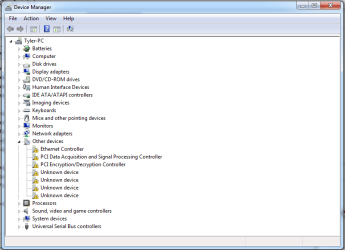
Couldn't find an ethernet driver, here is the updated Device Manager.
 

Attachments

  • device manager.PNG
    device manager.PNG
    73.2 KB · Views: 1

My Computer

Computer type
Laptop
Computer Manufacturer/Model Number
Asus/X540SA
OS
Windows 10 edition 64-bit
CPU
N3700 @ 1.60GHZ 1.60GHZ
Motherboard
ASUSTeK COMPUTER INC. X540SA 1.0
Memory
4.00GB
Graphics Card(s)
Intel HD Graphics
Sound Card
Intel(R) Display Audio, Realtek High Definition Audio
Monitor(s) Displays
Generic PnP Monitor
Screen Resolution
1366 x 768
Hard Drives
hgst hts54505a7e680
Keyboard
PC/AT Enhanced PS/2 Keyboard (101/102 Key)
Mouse
Asus Touchpad
Internet Speed
50mbps
Browser
Chrome
Open device manager, right click on Ethernet controller - Properties - Details tab - Hardware Ids
Windows 7 Help Forums
Take a snapshot with sniping tool and place the image here as an attachment.

I see that you already have a network adapter is it a LAN device?
 

My Computers

System One System Two

  • Computer type
    PC/Desktop
    Computer Manufacturer/Model Number
    custom build
    OS
    Windows 7 HP 64
    CPU
    i5 6600K - 800MHz to 4200MHz
    Motherboard
    GA-Z170-HD3P
    Memory
    4+4G GSkill DDR4 3000
    Graphics Card(s)
    IG - Intel 530
    Monitor(s) Displays
    Samsung 226BW
    Screen Resolution
    1680x1050
    Hard Drives
    (1) -1 SM951 – 128GB M.2 AHCI PCIe SSD drive for Windows 7 and Lubuntu
    (2) -1 WD SATA 3 - 1T for Data
    (3) -1 WD SATA 3 - 1T for backup
    PSU
    Thermaltake 450W TR2 gold
    Keyboard
    Old and good Chicony mechanical keyboard
    Mouse
    Logitech mX performance - 9 buttons (had to disable some)
    Internet Speed
    500Mb/s
    Browser
    Firefox 64
    Other Info
    TinyWall firewall
  • Computer type
    Laptop
    System Manufacturer/Model Number
    Asus Q550LF
    OS
    Windows 7 Pro
    CPU
    i7-4500U 800MHz to 3.0GHz
    Motherboard
    Asus Q550LF
    Memory
    (4+4)G DDR3 1600
    Graphics Card(s)
    IG intel 4400 + NVIDIA GeForce GT 745M
    Sound Card
    Realtek
    Monitor(s) Displays
    LG Display LP156WF4-SPH1
    Screen Resolution
    1920 x 1080
    Hard Drives
    BX500 120G SSD for Windows and programs +
    1T HDD for data
    Internet Speed
    500 Mb/s
    Browser
    Firefox
    Other Info
    TinyWall firewall
Open device manager, right click on Ethernet controller - Properties - Details tab - Hardware Ids
Windows 7 Help Forums
Take a snapshot with sniping tool and place the image here as an attachment.

I see that you already have a network adapter is it a LAN device?

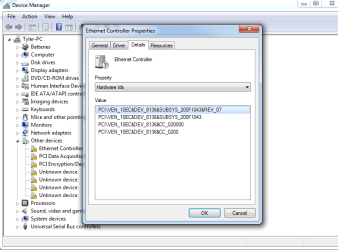
Yes I installed that first thing, it's Qualcomm. Here is the image of the Ethernet Controller IDS.
 

Attachments

  • Ethernet Controller.PNG
    Ethernet Controller.PNG
    89 KB · Views: 2

My Computer

Computer type
Laptop
Computer Manufacturer/Model Number
Asus/X540SA
OS
Windows 10 edition 64-bit
CPU
N3700 @ 1.60GHZ 1.60GHZ
Motherboard
ASUSTeK COMPUTER INC. X540SA 1.0
Memory
4.00GB
Graphics Card(s)
Intel HD Graphics
Sound Card
Intel(R) Display Audio, Realtek High Definition Audio
Monitor(s) Displays
Generic PnP Monitor
Screen Resolution
1366 x 768
Hard Drives
hgst hts54505a7e680
Keyboard
PC/AT Enhanced PS/2 Keyboard (101/102 Key)
Mouse
Asus Touchpad
Internet Speed
50mbps
Browser
Chrome
The Ethernet controller drive seems to be the second on the list Realtek

You should install the Windows updates. To save time fist install the SP2.
Once SP2 is installed, run WU. It will probably find the other missing drivers, even for the touch pad.
 

My Computers

System One System Two

  • Computer type
    PC/Desktop
    Computer Manufacturer/Model Number
    custom build
    OS
    Windows 7 HP 64
    CPU
    i5 6600K - 800MHz to 4200MHz
    Motherboard
    GA-Z170-HD3P
    Memory
    4+4G GSkill DDR4 3000
    Graphics Card(s)
    IG - Intel 530
    Monitor(s) Displays
    Samsung 226BW
    Screen Resolution
    1680x1050
    Hard Drives
    (1) -1 SM951 – 128GB M.2 AHCI PCIe SSD drive for Windows 7 and Lubuntu
    (2) -1 WD SATA 3 - 1T for Data
    (3) -1 WD SATA 3 - 1T for backup
    PSU
    Thermaltake 450W TR2 gold
    Keyboard
    Old and good Chicony mechanical keyboard
    Mouse
    Logitech mX performance - 9 buttons (had to disable some)
    Internet Speed
    500Mb/s
    Browser
    Firefox 64
    Other Info
    TinyWall firewall
  • Computer type
    Laptop
    System Manufacturer/Model Number
    Asus Q550LF
    OS
    Windows 7 Pro
    CPU
    i7-4500U 800MHz to 3.0GHz
    Motherboard
    Asus Q550LF
    Memory
    (4+4)G DDR3 1600
    Graphics Card(s)
    IG intel 4400 + NVIDIA GeForce GT 745M
    Sound Card
    Realtek
    Monitor(s) Displays
    LG Display LP156WF4-SPH1
    Screen Resolution
    1920 x 1080
    Hard Drives
    BX500 120G SSD for Windows and programs +
    1T HDD for data
    Internet Speed
    500 Mb/s
    Browser
    Firefox
    Other Info
    TinyWall firewall
The Ethernet controller drive seems to be the second on the list Realtek

You should install the Windows updates. To save time fist install the SP2.
Once SP2 is installed, run WU. It will probably find the other missing drivers, even for the touch pad.

Alright, thanks for your help so far. I also tried installing a couple other drivers but when I restarted it did the 74/200 thing and then after that finished, it reverted the changes cause of failure.
 

My Computer

Computer type
Laptop
Computer Manufacturer/Model Number
Asus/X540SA
OS
Windows 10 edition 64-bit
CPU
N3700 @ 1.60GHZ 1.60GHZ
Motherboard
ASUSTeK COMPUTER INC. X540SA 1.0
Memory
4.00GB
Graphics Card(s)
Intel HD Graphics
Sound Card
Intel(R) Display Audio, Realtek High Definition Audio
Monitor(s) Displays
Generic PnP Monitor
Screen Resolution
1366 x 768
Hard Drives
hgst hts54505a7e680
Keyboard
PC/AT Enhanced PS/2 Keyboard (101/102 Key)
Mouse
Asus Touchpad
Internet Speed
50mbps
Browser
Chrome
Hey, another user having issues chiming in here. I noticed how extremely helpful you've been, Megahertz07, and I was wondering if you would do the same for me. Since this thread is similar to what I'm trying to do, I figured I would pass on creating a new thread and post here instead if that's acceptable. If a new thread is better let me know, and I'll make one.

Anyways, my laptop (ASUS GL502VS), came pre-installed with Windows 10 Home (Skylake chipset so also has no USB 2.0) and I'm trying to install Windows 7 Enterprise (yes, enterprise; my father can get it free because he's a professor) on a USB 3.1C external SSD. I've been reading through a bunch of threads and articles and such for a few hours now about installing Windows, and compatibility with USB 3.0, and compatibility with installing on an external drive, and etcetera etcetera but I really can't seem to understand everything properly because I can't find someone that's posted about this exact situation with the enterprise version and dual boot and external USB 3.1C.

Anyways, I have the Windows 7 Enterprise iso, a usb, my external ssd, and my determination. Any thoughts?

Thanks much,
~Smexy
 

My Computer

Computer type
Laptop
Computer Manufacturer/Model Number
Asus GL502VS
OS
Windows 10 Home
CPU
i7 6700HQ
Memory
16GB DDR4 2133MHz
Graphics Card(s)
GTX 1070 8GB
Screen Resolution
1920x1080
Hard Drives
Internal-
256GB SSD
1TB HDD
External-
USB 3.1C 512GB SSD
USB 3.0 1TB HDD
Mouse
Razer Naga
Browser
Google Chrome
Back
Top