bootable cloning

vlsi99xx

New member
Local time
5:20 PM
Messages
17
Hello:

I am trying to understand if all backup applications that do cloning means that that a clone of the OS drive will be bootable without using any recovery disks . This means just plug the new cloned drive into the old drive and it should work (in theory). I know they may be some exceptions for laptops. For example, is m a c r i u m cloning bootable?


There is a product c a s p e r that claims to be easier faster , etc, etc, Is this just cloning or are they doing something different.

thank you
 

My Computer

OS
win 7 64
Yes a clone will be bootable.
A correctly imaged HDD will also be bootable. If you post a full Disk Management screenshot we can comment on partitions that need to be imaged.
 

My Computer

Computer type
PC/Desktop
Computer Manufacturer/Model Number
Own build
OS
Windows 7x64 Home Premium SP1
CPU
Intel i7 2600k
Motherboard
ASUS P8Z68 Deluxe
Memory
G.Skill Ripjaws (DDR3-1600) 2x4GB
Graphics Card(s)
Nvidia GeForce GTS 450; Intel HD Graphics 3000(GT2+)
Monitor(s) Displays
Dell Ultrasharp IPS panel U2311H, Samsung SyncMaster P2350
Screen Resolution
1920x1080
Hard Drives
Samsung 850 Pro SSD 256GB, Samsung SSD 840 120GB, Seagates 1TB Barracuda ST31000528AS x2
PSU
Seasonic M12II 520W
Case
Lian Li Lancool PC-K60
Cooling
Case: 1x120mm, 3x140mm CPU: Hyper 212+
Keyboard
Logitech MK520 (wireless)
Mouse
Logitech MK520
Internet Speed
6-7 Mbps
Antivirus
Norton Security Premium, Malwarebytes on 2 (MSE on 3rd PC)
Browser
FireFox
Other Info
Audio: Logitech Z523 2.1
This is interesting. Now I am more confused. When I look a file structure of a Windows backup system image , it seems that that the "image" needs to be uncompressed or something into another disk. I guess this discussion is in reference to my second question about the product " casper" where the claim is that your destination media of the cloned system disk can be plug back into the system and you boot as if the original disk were there (no recovery CD , etc).

As far as I know, all this image software applications need some kind of recovery disk with their application in order to restore the image.

For me bootable means that the cloned disk can be put in place of the original disk and the system should boot without doing anything. Is this the correct definition of of cloning? I am assuming with an image you can't do this.

If my understanding is true about cloning, I am trying to figure out what is so special about "casper" then.


thank you for your help.
 

My Computer

OS
win 7 64
For me bootable means that the cloned disk can be put in place of the original disk and the system should boot without doing anything. Is this the correct definition of of cloning? I am assuming with an image you can't do this.

You are generally correct.

A successful clone is bootable immediately--the system is transferred from hard drive 1 to hard drive 2 in real time.

Imaging produces an image file. That image file is stored on some other partition and is not bootable. If the image file is then "restored" to a hard drive, the hard drive will then be bootable.

Imaging is most often used as a means of system recovery after a major problem, such as corruption, viruses, or drive failure. Cloning is most often used to move a system that is working well from one drive to another---as when upgrading to a larger hard drive.

You sometimes hear the 2 terms used as if they were synonyms, but they are in fact different processes with different results.

Neither is guaranteed to work.
 

My Computer

Computer type
PC/Desktop
Computer Manufacturer/Model Number
Ignatz Special; 4 speed manual gearbox; factory air conditioning; one of one
OS
Windows 7 Home Premium SP1, 64-bit
CPU
Intel Skylake i5-6600K, not overclocked
Motherboard
AsRock Z170M Extreme 4, micro ATX
Memory
8 GB HyperX DDR4-2666 (2 x 4 GB)
Graphics Card(s)
none; graphics are integrated on CPU
Sound Card
onboard: Realtek ALC1150; external: USB Behringer UF0-202
Monitor(s) Displays
Dell S2340M 23 inch IPS
Screen Resolution
1600 x 900
Hard Drives
System: Crucial MX100 series SSD, 128 GB;
Data: Samsung Spinpoint 103SJ, 1 TB;
Backup: WD Caviar Green WD30EZRX-00D8PB0, 3 TB
PSU
Rosewill SilentNight 500 watt fanless, semi-modular
Case
Antec Solo II
Cooling
Noctua NH-U12S; Noctua F12 intake, Noctua S12A exhaust
Keyboard
Microsoft 200 6JH-00001 USB
Mouse
Dell or Microsoft optical wired; USB
Antivirus
Microsoft Security Essentials and Malwarebytes Premium
Browser
Pale Moon
Other Info
All fans PWM; speeds at idle: CPU circa 500 rpm; intake circa 600 rpm; exhaust circa 600 rpm; CPU temps 27 idle and 47 C load in a warm room (27 C/81 F) when running Intel Extreme Tuning Utility stress test.
Thanks for the response , now that I am sync with the understanding of cloning, I have more questions:

1- Do programs like Macrium and Paragon or most other that do "cloning" infer a bootbale disk or you still need to use their recovery disk to do something before you replace the failed disk? I am trying to understand that if I buy a program that performs "cloning" means what I understands to be or there are many other definitions.

2- The program casper (which I am thinking about buying) sounds like they just do cloning with supposedly better algorithm (faster, bla bla) or are they doing something different . I did not see the word cloning in their feature set.

thanks again
 

My Computer

OS
win 7 64
1: I've never done a clone and am not sure if a bootable recovery disk is needed. Probably not? A bootable recovery disk is needed to restore an image. That disk can be a Linux-based disc or a WinPE disk. The WinPE disk is more flexible and more likely to boot without issues, but is a bit more difficult to make. Whichever you use, confirm that it will in fact boot your PC.

2: I'm unfamiliar with Casper, but for all I know they are using the term "cloning" to mean "imaging". You have to confirm that on your own--as I said, the 2 terms are often used interchangeably---incorrectly.

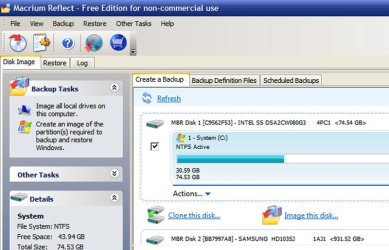
The free version of Macrium Reflect 5.0 appears to offer both cloning and imaging. See pic:
 

Attachments

  • Untitled-1.jpg
    Untitled-1.jpg
    79.1 KB · Views: 53

My Computer

Computer type
PC/Desktop
Computer Manufacturer/Model Number
Ignatz Special; 4 speed manual gearbox; factory air conditioning; one of one
OS
Windows 7 Home Premium SP1, 64-bit
CPU
Intel Skylake i5-6600K, not overclocked
Motherboard
AsRock Z170M Extreme 4, micro ATX
Memory
8 GB HyperX DDR4-2666 (2 x 4 GB)
Graphics Card(s)
none; graphics are integrated on CPU
Sound Card
onboard: Realtek ALC1150; external: USB Behringer UF0-202
Monitor(s) Displays
Dell S2340M 23 inch IPS
Screen Resolution
1600 x 900
Hard Drives
System: Crucial MX100 series SSD, 128 GB;
Data: Samsung Spinpoint 103SJ, 1 TB;
Backup: WD Caviar Green WD30EZRX-00D8PB0, 3 TB
PSU
Rosewill SilentNight 500 watt fanless, semi-modular
Case
Antec Solo II
Cooling
Noctua NH-U12S; Noctua F12 intake, Noctua S12A exhaust
Keyboard
Microsoft 200 6JH-00001 USB
Mouse
Dell or Microsoft optical wired; USB
Antivirus
Microsoft Security Essentials and Malwarebytes Premium
Browser
Pale Moon
Other Info
All fans PWM; speeds at idle: CPU circa 500 rpm; intake circa 600 rpm; exhaust circa 600 rpm; CPU temps 27 idle and 47 C load in a warm room (27 C/81 F) when running Intel Extreme Tuning Utility stress test.
The free version of Macrium Reflect 5.0 appears to offer both cloning and imaging. See pic:

Yes it does. I have used it for cloning but not on an OS disk.
 

My Computer

Computer type
Laptop
Computer Manufacturer/Model Number
Hewlett-Packard/G62-107SA Notebook
OS
Microsoft Windows 7 Home Premium 64-bit Service Pack 1
CPU
Intel(R) Core(TM) i3 CPU M 330 @ 2.13GHz
Motherboard
Hewlett-Packard 1425
Memory
8 GB DDR3
Graphics Card(s)
Intel(R) HD Graphics
Sound Card
Realtek High Definition Audio
Monitor(s) Displays
Builtin
Screen Resolution
1366 x 768 x 32 bits (4294967296 colors) @ 60 Hz
Hard Drives
250 GB SATA Hard Disk Drive 7200 rpm
2TB Seagate GoFlex USB 2 Drive
1TB Iomega Prestige USB 2 Drive
1.5TB Iomega Prestige USB 2 Drive (Samsung)
2TB WD MyBook Live NAS.
Mouse
Logitech Anywhere MX
Internet Speed
152 Mbs download 10 Mbs upload
Antivirus
Norton 360
Browser
Chrome
2- The program casper (which I am thinking about buying) sounds like they just do cloning with supposedly better algorithm (faster, bla bla) or are they doing something different . I did not see the word cloning in their feature set.

Casper looks to be a high-priced cloning tool for encrypted hard drives.
You may do fine with free software. Not clear what your purpose is.
Here's something that hasn't been mentioned.
When you clone a HD your cloned drive has the same partition size of the partition you cloned. There may be a way around that - don't know. And that's fine if you intend to use it as your new system drive right away.
Otherwise it will sit somewhere unused, because you really don't want to write to it as a "working" drive. If that's okay, then a cloned system drive is fine. Put it in or connect it when you need it.
A system image created with Macrium, Ghost, True Image, etc., can be put in a folder on any drive. It is a simple file, and always smaller than the partition size, and can also be compressed when making it.
To restore the image you need to boot a CD or thumb drive. But you don't necessarily have to connect any hardware to get your system back.
With a cloned drive you don't need a boot CD, but have to connect the drive.
I don't know if you have to boot a CD to clone - never did it.
System imaging is more flexible. Personally, it has always served my needs, and that's why I have no experience cloning.
My main point is that you have to define your purpose before you decide whether to clone or image.
 

My Computer

Computer Manufacturer/Model Number
Home Built
OS
Windows 7 Ultimate x64
CPU
QuadCore Intel Core i7 920, 2666 MHz (20 x 133)
Motherboard
Asus P6T
Memory
6134 MB (DDR3-1333 DDR3 SDRAM)
Graphics Card(s)
(2 - SLI) NVIDIA GeForce GTS 250 (1024 MB)
Sound Card
Onboard Realtek ALC888/1200 @ Intel 82801JB IC
Monitor(s) Displays
HDMII
Screen Resolution
1280 x 800
Hard Drives
Crucial M4 (64 GB SSD)
WD Caviar Blacks
WD5001AALS-00J7B1 ATA Device (465 GB)
WD5001AALS-00L3B2 ATA Device (465 GB)
WD Elements USB External (250 GB)
PSU
Corsair 550
Case
iStarUSA S-10000BL Black
This is very true. You might also have mentioned that with imaging you can have as many images as your backup disk will hold.
 

My Computer

Computer type
Laptop
Computer Manufacturer/Model Number
Hewlett-Packard/G62-107SA Notebook
OS
Microsoft Windows 7 Home Premium 64-bit Service Pack 1
CPU
Intel(R) Core(TM) i3 CPU M 330 @ 2.13GHz
Motherboard
Hewlett-Packard 1425
Memory
8 GB DDR3
Graphics Card(s)
Intel(R) HD Graphics
Sound Card
Realtek High Definition Audio
Monitor(s) Displays
Builtin
Screen Resolution
1366 x 768 x 32 bits (4294967296 colors) @ 60 Hz
Hard Drives
250 GB SATA Hard Disk Drive 7200 rpm
2TB Seagate GoFlex USB 2 Drive
1TB Iomega Prestige USB 2 Drive
1.5TB Iomega Prestige USB 2 Drive (Samsung)
2TB WD MyBook Live NAS.
Mouse
Logitech Anywhere MX
Internet Speed
152 Mbs download 10 Mbs upload
Antivirus
Norton 360
Browser
Chrome
This is very true. You might also have mentioned that with imaging you can have as many images as your backup disk will hold.


I agree, I think cloning and imaging could be part of your overall backup strategy. You could have a clone of your sys drive and several images versions.

For data, it is more of a grey area as you need a lot space for it and you may also want incremental images copies as well.

Victor: Casper looks to be a high-priced cloning tool for encrypted hard drives.

For $50 is a high price compare to free but it is within the range of most paid products.


thanks for all the feedback
 

My Computer

OS
win 7 64
This is very true. You might also have mentioned that with imaging you can have as many images as your backup disk will hold.


I agree, I think cloning and imaging could be part of your overall backup strategy. You could have a clone of your sys drive and several images versions.

For data, it is more of a grey area as you need a lot space for it and you may also want incremental images copies as well.

Victor: Casper looks to be a high-priced cloning tool for encrypted hard drives.

For $50 is a high price compare to free but it is within the range of most paid products.


thanks for all the feedback

I disagree on imaging data partitions. I think a File and Folder backup is preferable. The one I use is FreeFileSync which allows you to create a mirror with versions so you only have to do a full backup the first time. FreeFileSync | Free Security & Utilities software downloads at SourceForge.net. I made a video of it if you are interested. Backup With FreeFileSync - YouTube
 

My Computer

Computer type
Laptop
Computer Manufacturer/Model Number
Hewlett-Packard/G62-107SA Notebook
OS
Microsoft Windows 7 Home Premium 64-bit Service Pack 1
CPU
Intel(R) Core(TM) i3 CPU M 330 @ 2.13GHz
Motherboard
Hewlett-Packard 1425
Memory
8 GB DDR3
Graphics Card(s)
Intel(R) HD Graphics
Sound Card
Realtek High Definition Audio
Monitor(s) Displays
Builtin
Screen Resolution
1366 x 768 x 32 bits (4294967296 colors) @ 60 Hz
Hard Drives
250 GB SATA Hard Disk Drive 7200 rpm
2TB Seagate GoFlex USB 2 Drive
1TB Iomega Prestige USB 2 Drive
1.5TB Iomega Prestige USB 2 Drive (Samsung)
2TB WD MyBook Live NAS.
Mouse
Logitech Anywhere MX
Internet Speed
152 Mbs download 10 Mbs upload
Antivirus
Norton 360
Browser
Chrome
I disagree on imaging data partitions. I think a File and Folder backup is preferable. The one I use is FreeFileSync which allows you to create a mirror with versions so you only have to do a full backup the first time. FreeFileSync | Free Security & Utilities software downloads at SourceForge.net. I made a video of it if you are interested. Backup With FreeFileSync - YouTube

Some questions:
1- Do you have experience with large chunk of data 1Tb? (nice video by the way)
2- When you say with mirror with versions, are you able automatically select how many copies of version you want to keep?
3- Does it stop access to the disks that you are mirror from and to?
4- How do know you if a file copy fails ? (log file or some other indication, like email)
5- Any idea of the time it takes per GB of data approx ?


Would you mind sharing why imaging with incremental backups is not a good idea for data?

thanks
 

My Computer

OS
win 7 64
Thanks
1. No my total data is about 500GB.
2. No that is something you will have to to as a manual exercise from time to time. It only creates a version if there are any changes to the folder pair.
3. No it uses VSS like Windows backup to freeze the state.
4. There is a log created with each run showing exactly what happened.
5. It depends on a number of factors like any file copy. The type of disk and the file sizes being the main determinants. I use a USB attached backup drive and most of my data is also on a USB attached drive so I have the worst of all situations. Obviously the initial backup took some time but I spread the pain around by by gradually adding folder pairs over a week. Now that it is all set up I have created a task to run the job daily and that usually takes less than a minute to run. Today it backed up 42 files, 1.0GB of data in 1 minute 21 seconds.
 

My Computer

Computer type
Laptop
Computer Manufacturer/Model Number
Hewlett-Packard/G62-107SA Notebook
OS
Microsoft Windows 7 Home Premium 64-bit Service Pack 1
CPU
Intel(R) Core(TM) i3 CPU M 330 @ 2.13GHz
Motherboard
Hewlett-Packard 1425
Memory
8 GB DDR3
Graphics Card(s)
Intel(R) HD Graphics
Sound Card
Realtek High Definition Audio
Monitor(s) Displays
Builtin
Screen Resolution
1366 x 768 x 32 bits (4294967296 colors) @ 60 Hz
Hard Drives
250 GB SATA Hard Disk Drive 7200 rpm
2TB Seagate GoFlex USB 2 Drive
1TB Iomega Prestige USB 2 Drive
1.5TB Iomega Prestige USB 2 Drive (Samsung)
2TB WD MyBook Live NAS.
Mouse
Logitech Anywhere MX
Internet Speed
152 Mbs download 10 Mbs upload
Antivirus
Norton 360
Browser
Chrome
In terms of immediately bootable then:
1) A clone requires a new HDD at the time of cloning. Therefore, immediately bootable in that sense.
2) An image + reimage to a new HDD is bootable. The reimaged HDD is immediately bootable. This is how I create a cold immediately bootable standby. I see no reason to clone.
3) Given you can store many images on an external HDD then reimaging a more recent image to a spare HDD is a better option IMO provided you have ~45 minutes to spare.
 

My Computer

Computer type
PC/Desktop
Computer Manufacturer/Model Number
Own build
OS
Windows 7x64 Home Premium SP1
CPU
Intel i7 2600k
Motherboard
ASUS P8Z68 Deluxe
Memory
G.Skill Ripjaws (DDR3-1600) 2x4GB
Graphics Card(s)
Nvidia GeForce GTS 450; Intel HD Graphics 3000(GT2+)
Monitor(s) Displays
Dell Ultrasharp IPS panel U2311H, Samsung SyncMaster P2350
Screen Resolution
1920x1080
Hard Drives
Samsung 850 Pro SSD 256GB, Samsung SSD 840 120GB, Seagates 1TB Barracuda ST31000528AS x2
PSU
Seasonic M12II 520W
Case
Lian Li Lancool PC-K60
Cooling
Case: 1x120mm, 3x140mm CPU: Hyper 212+
Keyboard
Logitech MK520 (wireless)
Mouse
Logitech MK520
Internet Speed
6-7 Mbps
Antivirus
Norton Security Premium, Malwarebytes on 2 (MSE on 3rd PC)
Browser
FireFox
Other Info
Audio: Logitech Z523 2.1
In terms of immediately bootable then:
1) A clone requires a new HDD at the time of cloning. Therefore, immediately bootable in that sense.
2) An image + reimage to a new HDD is bootable. The reimaged HDD is immediately bootable. This is how I create a cold immediately bootable standby. I see no reason to clone.
3) Given you can store many images on an external HDD then reimaging a more recent image to a spare HDD is a better option IMO provided you have ~45 minutes to spare.

Hi:

Can you explain what an image plus reimage means?
I thought an imaged HDD is in format that need a recovery CD to uncompressed the data into the new or same HDD. The cloning is basically a mirror copy of the HDD sector by sector in a format that you can browse with a file viewer with identical file structure as the original and therefore immediately bootable.

How do you create this image reimage setup? Can you do it with WINDOWS backup?

thanks
 

My Computer

OS
win 7 64
In terms of immediately bootable then:
1) A clone requires a new HDD at the time of cloning. Therefore, immediately bootable in that sense.
2) An image + reimage to a new HDD is bootable. The reimaged HDD is immediately bootable. This is how I create a cold immediately bootable standby. I see no reason to clone.
3) Given you can store many images on an external HDD then reimaging a more recent image to a spare HDD is a better option IMO provided you have ~45 minutes to spare.

Hi:

Can you explain what an image plus reimage means?
I thought an imaged HDD is in format that need a recovery CD to uncompressed the data into the new or same HDD. The cloning is basically a mirror copy of the HDD sector by sector in a format that you can browse with a file viewer with identical file structure as the original and therefore immediately bootable.

How do you create this image reimage setup? Can you do it with WINDOWS backup?

thanks

I think MJF simply means make an image file and restore it.

"Image" means make the image file.

"Reimage" means restore it.
 

My Computer

Computer type
PC/Desktop
Computer Manufacturer/Model Number
Ignatz Special; 4 speed manual gearbox; factory air conditioning; one of one
OS
Windows 7 Home Premium SP1, 64-bit
CPU
Intel Skylake i5-6600K, not overclocked
Motherboard
AsRock Z170M Extreme 4, micro ATX
Memory
8 GB HyperX DDR4-2666 (2 x 4 GB)
Graphics Card(s)
none; graphics are integrated on CPU
Sound Card
onboard: Realtek ALC1150; external: USB Behringer UF0-202
Monitor(s) Displays
Dell S2340M 23 inch IPS
Screen Resolution
1600 x 900
Hard Drives
System: Crucial MX100 series SSD, 128 GB;
Data: Samsung Spinpoint 103SJ, 1 TB;
Backup: WD Caviar Green WD30EZRX-00D8PB0, 3 TB
PSU
Rosewill SilentNight 500 watt fanless, semi-modular
Case
Antec Solo II
Cooling
Noctua NH-U12S; Noctua F12 intake, Noctua S12A exhaust
Keyboard
Microsoft 200 6JH-00001 USB
Mouse
Dell or Microsoft optical wired; USB
Antivirus
Microsoft Security Essentials and Malwarebytes Premium
Browser
Pale Moon
Other Info
All fans PWM; speeds at idle: CPU circa 500 rpm; intake circa 600 rpm; exhaust circa 600 rpm; CPU temps 27 idle and 47 C load in a warm room (27 C/81 F) when running Intel Extreme Tuning Utility stress test.
In terms of immediately bootable then:
1) A clone requires a new HDD at the time of cloning. Therefore, immediately bootable in that sense.
2) An image + reimage to a new HDD is bootable. The reimaged HDD is immediately bootable. This is how I create a cold immediately bootable standby. I see no reason to clone.
3) Given you can store many images on an external HDD then reimaging a more recent image to a spare HDD is a better option IMO provided you have ~45 minutes to spare.

Hi:

Can you explain what an image plus reimage means?
I thought an imaged HDD is in format that need a recovery CD to uncompressed the data into the new or same HDD. The cloning is basically a mirror copy of the HDD sector by sector in a format that you can browse with a file viewer with identical file structure as the original and therefore immediately bootable.

How do you create this image reimage setup? Can you do it with WINDOWS backup?

thanks

I think MJF simply means make an image file and restore it.

"Image" means make the image file.

"Reimage" means restore it.
Correct but I don't use the term "Restore" because a Windows "System Restore" is actually different and uses Restore Points and is not a (system) reimage. Maybe I shouldn't be lazy and say "system image recovery".
 

My Computer

Computer type
PC/Desktop
Computer Manufacturer/Model Number
Own build
OS
Windows 7x64 Home Premium SP1
CPU
Intel i7 2600k
Motherboard
ASUS P8Z68 Deluxe
Memory
G.Skill Ripjaws (DDR3-1600) 2x4GB
Graphics Card(s)
Nvidia GeForce GTS 450; Intel HD Graphics 3000(GT2+)
Monitor(s) Displays
Dell Ultrasharp IPS panel U2311H, Samsung SyncMaster P2350
Screen Resolution
1920x1080
Hard Drives
Samsung 850 Pro SSD 256GB, Samsung SSD 840 120GB, Seagates 1TB Barracuda ST31000528AS x2
PSU
Seasonic M12II 520W
Case
Lian Li Lancool PC-K60
Cooling
Case: 1x120mm, 3x140mm CPU: Hyper 212+
Keyboard
Logitech MK520 (wireless)
Mouse
Logitech MK520
Internet Speed
6-7 Mbps
Antivirus
Norton Security Premium, Malwarebytes on 2 (MSE on 3rd PC)
Browser
FireFox
Other Info
Audio: Logitech Z523 2.1
Back
Top