booted up to BSOD after computer logo

meesh

New member
Local time
8:17 AM
Messages
19
booted up to BSOD a few days after unexpected shutdown

I don't know if anyone uses W7 or monitors this forum but today I turned on my computer and immediately after showing laptop manufacturer name it was BSOD. It continued to start up perfectly fine - not a restart, just continued with startup after a few seconds.


This is after a few days ago my computer started up and I got a message saying: Windows has recovered from an unexpected shutdown... but it shut down perfectly fine before that. It said the problem is BlueScreen (image attached). I immediately did chkdsk /f /r /x and no issues.


W7 is old but have not had issues before this week. I haven't made a single change or update to any hardware or softwareand scans show no malware. ANY help would be appreciated! Thanks.
 

Attachments

Last edited:

My Computers

System One System Two

  • Computer type
    Laptop
    Computer Manufacturer/Model Number
    Lenovo Thinkpad
    OS
    W7 professional 64
    CPU
    i5 2.3GHz
    Memory
    8 gb
    Graphics Card(s)
    Intel HD 520
    Monitor(s) Displays
    15.6 HD LED AG
    Screen Resolution
    1366x768
    Hard Drives
    500GB SATA HDD
    Internet Speed
    100+
    Antivirus
    Malwarebytes Premium
    Browser
    Firefox
  • Computer type
    PC/Desktop

My Computers

System One System Two

I don't understand.. I followed the instructions when posting which says to attach the zip file provided by DM Log Collector - the zip file is attached to the post. The screen lasted a few seconds - I have no way of knowing what it said in detail.
 

My Computers

System One System Two

  • Computer type
    Laptop
    Computer Manufacturer/Model Number
    Lenovo Thinkpad
    OS
    W7 professional 64
    CPU
    i5 2.3GHz
    Memory
    8 gb
    Graphics Card(s)
    Intel HD 520
    Monitor(s) Displays
    15.6 HD LED AG
    Screen Resolution
    1366x768
    Hard Drives
    500GB SATA HDD
    Internet Speed
    100+
    Antivirus
    Malwarebytes Premium
    Browser
    Firefox
  • Computer type
    PC/Desktop
I apologize. I didn't see your attached file. I didn't find much in it. From what I can see Windows is finding file system corruption:

Crash Dump Analysis
--------------------------------------------------------------------------------

Crash dumps are enabled on your computer. This system is not configured for complete or automatic crash dumps. For best results, configure your system to write out complete or automatic crash dumps. Select Tools->Crash Dump Configuration from the main menu to configure your system to write out complete memory dumps.

Crash dump directories:
MEESH-PC-Fri_07_12_2024_192800_50

On Thu 7/4/2024 3:54:45 PM your computer crashed or a problem was reported

Crash dump file: \MEESH-PC-Fri_07_12_2024_192800_50\070424-25100-01.dmp (Minidump)
Bugcheck code: 0x24(0x1904FB, 0xFFFFF880041A3468, 0xFFFFF880041A2CD0, 0xFFFFF88002639419)
Bugcheck name: NTFS_FILE_SYSTEM
Driver or module in which error occurred: Ntfs.sys (Ntfs+0x4261)
File path: C:\Windows\System32\Drivers\Ntfs.sys
Description: NT File System Driver
Product: Microsoft® Windows® Operating System
Company: Microsoft Corporation
Bug check description: This indicates a problem occurred in the NTFS file system.
Analysis: This bugcheck indicates that the error is file system or disk related. If no offending driver is found, it is suggested that you run CHKDSK to check your drive(s) for errors. The crash took place in a file system driver. Since there is no other responsible driver detected, this could be pointing to a malfunctioning drive or corrupted disk. It's suggested that you run CHKDSK to check your drive(s) for errors.


On Wed 7/3/2024 9:25:52 AM your computer crashed or a problem was reported

Crash dump file: \MEESH-PC-Fri_07_12_2024_192800_50\070324-18111-01.dmp (Minidump)
Bugcheck code: 0x24(0x1904FB, 0xFFFFF880041AA468, 0xFFFFF880041A9CD0, 0xFFFFF88002618419)
Bugcheck name: NTFS_FILE_SYSTEM
Driver or module in which error occurred: Ntfs.sys (Ntfs+0x4261)
File path: C:\Windows\System32\Drivers\Ntfs.sys
Description: NT File System Driver
Product: Microsoft® Windows® Operating System
Company: Microsoft Corporation
Bug check description: This indicates a problem occurred in the NTFS file system.
Analysis: This bugcheck indicates that the error is file system or disk related. If no offending driver is found, it is suggested that you run CHKDSK to check your drive(s) for errors. The crash took place in a file system driver. Since there is no other responsible driver detected, this could be pointing to a malfunctioning drive or corrupted disk. It's suggested that you run CHKDSK to check your drive(s) for errors.

If you tried chkdsk then right click on command prompt from your start menu and select run as administrator. Then type the following into the black box followed by enter.

sfc /scannow

Let it run. It could take a few hours. Also you should download hard drive diagnostic tools from your hard drive's manufacturer and scan your hard drive using the long tests. That will also take a few hours.
 

My Computers

System One System Two

Hello,

Last week I did both CHKDSK and scannow.. yesterday my computer booted up to CHKDSK because I had requested one on the next startup. Everything started fine but when powering off it hung on the shutting down screen & I had to force shutdown with power button (but it started up fine the next time).

I just did scannow as admin. Took less than 30 mins. and said did not find any integrity violations.

Unfortunately, the only diagnostics tool I have already installed from the manufacturer (Lenovo) is a 'lite' version & it has always said everything is fine and only does short tests of things. I tried to downloaded a diff./updated diagnostic tool from their site but when I try to run it I get an error saying it was unable to start correctly - even though it said it was compatible for W7 I suspect it's not.

I appreciate any ideas or help you can give.

- - - Updated - - -

My computer shut down perfectly yesterday but today it won't turn on!! Right after the logo and welcome I got BSOD but this time it didn't start up.. it went back to logo and back to BSOD over and over.. I forced shutdown and went to F10 and am running manufacture diagnostic. It's passing everything. I don't know why this is happening suddenly (I made no changes).
 
Last edited:

My Computers

System One System Two

  • Computer type
    Laptop
    Computer Manufacturer/Model Number
    Lenovo Thinkpad
    OS
    W7 professional 64
    CPU
    i5 2.3GHz
    Memory
    8 gb
    Graphics Card(s)
    Intel HD 520
    Monitor(s) Displays
    15.6 HD LED AG
    Screen Resolution
    1366x768
    Hard Drives
    500GB SATA HDD
    Internet Speed
    100+
    Antivirus
    Malwarebytes Premium
    Browser
    Firefox
  • Computer type
    PC/Desktop
I said the hard drive's manufacturer not the computer's manufacturer. It'll be made by seagate, western digital, toshiba, hitachi, etc. They will have bootable disks with long tests. You can try seatools but I don't know if it'll run if the drive isn't a seagate. SeaTools | Support Seagate US Whatever you use run the long tests. BTW I strongly suggest that you backup your important documents.
 

My Computers

System One System Two

Sorry.. I misunderstood. My hard drive is WD. I was posting from my phone because it wouldn't boot up.. After the diagnostic it started and I never turned it off. Event viewer says: The driver detected a controller error on \Device\Harddisk2\DR5.

I tried to download the most recent WD testing software but I don't think W7 is supported. I think I'm using an older one. I'm running the only test now - I hope it's the right one.

- - - Updated - - -

I ran 'extended' test it said everything was fine. I don't think it was a proper long test... also, CrystalDiskInfo and HDDScan also say everything is normal..
'Not sure if this is helpful (I didn't see a txt file from the WD test):

----------------------------------------------------------------------------
CrystalDiskInfo 9.3.2 (C) 2008-2024 hiyohiyo
Crystal Dew World: Crystal Dew World [en] -
----------------------------------------------------------------------------

OS : Windows 7 Professional [6.1 Build 7601] (x64)
Date : 2024/07/16 10:59:23

-- Controller Map ----------------------------------------------------------
+ Intel(R) 6th Generation Core Processor Family Platform I/O SATA AHCI Controller [ATA]
- WDC WD5000LPLX-08ZNT SCSI Disk Device
- HL-DT-ST DVDRAM GUE0N SCSI CdRom Device
- BayHubTech Integrated MMC/SD controller [SCSI]

-- Disk List ---------------------------------------------------------------
(01) WDC WD5000LPLX-08ZNTT0 : 500.1 GB [0/0/0, pd1]

----------------------------------------------------------------------------
(01) WDC WD5000LPLX-08ZNTT0
----------------------------------------------------------------------------
Model : WDC WD5000LPLX-08ZNTT0
Firmware : 05.01A05
Serial Number : WD-WXK1A475JPJP
Disk Size : 500.1 GB (8.4/137.4/500.1/----)
Buffer Size : 32767 KB
Queue Depth : 32
# of Sectors : 976773168
Rotation Rate : 7200 RPM
Interface : Serial ATA
Major Version : ACS-2
Minor Version : ACS-3 Revision 3b
Transfer Mode : SATA/600 | SATA/600
Power On Hours : 22310 hours
Power On Count : 4235 count
Temperature : 36 C (96 F)
Health Status : Good
Features : S.M.A.R.T., APM, NCQ, GPL
APM Level : 0060h [ON]
AAM Level : ----
Drive Letter : C:

-- S.M.A.R.T. --------------------------------------------------------------
ID Cur Wor Thr RawValues(6) Attribute Name
01 200 200 _51 000000000000 Read Error Rate
03 144 142 _21 000000000708 Spin-Up Time
04 _46 _46 __0 00000000D313 Start/Stop Count
05 200 200 140 000000000000 Reallocated Sectors Count
07 200 200 _51 000000000000 Seek Error Rate
09 _70 _70 __0 000000005726 Power-On Hours
0A 100 100 __0 000000000000 Spin Retry Count
0B 100 100 __0 000000000000 Recalibration Retries
0C _96 _96 __0 00000000108B Power Cycle Count
C0 200 200 __0 00000000004D Power-off Retract Count
C1 134 134 __0 0000000307AB Load/Unload Cycle Count
C2 107 _83 __0 000000000024 Temperature
C4 200 200 __0 000000000000 Reallocation Event Count
C5 200 200 __0 000000000000 Current Pending Sector Count
C6 100 253 __0 000000000000 Uncorrectable Sector Count
C7 200 200 __0 000000000000 UltraDMA CRC Error Count
C8 200 200 __0 000000000000 Write Error Rate
F0 _71 _71 __0 00000000554E Head Flying Hours

-- IDENTIFY_DEVICE ---------------------------------------------------------
0 1 2 3 4 5 6 7 8 9
000: 427A 3FFF C837 0010 0000 0000 003F 0000 0000 0000
010: 2020 2020 2057 442D 5758 4B31 4134 3735 4A50 4A50
020: 0000 FFFF 0000 3035 2E30 3141 3035 5744 4320 5744
030: 3530 3030 4C50 4C58 2D30 385A 4E54 5430 2020 2020
040: 2020 2020 2020 2020 2020 2020 2020 8010 4000 2F00
050: 4000 0000 0000 0007 3FFF 0010 003F FC10 00FB 0110
060: FFFF 0FFF 0000 0007 0003 0078 0078 0078 0078 0D00
070: 0000 0000 0000 0000 0000 001F 9D0E 0006 004C 004C
080: 03FE 001F 346B 7D09 6123 3469 BC09 6123 407F 0024
090: 0024 0060 FFFE 0000 0000 0000 0000 0000 0000 0000
100: 6030 3A38 0000 0000 0000 0000 6003 0000 5001 4EE6
110: B246 24BE 0000 0000 0000 0000 0000 0000 0000 401C
120: 401C 0000 0000 0000 0000 0000 0000 0000 0029 0400
130: 0001 0000 0000 0000 0000 0000 0000 0000 0000 0000
140: 0000 0000 0004 0000 0000 0000 0000 0000 0000 0000
150: 0000 0000 0000 0000 0000 0000 0000 0000 0000 0000
160: 0000 0000 0000 0000 0000 0000 0000 0000 0000 0000
170: 0000 0000 0000 0000 0000 0000 0000 0000 0000 0000
180: 0000 0000 0000 0000 0000 0000 0000 0000 0000 0000
190: 0000 0000 0000 0000 0000 0000 0000 0000 0000 0000
200: 0000 0000 0000 0000 0000 0000 3035 0000 0000 4000
210: 0000 0000 0000 0000 0000 0000 0000 1C20 0000 0000
220: 0000 0000 107E 0000 0000 0000 0000 0000 0000 0000
230: 0000 0000 0000 0000 0001 1000 0000 0000 0000 0000
240: 0000 0000 0000 0000 0000 0000 0000 0000 0000 0000
250: 0000 0000 0000 0000 0000 49A5

-- SMART_READ_DATA ---------------------------------------------------------
+0 +1 +2 +3 +4 +5 +6 +7 +8 +9 +A +B +C +D +E +F
000: 10 00 01 2F 00 C8 C8 00 00 00 00 00 00 00 03 27
010: 00 90 8E 08 07 00 00 00 00 00 04 32 00 2E 2E 13
020: D3 00 00 00 00 00 05 33 00 C8 C8 00 00 00 00 00
030: 00 00 07 2F 00 C8 C8 00 00 00 00 00 00 00 09 32
040: 00 46 46 26 57 00 00 00 00 00 0A 32 00 64 64 00
050: 00 00 00 00 00 00 0B 32 00 64 64 00 00 00 00 00
060: 00 00 0C 32 00 60 60 8B 10 00 00 00 00 00 C0 32
070: 00 C8 C8 4D 00 00 00 00 00 00 C1 32 00 86 86 AB
080: 07 03 00 00 00 00 C2 22 00 6B 53 24 00 00 00 00
090: 00 00 C4 32 00 C8 C8 00 00 00 00 00 00 00 C5 32
0A0: 00 C8 C8 00 00 00 00 00 00 00 C6 30 00 64 FD 00
0B0: 00 00 00 00 00 00 C7 32 00 C8 C8 00 00 00 00 00
0C0: 00 00 C8 08 00 C8 C8 00 00 00 00 00 00 00 F0 32
0D0: 00 47 47 4E 55 00 00 00 00 00 00 00 00 00 00 00
0E0: 00 00 00 00 00 00 00 00 00 00 00 00 00 00 00 00
0F0: 00 00 00 00 00 00 00 00 00 00 00 00 00 00 00 00
100: 00 00 00 00 00 00 00 00 00 00 00 00 00 00 00 00
110: 00 00 00 00 00 00 00 00 00 00 00 00 00 00 00 00
120: 00 00 00 00 00 00 00 00 00 00 00 00 00 00 00 00
130: 00 00 00 00 00 00 00 00 00 00 00 00 00 00 00 00
140: 00 00 00 00 00 00 00 00 00 00 00 00 00 00 00 00
150: 00 00 00 00 00 00 00 00 00 00 00 00 00 00 00 00
160: 00 00 00 00 00 00 00 00 00 00 00 00 7C 1A 01 7B
170: 03 00 01 00 02 50 05 00 00 00 00 00 00 00 00 00
180: 00 00 01 02 00 00 00 00 00 00 00 00 00 00 00 00
190: 00 00 00 00 00 00 00 00 00 00 00 00 00 00 00 00
1A0: 00 00 00 00 00 00 00 00 00 00 00 00 00 00 00 00
1B0: 00 00 00 00 00 00 00 00 00 00 00 00 00 00 00 00
1C0: 00 00 00 00 00 00 00 00 00 00 00 00 00 00 00 00
1D0: 00 00 00 00 00 00 00 00 00 00 00 00 00 00 00 00
1E0: 00 00 00 00 00 00 00 00 00 00 00 00 00 00 00 00
1F0: 00 00 00 00 00 00 00 00 00 00 00 00 00 00 00 94

-- SMART_READ_THRESHOLD ----------------------------------------------------
+0 +1 +2 +3 +4 +5 +6 +7 +8 +9 +A +B +C +D +E +F
000: 10 00 01 33 C8 C8 00 00 00 00 00 00 00 00 03 15
010: 00 00 00 00 00 00 00 00 00 00 04 00 00 00 00 00
020: 00 00 00 00 00 00 05 8C 00 00 00 00 00 00 00 00
030: 00 00 07 33 C8 C8 00 00 00 00 00 00 00 00 09 00
040: 00 00 00 00 00 00 00 00 00 00 0A 00 00 00 00 00
050: 00 00 00 00 00 00 0B 00 00 00 00 00 00 00 00 00
060: 00 00 0C 00 00 00 00 00 00 00 00 00 00 00 C0 00
070: 00 00 00 00 00 00 00 00 00 00 C1 00 00 00 00 00
080: 00 00 00 00 00 00 C2 00 00 00 00 00 00 00 00 00
090: 00 00 C4 00 00 00 00 00 00 00 00 00 00 00 C5 00
0A0: 00 00 00 00 00 00 00 00 00 00 C6 00 00 00 00 00
0B0: 00 00 00 00 00 00 C7 00 00 00 00 00 00 00 00 00
0C0: 00 00 C8 00 C8 C8 00 00 00 00 00 00 00 00 F0 00
0D0: 00 00 00 00 00 00 00 00 00 00 00 00 00 00 00 00
0E0: 00 00 00 00 00 00 00 00 00 00 00 00 00 00 00 00
0F0: 00 00 00 00 00 00 00 00 00 00 00 00 00 00 00 00
100: 00 00 00 00 00 00 00 00 00 00 00 00 00 00 00 00
110: 00 00 00 00 00 00 00 00 00 00 00 00 00 00 00 00
120: 00 00 00 00 00 00 00 00 00 00 00 00 00 00 00 00
130: 00 00 00 00 00 00 00 00 00 00 00 00 00 00 00 00
140: 00 00 00 00 00 00 00 00 00 00 00 00 00 00 00 00
150: 00 00 00 00 00 00 00 00 00 00 00 00 00 00 00 00
160: 00 00 00 00 00 00 00 00 00 00 00 00 00 00 00 00
170: 00 00 00 00 00 00 00 00 00 00 00 00 00 00 00 00
180: 00 00 00 00 00 00 00 00 00 00 00 00 00 00 00 00
190: 00 00 00 00 00 00 00 00 00 00 00 00 00 00 00 00
1A0: 00 00 00 00 00 00 00 00 00 00 00 00 00 00 00 00
1B0: 00 00 00 00 00 00 00 00 00 00 00 00 00 00 00 00
1C0: 00 00 00 00 00 00 00 00 00 00 00 00 00 00 00 00
1D0: 00 00 00 00 00 00 00 00 00 00 00 00 00 00 00 00
1E0: 00 00 00 00 00 00 00 00 00 00 00 00 00 00 00 00
1F0: 00 00 00 00 00 00 00 00 00 00 00 00 00 00 00 EA

 
Last edited:

My Computers

System One System Two

  • Computer type
    Laptop
    Computer Manufacturer/Model Number
    Lenovo Thinkpad
    OS
    W7 professional 64
    CPU
    i5 2.3GHz
    Memory
    8 gb
    Graphics Card(s)
    Intel HD 520
    Monitor(s) Displays
    15.6 HD LED AG
    Screen Resolution
    1366x768
    Hard Drives
    500GB SATA HDD
    Internet Speed
    100+
    Antivirus
    Malwarebytes Premium
    Browser
    Firefox
  • Computer type
    PC/Desktop
You can't accurately and sufficiently scan and fix hard drive issues while Windows is running since part of the drive is in use. You need WD's bootable tools to be able to scan the entire hard drive. Go here: Western Digital Repair Tool | Repair WD hard drive for Windows 11, 10 Try this section:
[h=4]Step 1. Create a Windows PE bootable drive[/h]
If that doesn't work sea tools has the same thing. I provided the link.
 

My Computers

System One System Two

Quite a bit has changed since I first posted.. First I was told it might be hard drive.. I did every scan there is (CrystalDiskInfo, WD, HD tune) and all say hard drive is OK.. Then i was told it might be Malwarebytes - though I never had issue with it, I uinstalled and reinstalled. I did chkdsk and sfc scannow - all were normal. I took it to a repair shop and without looking at it they said possible software issue but I can't figure it out. The computer seems to lag in shutting down (sometimes says waiting for programs, sometimes says task host(?) so maybe it's not a startup issue it's a shutdown issue because even though it shuts down fine I did get 'Windows recovered from unexpected shutdown' message twice on startup (see above).. though I haven't gotten that lately. Since the original BSOD I only got it again once.
 

My Computers

System One System Two

  • Computer type
    Laptop
    Computer Manufacturer/Model Number
    Lenovo Thinkpad
    OS
    W7 professional 64
    CPU
    i5 2.3GHz
    Memory
    8 gb
    Graphics Card(s)
    Intel HD 520
    Monitor(s) Displays
    15.6 HD LED AG
    Screen Resolution
    1366x768
    Hard Drives
    500GB SATA HDD
    Internet Speed
    100+
    Antivirus
    Malwarebytes Premium
    Browser
    Firefox
  • Computer type
    PC/Desktop
I'm sorry that I missed this. Running hard drive scans in windows is just about pointless because windows is using the drive no matter what the software is. I referred you to using diagnostic tools that you either create on a cd or put on a usb drive and boot into without running windows. Then the drive isn't in use and you can get an adequate scan. Until you've done that you haven't adequately scanned the hard drive for issues. Try this specifically: https://www.seagate.com/content/dam...es/seatools/USBbootSetup-SeaToolsBootable.zip
 

My Computers

System One System Two

Since posting I haven't had any issues.. I purchased a hard drive but returned it. I will try what you said. The first link said for W10 & 11. Are there instructions for the file after download ? (I assume I have to change settings to boot from disc/usb which i can look up but do I have to know anything else?)

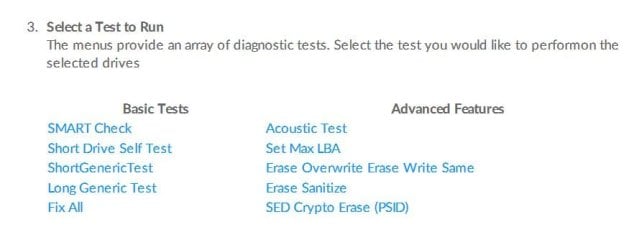
Actually, I see instructions here SeaTools Bootable User Manual - Using SeaTools | Seagate US
but I'm not sure which test to run..?


Thank you.
 

Attachments

  • st.JPG
    st.JPG
    38.2 KB · Views: 1

My Computers

System One System Two

  • Computer type
    Laptop
    Computer Manufacturer/Model Number
    Lenovo Thinkpad
    OS
    W7 professional 64
    CPU
    i5 2.3GHz
    Memory
    8 gb
    Graphics Card(s)
    Intel HD 520
    Monitor(s) Displays
    15.6 HD LED AG
    Screen Resolution
    1366x768
    Hard Drives
    500GB SATA HDD
    Internet Speed
    100+
    Antivirus
    Malwarebytes Premium
    Browser
    Firefox
  • Computer type
    PC/Desktop
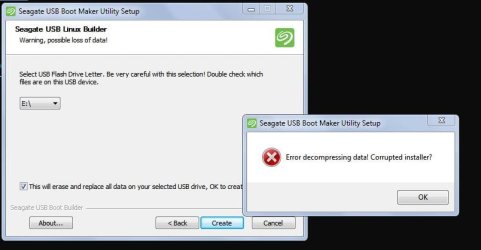
Capture.JPG
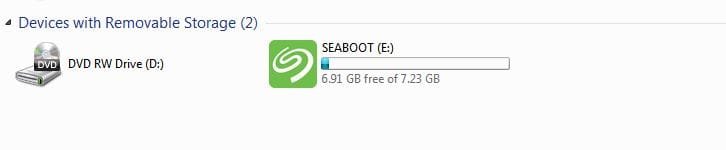
After this I got it from the site directly.. It worked, said completed. I turned on the computer with the USB in and it started normally without booting from the USB. Not sure why - unfortunately that's beyond my skill level. Please let me know how I can use the USB.
Thank you.
Capture.JPG
 
Last edited:

My Computers

System One System Two

  • Computer type
    Laptop
    Computer Manufacturer/Model Number
    Lenovo Thinkpad
    OS
    W7 professional 64
    CPU
    i5 2.3GHz
    Memory
    8 gb
    Graphics Card(s)
    Intel HD 520
    Monitor(s) Displays
    15.6 HD LED AG
    Screen Resolution
    1366x768
    Hard Drives
    500GB SATA HDD
    Internet Speed
    100+
    Antivirus
    Malwarebytes Premium
    Browser
    Firefox
  • Computer type
    PC/Desktop
I'd say try again. Otherwise I don't know. I'd run all the test but at least the smart test and the long generic test. I don't know what the acoustic test is but that's the only thing that you might need from advanced. Since you aren't running the disk in windows OS compatibility shouldn't matter. You boot into the usb drive not run the files from the usb directly.
 
Last edited:

My Computers

System One System Two

I formatted the USB and the instructions say you don't need to make any startup changes, just insert the USB and restart..
"Reboot your System Insert the SeaTools USB device and reboot or power on your computer. The system will boot to the Linux operating system."

I'm not sure how to do it.. I assume i have to change something in BIOS (but I worry I won't know how to change it back). I will check tomorrow how to do it and see if it works.
 

My Computers

System One System Two

  • Computer type
    Laptop
    Computer Manufacturer/Model Number
    Lenovo Thinkpad
    OS
    W7 professional 64
    CPU
    i5 2.3GHz
    Memory
    8 gb
    Graphics Card(s)
    Intel HD 520
    Monitor(s) Displays
    15.6 HD LED AG
    Screen Resolution
    1366x768
    Hard Drives
    500GB SATA HDD
    Internet Speed
    100+
    Antivirus
    Malwarebytes Premium
    Browser
    Firefox
  • Computer type
    PC/Desktop

My Computer

Computer type
PC/Desktop
Computer Manufacturer/Model Number
Custom build
OS
Windows 10 Pro
CPU
i5-6500
Motherboard
Gigabyte B150-HD3P-CF
Memory
16GB DDR4 2133 Crucial Ballistix Sport LT
Graphics Card(s)
MSI GeForce GTX 1060 GAMING X 6G
Sound Card
Intel Display Audio
Monitor(s) Displays
Liyama ProLite XB2483HSU-B2
Screen Resolution
1920 x 1080
Hard Drives
Crucial MX200 500GB & Toshiba DT01ACA300 3TB
PSU
Corsair RM550x
Case
Fractal Design Define S
Cooling
Cooler Master TX3 i
Keyboard
Func KB-460 (MX Red)
Mouse
Corsair Gaming M65 RGB
Antivirus
Bitdefender Total Security 2016 + MBAM Pro + MBAE Pro
Browser
Google Chrome
Other Info
Creative Sound Blaster Tactic3D Rage V2 headset
Yes, I was initially told it was malwarebytes causing it so I asked for help there.. It's obviously not since my settings have been the same since day 1.
 

My Computers

System One System Two

  • Computer type
    Laptop
    Computer Manufacturer/Model Number
    Lenovo Thinkpad
    OS
    W7 professional 64
    CPU
    i5 2.3GHz
    Memory
    8 gb
    Graphics Card(s)
    Intel HD 520
    Monitor(s) Displays
    15.6 HD LED AG
    Screen Resolution
    1366x768
    Hard Drives
    500GB SATA HDD
    Internet Speed
    100+
    Antivirus
    Malwarebytes Premium
    Browser
    Firefox
  • Computer type
    PC/Desktop
You made changes and basically reapplied the settings, since you haven't had a crash afterwards I'd say it was.
 

My Computer

Computer type
PC/Desktop
Computer Manufacturer/Model Number
Custom build
OS
Windows 10 Pro
CPU
i5-6500
Motherboard
Gigabyte B150-HD3P-CF
Memory
16GB DDR4 2133 Crucial Ballistix Sport LT
Graphics Card(s)
MSI GeForce GTX 1060 GAMING X 6G
Sound Card
Intel Display Audio
Monitor(s) Displays
Liyama ProLite XB2483HSU-B2
Screen Resolution
1920 x 1080
Hard Drives
Crucial MX200 500GB & Toshiba DT01ACA300 3TB
PSU
Corsair RM550x
Case
Fractal Design Define S
Cooling
Cooler Master TX3 i
Keyboard
Func KB-460 (MX Red)
Mouse
Corsair Gaming M65 RGB
Antivirus
Bitdefender Total Security 2016 + MBAM Pro + MBAE Pro
Browser
Google Chrome
Other Info
Creative Sound Blaster Tactic3D Rage V2 headset
I changed my settings AFTER the BSOD... (including turning on exploit - which they said not to because it would CAUSE a crash but since I only turned it on for the first time ever AFTER the crash it's obviously not that). The suggestions they made were how I had it set since day 1 so all I did was put everything back to how it was in the first place. I also made no software changes so it can't be that.. so the only thing I can think of is hard drive is dying.. but all tests say it's OK but apparently that could be false by checking while using windows... I've had to use my computer for work and haven't had a chance to do the USB boot because I understand the tests can take several hours (and I have to figure out how to boot from USB.. I read sometimes on Lenovo it won't allow..? Something about Legacy? )..

- - - Updated - - -
 
Last edited:

My Computers

System One System Two

  • Computer type
    Laptop
    Computer Manufacturer/Model Number
    Lenovo Thinkpad
    OS
    W7 professional 64
    CPU
    i5 2.3GHz
    Memory
    8 gb
    Graphics Card(s)
    Intel HD 520
    Monitor(s) Displays
    15.6 HD LED AG
    Screen Resolution
    1366x768
    Hard Drives
    500GB SATA HDD
    Internet Speed
    100+
    Antivirus
    Malwarebytes Premium
    Browser
    Firefox
  • Computer type
    PC/Desktop
It will take hours because you have to scan every sector however the smart test won't take very long. As for the setting if the usb drive doesn't show up after a reboot check your bios settings. We might be able to help there if we knew the make/model of your computer.
 

My Computers

System One System Two

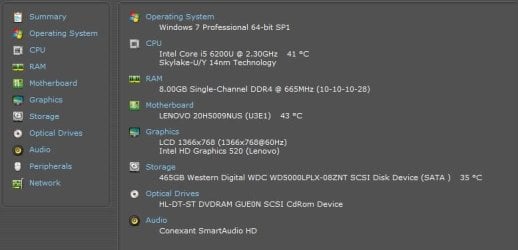
I plan on trying today.. Lenovo Thinkpad E570. If any of this helps:
Capture.JPG

- - - Updated - - -

View attachment 424023
- - - Updated - - -

- - - Updated - - -

It passed 100% - I did only the long test.. Does this mean it was a one-off (the two days of BSOD, bad shutdown etc.) and not my hard drive? Should I do the SMART too?
3Capture.JPG
 

My Computers

System One System Two

  • Computer type
    Laptop
    Computer Manufacturer/Model Number
    Lenovo Thinkpad
    OS
    W7 professional 64
    CPU
    i5 2.3GHz
    Memory
    8 gb
    Graphics Card(s)
    Intel HD 520
    Monitor(s) Displays
    15.6 HD LED AG
    Screen Resolution
    1366x768
    Hard Drives
    500GB SATA HDD
    Internet Speed
    100+
    Antivirus
    Malwarebytes Premium
    Browser
    Firefox
  • Computer type
    PC/Desktop
Back
Top