Solved Booting From Second HD- My Goof Yipes?

LadyLee

New member
Local time
5:47 AM
Messages
13
Oh brother!!! ! I am the person everyone calls to fix their PC's and I've been doing that for years with no problem. Now, I've completely done the worst thing to my own PC and can't get out of it.

My desktop HP has two WD hard drives in it and I totally forgot to disconnect the smaller one and install from the Win7 CD on the larger one. I thought everything was just fine after the install. Then realized on removing the Windows CD that I was being asked which drive I wanted. When I got into Windows, I instantly realized my error.

Now, I've got the pagefile on the C: (larger drive) and the Boot Mgr is on the slave drive. Windows 7 does not even see the second hard drive.

What I'd like to do and can't seem to do, is to delete and format the whole mess and use the Windows Cd to reinstall correctly. Naturally, I've been all over the web to find a way but so far, no luck.

If I disconnect the second drive cable and do a fresh install and then plug it back in, will I be able to format the disk or not?

Help in any way is appreciated. I just downloaded Easus and burned the ISO but I haven't tried it yet.

As of now, I have the entire large drive trying to boot but not able to because I zero'ed the slave drive. The boot partition is there and it says active but it still has the boot manager I can see.

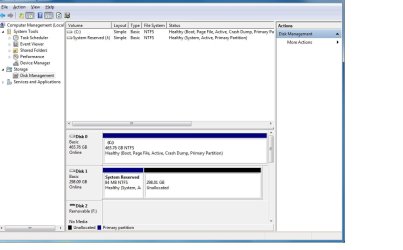
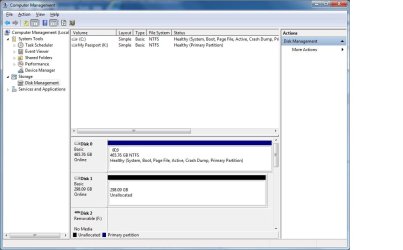
The larger drive which I want 'everything' on, has the pagefile but no boot mgr. Although diskmanager sees a 'system reserved' active partition.

Donna
 

My Computer My Computer

At a glance

Windows 7 Home Prem 64bit
Computer type
PC/Desktop
Computer Manufacturer/Model Number
HP
OS
Windows 7 Home Prem 64bit
Hard Drives
WD32
WD5000
Antivirus
MS Esentials
Browser
Firefox
Hi Donna -

Please post back a screenshot of http://www.sevenforums.com/tutorial...nt-post-screen-capture-image.html#post2261610 or a camera snap of the booted Easeus CD drive map.

Tell us what is on each drive to the best of your ability. We will give you the steps to make Win7 bootable again or delete the errant install to correctly http://www.sevenforums.com/tutorials/1649-clean-install-windows-7-a.html to your target HD.

Are you able to back up everything to an external, or where is your storage now?
 
Last edited:
Thanks Greg, I will take a screenshot "if" it will boot again. I turned it off and I'm on my laptop out of frustration. I had to give the 'unallocated' part of the drive after I filled with zeros trying to get the whole thing clean. Right now, it is installing 132 MS updates and I can't do anything.

I have literally everything on my external HD. So, I'm set to start with complete blank drives if I can get there.
 

My Computer My Computer

At a glance

Windows 7 Home Prem 64bit
Computer type
PC/Desktop
Computer Manufacturer/Model Number
HP
OS
Windows 7 Home Prem 64bit
Hard Drives
WD32
WD5000
Antivirus
MS Esentials
Browser
Firefox
Here's how to try to start Win7 you installed on the larger HD which can't boot now that you wiped the smaller drive where you think the boot files were placed:

Unplug the smaller HD which you didn't install Win7 on.

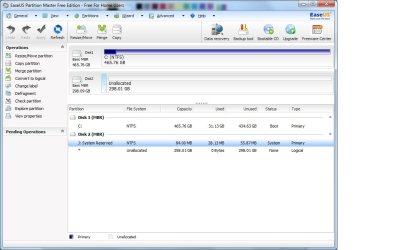
Mark the Win7 Partition Active following the Diskpart method in blue link Option Two to determine its' partition number and mark it Active. If Easeus will boot it can also mark the Win7 partition Active and will be easier since it shows a drive map you can rightclick on to Set Win7 partition Active. Post back a camera snap if you can of the map and listings, attach with Paper Clip in Reply box.

Next run http://www.sevenforums.com/tutorials/105541-startup-repair-run-3-separate-times.html to write the boot files to 7 partition and make it bootable, up to 3 times with reboots until Win7 starts.

If it won't boot after 3 attempts then I'd cut my losses and reinstall, making sure this time to delete all partitions during install, create and format new as you wish, install to first partition after the small boot partition it creates. http://www.sevenforums.com/tutorials/1649-clean-install-windows-7-a.html
 
Last edited:

My Computer My Computer

At a glance

Vista, Windows7, Mint Mate, Zorin, Windows 8from 1.6GHz Duo to i7
Computer Manufacturer/Model Number
HP, Dell, Gateway, Toshiba - 4 laptops and 2 desktops
OS
Vista, Windows7, Mint Mate, Zorin, Windows 8
CPU
from 1.6GHz Duo to i7
Monitor(s) Displays
2x HP w2207
Hard Drives
5x HDD, 7x SSD, 12x Externals
Keyboard
with trackball - no mices
Mouse
Trackball mice
Internet Speed
DSL 6000
It won't boot. Does EasyBCD now have a boot disk to apply the changes?
 
Whew, Sorry folks for the delay. When it rains it pours and all of a sudden I had a batch of other things like "teeth" to go take care of.

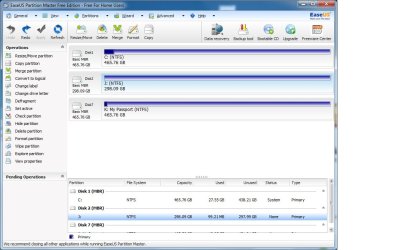
So, I'm attaching my screenshots and haven't done any suggestions yet. This is just the way I wrote the first post.

On my way home from the dentist I did have 2 thoughts........ Why am I fighting this. I have a WD external that I copy to and why don't I just keep the larger of the 2 disks in my desktop???? Or, if I have to have a second hard drive, then why don't I just get another small WD Caviar Blue? They must be super cheap by now??

On the other hand, I don't mind a challenge... and this is a 'beaut'

See attachments pls and thanks so much for all comments. I will wait until after you see these jpg's to do anything.

Oh... I did get it to boot but had to use Easus to rebuild bootmgr on the slave which I was forced to name "J" the primary on the slave automatically became "K".

My bios is saying to boot from the larger HD. I can set the HD group priority in my bios.

Donna
 

Attachments

  • Dmanager.jpg
    Dmanager.jpg
    61.8 KB · Views: 1
  • Easus1.jpg
    Easus1.jpg
    66.9 KB · Views: 3
  • Easus2.jpg
    Easus2.jpg
    29.5 KB · Views: 1

My Computer My Computer

At a glance

Windows 7 Home Prem 64bit
Computer type
PC/Desktop
Computer Manufacturer/Model Number
HP
OS
Windows 7 Home Prem 64bit
Hard Drives
WD32
WD5000
Antivirus
MS Esentials
Browser
Firefox
To make C independently bootable, power down to unplug the other HD, boot into the Win7 installation media or System Repair Disk to run Startup Repair - Run 3 Separate Times until Win7 starts and holds the System flag on its partition.

You can then plug back in the other HD, make sure it does not get set first HD to boot in BIOS setup, then wipe it with Diskpart Clean Command, repartition in Disk Mgmt.

Another method now that you can boot WIn7 is to from within the OS move the Bootmgr - Move to C:\ with EasyBCD - Windows 7 Forums as suggested earlier.
 
Last edited:
I will give the EasyBCD app a try tomorrow and see how it goes.
 

My Computer My Computer

At a glance

Windows 7 Home Prem 64bit
Computer type
PC/Desktop
Computer Manufacturer/Model Number
HP
OS
Windows 7 Home Prem 64bit
Hard Drives
WD32
WD5000
Antivirus
MS Esentials
Browser
Firefox
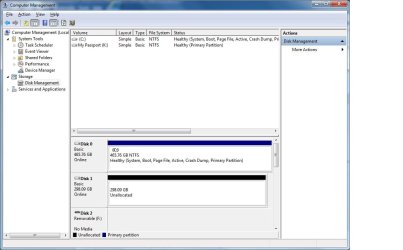
Whew!! The BCD app seems to have done the trick. I've attached a jpg so you can see how it looks now and that's how I'm leaving it for another answer PLEASE.
 
Last edited:

My Computer My Computer

At a glance

Windows 7 Home Prem 64bit
Computer type
PC/Desktop
Computer Manufacturer/Model Number
HP
OS
Windows 7 Home Prem 64bit
Hard Drives
WD32
WD5000
Antivirus
MS Esentials
Browser
Firefox
Attached file is here.

First, I have some good news. BCD has a new version as of 4/16/2014 and it does the job within a window instead of a command.

Now, here's my question. Should I make it a simple drive and format it or make it a logical drive and format it?

I do not have a D-drive at the moment but will it get that letter?

Thanks to every single reply here for literally EVERYTHING. This is a wonderful site and I'll be here often.

Donna - attachment
 

Attachments

  • afterbcd.jpg
    afterbcd.jpg
    64.3 KB · Views: 2

My Computer My Computer

At a glance

Windows 7 Home Prem 64bit
Computer type
PC/Desktop
Computer Manufacturer/Model Number
HP
OS
Windows 7 Home Prem 64bit
Hard Drives
WD32
WD5000
Antivirus
MS Esentials
Browser
Firefox
Looks fine. You can create and format your data partition(s) on DISK1 in Disk Mgmt:
Partition or Volume - Create New . This will create Primary partition which is fine. You only need to be concerned about primary partitions preceding the OS partition, which can have the boot files derailed to them when you run a Reinstall or Repair.
 
I am glad it worked for me. I like that approach because it is fast and easy.

But as I stated in my tutorial, you do lose the recovery environment. But if you are a frequent imager, that is not much of a loss.
 

My Computer My Computer

At a glance

Vista, Windows7, Mint Mate, Zorin, Windows 8from 1.6GHz Duo to i7
Computer Manufacturer/Model Number
HP, Dell, Gateway, Toshiba - 4 laptops and 2 desktops
OS
Vista, Windows7, Mint Mate, Zorin, Windows 8
CPU
from 1.6GHz Duo to i7
Monitor(s) Displays
2x HP w2207
Hard Drives
5x HDD, 7x SSD, 12x Externals
Keyboard
with trackball - no mices
Mouse
Trackball mice
Internet Speed
DSL 6000
I think it may now write the System Recovery Options to F8 Advanced Boot options.

LadyLee can you reboot your PC and tap the F8 key to see if Repair My Computer is at the top, and if you select it that it opens and detects your OS, before closing it?
 
I haven't done the F8 with regard to the repair option being at the top, but I will. Here's my current dilema. Disk 1 is formatted to NTSF and it has it's boot partion but I'm trying to label it D: and I cannot. That choice is not in the letters offered to me. I'm confused. I just saved a file to J and it works but I'd like it to be D drive if I can.

There is no "D" drive at all. Getting a DOS prompt and typing dir D: reports there is no drive D. I thought something else perhaps got assigned to that letter.

I could use it as J drive but that's not normal and confusing.

Oh, and right now it is logical because I was trying everything I could think of.

thanks - see attached
 

Attachments

  • afterbcd.jpg
    afterbcd.jpg
    64.3 KB · Views: 3

My Computer My Computer

At a glance

Windows 7 Home Prem 64bit
Computer type
PC/Desktop
Computer Manufacturer/Model Number
HP
OS
Windows 7 Home Prem 64bit
Hard Drives
WD32
WD5000
Antivirus
MS Esentials
Browser
Firefox
Logical is fine, meant for data partitions so that boot files cannot be placed there.

Did you scroll down to look if any card readers or other drives have claimed D? If not you may need a reboot.

What do you mean Disk1 has its boot partition? It should not have a boot partition at all. The screenshot you posted also has no partition created yet. So I'd check if anything down lower on the map has D, and if not reboot and create a new partition.
 
Last edited:

My Computer My Computer

At a glance

Vista, Windows7, Mint Mate, Zorin, Windows 8from 1.6GHz Duo to i7
Computer Manufacturer/Model Number
HP, Dell, Gateway, Toshiba - 4 laptops and 2 desktops
OS
Vista, Windows7, Mint Mate, Zorin, Windows 8
CPU
from 1.6GHz Duo to i7
Monitor(s) Displays
2x HP w2207
Hard Drives
5x HDD, 7x SSD, 12x Externals
Keyboard
with trackball - no mices
Mouse
Trackball mice
Internet Speed
DSL 6000
Windows will always name the drive/partition that is booted to Windows as C:\.
 

My Computer My Computer

At a glance

Windows 7 Ultimate X64 SP1Intel i5-2550K, Differing ~4.4-4.8GHz No buil...16GB G.Skill Sniper 1866MHz @ 2133MHz 2x8GBASUS GTX650TIB-DC2OC-2GD5, (650TI Boost)
Computer type
PC/Desktop
Computer Manufacturer/Model Number
Home Built Desktop By DataTech
OS
Windows 7 Ultimate X64 SP1
CPU
Intel i5-2550K, Differing ~4.4-4.8GHz No built in GPU
Motherboard
ASUS P8Z68-V PRO/GEN3
Memory
16GB G.Skill Sniper 1866MHz @ 2133MHz 2x8GB
Graphics Card(s)
ASUS GTX650TIB-DC2OC-2GD5, (650TI Boost)
Sound Card
Onboard Realtek 5-1
Monitor(s) Displays
Samsung P2570HD
Screen Resolution
1920x1080
Hard Drives
Samsung 840 Pro 256GB SSD for OS, 500GB Seagate Constellation (Enterprise drive) for Data
PSU
Corsair HX650W
Case
Inwin Dragon Rider
Cooling
Hyper 212 EVO w/two Noctua fans, push-pull, @1300 RPM
Keyboard
E-Z Eyes, bright yellow keys with large characters
Mouse
steelseries SENSEI Laser Pro Gaming
Internet Speed
48-51Mbs Mbs down, 11 Mbs up Xfinity Cable
Antivirus
Norton Internet Security 2013
Browser
IE 10, Opera, Pale Moon if needed
Other Info
4 case fans, LG BluRay-RE, ASUS DVD-RW, Mr. Fusion power supply, 1.21 gigawatts.
Sorry, I meant disk1 has it's primary partition. and YES, F8 does have repair first and it works.

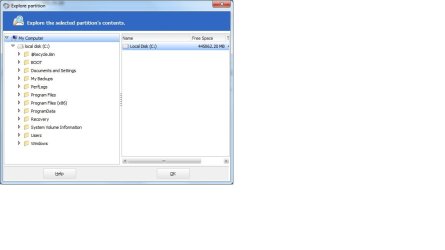
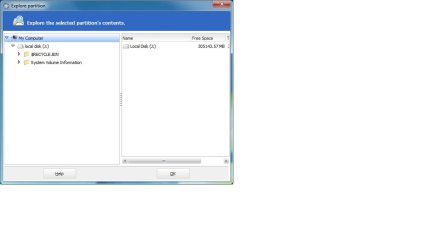
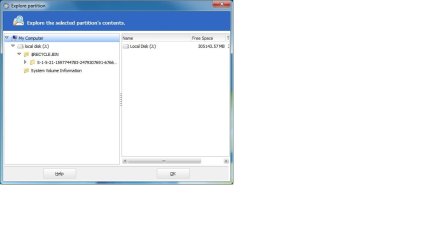
I took pics of Easus showing what is on J: it appears only the recycle bin?? But it is also on C:. Perhaps I need to clean out what you see on the disk 2 drive now and reformat?

I have no clue how I'd get that out unless with zeros??

Wow, this is interesting and I'm so close.

see attached confusion of disk 1
 

Attachments

  • Easus2.jpg
    Easus2.jpg
    80.3 KB · Views: 3
  • ExploreJ.jpg
    ExploreJ.jpg
    22.9 KB · Views: 0
  • ExploreRBfolder.jpg
    ExploreRBfolder.jpg
    24.7 KB · Views: 0

My Computer My Computer

At a glance

Windows 7 Home Prem 64bit
Computer type
PC/Desktop
Computer Manufacturer/Model Number
HP
OS
Windows 7 Home Prem 64bit
Hard Drives
WD32
WD5000
Antivirus
MS Esentials
Browser
Firefox
Back
Top