Solved Booting From Second HD- My Goof Yipes?

Nope, no luck. I unchecked the "hide system folders" and I have the desktop.ini file on both drives and both have the Recycle bin folder. I deleted two things and they both show up in both the c and the j recycle folder. I think that has something to do with this.
 

My Computer My Computer

At a glance

Windows 7 Home Prem 64bit
Computer type
PC/Desktop
Computer Manufacturer/Model Number
HP
OS
Windows 7 Home Prem 64bit
Hard Drives
WD32
WD5000
Antivirus
MS Esentials
Browser
Firefox
No that is normal for hidden files. There is something holding D Or needs more rebooting.

Is D available in Easeus?
 
It's interesting EaseUS shows Disk1, Disk2, and Disk7 (why not 3-6) ?

Just guessing, but I wonder if something did use [D] before, causing [D] to not be available now.

Here is a thread about clearing USB History
http://www.sevenforums.com/performa...-out-usb-history-bench-tech-machine-help.html

Post #3 has a link to this
USB drive or flash problems? How to cleanup and remove old USB storage drivers - TechSpot Forums
If you look at the output (Code) it looks like the utility can cleanup registry keys for unused drive letters

Just throwing this out, as something to consider trying ...
I've never used this utility, all I know about it is in the links I posted ...
 

My Computer My Computer

At a glance

Multi-Boot W7_Pro_x64 W8.1_Pro_x64 W10_Pro_x6...AMD Athlon II x4 6206GB GSkill DDR2 800AMD 4670 GPU + AMD 4200 IGP
Computer type
PC/Desktop
Computer Manufacturer/Model Number
home built
OS
Multi-Boot W7_Pro_x64 W8.1_Pro_x64 W10_Pro_x64 +Linux_VMs +Chromium_VM
CPU
AMD Athlon II x4 620
Motherboard
Gigabyte GA-MA785G-UD3H
Memory
6GB GSkill DDR2 800
Graphics Card(s)
AMD 4670 GPU + AMD 4200 IGP
Sound Card
on board Realtek ALC889A
Monitor(s) Displays
RCA 40" LCD TV, Insignia 32" LCD TV, HP 15" LCD monitor
Screen Resolution
1680 x 1050
Hard Drives
OCZ Vertex 3 120GB,
Samsung F3 1TB (3),
Several others - WD, Seagate, Hitachi, ...
PSU
Corsair 500 W
Case
Rosewill mid tower
Cooling
CM 90mm rifle
Keyboard
Gyration wireless, Logitech wireless, Dell USB wired
Mouse
Gyration wireless, Logitech wireless, V7 USB wired
Internet Speed
Spectrum - 100Mbps D / 10Mbps U
Antivirus
Avast, MBAM3, EMET, WinPatrol
Browser
Pale Moon, Firefox, IE
Other Info
2 multi-boot PC's
Mainly HTPC/Office/Gen purpose (no gaming).
Trendnet USB KVM.
LG DVD burner/Blue Ray Player.
Tray system for removable SATA backup drives.

Not currently OCd, under-volted.
I use Hybrid sleep, rarely re-boot or shutdown.

Hauppauge HD-PVR, Avermedia PCIe TV Tuner, Hauppauge PCI TV Tuner.
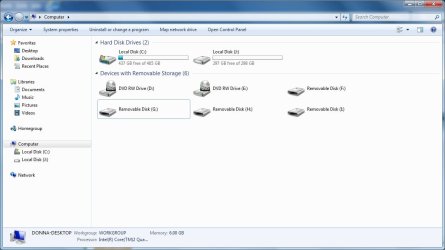
Well, here is a full picture. I've never used F-G-H.. Never will, but they are part of this pc. So, D is taken over by one of these guys.

I don't even have a clue what they'd be?

see attached
 

Attachments

  • FGH.jpg
    FGH.jpg
    56.8 KB · Views: 4

My Computer My Computer

At a glance

Windows 7 Home Prem 64bit
Computer type
PC/Desktop
Computer Manufacturer/Model Number
HP
OS
Windows 7 Home Prem 64bit
Hard Drives
WD32
WD5000
Antivirus
MS Esentials
Browser
Firefox
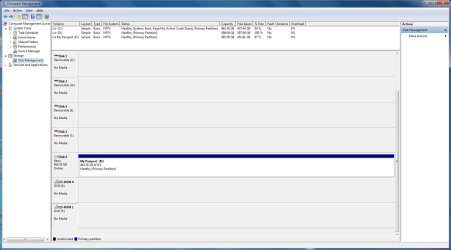
That last pic shows a DVD RW Drive has the [D] drive letter.
Can you change the drive letter from [D] to something else in Disk Management.
(You may need to scroll down the lower part of Disk Management to see the DVD drives)

It also shows you have a DVD RW drive as [E].
Do you have 2 DVD drives?
 

My Computer My Computer

At a glance

Multi-Boot W7_Pro_x64 W8.1_Pro_x64 W10_Pro_x6...AMD Athlon II x4 6206GB GSkill DDR2 800AMD 4670 GPU + AMD 4200 IGP
Computer type
PC/Desktop
Computer Manufacturer/Model Number
home built
OS
Multi-Boot W7_Pro_x64 W8.1_Pro_x64 W10_Pro_x64 +Linux_VMs +Chromium_VM
CPU
AMD Athlon II x4 620
Motherboard
Gigabyte GA-MA785G-UD3H
Memory
6GB GSkill DDR2 800
Graphics Card(s)
AMD 4670 GPU + AMD 4200 IGP
Sound Card
on board Realtek ALC889A
Monitor(s) Displays
RCA 40" LCD TV, Insignia 32" LCD TV, HP 15" LCD monitor
Screen Resolution
1680 x 1050
Hard Drives
OCZ Vertex 3 120GB,
Samsung F3 1TB (3),
Several others - WD, Seagate, Hitachi, ...
PSU
Corsair 500 W
Case
Rosewill mid tower
Cooling
CM 90mm rifle
Keyboard
Gyration wireless, Logitech wireless, Dell USB wired
Mouse
Gyration wireless, Logitech wireless, V7 USB wired
Internet Speed
Spectrum - 100Mbps D / 10Mbps U
Antivirus
Avast, MBAM3, EMET, WinPatrol
Browser
Pale Moon, Firefox, IE
Other Info
2 multi-boot PC's
Mainly HTPC/Office/Gen purpose (no gaming).
Trendnet USB KVM.
LG DVD burner/Blue Ray Player.
Tray system for removable SATA backup drives.

Not currently OCd, under-volted.
I use Hybrid sleep, rarely re-boot or shutdown.

Hauppauge HD-PVR, Avermedia PCIe TV Tuner, Hauppauge PCI TV Tuner.
Do you have two DVD drives as shown in Explorer above? If not put a disk in the DVD drive to see what letter it shows up on.

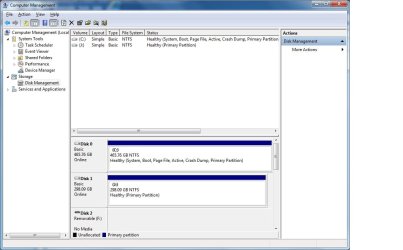
I also asked you earlier to show us what was taking up all the drive map space in Disk Mgmt we couldn't see unless you scrolled down. Are two DVD drives showing on the map?

Do you have card readers on that PC? Look in Device Manager to see if there are any missing drivers and report back the names.
 
Yes, I have 2 CDRom drives. I am attaching more pics for you. The lower part(s) of DM.

If I had WD Passport plugged in, it would be K -right now, it is out.

I have no clue what all the crazy storage things are and have never used them. It was a gimmick from HP when I bought this.

I can't relabel them. If I could start from the end, I could go down a letter of the alphabet on each one but I can't do it. Maybe I could copy the things on J to my external and detach it. Then could I relabel down a letter for each one? I can't delete them in the bios.

see all attached to go downward
 

Attachments

  • DM1.jpg
    DM1.jpg
    66.7 KB · Views: 1
  • DM2.jpg
    DM2.jpg
    57.6 KB · Views: 1
  • DM3.jpg
    DM3.jpg
    58.2 KB · Views: 1

My Computer My Computer

At a glance

Windows 7 Home Prem 64bit
Computer type
PC/Desktop
Computer Manufacturer/Model Number
HP
OS
Windows 7 Home Prem 64bit
Hard Drives
WD32
WD5000
Antivirus
MS Esentials
Browser
Firefox
Yes, I have card readers. I use one for my camera card all the time. I have no clue where to look for their drivers but the one I use works fine.
 

My Computer My Computer

At a glance

Windows 7 Home Prem 64bit
Computer type
PC/Desktop
Computer Manufacturer/Model Number
HP
OS
Windows 7 Home Prem 64bit
Hard Drives
WD32
WD5000
Antivirus
MS Esentials
Browser
Firefox
The card readers are what is occupying those Removable Device slots. They have their drivers in Device Manager or they would not be standing by in Disk Mgmt with assigned letters.

If you want to change the Optical drive currently occupying D, then rightclick on it in Disk Mgmt to change it to the next available letter, which will free up D to assign to your data drive partition. Drive Letter - Add, Change, or Remove in Windows 7 - Windows 7 Forums
 

My Computer My Computer

At a glance

Windows 7 Ultimate X64 SP1Intel i5-2550K, Differing ~4.4-4.8GHz No buil...16GB G.Skill Sniper 1866MHz @ 2133MHz 2x8GBASUS GTX650TIB-DC2OC-2GD5, (650TI Boost)
Computer type
PC/Desktop
Computer Manufacturer/Model Number
Home Built Desktop By DataTech
OS
Windows 7 Ultimate X64 SP1
CPU
Intel i5-2550K, Differing ~4.4-4.8GHz No built in GPU
Motherboard
ASUS P8Z68-V PRO/GEN3
Memory
16GB G.Skill Sniper 1866MHz @ 2133MHz 2x8GB
Graphics Card(s)
ASUS GTX650TIB-DC2OC-2GD5, (650TI Boost)
Sound Card
Onboard Realtek 5-1
Monitor(s) Displays
Samsung P2570HD
Screen Resolution
1920x1080
Hard Drives
Samsung 840 Pro 256GB SSD for OS, 500GB Seagate Constellation (Enterprise drive) for Data
PSU
Corsair HX650W
Case
Inwin Dragon Rider
Cooling
Hyper 212 EVO w/two Noctua fans, push-pull, @1300 RPM
Keyboard
E-Z Eyes, bright yellow keys with large characters
Mouse
steelseries SENSEI Laser Pro Gaming
Internet Speed
48-51Mbs Mbs down, 11 Mbs up Xfinity Cable
Antivirus
Norton Internet Security 2013
Browser
IE 10, Opera, Pale Moon if needed
Other Info
4 case fans, LG BluRay-RE, ASUS DVD-RW, Mr. Fusion power supply, 1.21 gigawatts.
:D

Greg, You are indeed a MVP and my hero. It was not a matter of changing drive J to D because D was occupied and as you change the D to some remote end of the alphabet letter to get it out of your way then the next hardware instantly fills the letter you want.

So, I reassigned everything from the top down starting with "L" and then going back up and reassigning them from D downward.

My disk 1 is now correctly labeled "D" :) and my external is now "K" which is where I began this mess.

I then rebooted to make absolutely sure it all worked. It booted, D is indeed the drive 1 and the external has everything I now need to install.

Now, I'll go see if I can activate this beast again. Then I've got mountains to restore from the external and my hardware drivers. I did not want to do any of that if I had to start all over again.

I will say this after using BCD software to move the boot, on nearly every one of these boots today, I've gotten more and more MS updates. When it was booting to the wrong drive, it never sent me the SP1 and I thought I'd have to put it on manually but today it was taking forever to boot and I waited as the screen said. I was afraid for a while that it was 'dead' but lo and behold, it installed SP1 all by itself.

So, I take all my hats off to you for your fortitude and very grateful help with all of this. I'm not unsavy with tons of software (was a programer for over 40 yrs) but wow, this one had me stuck all the way.

Thank you, thank you, thank you.
see scrnshots

 

Attachments

  • NewMap.jpg
    NewMap.jpg
    106.4 KB · Views: 1
  • MycomputerView.jpg
    MycomputerView.jpg
    53.3 KB · Views: 0

My Computer My Computer

At a glance

Windows 7 Home Prem 64bit
Computer type
PC/Desktop
Computer Manufacturer/Model Number
HP
OS
Windows 7 Home Prem 64bit
Hard Drives
WD32
WD5000
Antivirus
MS Esentials
Browser
Firefox
Looks good Donna.

In the future always use the latest official Win7 installer with SP1 to save many hours of updating. This and many other tips, tools and methods are compiled in Clean Reinstall - Factory OEM Windows 7 which assure you'll get and keep a perfect install.

Enjoy Windows 7! :geek:
 
Back
Top