
Bootmgr is missing - Fix

How to Fix the "Bootmgr is missing" Error in Windows

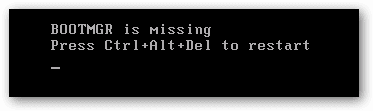
You may get this error while booting your computer.
1.png

   Information
This problem is not hardware related and can be fixed with a Windows 7 DVD OR a system repair disc.


Here's How:

NOTE: Sometimes it may take running a startup repair a few times before it fully fixes the startup issue.

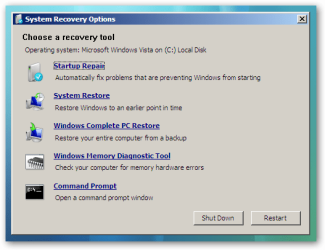
1. Boot to the System Recovery Options screen.

2. Select the Startup Repair option. (See screenshot below)
2.png
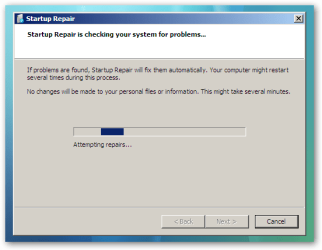
3. Now click on Startup Repair. Run the startup repair and it will attempt to fix this issue.
3.png
NOTE: It will ask you to reboot your system. Reboot to see if it works. If it doesn't work, follow step 4.


4. Click on Command Prompt.
A) Type c: and press <Enter>.

   Note
C:\ is the drive letter where Windows 7 is installed. You may replace it with whatever drive letter you want where you have installed Windows 7.


B) At the C:\ prompt, type cd boot and press <Enter>.

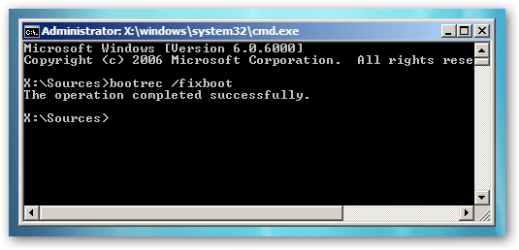
C) At the C:\Boot prompt, type the following commands and press Enter after each command.

Code:
[B]bootrec /FixMbr[/B]
[B]bootrec /FixBoot[/B]
[B]bootrec /RebuildBcd[/B]
4.png

D) Now close the command prompt, remove the DVD and reboot your computer.
That's it,
Dinesh.


Last edited by a moderator:
Thank you for posting this helpful information!

Having a BOOTMGR is missing error on an ACER notebook running Windows 7 with a TDL4 infection.

The Windows Recovery Environment (WRE) is already installed by ACER.

Is a WRE CD/DVD needed to execute the following commands, or can the already installed WRE be used to execute them:
bootrec /FixMbr
bootrec /FixBoot
bootrec /RebuildBcd

Thanks for your help!
 

My Computer

Computer type
PC/Desktop
Computer Manufacturer/Model Number
An ol' eMachines
OS
Windows 7 Home Premium
Internet Speed
Fine for me...I'm retired!
Hello Canardblanc,

You could use whatever method you like to open a command prompt at boot to use those commands at boot. :)
 

My Computer

Computer type
PC/Desktop
Computer Manufacturer/Model Number
Self built custom
OS
64-bit Windows 11 Pro for Workstations
CPU
Intel i7-8700K OC'd to 5 GHz
Motherboard
ASUS ROG Maximus XI Formula Z390
Memory
64 GB (4x16GB) G.SKILL TridentZ RGB DDR4 3600 MHz
Graphics Card(s)
ASUS ROG-STRIX-GTX1080TI-O11G-GAMING
Sound Card
Integrated
Monitor(s) Displays
2 x Samsung Odyssey G7 27"
Screen Resolution
2560x1440
Hard Drives
1TB Samsung 990 PRO M.2,
4TB Samsung 990 PRO PRO M.2,
TerraMaster F8 SSD Plus NAS
PSU
Seasonic Prime Titanium 850W
Case
Thermaltake Core P3
Cooling
Corsair Hydro H115i
Keyboard
Logitech wireless K800
Mouse
Logitech MX Master 4
Internet Speed
2 Gb/s Download and 100 Mb/s Upload
Antivirus
Malwarebyte Anti-Malware Premium
Browser
Google Chrome
Other Info
Logitech Z625 speaker system,
Logitech BRIO 4K Pro webcam,
HP Color LaserJet Pro MFP M477fdn,
APC SMART-UPS RT 1000 XL - SURT1000XLI,
Galaxy S23 Plus phone
Thanks for the prompt reply, Brink.

So, if the prompt with the option to Repair your computer appears, that means the Windows Recovery Environment is already installed, and it can be used without the need for a CD?
 

My Computer

Computer type
PC/Desktop
Computer Manufacturer/Model Number
An ol' eMachines
OS
Windows 7 Home Premium
Internet Speed
Fine for me...I'm retired!
Most likely yes. When it's finished (like at the end of step 3), you would need to select the Command Prompt option back in the System Recovery Options screen to be able to enter the commands if the repair didn't work.
 

My Computer

Computer type
PC/Desktop
Computer Manufacturer/Model Number
Self built custom
OS
64-bit Windows 11 Pro for Workstations
CPU
Intel i7-8700K OC'd to 5 GHz
Motherboard
ASUS ROG Maximus XI Formula Z390
Memory
64 GB (4x16GB) G.SKILL TridentZ RGB DDR4 3600 MHz
Graphics Card(s)
ASUS ROG-STRIX-GTX1080TI-O11G-GAMING
Sound Card
Integrated
Monitor(s) Displays
2 x Samsung Odyssey G7 27"
Screen Resolution
2560x1440
Hard Drives
1TB Samsung 990 PRO M.2,
4TB Samsung 990 PRO PRO M.2,
TerraMaster F8 SSD Plus NAS
PSU
Seasonic Prime Titanium 850W
Case
Thermaltake Core P3
Cooling
Corsair Hydro H115i
Keyboard
Logitech wireless K800
Mouse
Logitech MX Master 4
Internet Speed
2 Gb/s Download and 100 Mb/s Upload
Antivirus
Malwarebyte Anti-Malware Premium
Browser
Google Chrome
Other Info
Logitech Z625 speaker system,
Logitech BRIO 4K Pro webcam,
HP Color LaserJet Pro MFP M477fdn,
APC SMART-UPS RT 1000 XL - SURT1000XLI,
Galaxy S23 Plus phone
Great help!! :D

Thanks.
 

My Computer

Computer type
PC/Desktop
Computer Manufacturer/Model Number
An ol' eMachines
OS
Windows 7 Home Premium
Internet Speed
Fine for me...I'm retired!
You're most welcome. :)
 

My Computer

Computer type
PC/Desktop
Computer Manufacturer/Model Number
Self built custom
OS
64-bit Windows 11 Pro for Workstations
CPU
Intel i7-8700K OC'd to 5 GHz
Motherboard
ASUS ROG Maximus XI Formula Z390
Memory
64 GB (4x16GB) G.SKILL TridentZ RGB DDR4 3600 MHz
Graphics Card(s)
ASUS ROG-STRIX-GTX1080TI-O11G-GAMING
Sound Card
Integrated
Monitor(s) Displays
2 x Samsung Odyssey G7 27"
Screen Resolution
2560x1440
Hard Drives
1TB Samsung 990 PRO M.2,
4TB Samsung 990 PRO PRO M.2,
TerraMaster F8 SSD Plus NAS
PSU
Seasonic Prime Titanium 850W
Case
Thermaltake Core P3
Cooling
Corsair Hydro H115i
Keyboard
Logitech wireless K800
Mouse
Logitech MX Master 4
Internet Speed
2 Gb/s Download and 100 Mb/s Upload
Antivirus
Malwarebyte Anti-Malware Premium
Browser
Google Chrome
Other Info
Logitech Z625 speaker system,
Logitech BRIO 4K Pro webcam,
HP Color LaserJet Pro MFP M477fdn,
APC SMART-UPS RT 1000 XL - SURT1000XLI,
Galaxy S23 Plus phone
Hello i'm new to this. I have been having this problem for a while now and after doing many hours, days and weeks of research i found many fixes for this problem but the one that worked for me was to change my RAMs. After testing everything and diagnosting everything, my RAMs were the problem all along. So if you think you are trying everything and nothing works, try replacing some hardware parts and see if that does the job.
 

My Computer

OS
windows 7 64 bit home premium
i have a DELL Inspiron N5050.
i was having this problem right after i restored my PC using DELL DATASAFE yesterday.
but i fixed it successfully using my windows 7 DVD.
my question is that if i restored my PC to factory settings then why did this BOOTMGR problem occur only?
and will this problem occur again in future when i restore my PC??
please answer me.
 

My Computer

Computer Manufacturer/Model Number
Dell Inspiron N5050
OS
Windows 7 Ultimate 64bit
Motherboard
Intel 2nd generation core i5
Memory
4GB
Screen Resolution
1366x768
Hard Drives
500GB
Really helpful :) Just deleted mine and was able to fix it due to ur instructions. THanks a lot!:devil:
 

My Computer

Computer Manufacturer/Model Number
MSI
OS
Windows 7
CPU
MSI
Motherboard
MSI
Memory
MSI
Graphics Card(s)
MSI
Sound Card
MSI
Monitor(s) Displays
MSI
Hard Drives
MSI
PSU
MSI
Case
MSI
Cooling
MSI
Element is missing

You forget, most people have bootmgr or something on a partition labelled “System Volume Information”. I wasted a whole evening yelling my lungs out at this thing.
 
Last edited:

My Computer

Computer type
PC/Desktop
Computer Manufacturer/Model Number
Custom
OS
Microsoft Windows 7 Home Premium 64-bit Service Pack 1
CPU
AMD A10-6800K APU with Radeon(tm)™ HD Graphics 4100
Motherboard
ASRock FM2A85X Extreme4-M
Memory
(2) G.Skill F3-12800CL10-8GBXL
Graphics Card(s)
ASUS R7 250 Series (0x6610)
Sound Card
Realtek High Definition Audio
Monitor(s) Displays
Acer X213H LCD monitor, 21"
Screen Resolution
1920 x 1080 x 32 bits @ 60 Hz
Hard Drives
WD Black, 1.0TB, WDC WD1002FAEX-00Z3A0
PSU
Rosewill Quark-650
Case
Raidmax Comet SECC Steel ATX Mid Tower Computer Case
Cooling
1 x 80mm + 2 x 120mm + Stock cooler
Mouse
Gear Head Wireless Optical 5-button mouse
Internet Speed
FTTx 6000 / 1000
Antivirus
Avast! Free Antivirus 2015.10.0.2208
Browser
Google Chrome Version 40.0.2214.115
Other Info
*AMD Dual-Graphics
*Uses OpenDNS
*Uses Folding@Home
*HP 16x Super-Multi DVD Writer
*Superspeed 74-in-1 Card Reader
*Maximum overclock has not been determined.
What is the full name of bootmgr?
 

My Computer

Computer Manufacturer/Model Number
Acer Aspire One 722 (AO722)
OS
Windows 7 Home Premium Service Pack 1 32-bit Build 7601
CPU
AMD C-50 Processor 1.0 Ghz
Memory
2 GB DDR3 RAM (1.73 usable in System Properties)
Graphics Card(s)
AMD Radeon HD 6200 series Graphics
Sound Card
High Definition Audio Device
Monitor(s) Displays
Generic PnP Monitor
Screen Resolution
1366 x 768 (recommended)
Hard Drives
320 GB HDD storage
298.09 GB in Disk Management (REAL)
Keyboard
Built-in on my laptop
Mouse
External mouse
Other Info
Installed Windows 7 Service Pack 1 by 9/9/2012

My Computer

Computer type
PC/Desktop
Computer Manufacturer/Model Number
Self built custom
OS
64-bit Windows 11 Pro for Workstations
CPU
Intel i7-8700K OC'd to 5 GHz
Motherboard
ASUS ROG Maximus XI Formula Z390
Memory
64 GB (4x16GB) G.SKILL TridentZ RGB DDR4 3600 MHz
Graphics Card(s)
ASUS ROG-STRIX-GTX1080TI-O11G-GAMING
Sound Card
Integrated
Monitor(s) Displays
2 x Samsung Odyssey G7 27"
Screen Resolution
2560x1440
Hard Drives
1TB Samsung 990 PRO M.2,
4TB Samsung 990 PRO PRO M.2,
TerraMaster F8 SSD Plus NAS
PSU
Seasonic Prime Titanium 850W
Case
Thermaltake Core P3
Cooling
Corsair Hydro H115i
Keyboard
Logitech wireless K800
Mouse
Logitech MX Master 4
Internet Speed
2 Gb/s Download and 100 Mb/s Upload
Antivirus
Malwarebyte Anti-Malware Premium
Browser
Google Chrome
Other Info
Logitech Z625 speaker system,
Logitech BRIO 4K Pro webcam,
HP Color LaserJet Pro MFP M477fdn,
APC SMART-UPS RT 1000 XL - SURT1000XLI,
Galaxy S23 Plus phone
I did these now instead of getting a white cursor I get the messages
Remove disks or other media.
Press any key to restart
I have nothing plugged in so I hit a key and get the following messages
Reboot and select proper boot device
Or insert boot media in secured boot device and press a key


Got any ideas?
 

My Computer

OS
Windows 7
uh oh... RebuildBcd?

hi guys. Love the forum and have been getting a lot of help here today! I destroyed my win7 install this morning by messing with the registry (deleted the wownode entire key, bad idea...) anyhow now it wont start so I have a dell/alienware "repair" cd in there. after trying the steps above to get bootmgr working again, the 1st two were successful, but it's failed on the last step.

when I type bootrec /RebuildBcd it says, "Total identified Windows installations: 0"
then if i run repair, it says "Boot manager is missing or corrupt"
when i restart, it still says "BOOTMGR is missing, ctrl alt del to restart"

so i'm stuck on the last step - what's RebuildBcd trying to do?
 

My Computer

Computer Manufacturer/Model Number
dell/alienware
OS
Win 7 64 bit
Last edited:

My Computer

Computer Manufacturer/Model Number
dell/alienware
OS
Win 7 64 bit

My Computer

Computer type
Laptop
thanks it really helpd a lot:D
 

My Computer

OS
windows 7 ulitmate x32
bootmgr

after doing these steps it still says the same message
i also did the following
bcdedit /export C:\BCD_Backup
c:
cd boot
attrib bcd -s -h -r
ren c:\boot\bcd bcd.old
bootrec /RebuildBcd
but it didnt work so i tried again but it gave me an error that ren c:\boot\bcd bcd.old already exsits
thanks any help is really appreciated
 

My Computer

OS
win7 home premium
Back
Top