bootmgr is missing - tried everything, need help!

To reinstall you should use 32 bit if you have 4gb or less RAM and 64 bit if you have more than 4gb RAM.

For the repairs if SFC offline reports you're using wrong architecture and you are using a 64 bit installation Media or Repair CD then it appears you actually have 32 bit OS or it wouldn't give that error.
 
It is definitely a 64 bit os. I havent used 32 bit for years due to the memory limitations. I have 8gb ram in this system. Im confused as to why sfc gives that error? Probably part of the problem as to why it wont repair
 

My Computer My Computer

Computer type
PC/Desktop
OS
windows 7 ultimate sp1 64bit
Yes, I dont mind reinstalling. At this stage it looks the only option. However is there anyway I can do it without losing my data on both drives? How about programs/settings that are installed etc?
 

My Computer My Computer

Computer type
PC/Desktop
OS
windows 7 ultimate sp1 64bit
The best way to organize your data is to sort it into User folders, then copy them to your hard drive.

Afterwards you can either move each ones' contents back into the new User folders per the tutorial, or you can link them from the HD to your new install on the SSD by either moving the User Folders - Change Default Location to the HD ones, or rightclick each User folder on the HD to add it to the related Library - Include a Folder - Windows 7 Forums then make it the default folder for that Library - Set Save Folder - Windows 7 Help Forums
 
If you are going to finally install on the ssd, and you have no data on the ssd, then you won`t loose anything, except the games you said you had there, you will have to re install them. You will have to re install all your programs once your done the install.

And again, make sure you unplug the 500 GB hard drive before you start.

As stated much earlier, the best scenario is to have windows and programs installed on the ssd, and your data, games and disk images installed on the hard drive.

Once you have windows perfect and how you want it on the ssd, you create a system image and store it on the hard drive. That way if you have another problem in the future, you just re image windows to the ssd from the hdd.

http://www.sevenforums.com/tutorials/663-backup-complete-computer-create-image-backup.html
 

My Computer My Computer

Computer type
PC/Desktop
Computer Manufacturer/Model Number
Skylake Special #666
OS
Windows 10 Pro x64
CPU
Intel Core i7 6700K
Motherboard
Asus Sabertooth Z170 Mark 1
Memory
GSkill TridentZ RGB 16GB 3600 16-16-16-36
Graphics Card(s)
EVGA GTX 980 Ti SC x2
Sound Card
Realtek High Definition
Monitor(s) Displays
AOC G2460PG
Screen Resolution
1920 x 1080 144Hz
Hard Drives
Samsung 860 Pro 256GB, Seagate Barracuda 4TB x2
PSU
EVGA 1000 P2, EVGA White Custom Braided Cables
Case
Corsair Vengeance C70 Gunmetal Black
Cooling
Corsair H100i v2, Corsair ML120 x2, Thermal Grizzly Kryonaut
Keyboard
Logitech G910 Orion Spectrum
Mouse
Logitech G700s
Internet Speed
Verizon Fios Quantum Gateway 75/75
Antivirus
Windows Defender, Malwarebytes Free 3.8.3
Browser
Chrome
Other Info
Corsair SP120 x4, LG Blu-ray Drive, Durabrand HT-395 100 Watt Dolby Digital Amp, Corsair H2100 Wireless 7.1 Headset
I think I'd want as many games as possible installed on the SSD and not from the HDD, since like Programs they surely benefit from the speed.

What I'm not sure you understood is that by having the OS on the HD and Games on the SSD it made them no faster at all.

It's your files (best sorted into User folders) that benefit least from the speed so can easily stay on HD where you can move them before you do the reinstall to the SSD plugged in alone.
 
Ok guys. After another fruitless night trying to fix tonight I guess it will have to a fresh install. I had read that when all else failed a couple of people had got windows to boot via usb then could carry out better repairs to get it back booting as normal but I couldnt get this to work.

I will back up my user folders but thers not that much of importance in there to be honest. The killer is gonna be having to reinstall programs/games/tweaks/drivers etc etc. Had a perfect setup running in terms of all that! I have microsoft fsx on the ssd and that is over 55gb of stuff which is pointless backing up because it will need reinstalling into the new windows registery!

This is probably a stupid question but is it at all possible to install a fresh windows, copy the fresh boot folder over the old non booting windows and see if it boots??
 

My Computer My Computer

Computer type
PC/Desktop
OS
windows 7 ultimate sp1 64bit
After you install Win7 to the SSD, you can install EasyBCD to try to add the old Win7 partition to see if it will boot from the Dual Boot menu it will create.

Looking at your screenshot posted earlier I am reminded that the HD was marked Active. When you attempted to repair the 100mb System Reserved partition which you'd also marked Active, had you marked the HD Inactive during these repairs? This might make a difference.
 
After you install Win7 to the SSD, you can install EasyBCD to try to add the old Win7 partition to see if it will boot from the Dual Boot menu it will create.

Looking at your screenshot posted earlier I am reminded that the HD was marked Active. When you attempted to repair the 100mb System Reserved partition which you'd also marked Active, had you marked the HD Inactive during these repairs? This might make a difference.

Ok will do that tonight hopefully. Everything I need from the ssd is in one folder so I will copy that out to the hdd, unplug the hdd and install windows onto the ssd using the guides you posted earlier. Will then install easy bcd to see if the old windows will boot.

Yeah I tried it marked inactive but still wouldnt repair. Thanks for all your help, will keep you posted
 

My Computer My Computer

Computer type
PC/Desktop
OS
windows 7 ultimate sp1 64bit
Currently installing windows 7 onto ssd. Decided to install onto an unallocated space so it creates the 100mb partition. Do you have a preference Greg? Any tips for easybcd and trying to boot my old windows?
 

My Computer My Computer

Computer type
PC/Desktop
OS
windows 7 ultimate sp1 64bit
Ok fresh windows installed. Any guide as to how I go about using easybcd to try boot off old os?
 

My Computer My Computer

Computer type
PC/Desktop
OS
windows 7 ultimate sp1 64bit
Add OS tab, select Win7 and drive letter for its partition, save and reboot.
 
YES!! Success! My old windows boots!! Thanks for all your support and patience Greg and everyone else who has helped me get this far.

Now, what is the best course of action here to try get back to how I was? What would you recommend doing from here now I can get back into my old windows?

PS - There seems to be a 'system reserved' drive showing on My Computer, a 200mb partition that is part of the HDD. I guess this is left over from resizing my HDD partition trying to fix my problems. Can i get rid of this now and resize back to normal size?
 

My Computer My Computer

Computer type
PC/Desktop
OS
windows 7 ultimate sp1 64bit
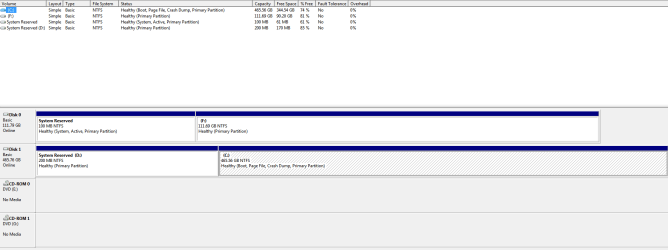
Did you follow the steps as you said you would and delete all partitions on the SSD during install? Post back a screenshot now of Disk Management - Post a Screen Capture Image.

What I would do is set up your Win7 on the SSD to see how much faster it is and then move everything needed over from the HD. You can keep your old install for up to 30 days until you need to activate the new one and delete the old one.
 
Here is the screengrab taken whilst running my old Windows OS. Yes I deleted all partitions during the install on the SSD so it installed just onto allocated space.

Would it be possible to make a complete system image of my old Windows OS and copy that over to the SSD? Or would that cause boot problems again? Or copy the working bootloader onto the old os? Really dont want to have to reinstall a tonne of programs etc into the new Windows if possible
 

Attachments

  • Capture.PNG
    Capture.PNG
    16.6 KB · Views: 6

My Computer My Computer

Computer type
PC/Desktop
OS
windows 7 ultimate sp1 64bit
Both installations are being booted by the new System Reserved partition as signified by the System flag on it.

I see you constructed a System Reserved for the hard drive, but since it isn't marked Active now (which is should not be with the SSD booting the HD) I'm wondering if you completed the steps necessary to make it boot the hard drive yesterday. Those are to mark it Active, then unplug the SSD, boot into Win7 disk to run 3 separate Startup Repairs. You might want to try that again now to see if it might work this time.

Otherwise you'll need the SSD to boot the HD, but I'm sure you'll want to transfer everything over to the SSD when you see the performance difference. If not it would be the strangest thing I've ever seen in 45,000 posts here.

Install your favorite game now to each to compare..
 
Greg, there is no speed benefit by installing the games on the ssd and they will eventually take up way to much space with save points etc. ;)

Some games take up gigabytes of space.

Texas Hold`em from Vista maybe, but not Crisys, Assassin`s Creed or Battlefield etc.


But she won`t even be able to do that until she backs up her data that`s on the hard drive and formats it.
 

My Computer My Computer

Computer type
PC/Desktop
Computer Manufacturer/Model Number
Skylake Special #666
OS
Windows 10 Pro x64
CPU
Intel Core i7 6700K
Motherboard
Asus Sabertooth Z170 Mark 1
Memory
GSkill TridentZ RGB 16GB 3600 16-16-16-36
Graphics Card(s)
EVGA GTX 980 Ti SC x2
Sound Card
Realtek High Definition
Monitor(s) Displays
AOC G2460PG
Screen Resolution
1920 x 1080 144Hz
Hard Drives
Samsung 860 Pro 256GB, Seagate Barracuda 4TB x2
PSU
EVGA 1000 P2, EVGA White Custom Braided Cables
Case
Corsair Vengeance C70 Gunmetal Black
Cooling
Corsair H100i v2, Corsair ML120 x2, Thermal Grizzly Kryonaut
Keyboard
Logitech G910 Orion Spectrum
Mouse
Logitech G700s
Internet Speed
Verizon Fios Quantum Gateway 75/75
Antivirus
Windows Defender, Malwarebytes Free 3.8.3
Browser
Chrome
Other Info
Corsair SP120 x4, LG Blu-ray Drive, Durabrand HT-395 100 Watt Dolby Digital Amp, Corsair H2100 Wireless 7.1 Headset
All fixed and back up and running as I was now! I used easy cd change boot drive option to make my old windows installation the main boot. Deleted all unnecessary partitions, reformatted my ssd and copied my stuff back onto it. All back to normal! Thanks for your help
 

My Computer My Computer

Computer type
PC/Desktop
OS
windows 7 ultimate sp1 64bit
Back
Top