bootmgr is missing - tried everything, need help!

marcl

New member
Member
Local time
3:38 PM
Messages
53
Location
United Kingdom
Hello

I have a strange issue with my w7 64 ultimate system. All was working well earlier today, shut the system down for a bit, went to switch back on I am getting bootmgr is missing error and the system wont boot. This has happened once before, a simple windows startup repair fixed it in 2 minutes. However this time I have tried every solution I can find on the net to no avail. My setup is a 500gb hdd drive with windows on and a 120gb sata drive. However the 100mb system reserved part is on the sata drive. In the bios I hav always had to point to boot from the sata drive otherwise windows wont boot. If I tried booting from the windows drive I would get the bootmgr is missing error. That has always been the case.

I have tried running startup repair but it says it cant automatically fix errors and I get a problem Signature 07 error code missing boot manager. I have tried every possible command prompt solution I could find on the net but nothing works including deleting the whole boot record and creating a new one.

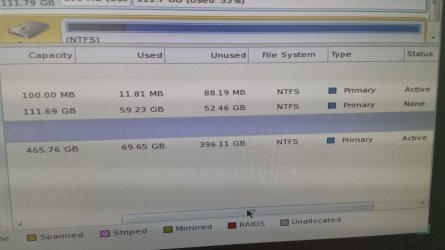
I have downloaded magic partition wizard but I am not 100% sure what I should do on their to try fix my problem. When I went on their first time, my 100mb partition on the sata drive was showing as unallocated space which I am guessing isnt right. Should I have the windows drive (only 1 partition)marked as active or the 100mb space on the sata drive? Any help would be greatly appreciated, if you need anymore information just ask!
 

My Computer

Computer type
PC/Desktop
OS
windows 7 ultimate sp1 64bit

My Computer

Computer type
PC/Desktop
Computer Manufacturer/Model Number
Skylake Special #666
OS
Windows 10 Pro x64
CPU
Intel Core i7 6700K
Motherboard
Asus Sabertooth Z170 Mark 1
Memory
GSkill TridentZ RGB 16GB 3600 16-16-16-36
Graphics Card(s)
EVGA GTX 980 Ti SC x2
Sound Card
Realtek High Definition
Monitor(s) Displays
AOC G2460PG
Screen Resolution
1920 x 1080 144Hz
Hard Drives
Samsung 860 Pro 256GB, Seagate Barracuda 4TB x2
PSU
EVGA 1000 P2, EVGA White Custom Braided Cables
Case
Corsair Vengeance C70 Gunmetal Black
Cooling
Corsair H100i v2, Corsair ML120 x2, Thermal Grizzly Kryonaut
Keyboard
Logitech G910 Orion Spectrum
Mouse
Logitech G700s
Internet Speed
Verizon Fios Quantum Gateway 75/75
Antivirus
Windows Defender, Malwarebytes Free 3.8.3
Browser
Chrome
Other Info
Corsair SP120 x4, LG Blu-ray Drive, Durabrand HT-395 100 Watt Dolby Digital Amp, Corsair H2100 Wireless 7.1 Headset
Ok will try this tonight after work.

With the ssd, should I leave the 100mb as unallocated space and set the main partition as active. Or should I create a partition on the 100mb space and set that as active?
 

My Computer

Computer type
PC/Desktop
OS
windows 7 ultimate sp1 64bit
Ok so just unplugged the hdd drive, set the 100mb partition on the ssd as active (had to create this partition as it was down as unallocated space), checked no other partitions were active. Ran the startup repair but still get the failed repair with problem sIgnature 07 missing boot manager. Tried running 3 or 4 times but same thing. When I try to boot from the ssd now I am getting ntldr is missing error rather than bootmgr??
 

My Computer

Computer type
PC/Desktop
OS
windows 7 ultimate sp1 64bit
Just stuck in this endless startup repair loop. Either missing boot manager or if I connect the windows drive I occasionally get the noOsinstalled / partition table repair failed. Can anyone help?
 

My Computer

Computer type
PC/Desktop
OS
windows 7 ultimate sp1 64bit
Windows drive ?

You are confusing, why isn`t windows on the ssd ?

What is the purpose of the ssd in this scenario ?

If windows is on the 500 GB drive, of course windows won`t boot if it`s unplugged.

Hook up only the drive with windows on it, mark active then run startup repair.
 

My Computer

Computer type
PC/Desktop
Computer Manufacturer/Model Number
Skylake Special #666
OS
Windows 10 Pro x64
CPU
Intel Core i7 6700K
Motherboard
Asus Sabertooth Z170 Mark 1
Memory
GSkill TridentZ RGB 16GB 3600 16-16-16-36
Graphics Card(s)
EVGA GTX 980 Ti SC x2
Sound Card
Realtek High Definition
Monitor(s) Displays
AOC G2460PG
Screen Resolution
1920 x 1080 144Hz
Hard Drives
Samsung 860 Pro 256GB, Seagate Barracuda 4TB x2
PSU
EVGA 1000 P2, EVGA White Custom Braided Cables
Case
Corsair Vengeance C70 Gunmetal Black
Cooling
Corsair H100i v2, Corsair ML120 x2, Thermal Grizzly Kryonaut
Keyboard
Logitech G910 Orion Spectrum
Mouse
Logitech G700s
Internet Speed
Verizon Fios Quantum Gateway 75/75
Antivirus
Windows Defender, Malwarebytes Free 3.8.3
Browser
Chrome
Other Info
Corsair SP120 x4, LG Blu-ray Drive, Durabrand HT-395 100 Watt Dolby Digital Amp, Corsair H2100 Wireless 7.1 Headset
Yes the hdd drive with my windows os install on. As I mentioned that is on one drive and the 100mb system files are on another. I disconnected the windows drive to try run start up repair on the drive with the system reserved area but it didnt work even when I had it set to the active partition. Should the windows drive be marked as an active partition when its connected? It only has the 1 partition
 

My Computer

Computer type
PC/Desktop
OS
windows 7 ultimate sp1 64bit
Can you post back a picture of Partition Wizard showing the full drive map and listings? Screenshots and Files - Upload and Post in Seven Forums - Windows 7 Forums

If you don't have Win7 on the SSD then that is just ridiculous and you should focus now on doing a perfect Clean Install Windows 7 to the SSD with the other drive unplugged. Delete all partitions during the booted install. You dont' have to activate it with the key from the other Win7 for 30 days but when you see the performance difference you will want to do so.

If there is some strange reason you'd want Win7 on the HD and not SSD, then confirm that C is Partition Marked Active and run Startup Repair - Run 3 Separate Times. You said you ran Startup Repair but didn't mention running it three times which is often what's required.

If this fails we need to see the PW drive map and listings picture to see what's blocking it.
 
Hi guys,

Thanks for your ongoing help. I have read that it is not unusual and pretty common for the system reserved partition and the windows OS to be on separate drives. I believe this is due to how Windows recognises the drives and the SATA ports they are connected to. I think the SSD drive is connected to sata port 1 so Windows installed the system reserve partition to that but I installed the actual OS to the other drive as I wanted to use the SSD just for games. This setup has worked fine for months.

Like I said previously, my working setup was I had to set the bios to boot from the SSD even though the OS isn't on there in order for it to boot. If I set it to boot from the Windows OS drive it would not boot (said bootmgr is missing). I assume this is because the boot files are on the 100mb partition on the SSD. Hope that makes sense? I will post a screenshot of partition wizard shortly.
 

My Computer

Computer type
PC/Desktop
OS
windows 7 ultimate sp1 64bit
Are you under the impression that your games will be faster by putting them on the SSD even thought the OS is inexplicably on the HD? This is utterly and foolishly wrong. If you don't install the OS on the SSD you are wasting it completely.

I would not boot Win7 from another physical drive. If you insist on such foolishness, Mark C Partition Active,
power down to unplug all other drives, then run Startup Repair - Run 3 Separate Times until Win7 starts and C holds System flag.

If this isn't working then post back the screenshot, which we should see anyway since such unsound decisions are being made.
 

My Computer

Computer type
PC/Desktop
Computer Manufacturer/Model Number
Home made Desktop
OS
Windows 10 Pro. 64/ version 1709 Windows 7 Pro/64
CPU
Intel i7-6800K @ 4.3
Motherboard
ASUS X-99 Deluxe II
Memory
Corsair Platinum 16 gig @2400
Graphics Card(s)
EVGA GTX 1070 OC
Monitor(s) Displays
Asus 27" LED LCD/VE278Q
Screen Resolution
1920-1080 or 1280-720 HDMI
Hard Drives
INTEL SSD 730-240 Gb Sata 3.0/
PSU
EVGA Platium 1200W
Case
Phanteks Luxe Tempered Glass 8 fans/ one radiator
Cooling
XSPC/ Water Cooled CPU
Keyboard
Das 4 Professional
Mouse
Logitech M705/MX Anywhere 2-S
Internet Speed
100 mbits
Antivirus
Microsoft Security Essentials/ Malwarebytes Premium 3.0/ SAS
Browser
I.E. 11 default/Firefox/ ISP Time Warner Cable/Spectrum
Other Info
LG BluRay Burner/
Sound system-KLipsch-THX/
Icy Dock ssd Hot Swap bays.
I am under no impressions of anything. My system ran perfectly fine and fast enough with the setup how I had it. The ssd is only 120gb so not big enough for os and other things. I appreciate your help but I dont need a patronising school kids telling off!

I will grab the screenshot now
 

My Computer

Computer type
PC/Desktop
OS
windows 7 ultimate sp1 64bit
From post #4
When I try to boot from the ssd now I am getting ntldr is missing error rather than bootmgr??

I don't understand how you are getting a NTLDR from a Windows 7 install.
 

My Computer

Computer type
PC/Desktop
Computer Manufacturer/Model Number
Home made Desktop
OS
Windows 10 Pro. 64/ version 1709 Windows 7 Pro/64
CPU
Intel i7-6800K @ 4.3
Motherboard
ASUS X-99 Deluxe II
Memory
Corsair Platinum 16 gig @2400
Graphics Card(s)
EVGA GTX 1070 OC
Monitor(s) Displays
Asus 27" LED LCD/VE278Q
Screen Resolution
1920-1080 or 1280-720 HDMI
Hard Drives
INTEL SSD 730-240 Gb Sata 3.0/
PSU
EVGA Platium 1200W
Case
Phanteks Luxe Tempered Glass 8 fans/ one radiator
Cooling
XSPC/ Water Cooled CPU
Keyboard
Das 4 Professional
Mouse
Logitech M705/MX Anywhere 2-S
Internet Speed
100 mbits
Antivirus
Microsoft Security Essentials/ Malwarebytes Premium 3.0/ SAS
Browser
I.E. 11 default/Firefox/ ISP Time Warner Cable/Spectrum
Other Info
LG BluRay Burner/
Sound system-KLipsch-THX/
Icy Dock ssd Hot Swap bays.
Instead of taking offense when we correctly point out how wrong-headed not using your SSD for the OS is, why not ask for help in resolving your hesitations. This allows you to benefit from the advice of the top tech forums on the web which is why you came here, right?

I operate my Win7 on a 120gb SSD with room to spare. This is because like many others I link my User folders to the hard drive which doesn't result in any speed differential. User Folders - Change Default Location

The blue link shows how it is done technically, but simply put you copy your User folders to the hard drive, then rightclick each to Choose Properties, on Location tab click Move, browse to select the new HD folder location, and Apply. That User folder then resides on the HD. Confirm this and you can delete the contents of the C drive User folder.

Another method is to copy the User folders to HD, then rightclick each to add to the related Library - Include a Folder - Windows 7 Forums while setting that HD folder as the default for saving: Library - Set Save Folder - Windows 7 Help Forums. Once the HD folder appears in the library with all your files in it, delete the contents of C User folder but leave it in the Library so you can see if anything gets saved there and drag it to HD.

This gives you a lightning fast OS on SSD with adequate expanding storage on the HD. You can simultaneously back up and sync your files to your other computers using this free method to Sync, Backup and Store your Files to the Cloud with Skydrive - Windows 7 Forums

I told you how to repair Win7 to boot from the HD if that's what you want. It should not be booting from the SSD until you install it there as urged. If you do you would want to unplug the HD during the reinstall, delete all partitions on SSD using the drive options pictured in Steps 7/8 of Clean Install Windows 7

After install plug back in the HD and link the User folders you've stored there as given above. No need to copy then.
 
Here is the screenshot as promised
 

Attachments

  • screenshot.jpg
    screenshot.jpg
    539.8 KB · Views: 6

My Computer

Computer type
PC/Desktop
OS
windows 7 ultimate sp1 64bit
She can't boot Jack.

You have no Boot partition. Run the repairs exactly as given in post 10.
 
Sorry, After seeing the picture in post #15 I thought she could boot.
 

My Computer

Computer type
PC/Desktop
Computer Manufacturer/Model Number
Home made Desktop
OS
Windows 10 Pro. 64/ version 1709 Windows 7 Pro/64
CPU
Intel i7-6800K @ 4.3
Motherboard
ASUS X-99 Deluxe II
Memory
Corsair Platinum 16 gig @2400
Graphics Card(s)
EVGA GTX 1070 OC
Monitor(s) Displays
Asus 27" LED LCD/VE278Q
Screen Resolution
1920-1080 or 1280-720 HDMI
Hard Drives
INTEL SSD 730-240 Gb Sata 3.0/
PSU
EVGA Platium 1200W
Case
Phanteks Luxe Tempered Glass 8 fans/ one radiator
Cooling
XSPC/ Water Cooled CPU
Keyboard
Das 4 Professional
Mouse
Logitech M705/MX Anywhere 2-S
Internet Speed
100 mbits
Antivirus
Microsoft Security Essentials/ Malwarebytes Premium 3.0/ SAS
Browser
I.E. 11 default/Firefox/ ISP Time Warner Cable/Spectrum
Other Info
LG BluRay Burner/
Sound system-KLipsch-THX/
Icy Dock ssd Hot Swap bays.
Thanks for your help everyone. I am away until Sunday now altho may get chance to do this late tonight.

So just to clarify.....unplug the ssd so only the windows os drive is connected, mark partition active (already is) run startup repair 3 times? I guess my windows os drive will have no boot files on at all.

Greg, I understand your points and I will look into this once I am back up and running. At this stage I just want to get it back booting!
 

My Computer

Computer type
PC/Desktop
OS
windows 7 ultimate sp1 64bit
Just tried and it wont work.

I click repair your computer option, it scans for windows and finds 'windows 7 ultimate (recovered)' on partition c:. When I select it and click next I get 'this version of system recovery options is not compatible with your version of windows.....' message. I click cancel and navigate through to the start up repair screen. Run that and it fails citing problem signature 05 external media problem signature 07 missingbootmanager. If I click out of that to view the log I can see it has the root cause found as "missing or corrupt boot record'

Ther was a boot folder on the c: so I tried clearing that out to make sure it was starting from scratch but still the same problem. Any ideas?
 

My Computer

Computer type
PC/Desktop
OS
windows 7 ultimate sp1 64bit
Back
Top