My Computer
- Computer Manufacturer/Model Number
- Packard Bell SJ 51
- OS
- Win 7 Home Premium 32bit
- CPU
- AMD Turion 64 Dual core
- Memory
- 3 GB
- Graphics Card(s)
- Nividia 7000
- Sound Card
- Conexant HD

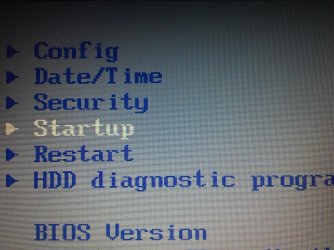
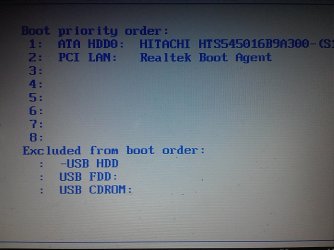
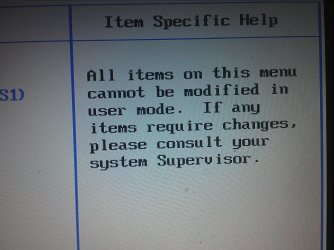
The last screenshot states you're viewing the BIOS in "user mode". Weren't you asked for a password when entering the BIOS?
That's likely why you can't boot from other media.
Oh, I gotcha.
The college owns the laptop?
You could get a USB adapter to connect and wipe that HD.
I think this might be common practice by schools & colleges to block BIOS access. My son's school netbook is BIOS password protected. It's a real PITA when you know what you're doing.Oh, I gotcha.
The college owns the laptop?
You could get a USB adapter to connect and wipe that HD.
Yeah they own it , and its upto me if i want to purchase it or not but that is only after i graduate.
USB adapters are easy to find for Hitachi HDD?

Will the disk and stick boot on Lenovo without the HD inserted?
If so then it is the HD blocking them. It needs to be wiped as code in the boot sector is blocking booting of disks. If PW or DBAN will not autostart then you can slave it using USB adapter cable.
If not then the problem is clearly the disks or stick or the way they are being burned/written. This is why I went around with you on this for quite awhile at beginning. If Download tool doesn't work then use ImgBurn, Universal Installer, or UltraISO trial.
DMBAN is installed with Universal Installer , the others were installed with Ultraiso Full version
Will the disk and stick boot on Lenovo without the HD inserted?
If so then it is the HD blocking them. It needs to be wiped as code in the boot sector is blocking booting of disks. If PW or DBAN will not autostart then you can slave it using USB adapter cable.
If not then the problem is clearly the disks or stick or the way they are being burned/written. This is why I went around with you on this for quite awhile at beginning. If Download tool doesn't work then use ImgBurn, Universal Installer, or UltraISO trial.
DMBAN is installed with Universal Installer , the others were installed with Ultraiso Full version
Try writing Universal Boot Disk which can test, repair and wipe the HD to USB as shown in this tutorial: Easily Boot Ultimate Boot CD (UBCD) from a USB flash drive | USB Pen Drive Linux
You announced halfway through that CD drive wasn't working any longer but never answered why. If you haven't tried booting a Win7 installer DVD burned with Win7 Download tool or ImgBurn then you won't know for sure that a disk won't work.
You've never made it clear if you attempted to boot a Win7 installer DVD burned with Win7 Download tool as I gave you in my first post. If so did you try writing a freshly downloaded official ISO from the link given to flash stick using that tool?
Is there any kind of BIOS lock or password on the Packard Bell like there is on the other laptop? No, we cannot help you crack a BIOS password and you should not ask such a question again here.
I'd find another laptop to install HD into to wipe the HD to see if it will then autostart the installer on original machine, or install Win7 to see if it will start up on original machine - then if not SysPrep it first.
I do not know if DBAN will write to USB flash stick with Universal USB Installer, or if it autostarts. Did it have a listing for it in Universal USB Installer dropdown? If not try the Universal Boot Disk which does for sure and offers more options including testing the HD, and will autostart for sure.
Can you diplomatically approach your college technicians and ask if you are able to boot from a CD or has it been blocked in the BIOS. The answer may save you a lot of wasted effort. It may be a job for them to fix.
Do you have a link for Universal Boot Disk ?
Did you change any drivers given by the installer and/or quickly updated/provided by optional Windows Updates? Which? As stated in Clean Reinstall - Factory OEM Windows 7 you should only change out installer/Updates drivers if there are performance problems.
Make sure you have the latest Display and Sound drivers.
Check the logs and System Resources for clues using these Troubleshooting Steps for Windows 7.
Post up the crash dump for analysis by our experts in Crashes forum: Blue Screen of Death (BSOD) Posting Instructions - Windows 7 Forums
Is there a newer chipset than that 2007 one?
Continue working through the steps given.