"BOOTMGR is missing"

thomis

New member
Local time
7:47 PM
Messages
33
...for Dell laptop Inspiron 1545 32-bit running Windows
Just downloaded Windows 7 install to flash drive to regain access to my laptop. I realize I will lose everything on it but all other attempts to do system restore, startup repair, etc.. have failed. I just need to get it working again so I can use it. I put the flash drive in the laptop and after hitting f12 to choose boot from usb...hit enter and "BOOTMGR" is missing it says...

Can I just download (from where?) this mr. BOOTMGR to the same usb and good to go?
 

My Computer

Computer Manufacturer/Model Number
DELL Inspiron 1545
OS
Windows 7 Home Premium 64
Internet Speed
760

My Computer

Computer type
PC/Desktop
Computer Manufacturer/Model Number
Self Assembled
OS
Microsoft Windows 10 Pro Insider Preview 64-bit
CPU
Intel(R) Core(TM) i3-4130 CPU @ 3.40GHz
Motherboard
Gigabyte Technology Co., Ltd. B85M-D3H
Memory
Corsair Vengence 4GB x2 (8.00GB Dual-Channel DDR3 @ 798MHz)
Graphics Card(s)
2047MB GeForce GTS 450 (ZOTAC International)
Sound Card
Onboard (Realtek High Definition Audio)
Monitor(s) Displays
LG Flatron E2040T
Screen Resolution
1600x900
Hard Drives
Western Digital 1 TB
Seagate 500 GB
PSU
Corsair VS550
Case
Cooler Master K380
Cooling
Cooler Master Seidon 120V Plus
Keyboard
Logitech MK260r
Mouse
Logitech MK260r
Internet Speed
PMPL Broadband
Antivirus
Windows Defender + MBAM
Browser
Firefox
Other Info
Dell Studio 15" Laptop
"all other attempts to do system restore, startup repair, etc.. have failed."
 

My Computer

Computer Manufacturer/Model Number
DELL Inspiron 1545
OS
Windows 7 Home Premium 64
Internet Speed
760
Have you tried to make it sure that the target partition is active, and then run the startup repair(not the automated one, but using the installation or recovery media) for three separate times, with restarts ?

It should work there.
 

My Computer

Computer type
PC/Desktop
Computer Manufacturer/Model Number
Self Assembled
OS
Microsoft Windows 10 Pro Insider Preview 64-bit
CPU
Intel(R) Core(TM) i3-4130 CPU @ 3.40GHz
Motherboard
Gigabyte Technology Co., Ltd. B85M-D3H
Memory
Corsair Vengence 4GB x2 (8.00GB Dual-Channel DDR3 @ 798MHz)
Graphics Card(s)
2047MB GeForce GTS 450 (ZOTAC International)
Sound Card
Onboard (Realtek High Definition Audio)
Monitor(s) Displays
LG Flatron E2040T
Screen Resolution
1600x900
Hard Drives
Western Digital 1 TB
Seagate 500 GB
PSU
Corsair VS550
Case
Cooler Master K380
Cooling
Cooler Master Seidon 120V Plus
Keyboard
Logitech MK260r
Mouse
Logitech MK260r
Internet Speed
PMPL Broadband
Antivirus
Windows Defender + MBAM
Browser
Firefox
Other Info
Dell Studio 15" Laptop
Make sure the USB flash drive is formatted as FAT32.
 

My Computer

OS
Windows 7 Home Premium 64bit
when i use the windows 7 repair disc, the dvd drive detects it and it loads. so why shouldn't the usb drive? does that still mean the partition is not set?
 

My Computer

Computer Manufacturer/Model Number
DELL Inspiron 1545
OS
Windows 7 Home Premium 64
Internet Speed
760
"Make sure the USB flash drive is formatted as FAT32."

i'm pretty novice my friend! how do i do that if i can't boot?
 

My Computer

Computer Manufacturer/Model Number
DELL Inspiron 1545
OS
Windows 7 Home Premium 64
Internet Speed
760

My Computer

Computer Manufacturer/Model Number
DELL Inspiron 1545
OS
Windows 7 Home Premium 64
Internet Speed
760
Please explain. The Windows Download tool is to write the ISO file to flash stick or burn to DVD.
 
ok, i get it now. I didn't realize the windows 7 install file (2.38 gb) is called an iso file. i was just clicking and dragging it to the usb drive. guess that's why i was not able to use it to boot.
 

My Computer

Computer Manufacturer/Model Number
DELL Inspiron 1545
OS
Windows 7 Home Premium 64
Internet Speed
760
setup from the install disk ran for an hour and failed. something about a partition
 

My Computer

Computer Manufacturer/Model Number
DELL Inspiron 1545
OS
Windows 7 Home Premium 64
Internet Speed
760
Try wiping the HD first. Unplug all other HD's. Boot into installer, at first screen press Shift + F10 keys to open a Command Line, type:

DISKPART
LIST DISK
SELECT DISK # (replace # with the WIn7 disk #)
CLEAN
EXIT.

Now try install using CUstom install Drive Options to create partition(s) as you wish and format before install, or just click Next to let installer do it for you.

If this fails we need the exact error message.
 
It is funny, that during the thread as far as I can tell, you never stated the original problem.

The built-in repair options. like Startup Repair, are supposed to correct just about anything wrong with the system, but as you can see they don't always work. If you have not already done so, you might try running the three versions of the Bootrec.exe command from the command prompt to see if it might jump start your system.

Bootrec /fixMBR
Bootrec /fixboot

and if not running yet
Bootrec /rebuildBCD
 

My Computer

Computer Manufacturer/Model Number
Homebuilt
OS
Windows 7 x64
CPU
i7-2600K
Motherboard
Asus P8Z77-v Pro
Memory
8 G
Graphics Card(s)
GTX 480
Sound Card
Onboard
Monitor(s) Displays
LG W2753V
Screen Resolution
1920x1080
Hard Drives
Crucial M4 128 G SSD
update

Thank you all for trying to help me restore use on this laptop.
Some quick background info: Dell Inspiron 1545 laptop, Windows HP 32 bit.

I was out of town for a week but I'm back and trying to get it working again. I ran the repair disk (a CD I bought for repairing windows 7). That didn't work. Multiple times.

So, I have downloaded Windows 7 Home Premium SP 1 on a USB. At first, the computer was saying "BOOTMGR MISSING" but its not saying that anymore. Now it is reading the usb stick but it won't install windows.

Here are a couple error boxes I have seen recently:

pcprob.jpg


error.jpg


postpc.jpg


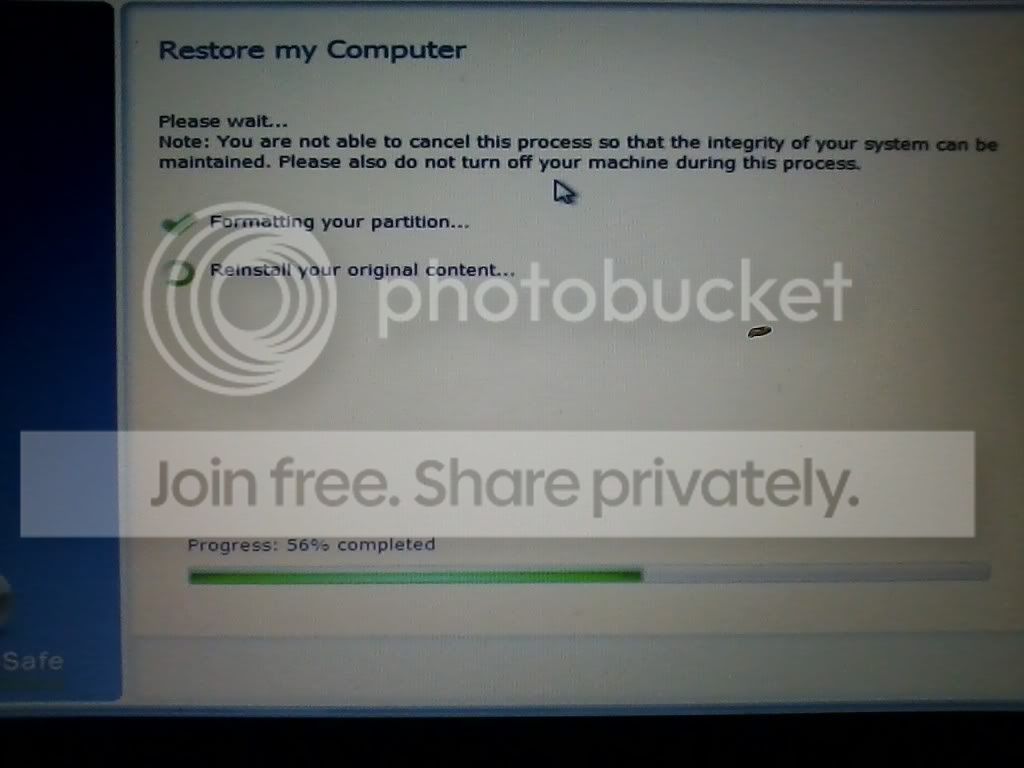
This last pic is from when "Dell Datasafe Restore" popped up... It ran for over 48 hours (seriously) and finally stuck for over 24 hours on 56%. That's when I shut it down.
 

My Computer

Computer Manufacturer/Model Number
DELL Inspiron 1545
OS
Windows 7 Home Premium 64
Internet Speed
760
2 questions

1) What program did you use to BURN the iso file to the flash stick ?
2) Did you change the BOOT DISC PRIORITY to have the usb drive listed 1st and save it ?
 

My Computer

Computer type
PC/Desktop
Computer Manufacturer/Model Number
Skylake Special #666
OS
Windows 10 Pro x64
CPU
Intel Core i7 6700K
Motherboard
Asus Sabertooth Z170 Mark 1
Memory
GSkill TridentZ RGB 16GB 3600 16-16-16-36
Graphics Card(s)
EVGA GTX 980 Ti SC x2
Sound Card
Realtek High Definition
Monitor(s) Displays
AOC G2460PG
Screen Resolution
1920 x 1080 144Hz
Hard Drives
Samsung 860 Pro 256GB, Seagate Barracuda 4TB x2
PSU
EVGA 1000 P2, EVGA White Custom Braided Cables
Case
Corsair Vengeance C70 Gunmetal Black
Cooling
Corsair H100i v2, Corsair ML120 x2, Thermal Grizzly Kryonaut
Keyboard
Logitech G910 Orion Spectrum
Mouse
Logitech G700s
Internet Speed
Verizon Fios Quantum Gateway 75/75
Antivirus
Windows Defender, Malwarebytes Free 3.8.3
Browser
Chrome
Other Info
Corsair SP120 x4, LG Blu-ray Drive, Durabrand HT-395 100 Watt Dolby Digital Amp, Corsair H2100 Wireless 7.1 Headset
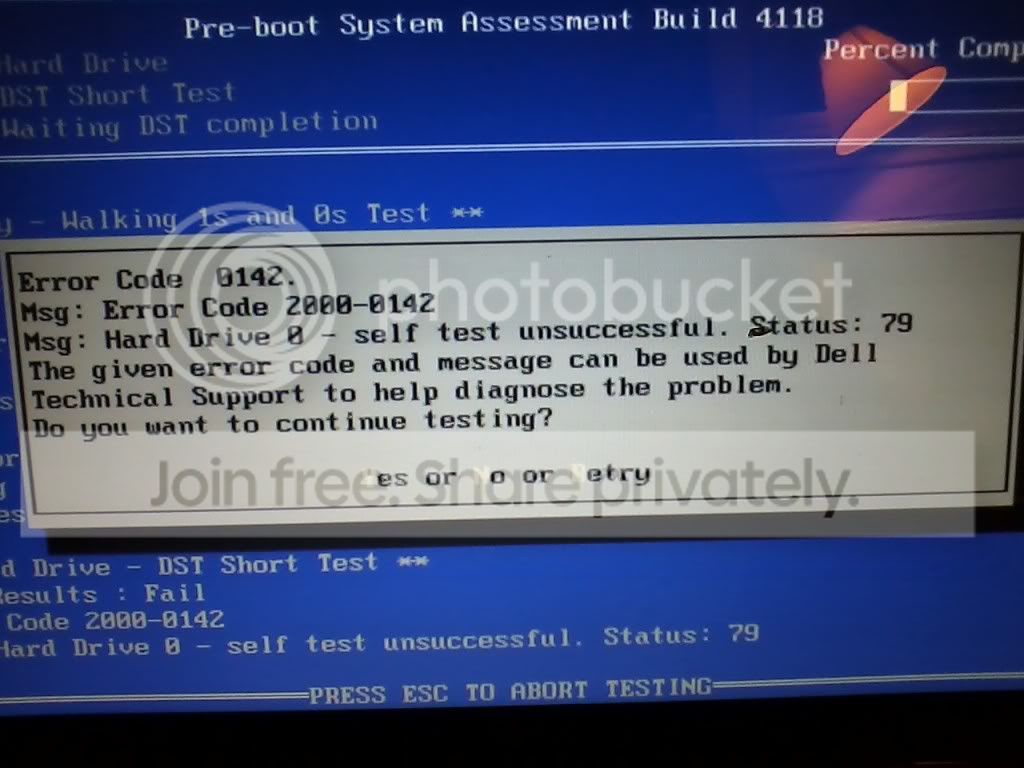
Dell Diagnostics tools were run from boot and show in the first screenshot that your HD has failed the Short test.

Boot into Dell Diagnostics via F12 at boot again to run the tests once more to confirm this.
Dell Diagnostics Utility - How to Run the
Dell DIagnostics downoad

You can then run the HD manufacturer's HD Diagnostic extended CD scan to confirm that your HD needs replacing.

I dont' know why you paid for a Win7 Repair CD as they are available free to be made from any Win7 PC. System Repair Disc - Create

We can continue with helping you get a perfect Clean Reinstall - Factory OEM Windows 7 once you repair or replace your HD.
 
If I haven't already said it, thank you. You guys are very kind to help. This is still a work in progress and with a 3 yr and 9 month old at my feet, it is taking forever.

AddRAM: "What program did you use to BURN the iso file to the flash stick?"

I used gregrocker's info he posted:

"Use the tool in Step 2 in Clean Reinstall - Factory OEM Windows 7 to write the ISO to stick."

For your second question: "Did you change the BOOT DISC PRIORITY to have the usb drive listed 1st and save it?"

I did do that but not sure if it was necessary since I could press F12 during startup and choose to boot from usb stick..which seemed to work fine.

Gregrocker, I ran the Dell diagn. tool and the same thing happened so I think its confirmed that the short test indeed failed. Also, I don't think I can run the manufacturer's HD diagnostic extended cd scan because the pc I'm using now (my home desktop) does not have a writable cd drive (also the reason I had to purchase the windows 7 repair cd).

As far as repairing or replacing the HD...Is there still any point in running the instructions from saltgrass:

Bootrec /fixMBR
Bootrec /fixboot

and if not running yet
Bootrec /rebuildBCD

OR gregrocker, is there still any point in your instructions to wipe the HD?"DISKPART
LIST DISK
SELECT DISK # (replace # with the WIn7 disk #)
CLEAN
EXIT."
 

My Computer

Computer Manufacturer/Model Number
DELL Inspiron 1545
OS
Windows 7 Home Premium 64
Internet Speed
760
You can write Hirens Boot CD or Ulitmate Boot CD to flash stick using Universal USB Installer
to test your HD with the HD maker's diagnostics or comparable.
Hiren’s BootCD 15.1
Easily Boot Ultimate Boot CD (UBCD) from a USB flash drive | USB Pen Drive Linux

Otherwise boot the Win7 installer, press Shift + F10 at the first screen to open a Command Box or access System Recovery Options to run Disk Check which will confirm if HD is salvageable.

If test fails or won't run then I would replace the HD.
 
Back
Top