Solved Dell Inspiron 1545 ssd and win 7 install?

Bertal

New member
Local time
9:14 AM
Messages
7
Hi there, Im just looking for a bit of advice as I’ve never done this before and have read some conflicting advice.

I have a Dell Inspiron 1545 without its original hdd and I also have an OS disc and a drivers and utilities disc that I think came with the laptop many years ago, although the discs may have come with a previous laptop, I’m not sure.

I have ordered a 500gb ssd and spacer to install and I then want to install win 7 on it.


Ive read that after fitting the ssd, I need to go into the bios and set to AHCI mode if using an ssd, but I’ve also read that it should be changed from AHCI so I’m not too sure what to do?

I’m also not sure about how to install the os and drivers and whether these discs will be ok if they didn’t come with this laptop?

Any Advice would be much appreciated.

Thanks.
 

My Computers My Computers

  • At a glance

    Windows 11
    OS
    Windows 11
  • Computer type
    PC/Desktop
The spec shows that the Inspiron 1545 is about 2009 and probably shipped with Windows Vista. You probably won't need to change anything in BIOS, and it should find the DVD Drive and boot from an installation Disk. The Operating System installation disks can be used on any machine, but it needs to be the version of Windows 7 that you want to install. If you have the original Disk you might find it to be Windows Vista. The Product Key and Associated Operating System used to be put on a label on the back of the machine.
It is the Product key that is machine specific, and to contunue to use Windows without a black screen after 30 days you will need to activate it.
I have put SSDs in quite a few older machines without any problems, it is generally a starightforward swap with the old HDD and Fresh Windows Install.
There is plenty of guidance for the installation and Activation process online and you can purchase a License key if needed which normally comes with a link to download the installation file for that version. Most are Windows 7 SP1 but you still need to run the Windows update when you have completed the basic install. Be aware that it can take a couple of hours or more to download and install something like 170 updates. Often some will fail to install first time so just run Update again till you are up to date. Windows will install generic device drivers to get things working. If there are any missing drivers you may need to search, but again there are plenty of sources available to download. If the Windows Update fails to run, install these manually: KB947821, KB3138612 & KB4490628 all for 64 bit - one of those should get you going. All available from the Microsoft website.
Hopefully haven't put you off, but even today there is very little I can't do with Windows 7 on my Desktop, and I think it is worth the time it takes to set up. Also runs well on the older machines which are painfully slow with Windows 10 even after tweaking.
Pete
 

My Computers My Computers

  • At a glance

    Windows 7 Home Premium 64 bit
    OS
    Windows 7 Home Premium 64 bit
  • Computer type
    PC/Desktop
I have a Dell Inspiron 1545 without its original hdd and I also have an OS disc and a drivers and utilities disc that I think came with the laptop many years ago, although the discs may have come with a previous laptop, I’m not sure.

Ive read that after fitting the ssd, I need to go into the bios and set to AHCI mode if using an ssd, but I’ve also read that it should be changed from AHCI so I’m not too sure what to do?

I’m also not sure about how to install the os and drivers and whether these discs will be ok if they didn’t come with this laptop?

AHCI is what you want. RAID is second best, if your particular BIOS doesn't have a specific AHCI option. Do not choose ATA, as I don't think TRIM works with ATA, and you'll kill your SSD if TRIM isn't enabled. The AHCI option must be set before Windows is installed, as Windows will install different disk drivers depending on the setting and it's not easy to change drivers after then fact. (It can be done if necessary, but don't make things more difficult for yourself.)

Is your OS disc a Dell-branded Windows 7 disc? Unlike some other manufacturers (such as HP), Dell deliberately avoided tying their reinstallation media to a specific model, so it doesn't matter which computer the disc came with -- a Dell-branded disc should work with any Dell computer. Essentially, a Dell disc is a generic Microsoft disc that has been BIOS-locked to computers with a Dell BIOS, such that it will self-activate without you having to enter a product key or go through online activation (which would fail, anyway, because Microsoft long ago shut off their activation servers).

The downside of Dell's "one-disc-fits-all" approach is that the media contains no model-specific drivers, so you'll have to install a bunch of Dell drivers yourself to get any kind of functional system.

Unlike the OS disc, the Drivers & Utilities disc is specific to the model (or group of similar models), so a Drivers disc that came with one model should not be installed on another model. Besides having the wrong drivers, it will be way outdated anyway. Ignore the Drivers disc. You can download the latest drivers on the 1545 page of support.dell.com.
 

My Computer My Computer

At a glance

Windows 7/8.1/10 multibootIntel Core i7-770048GB (2x16GB Crucial DDR4-3200 + 2x8GB Hynix ...Intel HD630 + AMD Radeon R7 450 PCIe
Computer type
PC/Desktop
Computer Manufacturer/Model Number
Dell Optiplex 7050
OS
Windows 7/8.1/10 multiboot
CPU
Intel Core i7-7700
Motherboard
Dell, Intel Q270 chipset
Memory
48GB (2x16GB Crucial DDR4-3200 + 2x8GB Hynix DDR4-2400)
Graphics Card(s)
Intel HD630 + AMD Radeon R7 450 PCIe
Monitor(s) Displays
Asus VC279 (27")
Screen Resolution
1920x1080
Hard Drives
Toshiba M.2 NVMe (256GB),
Samsung 960 Evo (500GB),
WD Red Plus 80EFBX (8TB)
Thank you for the advice. I’ll fit the ssd when it arrives and set to ACHI before attempting an OS install.


I forgot to mention in my first post that I’m not actually intending to use it online, just for capturing video from vhs with a program that works best on windows 7, I may also install VLC but that’s about it.

The discs are Dell branded and the drivers and utilities disc does actually say that it’s for a 1545. Do you think that the drivers on it will be enough for what I’m using the laptop for or would you still recommend going online and downloading them?
 

My Computers My Computers

  • At a glance

    Windows 11
    OS
    Windows 11
  • Computer type
    PC/Desktop
its possible that you may need SP1 and some Netframework/C++ updates...(depends on those discs)
But you wont know until you start to Video capture

stay off-line to start with and see what happens
 

My Computer My Computer

At a glance

W7 home premium 32bit/W7HP 64bit/w10 tp insid...E5300 dual core3gbNvidia Geforce 7100 Nforce 630i
Computer type
PC/Desktop
Computer Manufacturer/Model Number
medionl/Aspire 6930G/acer x55a
OS
W7 home premium 32bit/W7HP 64bit/w10 tp insider ring
CPU
E5300 dual core
Motherboard
medion MS7366
Memory
3gb
Graphics Card(s)
Nvidia Geforce 7100 Nforce 630i
Monitor(s) Displays
avixc
Internet Speed
n (isp resticted to 72)
Antivirus
mse/pands
Browser
palemoon
Other Info
Belkin Fd7050 n USB using Railink RT2870 drivers, more upto date
the drivers and utilities disc does actually say that it’s for a 1545. Do you think that the drivers on it will be enough for what I’m using the laptop for or would you still recommend going online and downloading them?

It might be adequate for your use case . . . although, the drivers might be for Vista instead of Win7, so might be the wrong drivers anyway.

If you look online, there are a boat-load of drivers available, but most probably aren't relevant to your particular machine's hardware. I'd start by installing the Chipset, Video, Ethernet, and Touchpad drivers, then look in Device Manager to see what else might still be missing (Audio? Bluetooth? Wifi? et al).

And once you sort out the drivers and clear all the yellow question marks in Device Manager, you'll still want to deal with at least some Windows updates. They're not just for security online, so you can't just ignore them because you're not going to be going online. Some software (such as perhaps VLC) may require certain updates like IE 11 or specific .NET versions, for instance.

But updates aren't hard, they're just time consuming. Sort out the OS install and drivers first.

-----

Edit: On second thought, if the Drivers disc was Vista drivers, you'd probably have a Vista OS disc instead of Win7. The fact you have a Win7 OS disc would suggest it's more likely the Drivers disc is Win7, too.
 
Last edited:

My Computer My Computer

At a glance

Windows 7/8.1/10 multibootIntel Core i7-770048GB (2x16GB Crucial DDR4-3200 + 2x8GB Hynix ...Intel HD630 + AMD Radeon R7 450 PCIe
Computer type
PC/Desktop
Computer Manufacturer/Model Number
Dell Optiplex 7050
OS
Windows 7/8.1/10 multiboot
CPU
Intel Core i7-7700
Motherboard
Dell, Intel Q270 chipset
Memory
48GB (2x16GB Crucial DDR4-3200 + 2x8GB Hynix DDR4-2400)
Graphics Card(s)
Intel HD630 + AMD Radeon R7 450 PCIe
Monitor(s) Displays
Asus VC279 (27")
Screen Resolution
1920x1080
Hard Drives
Toshiba M.2 NVMe (256GB),
Samsung 960 Evo (500GB),
WD Red Plus 80EFBX (8TB)
I wouldn't go down the raid set up. Most people don't need it and depending upon the type it takes either 2 or 3 drives minimum. There are pluses and minuses to each type.

As far as drivers are concerned I've had most Vista drivers work on 7. I think I couldn't get audio to work but that's been so long I don't remember for sure. 7 drivers would be preferable.
 

My Computers My Computers

  • At a glance

    Windows 7 pro/Windows 10 ProIntel i7 860 Quad core 2.8 ghz8 gbATI Radeon HD 5770 1 gb ram
    Computer type
    PC/Desktop
    Computer Manufacturer/Model Number
    HP Pavillion Elite HPE-250f
    OS
    Windows 7 pro/Windows 10 Pro
    CPU
    Intel i7 860 Quad core 2.8 ghz
    Memory
    8 gb
    Graphics Card(s)
    ATI Radeon HD 5770 1 gb ram
    Monitor(s) Displays
    Alienware 25 AW2521HF & Viewsonic
    Screen Resolution
    1920 x1080 & 1680x1050
    Hard Drives
    WD blue 1 tb & 500 gb.
    Browser
    FF of course.
    Other Info
    https://www.bestbuy.com/site/hp-pavilion-elite-desktop-intel-core-i7-processor-8gb-memory-1tb-hard-drive/9921493.p?skuId=9921493
  • At a glance

    Windows 2012 R2 Data center/Linux Minti3 9100 3.6GHz, 8M cache, 4C/4T8GB 2666MT/s DDR4 ECC UDIMM
    Computer type
    PC/Desktop
    System Manufacturer/Model Number
    Dell Poweredge T140
    OS
    Windows 2012 R2 Data center/Linux Mint
    CPU
    i3 9100 3.6GHz, 8M cache, 4C/4T
    Memory
    8GB 2666MT/s DDR4 ECC UDIMM
    Monitor(s) Displays
    Viewsonic
    Screen Resolution
    1680x1050
    Hard Drives
    1 TB & 750 GB
    Other Info
    https://www.dell.com/en-us/work/shop/productdetailstxn/poweredge-t140?~ck=bt
Ok it looks like it’ll be better to just go online and get all the drivers from dell. I’m just waiting for the ssd and a replacement charger to turn up and then I’ll give it a go. I’ll check back in then and let you know how it went.

- - - Updated - - -

I’ve just had a thought, this laptop is about 16 years old. Would you guys recommend changing the cmos battery before OS/drivers install. I’m a bit apprehensive about doing it as it will reset all the bios settings and I’m not really computer savvy enough to know what to put them back to. That said, if it’s already dead they will have reset anyway.
 

My Computers My Computers

  • At a glance

    Windows 11
    OS
    Windows 11
  • Computer type
    PC/Desktop
You really only need to do that if the computer is losing the clock and bios settings. I won't have anything to do with the new install of a hard drive.
 

My Computers My Computers

  • At a glance

    Windows 7 pro/Windows 10 ProIntel i7 860 Quad core 2.8 ghz8 gbATI Radeon HD 5770 1 gb ram
    Computer type
    PC/Desktop
    Computer Manufacturer/Model Number
    HP Pavillion Elite HPE-250f
    OS
    Windows 7 pro/Windows 10 Pro
    CPU
    Intel i7 860 Quad core 2.8 ghz
    Memory
    8 gb
    Graphics Card(s)
    ATI Radeon HD 5770 1 gb ram
    Monitor(s) Displays
    Alienware 25 AW2521HF & Viewsonic
    Screen Resolution
    1920 x1080 & 1680x1050
    Hard Drives
    WD blue 1 tb & 500 gb.
    Browser
    FF of course.
    Other Info
    https://www.bestbuy.com/site/hp-pavilion-elite-desktop-intel-core-i7-processor-8gb-memory-1tb-hard-drive/9921493.p?skuId=9921493
  • At a glance

    Windows 2012 R2 Data center/Linux Minti3 9100 3.6GHz, 8M cache, 4C/4T8GB 2666MT/s DDR4 ECC UDIMM
    Computer type
    PC/Desktop
    System Manufacturer/Model Number
    Dell Poweredge T140
    OS
    Windows 2012 R2 Data center/Linux Mint
    CPU
    i3 9100 3.6GHz, 8M cache, 4C/4T
    Memory
    8GB 2666MT/s DDR4 ECC UDIMM
    Monitor(s) Displays
    Viewsonic
    Screen Resolution
    1680x1050
    Hard Drives
    1 TB & 750 GB
    Other Info
    https://www.dell.com/en-us/work/shop/productdetailstxn/poweredge-t140?~ck=bt
Would you guys recommend changing the cmos battery before OS/drivers install. I’m a bit apprehensive about doing it as it will reset all the bios settings

I wouldn't worry about losing the BIOS settings. Given you're doing a fresh install, you can probably even reset everything to its defaults and then just double-check the AHCI setting.

The part you should be apprehensive about is changing the CMOS battery. It's not for the faint of heart. You first have to split the cases, completely dismantling the laptop, and remove the motherboard. It should be criminal to design a product to make it so difficult to replace such a simple part.

Yeah, at 16 yrs old, it sounds like replacement is a good idea, but you've got enough on your plate already. It can always be done later if need be. As townsbg said, I wouldn't worry about it unless you discover other indications it needs replacing. My advice would be different if you already had the whole thing apart for some other reason, but in your case it's not like changing it now is going to save you any time down the road.
 

My Computer My Computer

At a glance

Windows 7/8.1/10 multibootIntel Core i7-770048GB (2x16GB Crucial DDR4-3200 + 2x8GB Hynix ...Intel HD630 + AMD Radeon R7 450 PCIe
Computer type
PC/Desktop
Computer Manufacturer/Model Number
Dell Optiplex 7050
OS
Windows 7/8.1/10 multiboot
CPU
Intel Core i7-7700
Motherboard
Dell, Intel Q270 chipset
Memory
48GB (2x16GB Crucial DDR4-3200 + 2x8GB Hynix DDR4-2400)
Graphics Card(s)
Intel HD630 + AMD Radeon R7 450 PCIe
Monitor(s) Displays
Asus VC279 (27")
Screen Resolution
1920x1080
Hard Drives
Toshiba M.2 NVMe (256GB),
Samsung 960 Evo (500GB),
WD Red Plus 80EFBX (8TB)
Ok thanks, I’ll leave that for now then.

Edit.
I’ve just watched a video on the cmos replacement :shock:. I’ll definitely be leaving that unless absolutely necessary, looks like a nightmare.

- - - Updated - - -

Quick update.

SSD hasn’t arrived yet but the charger has so I’ve booted it up into the bios. SATA controller was already set to AHCI but the time and dates had reset back to 2009 so it looks like the cmos battery is dead.

I have a question about doing the OS install. At the moment the boot sequence is set to Diskette Drive 1st, Internal HDD 2nd, USB storage Device 3rd and DVD drive last. Do I need to set DVD drive to 1st before doing the install, and will I need to go back into bios after the install and change it SSD 1st?

Also I set the time and date correctly but it reset when I turned the laptop on and off so I’m guessing that I need to change the CMOS battery now otherwise it’s not going to remember the boot sequence order?
 
Last edited:

My Computers My Computers

  • At a glance

    Windows 11
    OS
    Windows 11
  • Computer type
    PC/Desktop
Oh, darn. Yes, unfortunately your 2035 battery is dead. You'll have to split the cases.

Download the manual, work slowly and take your time, especially around the delicate ribbon cables. During reassembly, make sure the ribbons are fully seated before locking the clamps. Removing the palmrest entails removing some screws and then unsnapping the plastic palmrest from the plastic base. Ideally, you'd want a plastic spudger tool for unsnapping them apart, but some people have been able to use a plastic guitar pick for that. Try to avoid the urge to use a small, flat-bladed screwdriver, as that will just gouge and mar the plastic seams.

Frankly, I would ignore the battery until after doing at least a trial install of Windows plus drivers. I wouldn't want to do all that work replacing the battery and then later find out the project isn't going to work out for some other reason. You may find parts that no longer work -- notably, the DVD drive, USB ports, or card reader. If everything seems to install and work okay, you can always go back later and deal with the hard part of replacing the CMOS battery.

I've had two extended-family members that used to have 1545's, and IME that model was not very robust and didn't last. I've got a half dozen other laptops here of similar vintage that are still working, but those 1545's bit the dust long ago. If you've got one that's still good, be nice to it and it should be fine. But if you don't know it's history, I'd test whether everything still works before wasting time tearing it apart.


I have a question about doing the OS install. At the moment the boot sequence is set to Diskette Drive 1st, Internal HDD 2nd, USB storage Device 3rd and DVD drive last. Do I need to set DVD drive to 1st before doing the install, and will I need to go back into bios after the install and change it SSD 1st?

No need. During boot, wait for the giant monochrome Dell logo to show, then tap the F12 button a few times. The screen should pause to display a one-time boot menu, from which you can select the boot device for that boot instance. As for the sequence, the computer will fall through to the next device if devices higher in the order are not bootable.
 

My Computer My Computer

At a glance

Windows 7/8.1/10 multibootIntel Core i7-770048GB (2x16GB Crucial DDR4-3200 + 2x8GB Hynix ...Intel HD630 + AMD Radeon R7 450 PCIe
Computer type
PC/Desktop
Computer Manufacturer/Model Number
Dell Optiplex 7050
OS
Windows 7/8.1/10 multiboot
CPU
Intel Core i7-7700
Motherboard
Dell, Intel Q270 chipset
Memory
48GB (2x16GB Crucial DDR4-3200 + 2x8GB Hynix DDR4-2400)
Graphics Card(s)
Intel HD630 + AMD Radeon R7 450 PCIe
Monitor(s) Displays
Asus VC279 (27")
Screen Resolution
1920x1080
Hard Drives
Toshiba M.2 NVMe (256GB),
Samsung 960 Evo (500GB),
WD Red Plus 80EFBX (8TB)
Oh, darn. Yes, unfortunately your 2035 battery is dead. You'll have to split the cases.

Download the manual, work slowly and take your time, especially around the delicate ribbon cables. During reassembly, make sure the ribbons are fully seated before locking the clamps. Removing the palmrest entails removing some screws and then unsnapping the plastic palmrest from the plastic base. Ideally, you'd want a plastic spudger tool for unsnapping them apart, but some people have been able to use a plastic guitar pick for that. Try to avoid the urge to use a small, flat-bladed screwdriver, as that will just gouge and mar the plastic seams.

Frankly, I would ignore the battery until after doing at least a trial install of Windows plus drivers. I wouldn't want to do all that work replacing the battery and then later find out the project isn't going to work out for some other reason. You may find parts that no longer work -- notably, the DVD drive, USB ports, or card reader. If everything seems to install and work okay, you can always go back later and deal with the hard part of replacing the CMOS battery.

I've had two extended-family members that used to have 1545's, and IME that model was not very robust and didn't last. I've got a half dozen other laptops here of similar vintage that are still working, but those 1545's bit the dust long ago. If you've got one that's still good, be nice to it and it should be fine. But if you don't know it's history, I'd test whether everything still works before wasting time tearing it apart.


No need. During boot, wait for the giant monochrome Dell logo to show, then tap the F12 button a few times. The screen should pause to display a one-time boot menu, from which you can select the boot device for that boot instance. As for the sequence, the computer will fall through to the next device if devices higher in the order are not bootable.


Good news, new cmos battery and windows installed, I found a shortcut way of doing the battery on youtube by using a pick to get it out from the underside of the case. It wasn’t pretty and I definitely wouldn’t recommend doing it that way on a more valuable laptop but it did work and I’m not confident the laptop would of after me taking the whole thing apart and reassembling.

Windows installed from the dvd without a hitch. I was able to connect to my WiFi immediately so opened IE to log on to Dell for the drivers forgetting that IE8 no longer works. Strangely the only website I could connect to was Firefox but I was unable to download the browser.

I loaded up the drivers disk but to be honest I really wasn’t sure what to download from there, a lot of the drivers had a tick against them and the ones that didn’t, I just wasn’t sure about them, at least the ones at dell tell you if recommended or critical.

A quick google tells me that I need to download them from dell onto a usb from another computer. One thing I would say though is that all the drivers seem to be present. There’s no symbols in device manager to say that any drivers are missing and the laptop is working fine although I have only used VLC so far.

Would you still recommend me to get them from Dell and do you know a way of connecting the laptop to the dell website or will I have to do it via usb?
 

My Computers My Computers

  • At a glance

    Windows 11
    OS
    Windows 11
  • Computer type
    PC/Desktop
download your browser of choise to a usb install from it


is it w7 or W7 SP1 (kb976932)
 

My Computer My Computer

At a glance

W7 home premium 32bit/W7HP 64bit/w10 tp insid...E5300 dual core3gbNvidia Geforce 7100 Nforce 630i
Computer type
PC/Desktop
Computer Manufacturer/Model Number
medionl/Aspire 6930G/acer x55a
OS
W7 home premium 32bit/W7HP 64bit/w10 tp insider ring
CPU
E5300 dual core
Motherboard
medion MS7366
Memory
3gb
Graphics Card(s)
Nvidia Geforce 7100 Nforce 630i
Monitor(s) Displays
avixc
Internet Speed
n (isp resticted to 72)
Antivirus
mse/pands
Browser
palemoon
Other Info
Belkin Fd7050 n USB using Railink RT2870 drivers, more upto date
According to tinternet it came with win7. Why not get the dell win7 inc sp1 media

987TR_5JJH2A00_W7SP1PRO64_EM(DL).iso

or if you must have 32bit

9VKRP_VC95TA00_W7SP1PRO32_EM.iso
 
Last edited:

My Computers My Computers

  • At a glance

    7 X64i5 84002x8gb 3200mhz
    Computer type
    PC/Desktop
    OS
    7 X64
    CPU
    i5 8400
    Motherboard
    gigabyte b365m ds3h
    Memory
    2x8gb 3200mhz
    Hard Drives
    various
    PSU
    pure power 11 400w cm
    Case
    Coolermaster
    Cooling
    cryorig m9i
  • At a glance

    7x64g54008gb ddr4 2400
    Computer type
    PC/Desktop
    OS
    7x64
    CPU
    g5400
    Motherboard
    ga b365m ds3h
    Memory
    8gb ddr4 2400
    PSU
    xfx pro 450w
Great news -- you sidestepped the most difficult part of the project!

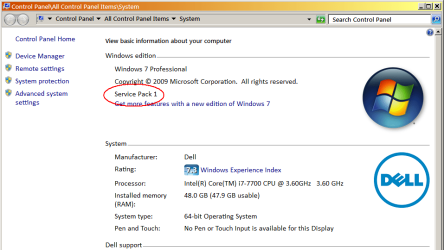
If it's SP1, it will say so on the Computer Properties screen:

Image1.png

If you need to add SP1, use another computer and go to catalog.update.microsoft.com and search for KB976932. Download to a USB stick, walk it over to the 1545, and install.

For additional Windows updates, see simplix.info and download Updatepack7R2, a single package that will install all the cumulative Microsoft updates to date, less tracking updates. I'm not sure if it includes the optional SHA2 and TLS-1.2 updates, but you can add those for yourself afterward. There's plenty of other threads in this forum about Simplix, if you need to know more.

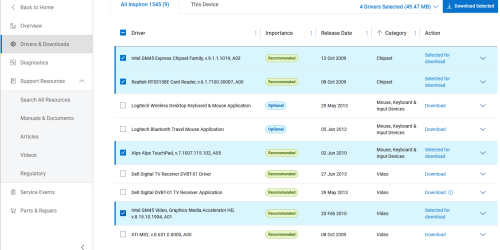
For Dell drivers, go to the 1545 Drivers page and sort by Category. At minimum, download the four shown here:

Image2.png

Note that if you don't currently have any yellow question marks in Device Manager, it may be because Windows isn't seeing everything yet or because Windows is using the default Microsoft drivers. For instance, installing the Chipset driver will sometimes reveal several other "devices" that Windows didn't even know about until the Chipset driver got installed. For video, it may currently be using a lower resolution Microsoft driver, whereas installing the Dell driver will allow Windows to run at native resolution. (If your 1545 has the ATI Radeon upgrade, add the ATI driver to your downloads.)

For the web browser, I recommend either Supermium (Chromium fork) or R3dfox (Firefox fork). Both are still being maintained and fully up to date with security patches. Firefox 115 ESR is also up-to-date, security-wise, but the version number can cause some websites to complain your browser is out-of-date when it's actually perfectly fine.
 

My Computer My Computer

At a glance

Windows 7/8.1/10 multibootIntel Core i7-770048GB (2x16GB Crucial DDR4-3200 + 2x8GB Hynix ...Intel HD630 + AMD Radeon R7 450 PCIe
Computer type
PC/Desktop
Computer Manufacturer/Model Number
Dell Optiplex 7050
OS
Windows 7/8.1/10 multiboot
CPU
Intel Core i7-7700
Motherboard
Dell, Intel Q270 chipset
Memory
48GB (2x16GB Crucial DDR4-3200 + 2x8GB Hynix DDR4-2400)
Graphics Card(s)
Intel HD630 + AMD Radeon R7 450 PCIe
Monitor(s) Displays
Asus VC279 (27")
Screen Resolution
1920x1080
Hard Drives
Toshiba M.2 NVMe (256GB),
Samsung 960 Evo (500GB),
WD Red Plus 80EFBX (8TB)
2009 discs are PRE SP1 (2011)
 

My Computer My Computer

At a glance

W7 home premium 32bit/W7HP 64bit/w10 tp insid...E5300 dual core3gbNvidia Geforce 7100 Nforce 630i
Computer type
PC/Desktop
Computer Manufacturer/Model Number
medionl/Aspire 6930G/acer x55a
OS
W7 home premium 32bit/W7HP 64bit/w10 tp insider ring
CPU
E5300 dual core
Motherboard
medion MS7366
Memory
3gb
Graphics Card(s)
Nvidia Geforce 7100 Nforce 630i
Monitor(s) Displays
avixc
Internet Speed
n (isp resticted to 72)
Antivirus
mse/pands
Browser
palemoon
Other Info
Belkin Fd7050 n USB using Railink RT2870 drivers, more upto date
All sorted. I installed Firefox and was able to get online to download the drivers.

Thanks again for all the help and advice.
 

My Computers My Computers

  • At a glance

    Windows 11
    OS
    Windows 11
  • Computer type
    PC/Desktop
Last edited:

My Computers My Computers

  • At a glance

    Windows 7 pro/Windows 10 ProIntel i7 860 Quad core 2.8 ghz8 gbATI Radeon HD 5770 1 gb ram
    Computer type
    PC/Desktop
    Computer Manufacturer/Model Number
    HP Pavillion Elite HPE-250f
    OS
    Windows 7 pro/Windows 10 Pro
    CPU
    Intel i7 860 Quad core 2.8 ghz
    Memory
    8 gb
    Graphics Card(s)
    ATI Radeon HD 5770 1 gb ram
    Monitor(s) Displays
    Alienware 25 AW2521HF & Viewsonic
    Screen Resolution
    1920 x1080 & 1680x1050
    Hard Drives
    WD blue 1 tb & 500 gb.
    Browser
    FF of course.
    Other Info
    https://www.bestbuy.com/site/hp-pavilion-elite-desktop-intel-core-i7-processor-8gb-memory-1tb-hard-drive/9921493.p?skuId=9921493
  • At a glance

    Windows 2012 R2 Data center/Linux Minti3 9100 3.6GHz, 8M cache, 4C/4T8GB 2666MT/s DDR4 ECC UDIMM
    Computer type
    PC/Desktop
    System Manufacturer/Model Number
    Dell Poweredge T140
    OS
    Windows 2012 R2 Data center/Linux Mint
    CPU
    i3 9100 3.6GHz, 8M cache, 4C/4T
    Memory
    8GB 2666MT/s DDR4 ECC UDIMM
    Monitor(s) Displays
    Viewsonic
    Screen Resolution
    1680x1050
    Hard Drives
    1 TB & 750 GB
    Other Info
    https://www.dell.com/en-us/work/shop/productdetailstxn/poweredge-t140?~ck=bt
Back
Top