Solved Bootmgr Missing

Brendan M

New member
Member
Local time
1:03 AM
Messages
44
My computer downloaded and installed updates 2 days ago. I didn't pay much attention except to check if they were important or optional.
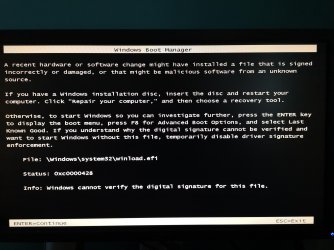
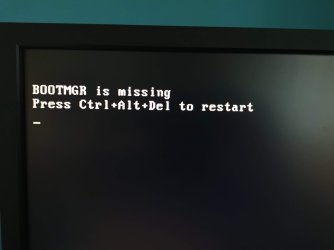
My computer goes to restart and now it won't boot.

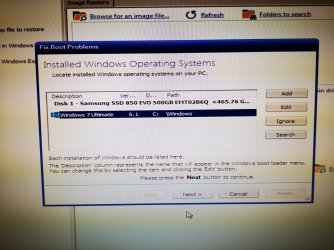
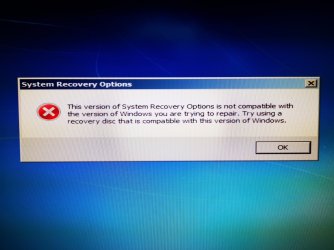
I take out my original installation disc and my recovery disc which is on a usb stick. Using the installation disc I get an error message that the version of system recovery options is not compatible with the version of Windows I am trying to repair.

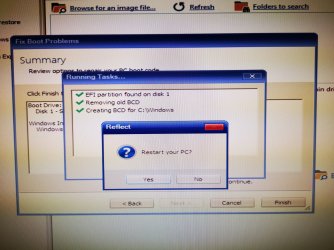
Using my recovery usb stick, I get to removing old BCD, creating new BCD, restart and then same error.

Please see the attached pictures.

I hope someone can help walk me through what needs to be done.

I am running Windows 7 Ultimate. You can see my build in my signature.
 

Attachments
  • IMG_20190827_070352.jpg
    IMG_20190827_070352.jpg
    2 MB · Views: 1
  • IMG_20190827_071017.jpg
    IMG_20190827_071017.jpg
    2 MB · Views: 1
  • IMG_20190827_071045.jpg
    IMG_20190827_071045.jpg
    2.3 MB · Views: 1
  • IMG_20190827_071127.jpg
    IMG_20190827_071127.jpg
    612.2 KB · Views: 1
  • IMG_20190827_071150.jpg
    IMG_20190827_071150.jpg
    155 KB · Views: 1

My Computer

Computer type
PC/Desktop
OS
Windows 7 Ultimate
CPU
iNTEL i5 4440
Motherboard
Gigabyte Z97X-UD3H
Memory
32GB
Graphics Card(s)
MSI GTX 970
Hard Drives
1 times Samsung SSD 500 GB
2 times Western Digital 1TB
PSU
Corsair ATX 850W
Case
Cooler Master 690 Advanced
Cooling
Zalman CNPS9900 LED
You could try using bootsect to fix the bootmgr issue. However, macrium is claiming it to be a gpt disk - is that correct?
If so, you can attempt to fix it using bcdboot from command prompt


But you might have more of a problem than just that.

Restore an image if you have one. If not, you can use my boot media to see if you can restore from a shadow copy ( shadowcopyview is in the boot media)

17514x64v14.iso

create a bootable usb from iso using rufus, or similar

Rufus

If your system is installed in efi mode, you need to boot the media in efi mode.
 

My Computers

System One System Two

  • Computer type
    PC/Desktop
    OS
    7 X64
    CPU
    i5 8400
    Motherboard
    gigabyte b365m ds3h
    Memory
    2x8gb 3200mhz
    Hard Drives
    various
    PSU
    pure power 11 400w cm
    Case
    Coolermaster
    Cooling
    cryorig m9i
  • Computer type
    PC/Desktop
    OS
    7x64
    CPU
    g5400
    Motherboard
    ga b365m ds3h
    Memory
    8gb ddr4 2400
    PSU
    xfx pro 450w
Thank you SIW2 for your reply. It is now morning here where I live and I am about to go to work. I will try everything you suggest this evening and let you know how I get on.

The only other computer I have access to is a work macbook air. So instead of Rufus, I am using a piece of software called balenaEtcher. I hope this is suitable.

I will keep you posted and thanks again.
 

My Computer

Computer type
PC/Desktop
OS
Windows 7 Ultimate
CPU
iNTEL i5 4440
Motherboard
Gigabyte Z97X-UD3H
Memory
32GB
Graphics Card(s)
MSI GTX 970
Hard Drives
1 times Samsung SSD 500 GB
2 times Western Digital 1TB
PSU
Corsair ATX 850W
Case
Cooler Master 690 Advanced
Cooling
Zalman CNPS9900 LED
You're booting Win7 in UEFI mode, you just installed Aug updates, and you're getting a 0xc0000428 error. That meets the exact conditions described in this thread in another forum. Perhaps you can find something useful in that thread.

That thread is based on these articles:

(Once again, those of us who've already quit applying Microsoft updates are safe. This bug only crashed those foolhardy enough to still trust in Microsoft.)
 

My Computer

Computer type
PC/Desktop
Computer Manufacturer/Model Number
Dell Optiplex 7050
OS
Windows 7/8.1/10 multiboot
CPU
Intel Core i7-7700
Motherboard
Dell, Intel Q270 chipset
Memory
48GB (2x16GB Crucial DDR4-3200 + 2x8GB Hynix DDR4-2400)
Graphics Card(s)
Intel HD630 + AMD Radeon R7 450 PCIe
Monitor(s) Displays
Asus VC279 (27")
Screen Resolution
1920x1080
Hard Drives
Toshiba M.2 NVMe (256GB),
Samsung 960 Evo (500GB),
WD Red Plus 80EFBX (8TB)
Following dg1261 useful link, it seems you need to install KB 3133977.
Installing Windows 7 from a backup? You need a BitLocker patch right away | Computerworld

You can do that from the boot media I posted. There are two suitbale version of my boot media. They both contain dism++ which can be used to install the KB 3133977 into your non booting system.


First download KB 3133977 and keep it somewhere you can get at it, e.g. a flashdrive.
https://download.microsoft.com/down...DA7-FEA3886E7B5E/Windows6.1-KB3133977-x64.msu


Then boot my boot media in efi mode.
Start dism++ from the desktop icon.
Click the non booting os at the top of dism++ windows so it turns blue.
Click Updates in the left pane
Click add and browse to wherever you put KB 3133977


Unclear as to whether you ned to run bcdboot after that. I would to be sure.


https://support.microsoft.com/en-us...ning-support-requirement-for-windows-and-wsus
 
Last edited:

My Computers

System One System Two

  • Computer type
    PC/Desktop
    OS
    7 X64
    CPU
    i5 8400
    Motherboard
    gigabyte b365m ds3h
    Memory
    2x8gb 3200mhz
    Hard Drives
    various
    PSU
    pure power 11 400w cm
    Case
    Coolermaster
    Cooling
    cryorig m9i
  • Computer type
    PC/Desktop
    OS
    7x64
    CPU
    g5400
    Motherboard
    ga b365m ds3h
    Memory
    8gb ddr4 2400
    PSU
    xfx pro 450w
Probably wise to stay away from windows update, use dism++ every month to update, or better still - Simplix pack.


Current Simplix pack
 

My Computers

System One System Two

  • Computer type
    PC/Desktop
    OS
    7 X64
    CPU
    i5 8400
    Motherboard
    gigabyte b365m ds3h
    Memory
    2x8gb 3200mhz
    Hard Drives
    various
    PSU
    pure power 11 400w cm
    Case
    Coolermaster
    Cooling
    cryorig m9i
  • Computer type
    PC/Desktop
    OS
    7x64
    CPU
    g5400
    Motherboard
    ga b365m ds3h
    Memory
    8gb ddr4 2400
    PSU
    xfx pro 450w
Thank you both.
I am trying to get hold of a Windows machine so as to be able to use Rufus. Might be able to get one in a day or two. I will keep you posted.

The joys of working in an OSX environment so we can run shiny expensive machines to run Office 365!!!
 
Last edited:

My Computer

Computer type
PC/Desktop
OS
Windows 7 Ultimate
CPU
iNTEL i5 4440
Motherboard
Gigabyte Z97X-UD3H
Memory
32GB
Graphics Card(s)
MSI GTX 970
Hard Drives
1 times Samsung SSD 500 GB
2 times Western Digital 1TB
PSU
Corsair ATX 850W
Case
Cooler Master 690 Advanced
Cooling
Zalman CNPS9900 LED
You can burn this direct to cd/dvd if that is easier. Dism++ is included in the wim.

16299_x64-v2.iso


(Ignore the warning dism++ gives about less than 5gb scratch. You don't need that much to install one update )
 

My Computers

System One System Two

  • Computer type
    PC/Desktop
    OS
    7 X64
    CPU
    i5 8400
    Motherboard
    gigabyte b365m ds3h
    Memory
    2x8gb 3200mhz
    Hard Drives
    various
    PSU
    pure power 11 400w cm
    Case
    Coolermaster
    Cooling
    cryorig m9i
  • Computer type
    PC/Desktop
    OS
    7x64
    CPU
    g5400
    Motherboard
    ga b365m ds3h
    Memory
    8gb ddr4 2400
    PSU
    xfx pro 450w
Just tried to make bootable usb drives using balenaEtcher, no luck.
Hope to be borrowing a windows laptop from work tomorrow so will be able to burn a cd and use Rufus.
Cheers
 

My Computer

Computer type
PC/Desktop
OS
Windows 7 Ultimate
CPU
iNTEL i5 4440
Motherboard
Gigabyte Z97X-UD3H
Memory
32GB
Graphics Card(s)
MSI GTX 970
Hard Drives
1 times Samsung SSD 500 GB
2 times Western Digital 1TB
PSU
Corsair ATX 850W
Case
Cooler Master 690 Advanced
Cooling
Zalman CNPS9900 LED
Not sure what I'm doing wrong.
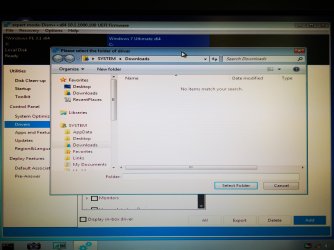
When I try to use the "Add drivers" function, the software does not see the driver that is in the folder.

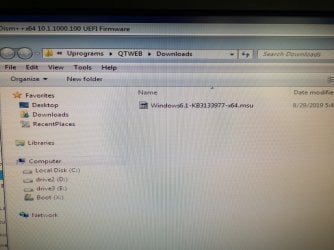
The driver is named "Windows6.1-KB3133977-x64.msu"

It's there when I check the usb stick on another laptop, but my pc cannot see it.
Any ideas on what I may be doing wrong?
 

Attachments

  • IMG_20190829_175221.jpg
    IMG_20190829_175221.jpg
    944.3 KB · Views: 0
  • IMG_20190829_175206.jpg
    IMG_20190829_175206.jpg
    2.5 MB · Views: 0
  • IMG_20190829_175152.jpg
    IMG_20190829_175152.jpg
    2.8 MB · Views: 0
  • IMG_20190829_180426.jpg
    IMG_20190829_180426.jpg
    2.1 MB · Views: 0
  • IMG_20190829_170931.jpg
    IMG_20190829_170931.jpg
    210.5 KB · Views: 0

My Computer

Computer type
PC/Desktop
OS
Windows 7 Ultimate
CPU
iNTEL i5 4440
Motherboard
Gigabyte Z97X-UD3H
Memory
32GB
Graphics Card(s)
MSI GTX 970
Hard Drives
1 times Samsung SSD 500 GB
2 times Western Digital 1TB
PSU
Corsair ATX 850W
Case
Cooler Master 690 Advanced
Cooling
Zalman CNPS9900 LED
I am booting off of the image; 17514x64v14.iso
 

My Computer

Computer type
PC/Desktop
OS
Windows 7 Ultimate
CPU
iNTEL i5 4440
Motherboard
Gigabyte Z97X-UD3H
Memory
32GB
Graphics Card(s)
MSI GTX 970
Hard Drives
1 times Samsung SSD 500 GB
2 times Western Digital 1TB
PSU
Corsair ATX 850W
Case
Cooler Master 690 Advanced
Cooling
Zalman CNPS9900 LED
dism++ wants you to browse to a folder/directory containing DRIVER files.

To add UPDATES ( msu or cab - sometimes also called packages ) select UPDATES in dism++ left pane


After you have added the update Windows6.1-KB3133977-x64.msu, the next thing is to run bcdboot command.
From command prompt:
bcdboot c:\windows
 
Last edited:

My Computers

System One System Two

  • Computer type
    PC/Desktop
    OS
    7 X64
    CPU
    i5 8400
    Motherboard
    gigabyte b365m ds3h
    Memory
    2x8gb 3200mhz
    Hard Drives
    various
    PSU
    pure power 11 400w cm
    Case
    Coolermaster
    Cooling
    cryorig m9i
  • Computer type
    PC/Desktop
    OS
    7x64
    CPU
    g5400
    Motherboard
    ga b365m ds3h
    Memory
    8gb ddr4 2400
    PSU
    xfx pro 450w
I follow all instructions as stated but still no luck.
Strangely, when all of my hard drives are connected, my operating system drive is labeled D:
When I unplug my other drives, it reverts to being labeled C:.
 

Attachments

  • IMG_20190830_183944 (1).jpg
    IMG_20190830_183944 (1).jpg
    1.7 MB · Views: 0

My Computer

Computer type
PC/Desktop
OS
Windows 7 Ultimate
CPU
iNTEL i5 4440
Motherboard
Gigabyte Z97X-UD3H
Memory
32GB
Graphics Card(s)
MSI GTX 970
Hard Drives
1 times Samsung SSD 500 GB
2 times Western Digital 1TB
PSU
Corsair ATX 850W
Case
Cooler Master 690 Advanced
Cooling
Zalman CNPS9900 LED
If it would be best to do a new and clean install, which guide should I follow that I get a nice install on my Samsung SSD and which guide would show me best settings so as not to get these updates that screw up my pc.
 

My Computer

Computer type
PC/Desktop
OS
Windows 7 Ultimate
CPU
iNTEL i5 4440
Motherboard
Gigabyte Z97X-UD3H
Memory
32GB
Graphics Card(s)
MSI GTX 970
Hard Drives
1 times Samsung SSD 500 GB
2 times Western Digital 1TB
PSU
Corsair ATX 850W
Case
Cooler Master 690 Advanced
Cooling
Zalman CNPS9900 LED
Strangely, when all of my hard drives are connected, my operating system drive is labeled D:
When I unplug my other drives, it reverts to being labeled C:
It is normal. Winpe will enumerate whatever drives it finds. By default it uses X letter as alias for itself and starts allocating from letter C for other drives. So that will vary depending on what you have plugged in.

Whatever letter winpe gives to your windows partition is the one you should point commands at.


I am not sure why you posted a screen shot of dism++ drivers window again. Are you trying to add drivers?
 

My Computers

System One System Two

  • Computer type
    PC/Desktop
    OS
    7 X64
    CPU
    i5 8400
    Motherboard
    gigabyte b365m ds3h
    Memory
    2x8gb 3200mhz
    Hard Drives
    various
    PSU
    pure power 11 400w cm
    Case
    Coolermaster
    Cooling
    cryorig m9i
  • Computer type
    PC/Desktop
    OS
    7x64
    CPU
    g5400
    Motherboard
    ga b365m ds3h
    Memory
    8gb ddr4 2400
    PSU
    xfx pro 450w
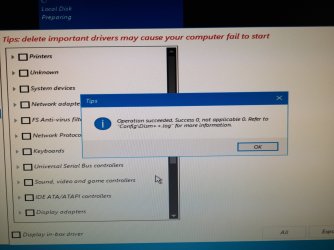
I have posted the screenshot again to see if this is what I should be seeing when I add the driver. As instructed, I directed dism++ to the folder that contains the driver and this message is what popped up. Does it mean the driver installed correctly?
I then ran bcdboot from the command prompt.

Unfortunately, my pc still shows the same error when I try to restart. Not sure what I'm doing wrong but do appreciate your time trying to help me.

Arghhh: "Updates", NOT Driver...
 
Last edited:

My Computer

Computer type
PC/Desktop
OS
Windows 7 Ultimate
CPU
iNTEL i5 4440
Motherboard
Gigabyte Z97X-UD3H
Memory
32GB
Graphics Card(s)
MSI GTX 970
Hard Drives
1 times Samsung SSD 500 GB
2 times Western Digital 1TB
PSU
Corsair ATX 850W
Case
Cooler Master 690 Advanced
Cooling
Zalman CNPS9900 LED

My Computers

System One System Two

  • Computer type
    PC/Desktop
    OS
    7 X64
    CPU
    i5 8400
    Motherboard
    gigabyte b365m ds3h
    Memory
    2x8gb 3200mhz
    Hard Drives
    various
    PSU
    pure power 11 400w cm
    Case
    Coolermaster
    Cooling
    cryorig m9i
  • Computer type
    PC/Desktop
    OS
    7x64
    CPU
    g5400
    Motherboard
    ga b365m ds3h
    Memory
    8gb ddr4 2400
    PSU
    xfx pro 450w
It is not a driver. It is an update.

I might have written driver in an earlier post in a fit of absent mindedness.

You can not install it using the driver install function - because it is not a driver.

You need to click Updates in dism++ left pane, then click Add.

Then after it tells you the update has installed - run bcdboot command

I have posted the screenshot again to see if this is what I should be seeing when I add the driver. As instructed, I directed dism++ to the folder that contains the driver and this message is what popped up. Does it mean the driver installed correctly?
I then ran bcdboot from the command prompt.

Unfortunately, my pc still shows the same error when I try to restart. Not sure what I'm doing wrong but do appreciate your time trying to help me.
 

My Computers

System One System Two

  • Computer type
    PC/Desktop
    OS
    7 X64
    CPU
    i5 8400
    Motherboard
    gigabyte b365m ds3h
    Memory
    2x8gb 3200mhz
    Hard Drives
    various
    PSU
    pure power 11 400w cm
    Case
    Coolermaster
    Cooling
    cryorig m9i
  • Computer type
    PC/Desktop
    OS
    7x64
    CPU
    g5400
    Motherboard
    ga b365m ds3h
    Memory
    8gb ddr4 2400
    PSU
    xfx pro 450w
Right, I will get the "I'm Stupid" t-shirt printed tomorrow.

I kept trying to add driver, not update.
All is working now. Thank you so much for your patience SIW2.

I will use Simplix pack to perform any updates in the future, or would I be better off not updating?
 

My Computer

Computer type
PC/Desktop
OS
Windows 7 Ultimate
CPU
iNTEL i5 4440
Motherboard
Gigabyte Z97X-UD3H
Memory
32GB
Graphics Card(s)
MSI GTX 970
Hard Drives
1 times Samsung SSD 500 GB
2 times Western Digital 1TB
PSU
Corsair ATX 850W
Case
Cooler Master 690 Advanced
Cooling
Zalman CNPS9900 LED
I'm pretty sure you always said "Updates", but for some dumb reason I got fixated on drivers. Totally my fault and thank you once again. Greatly appreciate your help.
 

My Computer

Computer type
PC/Desktop
OS
Windows 7 Ultimate
CPU
iNTEL i5 4440
Motherboard
Gigabyte Z97X-UD3H
Memory
32GB
Graphics Card(s)
MSI GTX 970
Hard Drives
1 times Samsung SSD 500 GB
2 times Western Digital 1TB
PSU
Corsair ATX 850W
Case
Cooler Master 690 Advanced
Cooling
Zalman CNPS9900 LED
Back
Top