BOOTMGR missing!

Tried what? If we don't have a BCD entry to look at, we can't tell if something is still not correct in the entry or what....
 

My Computers

System One System Two

  • Computer type
    PC/Desktop
    Computer Manufacturer/Model Number
    The Beast Model A (homebrew)
    OS
    Windows 11 21H2 Current build
    CPU
    AMD Ryzen 9 3950X
    Motherboard
    MSI MEG X570 GODLIKE
    Memory
    4 * 32 GB - Corsair Vengeance 3600 MHz
    Graphics Card(s)
    EVGA GeForce RTX 3080 Ti XC3 ULTRA GAMING (12G-P5-3955-KR)
    Sound Card
    Realtek® ALC1220 Codec
    Monitor(s) Displays
    2x Eve Spectrum ES07D03 4K Gaming Monitor (Matte) | Eve Spec
    Screen Resolution
    3x 3840 x 2160
    Hard Drives
    3x Samsung 980 Pro NVMe PCIe 4 M.2 2 TB SSD (MZ-V8P2T0B/AM) } 3x Sabrent Rocket NVMe 4.0 1 TB SSD
    PSU
    PC Power & Cooling’s Silencer Series 1050 Watt, 80 Plus Plat
    Case
    Fractal Design Define 7 XL Dark ATX Full Tower Case
    Cooling
    SteelSeries Apex Pro Wired Gaming Keyboard
    Keyboard
    SteelSeries Apex Pro
    Mouse
    Logitech MX Master 3S | MX Master 3 for business
    Internet Speed
    AT&T LightSpeed Gigabit Duplex Ftth
    Antivirus
    Windows Defender + MB 3
    Browser
    Nightly (default) + Firefox (stable),Chrome, Edge
  • Computer type
    PC/Desktop
    System Manufacturer/Model Number
    Dell Latitude E5470
    OS
    ChromeOS Flex Dev Channel (current)
    CPU
    Intel(R) Core(TM) i5-6300U CPU @ 2.40GHz, 2501 Mhz, 2 Core(s), 4 Logical Processor(s)
    Motherboard
    Dell
    Memory
    16 GB
    Graphics Card(s)
    Intel(R) HD Graphics 520
    Sound Card
    Intel(R) HD Graphics 520 + RealTek Audio
    Monitor(s) Displays
    Dell laptop display 15"
    Screen Resolution
    1920 * 1080
    Hard Drives
    Toshiba 128GB M.2 22300 drive
    INTEL Cherryville 520 Series SSDSC2CW180A 180 GB SATA III SSD
    PSU
    Dell
    Case
    Dell
    Cooling
    Dell
    Keyboard
    Dell
    Mouse
    Logitech MX Master 3S (shared w. Sys 1) | Dell TouchPad
    Internet Speed
    AT&T LightSpeed Gigabit Duplex Ftth
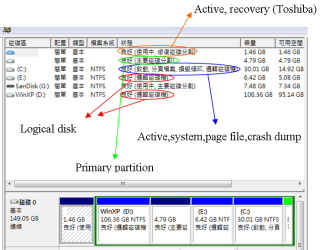
Here is a screenshot of the disk management screen. I translated from the Chinese.

圖片1.png
 

My Computer

Computer type
PC/Desktop
Computer Manufacturer/Model Number
Self built.
OS
Windows 7 RTM 64bit, Windows 8 Pro 64bit
CPU
Intel i5-2500K @ 3.3Ghz
Motherboard
Asus Maximus IV GENE-Z/GEN3
Memory
16GB G.Skill RaptorX 1600MHz DDR3
Graphics Card(s)
N570GTX Twin Frozr III Power Edition
Sound Card
SupremeFX X-Fi 2
Monitor(s) Displays
BenQ XL2420T 120Hz 24 inch gaming monitor, Acer V233H 23 inc
Screen Resolution
1920x1080
Hard Drives
320GB Seagate Barracuda
WD 1TB Black Caviar
2TB WD Green Caviar
Samsung SSD 840 PRO Series
PSU
CoolerMaster Silent Pro Gold 1200WATT 80 Plus Gold
Case
CoolerMaster HAF X RC-942
Cooling
CoolerMaster V6GT Multi-Platform CPU Cooler
Keyboard
Logitech G510 Gaming Keyboard
Mouse
Logitech G700 Gaming Mouse
Antivirus
Norton Internet Security
Browser
Firefox 21
Other Info
Logitech Extreme 3D Pro Gaming Joystick, Logitech G930 Wireless Gaming Headset
Tried what? If we don't have a BCD entry to look at, we can't tell if something is still not correct in the entry or what....

It would help, but even if it is correct his screenshot does not show any boot files on XP.
 

My Computer

OS
Win 7
Well, it's not April 1st , so that rules out one theory, LOL.

Curious there is a Primary inside the Extended - I assume those two primaries are oem partitions.

The C logical partition is listed as System , Active - yet there's no sign of bootmgr , or the Boot folder containing BCD.

Was that G Sandisk attached the time you installed 7?

What is on that G partition?

Also, the orange arrow in your diagram has no description to it?
 

My Computers

System One System Two

  • Computer type
    PC/Desktop
    OS
    7 X64
    CPU
    i5 8400
    Motherboard
    gigabyte b365m ds3h
    Memory
    2x8gb 3200mhz
    Hard Drives
    various
    PSU
    pure power 11 400w cm
    Case
    Coolermaster
    Cooling
    cryorig m9i
  • Computer type
    PC/Desktop
    OS
    7x64
    CPU
    g5400
    Motherboard
    ga b365m ds3h
    Memory
    8gb ddr4 2400
    PSU
    xfx pro 450w
The 'G' is my USB drive (Sandisk). The orange arrow points to some recovery partition from Toshiba. And my Sandisk was not attached during installation.
 

My Computer

Computer type
PC/Desktop
Computer Manufacturer/Model Number
Self built.
OS
Windows 7 RTM 64bit, Windows 8 Pro 64bit
CPU
Intel i5-2500K @ 3.3Ghz
Motherboard
Asus Maximus IV GENE-Z/GEN3
Memory
16GB G.Skill RaptorX 1600MHz DDR3
Graphics Card(s)
N570GTX Twin Frozr III Power Edition
Sound Card
SupremeFX X-Fi 2
Monitor(s) Displays
BenQ XL2420T 120Hz 24 inch gaming monitor, Acer V233H 23 inc
Screen Resolution
1920x1080
Hard Drives
320GB Seagate Barracuda
WD 1TB Black Caviar
2TB WD Green Caviar
Samsung SSD 840 PRO Series
PSU
CoolerMaster Silent Pro Gold 1200WATT 80 Plus Gold
Case
CoolerMaster HAF X RC-942
Cooling
CoolerMaster V6GT Multi-Platform CPU Cooler
Keyboard
Logitech G510 Gaming Keyboard
Mouse
Logitech G700 Gaming Mouse
Antivirus
Norton Internet Security
Browser
Firefox 21
Other Info
Logitech Extreme 3D Pro Gaming Joystick, Logitech G930 Wireless Gaming Headset
Were you able to see what is on the 4.7gb partition?

You would need to give it a drive letter, and post a screenshot.
 

My Computers

System One System Two

  • Computer type
    PC/Desktop
    OS
    7 X64
    CPU
    i5 8400
    Motherboard
    gigabyte b365m ds3h
    Memory
    2x8gb 3200mhz
    Hard Drives
    various
    PSU
    pure power 11 400w cm
    Case
    Coolermaster
    Cooling
    cryorig m9i
  • Computer type
    PC/Desktop
    OS
    7x64
    CPU
    g5400
    Motherboard
    ga b365m ds3h
    Memory
    8gb ddr4 2400
    PSU
    xfx pro 450w
Did not try to give it a drive letter, but if I remember correctly I didn't have the option to. I will have to see tomorrow, and post back. Thanks again for your help!
 

My Computer

Computer type
PC/Desktop
Computer Manufacturer/Model Number
Self built.
OS
Windows 7 RTM 64bit, Windows 8 Pro 64bit
CPU
Intel i5-2500K @ 3.3Ghz
Motherboard
Asus Maximus IV GENE-Z/GEN3
Memory
16GB G.Skill RaptorX 1600MHz DDR3
Graphics Card(s)
N570GTX Twin Frozr III Power Edition
Sound Card
SupremeFX X-Fi 2
Monitor(s) Displays
BenQ XL2420T 120Hz 24 inch gaming monitor, Acer V233H 23 inc
Screen Resolution
1920x1080
Hard Drives
320GB Seagate Barracuda
WD 1TB Black Caviar
2TB WD Green Caviar
Samsung SSD 840 PRO Series
PSU
CoolerMaster Silent Pro Gold 1200WATT 80 Plus Gold
Case
CoolerMaster HAF X RC-942
Cooling
CoolerMaster V6GT Multi-Platform CPU Cooler
Keyboard
Logitech G510 Gaming Keyboard
Mouse
Logitech G700 Gaming Mouse
Antivirus
Norton Internet Security
Browser
Firefox 21
Other Info
Logitech Extreme 3D Pro Gaming Joystick, Logitech G930 Wireless Gaming Headset
Hi Bull,

Looking forward to finding out what is going on there.

Keep us posted:D
 

My Computers

System One System Two

  • Computer type
    PC/Desktop
    OS
    7 X64
    CPU
    i5 8400
    Motherboard
    gigabyte b365m ds3h
    Memory
    2x8gb 3200mhz
    Hard Drives
    various
    PSU
    pure power 11 400w cm
    Case
    Coolermaster
    Cooling
    cryorig m9i
  • Computer type
    PC/Desktop
    OS
    7x64
    CPU
    g5400
    Motherboard
    ga b365m ds3h
    Memory
    8gb ddr4 2400
    PSU
    xfx pro 450w
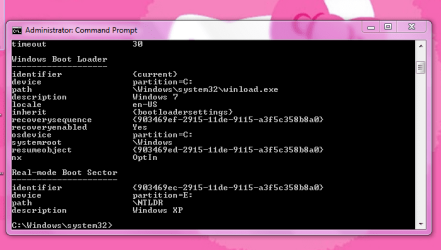
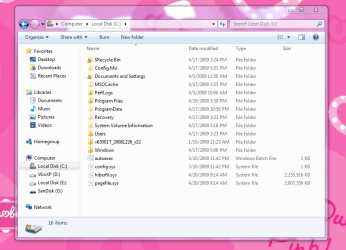
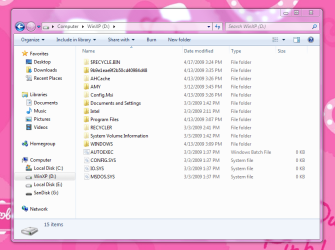
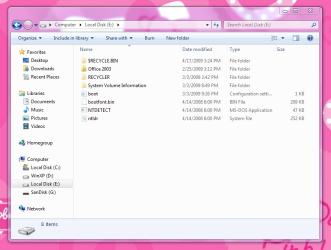
OK, guys, I was so excited about the RC that was 'almost' available, that I forgot about my boss's notebook. I can still not dual boot the damn thing. I get the dual bootscreen, and can boot into Windows 7, but not into XP. I tried with EasyBCD, but to no avail. Here is the screenshots as requested.

I hope someone out there can help me!!

C drive.PNG D drive.PNG

E drive.PNG BCDEDIT.PNG
 

My Computer

Computer type
PC/Desktop
Computer Manufacturer/Model Number
Self built.
OS
Windows 7 RTM 64bit, Windows 8 Pro 64bit
CPU
Intel i5-2500K @ 3.3Ghz
Motherboard
Asus Maximus IV GENE-Z/GEN3
Memory
16GB G.Skill RaptorX 1600MHz DDR3
Graphics Card(s)
N570GTX Twin Frozr III Power Edition
Sound Card
SupremeFX X-Fi 2
Monitor(s) Displays
BenQ XL2420T 120Hz 24 inch gaming monitor, Acer V233H 23 inc
Screen Resolution
1920x1080
Hard Drives
320GB Seagate Barracuda
WD 1TB Black Caviar
2TB WD Green Caviar
Samsung SSD 840 PRO Series
PSU
CoolerMaster Silent Pro Gold 1200WATT 80 Plus Gold
Case
CoolerMaster HAF X RC-942
Cooling
CoolerMaster V6GT Multi-Platform CPU Cooler
Keyboard
Logitech G510 Gaming Keyboard
Mouse
Logitech G700 Gaming Mouse
Antivirus
Norton Internet Security
Browser
Firefox 21
Other Info
Logitech Extreme 3D Pro Gaming Joystick, Logitech G930 Wireless Gaming Headset
did Easy Boot CD create that XP entry for you automatically?
 

My Computers

System One System Two

  • Computer type
    PC/Desktop
    Computer Manufacturer/Model Number
    The Beast Model A (homebrew)
    OS
    Windows 11 21H2 Current build
    CPU
    AMD Ryzen 9 3950X
    Motherboard
    MSI MEG X570 GODLIKE
    Memory
    4 * 32 GB - Corsair Vengeance 3600 MHz
    Graphics Card(s)
    EVGA GeForce RTX 3080 Ti XC3 ULTRA GAMING (12G-P5-3955-KR)
    Sound Card
    Realtek® ALC1220 Codec
    Monitor(s) Displays
    2x Eve Spectrum ES07D03 4K Gaming Monitor (Matte) | Eve Spec
    Screen Resolution
    3x 3840 x 2160
    Hard Drives
    3x Samsung 980 Pro NVMe PCIe 4 M.2 2 TB SSD (MZ-V8P2T0B/AM) } 3x Sabrent Rocket NVMe 4.0 1 TB SSD
    PSU
    PC Power & Cooling’s Silencer Series 1050 Watt, 80 Plus Plat
    Case
    Fractal Design Define 7 XL Dark ATX Full Tower Case
    Cooling
    SteelSeries Apex Pro Wired Gaming Keyboard
    Keyboard
    SteelSeries Apex Pro
    Mouse
    Logitech MX Master 3S | MX Master 3 for business
    Internet Speed
    AT&T LightSpeed Gigabit Duplex Ftth
    Antivirus
    Windows Defender + MB 3
    Browser
    Nightly (default) + Firefox (stable),Chrome, Edge
  • Computer type
    PC/Desktop
    System Manufacturer/Model Number
    Dell Latitude E5470
    OS
    ChromeOS Flex Dev Channel (current)
    CPU
    Intel(R) Core(TM) i5-6300U CPU @ 2.40GHz, 2501 Mhz, 2 Core(s), 4 Logical Processor(s)
    Motherboard
    Dell
    Memory
    16 GB
    Graphics Card(s)
    Intel(R) HD Graphics 520
    Sound Card
    Intel(R) HD Graphics 520 + RealTek Audio
    Monitor(s) Displays
    Dell laptop display 15"
    Screen Resolution
    1920 * 1080
    Hard Drives
    Toshiba 128GB M.2 22300 drive
    INTEL Cherryville 520 Series SSDSC2CW180A 180 GB SATA III SSD
    PSU
    Dell
    Case
    Dell
    Cooling
    Dell
    Keyboard
    Dell
    Mouse
    Logitech MX Master 3S (shared w. Sys 1) | Dell TouchPad
    Internet Speed
    AT&T LightSpeed Gigabit Duplex Ftth
Yes, but is doesn't seem to work!
 

My Computer

Computer type
PC/Desktop
Computer Manufacturer/Model Number
Self built.
OS
Windows 7 RTM 64bit, Windows 8 Pro 64bit
CPU
Intel i5-2500K @ 3.3Ghz
Motherboard
Asus Maximus IV GENE-Z/GEN3
Memory
16GB G.Skill RaptorX 1600MHz DDR3
Graphics Card(s)
N570GTX Twin Frozr III Power Edition
Sound Card
SupremeFX X-Fi 2
Monitor(s) Displays
BenQ XL2420T 120Hz 24 inch gaming monitor, Acer V233H 23 inc
Screen Resolution
1920x1080
Hard Drives
320GB Seagate Barracuda
WD 1TB Black Caviar
2TB WD Green Caviar
Samsung SSD 840 PRO Series
PSU
CoolerMaster Silent Pro Gold 1200WATT 80 Plus Gold
Case
CoolerMaster HAF X RC-942
Cooling
CoolerMaster V6GT Multi-Platform CPU Cooler
Keyboard
Logitech G510 Gaming Keyboard
Mouse
Logitech G700 Gaming Mouse
Antivirus
Norton Internet Security
Browser
Firefox 21
Other Info
Logitech Extreme 3D Pro Gaming Joystick, Logitech G930 Wireless Gaming Headset
What I see:

Local Disk C = Windows 7
WinXP D = Windows XP
Local Disk E = Data partition ? (Office 2003 ?)

But "bcdedit" shows:
Windows XP = device ...partition=E:

I recommend two changes:

1. Change device for Windows XP to partition D
bcdedit /set {903469ec-2915-11de-9115-a3f5c358b8a0} device partition=D:

2. Copy the files "ntldr" and "NTDETECT" form drive E to drive D
 

My Computer

OS
Windows XP and 7
The boot.ini is probably pointing to the wrong partition now.
 

My Computer

OS
Win 7
The boot.ini is probably pointing to the wrong partition now.
Oh - now I see it:
On drive E there is a file "boot"(.ini)
Copy this file also to drive D:

If this don't help then:
Open this file "boot"(.ini) with mouse double click and show us the content.
 

My Computer

OS
Windows XP and 7
Let's just take this back to basics. I think we're getting all tied up in detail here. If you want to boot 7, you need three things, an active partition for the BIOS to locate, the correct bootsector and a working BCD configuration. To accomplish this, start the computer with the Windows 7 installation disk. At the initial language dialog press shift+F10 for a command prompt. Start DISKPART and issue the "list vol" command. Identify the volume that contains the Windows 7 installation and select it with the "sel vol <drive>" command where <drive> is the drive letter assigned to that volume. If no drive letter is assigned to that volume we've established your issue and I will present an alternate solution. If a drive letter is assigned to that volume we will ensure that it is properly activated by issuing the "act" command. Now issue the "exi" command to quit DISKPART. To ensure a valid boot sector we'll use the BOOTSECT command like this "bootsect /nt60 <drive>" where <drive> is the drive letter you activated earlier using DISKPART. Finally we will recreate your BCD configuration. Switch to the activate volume by typing it's drive letter followed by a colon like "c:" Change directory to \windows\system32 with "cd \windows\system32". Create the BCD configuration using BCDBOOT like "bcdboot c:\windows /s c:" replacing c: with the active volume. Now reboot your computer safely using the command "wpeutil reboot" and Windows 7 should start.
 

My Computer

Computer type
Laptop
Computer Manufacturer/Model Number
Apple
OS
El Capitan / Windows 10
CPU
i7-4980HQ
Memory
16GB
Graphics Card(s)
Iris 5200
I know this has been installed but, you could install Ubuntu 8.10 and boot from GRUP, I've tried it, I know it works with 7, and even without BOOTMGR.
 

My Computer

Computer type
PC/Desktop
Computer Manufacturer/Model Number
twah
OS
Windows 7 Ultimate x64
CPU
AMD FX-8120
Motherboard
Biostar TA990FXE
Memory
8gb (4x2gb) DDR3 1600mHz
Graphics Card(s)
AMD 7850 2gb
Monitor(s) Displays
27"
Screen Resolution
1920x1080
Hard Drives
1TB HDD + 128GB SSD
I know this has been installed but, you could install Ubuntu 8.10 and boot from GRUP, I've tried it, I know it works with 7, and even without BOOTMGR.

Why complicate matters? It's just a simple config issue and there's no mention of any desire to install linux. For that reason alone I see GRUB as an inappropriate choice in this configuration.
 

My Computer

Computer type
Laptop
Computer Manufacturer/Model Number
Apple
OS
El Capitan / Windows 10
CPU
i7-4980HQ
Memory
16GB
Graphics Card(s)
Iris 5200
baarod thanks for the detailed info, just 1 thing though, the pc boots into Windows 7 without any issues. Just XP I can't boot into!
 

My Computer

Computer type
PC/Desktop
Computer Manufacturer/Model Number
Self built.
OS
Windows 7 RTM 64bit, Windows 8 Pro 64bit
CPU
Intel i5-2500K @ 3.3Ghz
Motherboard
Asus Maximus IV GENE-Z/GEN3
Memory
16GB G.Skill RaptorX 1600MHz DDR3
Graphics Card(s)
N570GTX Twin Frozr III Power Edition
Sound Card
SupremeFX X-Fi 2
Monitor(s) Displays
BenQ XL2420T 120Hz 24 inch gaming monitor, Acer V233H 23 inc
Screen Resolution
1920x1080
Hard Drives
320GB Seagate Barracuda
WD 1TB Black Caviar
2TB WD Green Caviar
Samsung SSD 840 PRO Series
PSU
CoolerMaster Silent Pro Gold 1200WATT 80 Plus Gold
Case
CoolerMaster HAF X RC-942
Cooling
CoolerMaster V6GT Multi-Platform CPU Cooler
Keyboard
Logitech G510 Gaming Keyboard
Mouse
Logitech G700 Gaming Mouse
Antivirus
Norton Internet Security
Browser
Firefox 21
Other Info
Logitech Extreme 3D Pro Gaming Joystick, Logitech G930 Wireless Gaming Headset
unawave, thanks mate, I will try your suggestions tomorrow morning, and report back!
 

My Computer

Computer type
PC/Desktop
Computer Manufacturer/Model Number
Self built.
OS
Windows 7 RTM 64bit, Windows 8 Pro 64bit
CPU
Intel i5-2500K @ 3.3Ghz
Motherboard
Asus Maximus IV GENE-Z/GEN3
Memory
16GB G.Skill RaptorX 1600MHz DDR3
Graphics Card(s)
N570GTX Twin Frozr III Power Edition
Sound Card
SupremeFX X-Fi 2
Monitor(s) Displays
BenQ XL2420T 120Hz 24 inch gaming monitor, Acer V233H 23 inc
Screen Resolution
1920x1080
Hard Drives
320GB Seagate Barracuda
WD 1TB Black Caviar
2TB WD Green Caviar
Samsung SSD 840 PRO Series
PSU
CoolerMaster Silent Pro Gold 1200WATT 80 Plus Gold
Case
CoolerMaster HAF X RC-942
Cooling
CoolerMaster V6GT Multi-Platform CPU Cooler
Keyboard
Logitech G510 Gaming Keyboard
Mouse
Logitech G700 Gaming Mouse
Antivirus
Norton Internet Security
Browser
Firefox 21
Other Info
Logitech Extreme 3D Pro Gaming Joystick, Logitech G930 Wireless Gaming Headset
baarod thanks for the detailed info, just 1 thing though, the pc boots into Windows 7 without any issues. Just XP I can't boot into!

Is XP on a separate physical drive? If so we can set that active in the BIOS and do an XP repair
 

My Computer

Computer type
Laptop
Computer Manufacturer/Model Number
Apple
OS
El Capitan / Windows 10
CPU
i7-4980HQ
Memory
16GB
Graphics Card(s)
Iris 5200
Back
Top