Solved Bootmgr not found, Bootrec /fixboot displays "Element not found"

Pikay2k

New member
Local time
8:11 AM
Messages
8
Bootmgr not found, Bootrec /fixboot displays "Element not found"

Hello, I've run into a problem with my Windows 7 install. For context, I originally had Windows XP dual booting with Windows 7 because I wasn't sure if I wanted to make the upgrade at the time. Windows XP was on my old 300 GB HDD, while I had Windows 7 on my 1.5 TB HDD (with 83GB allocated into my Windows 7 partition while the rest is used for storage).

Yesterday my 300GB HDD died (R.I.P.), and I realize that along with it, I must have still been using that hard drive for my boot loader. With the drive dead, I can no longer boot into my Windows 7 partition, even though bootrec /scanos reads that it's still there.

My issue is that /fixboot and /rebuildbcd both give me an "element not found" error when attempting them. My Windows installation doesn't appear in the list of installations to repair on my recovery DVDs. I've set the partition as active via Diskpart and Partition Wizard, but it still refuses to boot. It used to be a logical partition, but I set it to primary with Partition Wizard, so it should be fine.

I have executed the automatic startup repair option 6 times, and my installation still isn't listed under my repair DVD. The repair informs me that my Partition Table is corrupted, and that Windows should work after a restart, or repair will try again next restart. However, Windows is not repaired and automatic repair still doesn't fix anything. It's rather frustrating, because I know for a fact my files are all there and unharmed, but there's simply no way for me to get into them. I'm running out of ideas. I've searched extensively for a fix to this, and it seems everyone can find a fix but me by simply marking the partition as active and running /fixboot with automatic repair.

The only other thing I can think of is perhaps making another partition, throwing a Linux distribution with Grub onto it, using that to boot into Windows 7, and then do a repair install from there. Would that work out? Any better suggestions are of course welcomed with open arms.
 
Last edited:

My Computer My Computer

OS
Windows 7 Starter

My Computers My Computers

System One System Two

  • Computer type
    PC/Desktop
    Computer Manufacturer/Model Number
    ALWAYS UNDER CONSTRUCTION
    OS
    Windows 11 Pro
    CPU
    Ryzen 9 5900X
    Motherboard
    Asus X570 Crosshair Viii Hero
    Memory
    32GB G Skill DDR4-3600
    Graphics Card(s)
    EVGA RTX 3080 FTW 3 Ultra
    Sound Card
    On Board/Sennheiser PC37X Headset
    Monitor(s) Displays
    3 X Asus 27"
    Screen Resolution
    2560x1440
    Hard Drives
    2 X 1 TB NVME drives
    PSU
    EVGA 850
    Case
    Phanteks Eclipse P400A
    Cooling
    EVGA 280 AIO
    Keyboard
    Logitech G510s/ Logitech G13
    Mouse
    Logitech G502
    Internet Speed
    24/1
    Antivirus
    ESET/MBAM Pro/SAS Pro
    Browser
    Chrome/ Firefox/ Edge
  • Computer type
    Laptop
    System Manufacturer/Model Number
    Dell 16 Plus
    OS
    Windows 11 Pro
    CPU
    Intel Ultra 9 288V
    Memory
    32 GB LPDDR5X 8533
    Monitor(s) Displays
    16" Mini-LED HDR600 Touch 90 Hz
    Screen Resolution
    2560X1600
    Hard Drives
    1 TB NVME

When typing bcdedit I get "The boot configuration data store could not be opened. The requested system device cannot be found."

As for saving my data, I'm not too worried about it since I could always just install over it and keep it all in the Windows.old folder, but I'd rally like to just keep my current install. It's still there, there's just no boot manager to lead me to it.


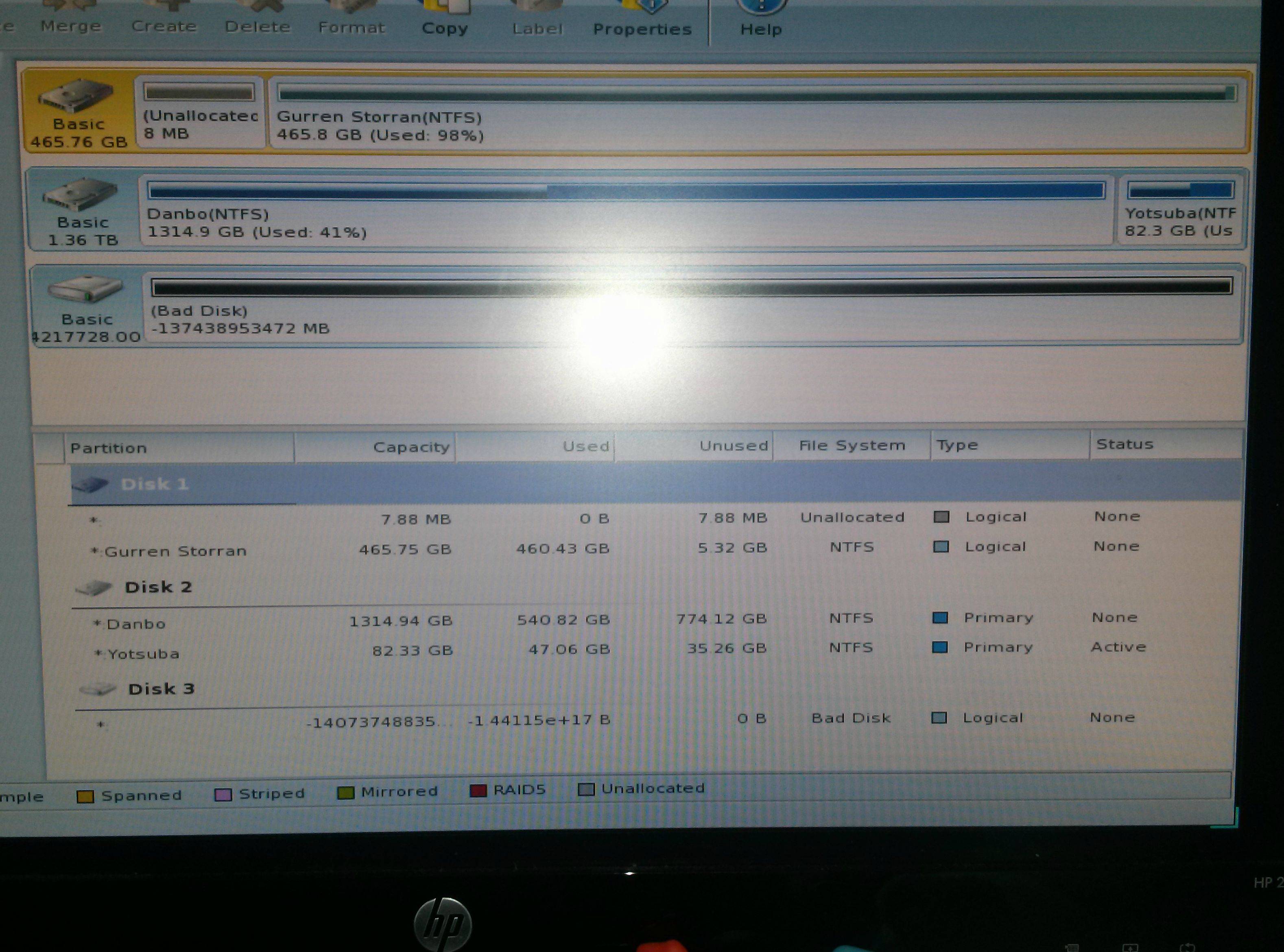
Edit: In another forum I was asked to upload a screenshot of my Partition Wizard window. Not sure if it'd help any of you to see. The partition that's active is the Windows partition, the bad disk isn't even in my computer anymore. I'm using a USB stick to load Partition Wizard, so it's possible it's just reading that as the "bad disk" anyway.

GMTqvNs.jpg
 
Last edited:

My Computer My Computer

OS
Windows 7 Starter
Pikay2k, I'm a little out of my element here. I've asked for more help. But, if you have marked the windows 7 partition as active, startup repair should work and find the installation.Will your XP drive work at all? If it will, there is another tutorial that will copy the MBR to the windows drive.
 

My Computers My Computers

System One System Two

  • Computer type
    PC/Desktop
    Computer Manufacturer/Model Number
    ALWAYS UNDER CONSTRUCTION
    OS
    Windows 11 Pro
    CPU
    Ryzen 9 5900X
    Motherboard
    Asus X570 Crosshair Viii Hero
    Memory
    32GB G Skill DDR4-3600
    Graphics Card(s)
    EVGA RTX 3080 FTW 3 Ultra
    Sound Card
    On Board/Sennheiser PC37X Headset
    Monitor(s) Displays
    3 X Asus 27"
    Screen Resolution
    2560x1440
    Hard Drives
    2 X 1 TB NVME drives
    PSU
    EVGA 850
    Case
    Phanteks Eclipse P400A
    Cooling
    EVGA 280 AIO
    Keyboard
    Logitech G510s/ Logitech G13
    Mouse
    Logitech G502
    Internet Speed
    24/1
    Antivirus
    ESET/MBAM Pro/SAS Pro
    Browser
    Chrome/ Firefox/ Edge
  • Computer type
    Laptop
    System Manufacturer/Model Number
    Dell 16 Plus
    OS
    Windows 11 Pro
    CPU
    Intel Ultra 9 288V
    Memory
    32 GB LPDDR5X 8533
    Monitor(s) Displays
    16" Mini-LED HDR600 Touch 90 Hz
    Screen Resolution
    2560X1600
    Hard Drives
    1 TB NVME
Unfortunately no. I just plugged my XP drive back into my tower and it's not even being read in my bios anymore. If I do get this drive to work, would just booting into Windows 7 and doing a repair install from in there fix my boot manager?

Edit: After a few tries, I actually managed to get it up again! However, since I changed my partition on my Windows 7 drive from logical to primary, it seems the Windows 7 option from my XP hard drive no longer leads me to Windows 7. Instead I get an error, which is understandable. While waiting for more information, I guess I an use this time to double check if there's any more data I should backup from this drive while I still can. Might as well see if chkdsk can extend its life a little longer.
 

My Computer My Computer

OS
Windows 7 Starter
Since XP HD was connected when you installed Win7, the Win7 installer merely updated the XP boot files to configure the Dual Boot. Those boot files for both OS's went south with the XP HD leaving Win7 unable to boot.

The solution is to unplug all other HD's, boot into the Win7 DVD or System Repair Disk to Mark Win7 Partition Active (Method Two) then run Startup Repair - Run up to 3 Separate Times until Win7 boots and has the System Active flags.

All boot recovery commands are automated in Win7 Startup Repair, which also runs multiple tests and fixes that cover alll parameters of Win7 boot.
 
Last edited:
Because I'm able to get into XP now, is there anything I can do within my XP installation to fix my Windows 7 boot partition's boot manager? Perhaps if I update my XP boot manager with my new Window 7 location and then import the updated MBR to my Windows 7 partition as essenbe mentioned earlier?
 

My Computer My Computer

OS
Windows 7 Starter
Please post back a screenshot of your maximized Partition Wizard disk map and drive listings. Tell us what's on each partition.

How did you get XP to finally boot?

Did you say that the small partition way over on the right side (farthest from where the disk reader parks)on Disk1 is your Win7 partition? If so did you unplug all other HD's to run Startup repair with reboots until it starts up?

You're better off having each HD boot independently via the BIOS for a multitude of reasons. You could install EasyBCD (click Download - no Name or Email required)
to XP (requiring Net Framework 2) to add Win7 but then it remains dependent upon possibly failing XP HD.
 
Wow, I didn't think it'd really make a difference so didn't try it; but removing all drives aside from the Windows 7 one did the trick. When I went into repair it actually showed a notification that it was looking for a Windows 7 install, rather than just showing me a lisst of nothing and asking if I'd like to load drivers or go straight into recovery options.

My Windows 7 booted just fine after 2 repairs. Thanks for all the help, guys.
 

My Computer My Computer

OS
Windows 7 Starter
What I would do now is set Win7 HD first HD to boot in BIOS setup.

Then when you want to boot XP, tap the one-time BIOS Boot menu key, choose its HD to boot.

If this is not satisfactory then install EasyBCD to Windows 7 to add XP to a Windows Dual Boot menu.

Are you getting any Boot Menu listings now left over from your previous Dual Boot, and do they work?
 
No dual boot anymore, which is fine. Plugged in all my drives and Windows 7 still boots on its own. Windows XP seems dead after chkdsk (or at least its system files seem fried after only getting 1 good boot out of it), but that doesn't really matter since I've backed up everything important from it by now and don't need anything more from it.
 

My Computer My Computer

OS
Windows 7 Starter
Thank you !

Windows 7 wasn't available in the list of the system recovery's options. After disconnecting all another disks, it works !
If someone have the explication ...
Disk0: XP (dead)
Disk1: nothing
Disk2: W7
Disk3: nothing

Nicolas

PS: pour les anglophobes, il suffit de débrancher les autres disques et de laisser celui de Windows 7 pour que cette version soit visible dans les options de récupération système. Après cela, faire une réparation de démarrage et ce sera bon. :party:
 

My Computer My Computer

Computer type
PC/Desktop
Computer Manufacturer/Model Number
asus
OS
windows7
CPU
quad core phantom
Motherboard
asus
Memory
4gb
Graphics Card(s)
8600gt
Hard Drives
3to, 2x160go
Antivirus
avats
Browser
chrome,operan,firefox
Since this is your first post perhaps you would like to explain more fully what the problem is and what you did. I'm assuming you did a search for Bootmgr is Missing to find this thread.

Please post back a screenshot of Disk Management - Post a Screen Capture Image
so we can look it over for any other potential problems.

What would you like to do with the other HD's? You can repair XP with an XP Repair Install with all other HD's unplugged, or you can delete the XP partition to repartition as desired in Disk Mgmt.

Make sure you keep the Win7 HD set first HDD to boot in BIOS setup when you reattach the others so it continues to boot itself and the others can't interfere. If they do interfere with Win7 boot with it confirmed set first HD to boot, I would boot the Win7 disk to rescue any files needed from the interfering HD using Copy & Paste - in Windows Recovery Console and then wipe the interfering HD with Diskpart Clean Command making sure you do not choose the Win7 HD to wipe.
 
Back
Top