Border around icons on desktop

Hakon

New member
Local time
9:46 AM
Messages
72
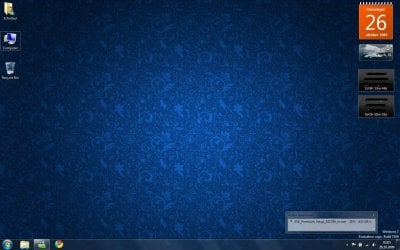
Is there any way to get rid of this dotted border around the desktop icons? (see screenshot, around the Computer icon)
I know it only appears sometimes, but its really annoying :(

attachment.php
 

Attachments

  • temp.jpg
    temp.jpg
    163.4 KB · Views: 8,888

My Computer My Computer

Computer Manufacturer/Model Number
Custom
OS
Windows 7 build 7600 64 bit
CPU
Phenom II X4 955 retail 3.2GHz
Motherboard
ASRock M3A790GXH/USB3 ATX AMD AMD3
Memory
4x GeiL 2GB Value PC3-10660 CL9 DC DDR3-1333, CL 9-9-9-28
Graphics Card(s)
PowerColor Radeon HD5850 PCS+ 1024MB, 256-bit GDDR5
Sound Card
Built in
Hard Drives
G.Skill Phoenix Pro 120GB SATA2 SSD Sandforce SF-120
Samsung Spinpoint 500GB SATA2 7200RPM
PSU
Tacens Radix III Smart 520W
Hakon

I can see why. did you make any changes to the theme? Is it stock win 7?

that doesnt look like a standard win 7 icon.

let us know and if it is i will have to look for it


Ken
 

My Computer My Computer

Computer Manufacturer/Model Number
HP Pavillion dv-7 1005 Tx
OS
Win 8 Release candidate 8400
CPU
[email protected]
Memory
4 gigs
Graphics Card(s)
Nvidia 9600M
Sound Card
HD built-in
Monitor(s) Displays
17" Wxga
Screen Resolution
1440x900
Cooling
none
Internet Speed
45Mb down 5Mb up
Its a fresh install of win 7 (4 hours ago), and no, i haven't made any changes to the theme (other than set a desktop wallpaper).
This happens if i click the desktop and press any key, it selects that icon, if i press C it selects Computer, and the border appears!

edit:
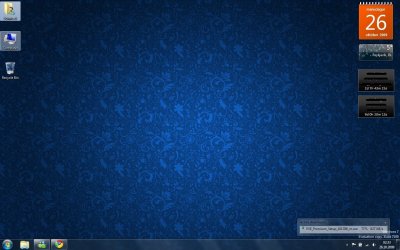
Otherwise its normal like in the screenshot attached, the Documents folder selected and mouse hovering over the Computer icon

attachment.php
 

Attachments

  • temp2.jpg
    temp2.jpg
    163.3 KB · Views: 8,957

My Computer My Computer

Computer Manufacturer/Model Number
Custom
OS
Windows 7 build 7600 64 bit
CPU
Phenom II X4 955 retail 3.2GHz
Motherboard
ASRock M3A790GXH/USB3 ATX AMD AMD3
Memory
4x GeiL 2GB Value PC3-10660 CL9 DC DDR3-1333, CL 9-9-9-28
Graphics Card(s)
PowerColor Radeon HD5850 PCS+ 1024MB, 256-bit GDDR5
Sound Card
Built in
Hard Drives
G.Skill Phoenix Pro 120GB SATA2 SSD Sandforce SF-120
Samsung Spinpoint 500GB SATA2 7200RPM
PSU
Tacens Radix III Smart 520W
Weird... mine has never done the dotted border around icons.
 

My Computer My Computer

Computer Manufacturer/Model Number
Custom
OS
Windows 7 RC 64bit
CPU
AMD Athlon 7750 Dual-Core Processor 2.70Ghz
Motherboard
Gigabyte GA-MA78GPM-UD2H
Memory
4GB
Graphics Card(s)
On-board Graphics ATI Radeon HD 3200
Sound Card
On-board Sound Realtek ALC889A
Monitor(s) Displays
42" Westinghouse 1080P Monitor (LVM-42w2)
Screen Resolution
1920x1080
Ok this happens to me too, I don't know if this helps but for me when I want it to go away I click on the show desktop button far far right and it goes away

If this is what you are looking for send me some rep
 

My Computer My Computer

Computer Manufacturer/Model Number
HP dv6910
OS
Windows 7 home pre
CPU
2 GHz AMD Turion X2 TL-60
Motherboard
phenoix ?
Memory
3 GB
Graphics Card(s)
NVIDIA GeForce Go 7150M
Sound Card
on board
Hard Drives
200 GB + Western Digi 260 GB
Cooling
Targus chill pad
Internet Speed
quick !
Same here, i can fix it by clicking show desktop.
There has to be some way to fix this, even tho it doesn't happen often its still annoying (and i am a perfectionist lol :D)
 

My Computer My Computer

Computer Manufacturer/Model Number
Custom
OS
Windows 7 build 7600 64 bit
CPU
Phenom II X4 955 retail 3.2GHz
Motherboard
ASRock M3A790GXH/USB3 ATX AMD AMD3
Memory
4x GeiL 2GB Value PC3-10660 CL9 DC DDR3-1333, CL 9-9-9-28
Graphics Card(s)
PowerColor Radeon HD5850 PCS+ 1024MB, 256-bit GDDR5
Sound Card
Built in
Hard Drives
G.Skill Phoenix Pro 120GB SATA2 SSD Sandforce SF-120
Samsung Spinpoint 500GB SATA2 7200RPM
PSU
Tacens Radix III Smart 520W
If the icon itself is a small image and does not scale, you will have the borders.

For example, if the icon image itself is 32x32 and you have all other icons at 128X128, when you scale that 32x32 image to 128x128, the image doesn't change size, but the border does.

If there is only one icon that is 'bordered', then that is simply the icon highlight.
 

My Computer My Computer

Computer type
PC/Desktop
Computer Manufacturer/Model Number
Systems by SmartEyeball
OS
8 Pro x64
CPU
i7 3770K 4.6GHz
Motherboard
ASUS P8Z77 WS
Memory
16GB G.Skill Trident X 2666mhz
Graphics Card(s)
x2 EVGA 780 Ti Superclocked SLI
Sound Card
SB X-FI Surround 5.1 PRO USB / ATH-AD900 Headphones
Monitor(s) Displays
x3 Dell U2410 / 58" Samsung
Screen Resolution
5760*1200/ 1920*1200
Hard Drives
2x Intel 520 240GB (RAID 0) * 2x WD Caviar Blacks 2TB (RAID 0) * 2TB WD Caviar Black * Sony Optirac DVD
PSU
Silverstone Strider Evolution 1200W
Case
Thermaltake Level 10 GT Snow Edition
Cooling
Noctua NH-D14
Keyboard
Topre Realforce // Ducky Shine MX Black // Filco Ninja TKL
Mouse
Thermaltake Theron (Highly Recommended) + Razer Imperator
Antivirus
MSE
Browser
IE, FF, WaterFox
Other Info
GT Extreme V2 Sim Racing Cockpit + 40" LCD and K/B Mouse stand ▼
Fanatec CSR Elite Wheel + Clubsport V1 Pedals + CSR shifter/7G-H ▼Saitek X52 Pro ▼ TrackIR 5 Pro
Buttkicker v2 Seat Rumbler with Dedicated 5.1 and Sub Woofer attached to frame ▼
=
Bloody Big Grin
I like to download custom icons from Rocketdocks pool in .png format, and then convert them to .ico format. If you install Rocketdock from here:

Download RocketDock - RocketDock.com

you get handy dock for windows 7, that may or may not grow on you.. personally, I cannot get by without it.. anyways, once installed, if you right click on one of the icons on the dock, and click icon settings, and then select "get more", it will bring you to the Rocketdock website, where there lies a plethora of killer icons and icon packs.. Download the ones you are interested in, then convert them to .ico format using this site:

ConvertICO.com - Convert .PNG format files to .ICO or .ICO format files to .PNG : Windows Vista compatible icons

Once converted, then right click the icon on the desktop you want to update, and hit on change icon, then eventually browse to where the .ico file is listed.. I change all my icons pretty much in this way..

Hope this helps.
 

My Computer My Computer

Computer Manufacturer/Model Number
Custom
OS
Windows 7 Ultimate
CPU
Amd 5400+ dual core overclocked to 3.0 ghz
Motherboard
EVGA 590 sli aM2
Memory
8gb 5-5-5-5-15 g-skill
Graphics Card(s)
Nvidia 9800gt 512mb
Sound Card
M-Audio Delta 2496
Monitor(s) Displays
Acer 22 inch lcd
Screen Resolution
1680 x 1050
Hard Drives
Hmm

4.0 terabytes total..
PSU
650 watts
Case
Antec Sonata II
Cooling
Zallmen Xpu cooler
Keyboard
some rubbish I found in my garage
Mouse
logitech
Internet Speed
caps at about 650kb down, 50kb up . Gigabit local network.
As smartey says, it is the last selection made on the desktop. If you were to use the arrow keys to move around the desktop, this would be the starting point. If you wanted to open that program you could press the spacebar to highlight and enter to open. The desktop must be in focus of course.
 

My Computer My Computer

Computer Manufacturer/Model Number
Dell XPS420
OS
Vista Ult 64 bit Seven Ult RTM x64
CPU
Intel Core2 Quad Q6600 2.40 gigahertz
Memory
Crucial Ballistix 4x2GB PC2 6400
Graphics Card(s)
NVIDIA GeForce 8600 GTS 256 MB
Sound Card
Creative SB X-Fi audio
Monitor(s) Displays
HP w2207 + HPvs15
Screen Resolution
1680x1050 + 1024x768
Hard Drives
2-WD5000AAKS-500 GB
WD5000AAV-500 GB external
Keyboard
Microsoft Comfort Curve
Mouse
MX Revolution
Other Info
Wacom Intuos 2 Graphics Tablet
Experience Index=5.5
Yeah, actually that is not the same thing as Smarteye and I were thinking now that I look at it closer.. Windows highlights things that are selected, in this case, the icons on your desktop.. Just select something else, or click on the empty space on your desktop, and the box you are referring to should go away...

I was more referring to the annoying scaling issue, that can occur when you have icons that are smaller than standard. I like to increase the size of my desktop icons slightly, and if the icons are smaller, eventually, they will no longer grow, and a little grey dotted box will be around them.. Itunes for instance, is notorious for this.. My method describes a place to score many free icons, and also a way to replace the icons on the desktop with large, resize-able icons..

 

My Computer My Computer

Computer Manufacturer/Model Number
Custom
OS
Windows 7 Ultimate
CPU
Amd 5400+ dual core overclocked to 3.0 ghz
Motherboard
EVGA 590 sli aM2
Memory
8gb 5-5-5-5-15 g-skill
Graphics Card(s)
Nvidia 9800gt 512mb
Sound Card
M-Audio Delta 2496
Monitor(s) Displays
Acer 22 inch lcd
Screen Resolution
1680 x 1050
Hard Drives
Hmm

4.0 terabytes total..
PSU
650 watts
Case
Antec Sonata II
Cooling
Zallmen Xpu cooler
Keyboard
some rubbish I found in my garage
Mouse
logitech
Internet Speed
caps at about 650kb down, 50kb up . Gigabit local network.
I know i can hide it and just get the normal one back, but i don't wanna see it in the first place, my question is: Can i get permanently rid of it, so it never appears?
Surely i'm not the only one here annoyed by this, i would classify this as a bug that MS need to fix, or at least give the user an option to disable this
 

My Computer My Computer

Computer Manufacturer/Model Number
Custom
OS
Windows 7 build 7600 64 bit
CPU
Phenom II X4 955 retail 3.2GHz
Motherboard
ASRock M3A790GXH/USB3 ATX AMD AMD3
Memory
4x GeiL 2GB Value PC3-10660 CL9 DC DDR3-1333, CL 9-9-9-28
Graphics Card(s)
PowerColor Radeon HD5850 PCS+ 1024MB, 256-bit GDDR5
Sound Card
Built in
Hard Drives
G.Skill Phoenix Pro 120GB SATA2 SSD Sandforce SF-120
Samsung Spinpoint 500GB SATA2 7200RPM
PSU
Tacens Radix III Smart 520W
When you select something by single clicking on it, it gets highlighted. This has always been the case. Not sure if there is a way to tell windows 7 to not highlight things you click on. There are various apps out and about that allow you to customize certain nitty gritty aspects of the appearance and behavior. Lamicsoft makes a fairly comprehensive and good "Windows 7 Manager", but I do not recall seeing this change option when gave it a trial run, but it easily could be..
 

My Computer My Computer

Computer Manufacturer/Model Number
Custom
OS
Windows 7 Ultimate
CPU
Amd 5400+ dual core overclocked to 3.0 ghz
Motherboard
EVGA 590 sli aM2
Memory
8gb 5-5-5-5-15 g-skill
Graphics Card(s)
Nvidia 9800gt 512mb
Sound Card
M-Audio Delta 2496
Monitor(s) Displays
Acer 22 inch lcd
Screen Resolution
1680 x 1050
Hard Drives
Hmm

4.0 terabytes total..
PSU
650 watts
Case
Antec Sonata II
Cooling
Zallmen Xpu cooler
Keyboard
some rubbish I found in my garage
Mouse
logitech
Internet Speed
caps at about 650kb down, 50kb up . Gigabit local network.
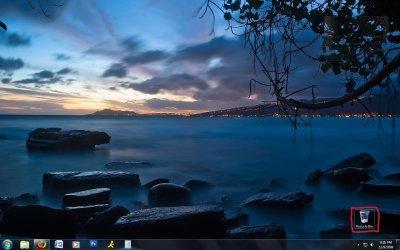
Yeah i'm having the same exact issue except it's on my "trash can" icon since it's the only one on my desktop. just as annoyed .

If i right click and hit "refresh" the dashed border will go away. however, if i alt tab away from desktop and then alt tab back, it's like windows automatically 'selects' the only icon on there and the dashed border is back.

anyway, i have no idea of how to fix this. there was an update and i restarted. it seemed like it had gone away and i remember thinking, "oh wow, that actually fixed that" but then i've added more wallpapers to my changing desktop and it's back :(
here's a pic:
dashed border desktop.jpg


post if you figure anything out!
 

My Computer My Computer

OS
Windows 7
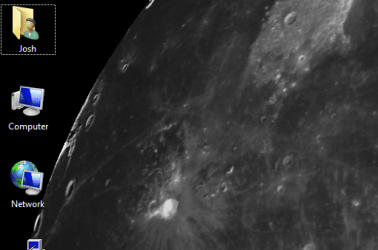
I keep getting the same thing from time to time...its annoying! I am not sure when it happened or how, but I keep getting dotted outlines of the Desktop Icons. If I Refresh the Desktop, it goes away, until I select/use a new icon.

attached is crop of my desktop.
 

Attachments

  • dot-outline.png
    dot-outline.png
    63.3 KB · Views: 109

My Computer My Computer

Computer Manufacturer/Model Number
Asus V2-M3M8200 Barebones
OS
Windows 7 Professional x64
CPU
AMD Phenom II X4 925
Motherboard
V2-M3M8200 (basically a M3N78-VM)
Memory
4x1024mb Kingston HyperX DDR2-1066 KHX8500D2/1G
Graphics Card(s)
Asus GTS 450 OC
Sound Card
Creative Sound Blaster X-Fi Titanium PCIe
Monitor(s) Displays
Asus 24" LCD VH242H
Screen Resolution
1920x1080
Hard Drives
WDC WD5000AAKS
WDC WD5002ABYS
Seagate ST325062 USB-to-IDE
Fujitsu 160GB Pocket USB HDD
PSU
Antec Earthwatts EA-430D
Case
Asus V2-M3M8200
Cooling
120mm side fan & 80mm front & 92mm rear fan
Keyboard
Dell USB mini Multimedia
Mouse
Logitech MX518
Internet Speed
Comcast Xfinity
Other Info
Logitech Webcam Pro 9000
Accurian 40-1462 Speakers
little dot MKII Headphone Amp
Click anywhere on the desktop, then hit TAB a few times.
The dotted border is keyboard focus for navigation.
 

My Computer My Computer

Computer type
PC/Desktop
Computer Manufacturer/Model Number
Alienware Aurora ALX R4
OS
Windows 10 Pro (x64)
CPU
Intel Core i7-3930K (3.2GHz - 4.5GHz)
Motherboard
Alienware Aurora-R4 x79
Memory
4x Samsung 4GB PC3-12800 DDR3 (16GB 1600MHz)
Graphics Card(s)
Nvidia Geforce GTX 690
Sound Card
SteelSeries Siberia Elite
Monitor(s) Displays
Dell UltraSharp U3011
Screen Resolution
2560x1600
Hard Drives
Samsung 850 Pro 256 GB, Seagate 1TB Desktop Hybrid HDD, 2x Western Digital 4TB Green HDD
PSU
875W Some Dell PSU <.<
Case
Alienware Aurora ALX
Cooling
Custom Liquid Cooling (EK CPU & GPU blocks) dual EK 480RAD
Keyboard
Logitech G710+ Mechanical
Mouse
Logitech G700s
Internet Speed
Verizon Fios (50 mbps average)
Other Info
Server: Intel NUC D54250WYK: i5-4250U, 16GB, 256 GB mSATA, Windows Server 2012 R2
that does nothing but move the dotted border to a new area. Once you click the desktop or use a icon it shows again.
 

My Computer My Computer

Computer Manufacturer/Model Number
Asus V2-M3M8200 Barebones
OS
Windows 7 Professional x64
CPU
AMD Phenom II X4 925
Motherboard
V2-M3M8200 (basically a M3N78-VM)
Memory
4x1024mb Kingston HyperX DDR2-1066 KHX8500D2/1G
Graphics Card(s)
Asus GTS 450 OC
Sound Card
Creative Sound Blaster X-Fi Titanium PCIe
Monitor(s) Displays
Asus 24" LCD VH242H
Screen Resolution
1920x1080
Hard Drives
WDC WD5000AAKS
WDC WD5002ABYS
Seagate ST325062 USB-to-IDE
Fujitsu 160GB Pocket USB HDD
PSU
Antec Earthwatts EA-430D
Case
Asus V2-M3M8200
Cooling
120mm side fan & 80mm front & 92mm rear fan
Keyboard
Dell USB mini Multimedia
Mouse
Logitech MX518
Internet Speed
Comcast Xfinity
Other Info
Logitech Webcam Pro 9000
Accurian 40-1462 Speakers
little dot MKII Headphone Amp
that does nothing but move the dotted border to a new area. Once you click the desktop or use a icon it shows again.
Hit it a few more times...it will go some where else. After moving it onto the start menu button and select then deselect a desktop icon it does not get dotted.
 

My Computer My Computer

Computer type
PC/Desktop
Computer Manufacturer/Model Number
Alienware Aurora ALX R4
OS
Windows 10 Pro (x64)
CPU
Intel Core i7-3930K (3.2GHz - 4.5GHz)
Motherboard
Alienware Aurora-R4 x79
Memory
4x Samsung 4GB PC3-12800 DDR3 (16GB 1600MHz)
Graphics Card(s)
Nvidia Geforce GTX 690
Sound Card
SteelSeries Siberia Elite
Monitor(s) Displays
Dell UltraSharp U3011
Screen Resolution
2560x1600
Hard Drives
Samsung 850 Pro 256 GB, Seagate 1TB Desktop Hybrid HDD, 2x Western Digital 4TB Green HDD
PSU
875W Some Dell PSU <.<
Case
Alienware Aurora ALX
Cooling
Custom Liquid Cooling (EK CPU & GPU blocks) dual EK 480RAD
Keyboard
Logitech G710+ Mechanical
Mouse
Logitech G700s
Internet Speed
Verizon Fios (50 mbps average)
Other Info
Server: Intel NUC D54250WYK: i5-4250U, 16GB, 256 GB mSATA, Windows Server 2012 R2
dotted box me too

i have exactly the same problem and looking for a solution. i m now seeing in HKEY_CURRENT_USER\Control Panel\Desktop to find something wrong but i m not an ingeneer... if someone have THE solution to make this dotted line disapear, please let us know!!! (sorry about my english, i m french)
 

My Computer My Computer

OS
windows seven pro 64bits
CPU
quad 2.8 G
Motherboard
asusp2qd turbo
Memory
corsair 1066Mhz 1G x 4
Graphics Card(s)
nvidia 9600gt
Hard Drives
caviar black
i have exactly the same problem and looking for a solution. i m now seeing in HKEY_CURRENT_USER\Control Panel\Desktop to find something wrong but i m not an ingeneer... if someone have THE solution to make this dotted line disapear, please let us know!!! (sorry about my english, i m french)

Click on the desktop then hit the TAB key until the line disappears.
 

My Computer My Computer

Computer type
PC/Desktop
Computer Manufacturer/Model Number
Alienware Aurora ALX R4
OS
Windows 10 Pro (x64)
CPU
Intel Core i7-3930K (3.2GHz - 4.5GHz)
Motherboard
Alienware Aurora-R4 x79
Memory
4x Samsung 4GB PC3-12800 DDR3 (16GB 1600MHz)
Graphics Card(s)
Nvidia Geforce GTX 690
Sound Card
SteelSeries Siberia Elite
Monitor(s) Displays
Dell UltraSharp U3011
Screen Resolution
2560x1600
Hard Drives
Samsung 850 Pro 256 GB, Seagate 1TB Desktop Hybrid HDD, 2x Western Digital 4TB Green HDD
PSU
875W Some Dell PSU <.<
Case
Alienware Aurora ALX
Cooling
Custom Liquid Cooling (EK CPU & GPU blocks) dual EK 480RAD
Keyboard
Logitech G710+ Mechanical
Mouse
Logitech G700s
Internet Speed
Verizon Fios (50 mbps average)
Other Info
Server: Intel NUC D54250WYK: i5-4250U, 16GB, 256 GB mSATA, Windows Server 2012 R2
ho..... i invit you to hit tab on my keyboard all time i need it.... :). i know its a bug and i m looking for a real solution.
 

My Computer My Computer

OS
windows seven pro 64bits
CPU
quad 2.8 G
Motherboard
asusp2qd turbo
Memory
corsair 1066Mhz 1G x 4
Graphics Card(s)
nvidia 9600gt
Hard Drives
caviar black
Back
Top