
Borders - Changing Width to suite your needs

How to Change the Width of Window Borders

   Information
Do you find the default with of the window borders too thin or too wide? This tutorial will show you how to change it to suite your taste.


Here's How:
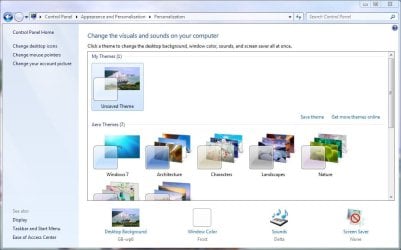
1) Open control panel and click on Appearance and Personalization[

2) Click on Personalization and then Window Color at the bottom
tut1.JPG
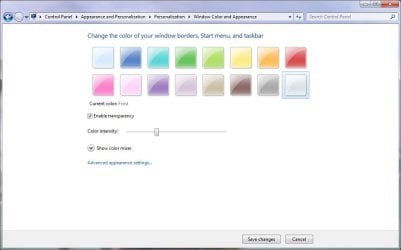
3) In the Window Color screen, click on Advanced appearance settings
tut2.JPG
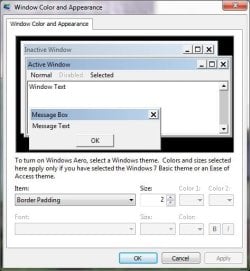
4) A dialog box will appear where you can change various aspects of the desktop appearance. In the item box, scroll down to Border Padding, and change the Size value to whatever you fancy then press ok.
NOTE: The default size is 4. The smaller the number, the thinner the border. The larger the number, the wider the border.
tut3.JPG

   Note
This tutorial can also apply to Vista.

Have fun playing with this feature!


Last edited by a moderator:
this works only if you have basic theme or accessibility themes. It says so right on the window.
 

My Computer

OS
Windows 7 x64
no, it works on aero as well.
 

My Computer

Computer Manufacturer/Model Number
self built
OS
Windows 7 Professional 64-bit
CPU
Intel E8400 3GHz
Motherboard
Intel DX48BT2
Memory
Kingston PC3-10700H 4Gb
Graphics Card(s)
XFX Radeon HD 5850 BlackEd.
Sound Card
Asus Xonar DG
Monitor(s) Displays
2x Samsung SM-T220HD 22"
Screen Resolution
1680x1050 on two monitors
Hard Drives
OCZ Vertex 2 120gb 3.5" (OS)
Seagate Momentus XT 500gb
Samsung F3 1Tb (games)
2x Samsung F1 1Tb
PSU
Thermaltake ToughPower 850w
Case
Thermaltake Armor
Cooling
Scythe Mugen II
Keyboard
Microsoft Comfort Curve USB
Mouse
Razer Diamondback 3G
Internet Speed
8128/443
yes, it does! thanks!

I wonder why the text on the top then saying settings in this dialog work only with ....
 

My Computer

OS
Windows 7 x64
Great!

...I was searching for this everywhere, but I couldn't find!!
 

My Computer

Computer Manufacturer/Model Number
self-assembled
OS
Windows7 RTM 7600 x64
CPU
AMD Phenom
Motherboard
ASUS M3A32-MVP Deluxe
Memory
4 GBytes
Graphics Card(s)
nVidia GeForce 8800 GT
Monitor(s) Displays
2x Samsung Syncmaster 244T
Screen Resolution
1920x1200 (x2)
PSU
Xilence 650 W
Cooling
Accelero X1 on graphic card
Thanks for the post

I could not see the beginning part of my online trading activity $ amounts until I saw this.
Thanks :D
 

My Computer

Computer Manufacturer/Model Number
Sony/VPCCW27FX
OS
Windows 7
CPU
Intel Core i5 M520
Motherboard
N/A
Memory
4GB
Graphics Card(s)
Nvidia GeForce GT 330M
Sound Card
Nvidia High Def
Monitor(s) Displays
N/A
Hard Drives
500 GB
Yes, but 1 is still like 10pix wide?!?! That is nuts!
 

My Computer

OS
Win7 64bit
i was looking for this! thank you for saving me time by not going to regedit!
 

My Computer

Computer type
Laptop
Computer Manufacturer/Model Number
HP
OS
Windows 7 Professional x64
CPU
AMD A8-6410 APU with AMD Radeon R5
Motherboard
Pavillion 15-P053NP
Memory
1x 4GB DDR3L 1600Mhz CL11 PC3L
Graphics Card(s)
AMD Radeon R7 M260 2GB
Sound Card
Beats Audio
Screen Resolution
1366x768
Hard Drives
SSD 128GB Toshiba Q Series PRO
HDD 500GB Seagate Momentus 7mm
Mouse
Microsoft Wireless Mobile Mouse 3500
Internet Speed
4G/LTE 150mbps
Antivirus
MSE+Malwarebytes
Browser
Chrome
Thanks OP @swarfega

Nice feature indeed, but I need something a little different. In the attachments you see a screen showing win7 explorer and MS Outlook 2010. I've shown with arrows for which borders I want to increase the thickness. It's those separation borders inside the window that I want to make thicker. Border padding addresses only the outer frame and I want something for the inner frames, cos some of them are so annoying and with a fast mouse it's a paint to hit them. I'd like to increase the thickness of those inner boarders, and not only for explorer windows but if psbl for other 3rd party apps (though that might be too much to ask for but too late, I already did it :) ) So pls help, anybody .. somebody! :)
 

Attachments

  • hhhhhhhhhf.png
    hhhhhhhhhf.png
    120.2 KB · Views: 71

My Computer

Computer type
Laptop
Computer Manufacturer/Model Number
HP
OS
Win 7 x64
Back
Top