Brand new 1.5TB Extension not recognised - cannot "initialise"

severussnape11

New member
Local time
11:41 AM
Messages
32
Brand new 1.5TB Extension not recognised - cannot "initialise"

I'm posting this out of the extended external hard drive recognition thread because my problem is slightly different.

Windows detects my external HDD but doesn't show up in My Computer. Drive is detected in Disk Management, described as "not initialized". When I try to initialize the drive though, it gives me the following error:

"The request could not be performed because of an I/O device error".

I'm running windows 7 on a sony vaio laptop. Also, I tried the drive on another laptop, and it works perfectly.


___


Literally pulling my hair out over this (seriously its gross, my office desk is covered in hair), so ANY and ALL advice is greatly appreciated!!
 

My Computer My Computer

At a glance

windows 64
OS
windows 64
Welcome to Seven Forums severussnape11. you did it right by starting a new thread.

how is the external connected?
You can download Partition Wizard Free and see if it will let you initialize and format the drive.
Is this a brand-new out-of-the-box drive?
 

My Computer My Computer

At a glance

Windows 7 Ultimate X64 SP1Intel i5-2550K, Differing ~4.4-4.8GHz No buil...16GB G.Skill Sniper 1866MHz @ 2133MHz 2x8GBASUS GTX650TIB-DC2OC-2GD5, (650TI Boost)
Computer type
PC/Desktop
Computer Manufacturer/Model Number
Home Built Desktop By DataTech
OS
Windows 7 Ultimate X64 SP1
CPU
Intel i5-2550K, Differing ~4.4-4.8GHz No built in GPU
Motherboard
ASUS P8Z68-V PRO/GEN3
Memory
16GB G.Skill Sniper 1866MHz @ 2133MHz 2x8GB
Graphics Card(s)
ASUS GTX650TIB-DC2OC-2GD5, (650TI Boost)
Sound Card
Onboard Realtek 5-1
Monitor(s) Displays
Samsung P2570HD
Screen Resolution
1920x1080
Hard Drives
Samsung 840 Pro 256GB SSD for OS, 500GB Seagate Constellation (Enterprise drive) for Data
PSU
Corsair HX650W
Case
Inwin Dragon Rider
Cooling
Hyper 212 EVO w/two Noctua fans, push-pull, @1300 RPM
Keyboard
E-Z Eyes, bright yellow keys with large characters
Mouse
steelseries SENSEI Laser Pro Gaming
Internet Speed
48-51Mbs Mbs down, 11 Mbs up Xfinity Cable
Antivirus
Norton Internet Security 2013
Browser
IE 10, Opera, Pale Moon if needed
Other Info
4 case fans, LG BluRay-RE, ASUS DVD-RW, Mr. Fusion power supply, 1.21 gigawatts.
Try this:

1. From RUN, type diskpart and click OK
2. At the DISKPART prompt, type automount
3. From the Device Manager , find the device not being recognized. It could be under storage devices
4. Right click on the device and choose Properties
5. Click on the Driver tab
6. Click Uninstall
7. Unplug the device
8. Plug the device back in.

This solution seems to have worked for many.
 

My Computer My Computer

At a glance

Windows 7 Home Premium 32 bit
OS
Windows 7 Home Premium 32 bit
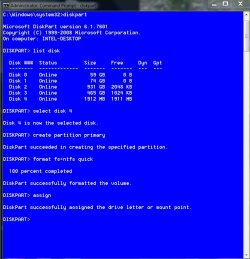
Try using diskpart from an elevated cpmmand prompt. (click start, in the search box type cmd, in the cmd entry that appears, right click it and select 'run as administrator) Give adninistrative permission. In the box that opens type diskpart and press enter, it will take a few seconds and the cmd prompt will respond diskpart. Type list disk and press enter. It will show all disk drives connected to your computer and show the sizes. It will give each one a number. On a laptop it will probably be disk 2. type select disk 2 (or whatever disk it is numbered) It will reply disk 2 is the selected disk. type create partition primary and press enter. (this will create 1 partition of the whole drive. If you want to partition it into different sizes, the command will be create partition primary size= 102400 which is 100GB. Enter the size you want in MB with 1024 MB=1GB. If you do this, create the rest of the drive in another partition. If you put no size in the command it will create a partition of the entire disk) So, create partiotion primary and enter will create 1 large partition. It will respond with diskpart created the specified partition. Then type format fs-ntfs quick and press enter. In a few seconds it will reply diskpart formatted the specified partition. type assign and press enter. That will assign it a drive letter. It will respond that diskpart has assigned it a drive letter. Type exit and press enter (do this twice) and the window will close. You should see the drive in computer. As an example, I formatted a USB drive as an example. You won't have as many drives as me. I selected disk 4 because you can tell by the sizt it is a 2GB USB drive. Again, yours will probably be disk 2. This is what it will look like.

diskpart.JPG
 

My Computers My Computers

  • At a glance

    Windows 11 ProRyzen 9 5900X32GB G Skill DDR4-3600EVGA RTX 3080 FTW 3 Ultra
    Computer type
    PC/Desktop
    Computer Manufacturer/Model Number
    ALWAYS UNDER CONSTRUCTION
    OS
    Windows 11 Pro
    CPU
    Ryzen 9 5900X
    Motherboard
    Asus X570 Crosshair Viii Hero
    Memory
    32GB G Skill DDR4-3600
    Graphics Card(s)
    EVGA RTX 3080 FTW 3 Ultra
    Sound Card
    On Board/Sennheiser PC37X Headset
    Monitor(s) Displays
    3 X Asus 27"
    Screen Resolution
    2560x1440
    Hard Drives
    2 X 1 TB NVME drives
    PSU
    EVGA 850
    Case
    Phanteks Eclipse P400A
    Cooling
    EVGA 280 AIO
    Keyboard
    Logitech G510s/ Logitech G13
    Mouse
    Logitech G502
    Internet Speed
    24/1
    Antivirus
    ESET/MBAM Pro/SAS Pro
    Browser
    Chrome/ Firefox/ Edge
  • At a glance

    Windows 11 ProIntel Ultra 9 288V32 GB LPDDR5X 8533
    Computer type
    Laptop
    System Manufacturer/Model Number
    Dell 16 Plus
    OS
    Windows 11 Pro
    CPU
    Intel Ultra 9 288V
    Memory
    32 GB LPDDR5X 8533
    Monitor(s) Displays
    16" Mini-LED HDR600 Touch 90 Hz
    Screen Resolution
    2560X1600
    Hard Drives
    1 TB NVME
Almost all external hard drives come preformatted. The OP has further said that the drive works on another computer. So my assumption is that the filesystem exists and hence the automount suggestion. ( if for some reason automount got disabled I presume that the drive will appear not initialised and not mounted)

That said, there is absolutely no problem formatting the drive again in this particular instance since it is new and there is no data in it.:) I am curious to know whether the drive is listed in diskpart.
 

My Computer My Computer

At a glance

Windows 7 Home Premium 32 bit
OS
Windows 7 Home Premium 32 bit
I would assume it would show up in diskpart if it shows in disk management. In disk management, make sure it says online in the left column. If it says offline, right click offline and select online.
 

My Computers My Computers

  • At a glance

    Windows 11 ProRyzen 9 5900X32GB G Skill DDR4-3600EVGA RTX 3080 FTW 3 Ultra
    Computer type
    PC/Desktop
    Computer Manufacturer/Model Number
    ALWAYS UNDER CONSTRUCTION
    OS
    Windows 11 Pro
    CPU
    Ryzen 9 5900X
    Motherboard
    Asus X570 Crosshair Viii Hero
    Memory
    32GB G Skill DDR4-3600
    Graphics Card(s)
    EVGA RTX 3080 FTW 3 Ultra
    Sound Card
    On Board/Sennheiser PC37X Headset
    Monitor(s) Displays
    3 X Asus 27"
    Screen Resolution
    2560x1440
    Hard Drives
    2 X 1 TB NVME drives
    PSU
    EVGA 850
    Case
    Phanteks Eclipse P400A
    Cooling
    EVGA 280 AIO
    Keyboard
    Logitech G510s/ Logitech G13
    Mouse
    Logitech G502
    Internet Speed
    24/1
    Antivirus
    ESET/MBAM Pro/SAS Pro
    Browser
    Chrome/ Firefox/ Edge
  • At a glance

    Windows 11 ProIntel Ultra 9 288V32 GB LPDDR5X 8533
    Computer type
    Laptop
    System Manufacturer/Model Number
    Dell 16 Plus
    OS
    Windows 11 Pro
    CPU
    Intel Ultra 9 288V
    Memory
    32 GB LPDDR5X 8533
    Monitor(s) Displays
    16" Mini-LED HDR600 Touch 90 Hz
    Screen Resolution
    2560X1600
    Hard Drives
    1 TB NVME
hi everyone, i just woke up, but wow thanks for all the responses. ill go through them now one by one and see what works and what doesnt, then get back to you all!

thanks again
 

My Computer My Computer

At a glance

windows 64
OS
windows 64
okay, starting with jumanji - i thought this had worked, because i box at the bottom came up saying 'seagate drive xyz installed..' and that hadnt happened before, but in the end it didnt

essenbe - when i got the the 'create partition primary' step, diskpart responded saying 'Diskpart has encountered an error: The request could not be performed because of an I/O device error. See the System Event Long for more information.' damn :(. thank you both for the very thorough and easy to follow instructions however. any suggestions where something may have gone wrong?

have to go to christmas lunch now, but will be back soon!
 

My Computer My Computer

At a glance

windows 64
OS
windows 64
My only recommendation would be to download Seagates diagnostic test, Seatools and see if there is a problem with the drive.
 

My Computers My Computers

  • At a glance

    Windows 11 ProRyzen 9 5900X32GB G Skill DDR4-3600EVGA RTX 3080 FTW 3 Ultra
    Computer type
    PC/Desktop
    Computer Manufacturer/Model Number
    ALWAYS UNDER CONSTRUCTION
    OS
    Windows 11 Pro
    CPU
    Ryzen 9 5900X
    Motherboard
    Asus X570 Crosshair Viii Hero
    Memory
    32GB G Skill DDR4-3600
    Graphics Card(s)
    EVGA RTX 3080 FTW 3 Ultra
    Sound Card
    On Board/Sennheiser PC37X Headset
    Monitor(s) Displays
    3 X Asus 27"
    Screen Resolution
    2560x1440
    Hard Drives
    2 X 1 TB NVME drives
    PSU
    EVGA 850
    Case
    Phanteks Eclipse P400A
    Cooling
    EVGA 280 AIO
    Keyboard
    Logitech G510s/ Logitech G13
    Mouse
    Logitech G502
    Internet Speed
    24/1
    Antivirus
    ESET/MBAM Pro/SAS Pro
    Browser
    Chrome/ Firefox/ Edge
  • At a glance

    Windows 11 ProIntel Ultra 9 288V32 GB LPDDR5X 8533
    Computer type
    Laptop
    System Manufacturer/Model Number
    Dell 16 Plus
    OS
    Windows 11 Pro
    CPU
    Intel Ultra 9 288V
    Memory
    32 GB LPDDR5X 8533
    Monitor(s) Displays
    16" Mini-LED HDR600 Touch 90 Hz
    Screen Resolution
    2560X1600
    Hard Drives
    1 TB NVME
okay, starting with jumanji - i thought this had worked, because i box at the bottom came up saying 'seagate drive xyz installed..' and that hadnt happened before, but in the end it didnt .....

When the drive was installed how did it look in the Disk Management? Was it the same as before or anything different?

Did you check the Device Manager? And what did you find?

If in case you do find it in the Device Manager with an exclamation mark, you can try the following resolution.

Symptoms:
USB shows in the device manager (right click on my computer and click manage, devices) either "Unknown USB device" or "name of USB hard drive manufacturer" both of which have the yellow ! next to them saying they aren't installed correctly.
Resolution :
Right click on the device in the device manager that shows it isn't installed, click update driver software, enter this location assuming your C drive is your main drive
"C:\Windows\winsxs" and ensure the box is checked to include subfolders and hit ok. It should reinstall immediately and show up as a new drive in "My Computer"
You may have to uninstall the device first, replug it back in and then run through the above steps.
 
Last edited:

My Computer My Computer

At a glance

Windows 7 Home Premium 32 bit
OS
Windows 7 Home Premium 32 bit

My Computer My Computer

At a glance

Windows 7 Ultimate X64 SP1Intel i5-2550K, Differing ~4.4-4.8GHz No buil...16GB G.Skill Sniper 1866MHz @ 2133MHz 2x8GBASUS GTX650TIB-DC2OC-2GD5, (650TI Boost)
Computer type
PC/Desktop
Computer Manufacturer/Model Number
Home Built Desktop By DataTech
OS
Windows 7 Ultimate X64 SP1
CPU
Intel i5-2550K, Differing ~4.4-4.8GHz No built in GPU
Motherboard
ASUS P8Z68-V PRO/GEN3
Memory
16GB G.Skill Sniper 1866MHz @ 2133MHz 2x8GB
Graphics Card(s)
ASUS GTX650TIB-DC2OC-2GD5, (650TI Boost)
Sound Card
Onboard Realtek 5-1
Monitor(s) Displays
Samsung P2570HD
Screen Resolution
1920x1080
Hard Drives
Samsung 840 Pro 256GB SSD for OS, 500GB Seagate Constellation (Enterprise drive) for Data
PSU
Corsair HX650W
Case
Inwin Dragon Rider
Cooling
Hyper 212 EVO w/two Noctua fans, push-pull, @1300 RPM
Keyboard
E-Z Eyes, bright yellow keys with large characters
Mouse
steelseries SENSEI Laser Pro Gaming
Internet Speed
48-51Mbs Mbs down, 11 Mbs up Xfinity Cable
Antivirus
Norton Internet Security 2013
Browser
IE 10, Opera, Pale Moon if needed
Other Info
4 case fans, LG BluRay-RE, ASUS DVD-RW, Mr. Fusion power supply, 1.21 gigawatts.
Jumanji -

When the drive was installed, it was still unallocated and uninitialised in disk management.

im also unable to to find the drive in 'Device manager', but the list is quite long (30+ in the list) and im not exactly sure what im looking for. theres certainly nothing in the list with 'seagate' in the name, 'unknown USB device', or anything with a yellow '!' next to it.

further suggestions? :S
 

My Computer My Computer

At a glance

windows 64
OS
windows 64
oh right sorry britton30, i have no idea why i missed your post, how rude of me.

the drive is indeed brand new, out of the box. its connected by what im assuming is a standard USB cable.

going to download the partition wizard now and get back to you.
 

My Computer My Computer

At a glance

windows 64
OS
windows 64
i thought i replied, but i cant find it :S

britton -

can you elaborate what i need to do with the partition wizard? i downloaded the home version, but there seems to be a lot of options and i dont want to cause any incurable change. to begin: do i want to format or partition the drive? there also seems to be 4 different portions of the drive and their details read as follows:

14.4 gb - other - primary - none
100 mb - unformatted - primary - active
223.9 gb - unformatted - primary - none
1158.7 gb - unallocated - logical - none


basically there are multiple options for each detail for each portion - what should i do?
 

My Computer My Computer

At a glance

windows 64
OS
windows 64
First make sure you are selecting the new external drive to work on. you would want to create a partition and then format it. Odd to have prtitions like shown on a new drive, if indeed there are, delete them and proceed.
As I said, be sure it is only the new drive you're working on, PW will list all drives and partitions in your system.

14.4 gb - other - primary - none maybe OEM recovery
100 mb - unformatted - primary - active System reserved, your boot manager, don't change
223.9 gb - unformatted - primary - none your Windows 7 installation probably
1158.7 gb - unallocated - logical - none should be the external

Unless all the above is external and you've tried to install Win 7 on it.
 

My Computer My Computer

At a glance

Windows 7 Ultimate X64 SP1Intel i5-2550K, Differing ~4.4-4.8GHz No buil...16GB G.Skill Sniper 1866MHz @ 2133MHz 2x8GBASUS GTX650TIB-DC2OC-2GD5, (650TI Boost)
Computer type
PC/Desktop
Computer Manufacturer/Model Number
Home Built Desktop By DataTech
OS
Windows 7 Ultimate X64 SP1
CPU
Intel i5-2550K, Differing ~4.4-4.8GHz No built in GPU
Motherboard
ASUS P8Z68-V PRO/GEN3
Memory
16GB G.Skill Sniper 1866MHz @ 2133MHz 2x8GB
Graphics Card(s)
ASUS GTX650TIB-DC2OC-2GD5, (650TI Boost)
Sound Card
Onboard Realtek 5-1
Monitor(s) Displays
Samsung P2570HD
Screen Resolution
1920x1080
Hard Drives
Samsung 840 Pro 256GB SSD for OS, 500GB Seagate Constellation (Enterprise drive) for Data
PSU
Corsair HX650W
Case
Inwin Dragon Rider
Cooling
Hyper 212 EVO w/two Noctua fans, push-pull, @1300 RPM
Keyboard
E-Z Eyes, bright yellow keys with large characters
Mouse
steelseries SENSEI Laser Pro Gaming
Internet Speed
48-51Mbs Mbs down, 11 Mbs up Xfinity Cable
Antivirus
Norton Internet Security 2013
Browser
IE 10, Opera, Pale Moon if needed
Other Info
4 case fans, LG BluRay-RE, ASUS DVD-RW, Mr. Fusion power supply, 1.21 gigawatts.
sorry, all of the above is the external (which is 1.5 TB)

does that change what i should do?
 

My Computer My Computer

At a glance

windows 64
OS
windows 64
No, if there's no data on it try deleting all of the partions.
 

My Computer My Computer

At a glance

Windows 7 Ultimate X64 SP1Intel i5-2550K, Differing ~4.4-4.8GHz No buil...16GB G.Skill Sniper 1866MHz @ 2133MHz 2x8GBASUS GTX650TIB-DC2OC-2GD5, (650TI Boost)
Computer type
PC/Desktop
Computer Manufacturer/Model Number
Home Built Desktop By DataTech
OS
Windows 7 Ultimate X64 SP1
CPU
Intel i5-2550K, Differing ~4.4-4.8GHz No built in GPU
Motherboard
ASUS P8Z68-V PRO/GEN3
Memory
16GB G.Skill Sniper 1866MHz @ 2133MHz 2x8GB
Graphics Card(s)
ASUS GTX650TIB-DC2OC-2GD5, (650TI Boost)
Sound Card
Onboard Realtek 5-1
Monitor(s) Displays
Samsung P2570HD
Screen Resolution
1920x1080
Hard Drives
Samsung 840 Pro 256GB SSD for OS, 500GB Seagate Constellation (Enterprise drive) for Data
PSU
Corsair HX650W
Case
Inwin Dragon Rider
Cooling
Hyper 212 EVO w/two Noctua fans, push-pull, @1300 RPM
Keyboard
E-Z Eyes, bright yellow keys with large characters
Mouse
steelseries SENSEI Laser Pro Gaming
Internet Speed
48-51Mbs Mbs down, 11 Mbs up Xfinity Cable
Antivirus
Norton Internet Security 2013
Browser
IE 10, Opera, Pale Moon if needed
Other Info
4 case fans, LG BluRay-RE, ASUS DVD-RW, Mr. Fusion power supply, 1.21 gigawatts.
I would advise the OP to format the external drive on another PC using HP USB Disk storage format Utility assuming that it works on another PC as he had mentioned. Only the USB drive will be shown and that way he won't be confused and mess up with his PC even accidentally.(I am amused to know he has four partitions on a new hard drive.)

HP USB Format tool: http://files.extremeoverclocking.com/file.php?f=197
 
Last edited:

My Computer My Computer

At a glance

Windows 7 Home Premium 32 bit
OS
Windows 7 Home Premium 32 bit
No, if there's no data on it try deleting all of the partions.

do i do this by right clicking each of the 4 aforementioned sections of the drive and 'wipe partition'?
 

My Computer My Computer

At a glance

windows 64
OS
windows 64
okay so when i right click --> 'wipe partition', it asks me to choose a 'wiping method':

Fill sectors with Zero (Quick)
Fill sectors with One (Quick)
Fill sectors with Zero & One (Quick)
DoD 5220.22-M (3 passes) (Very Slow)
DoD 5220.28-STD (7 passes) (Very Slow)

can anyone shed some light as to what option i should choose to wipe each partition?
 

My Computer My Computer

At a glance

windows 64
OS
windows 64
Back
Top