Brand new Windows 7 not installing software

snakebeard

New member
Local time
6:55 AM
Messages
22
I just bought a new laptop yesterday, so there's no bugs or anything on it. All I've done is check my gmail, install an the antivirus program Best Buy gave me, and try to install some of my audio recording software (Adobe Audition and Guitar Port).
And that is where my problem starts.
My old computer had windows xp on it, and it ran my software just fine.
Now with this brand new computer, it won't install.
I get just past the part where you agree with all their license stuff,
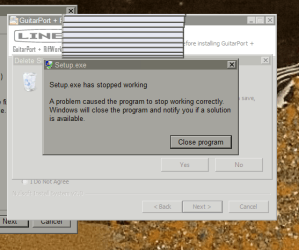
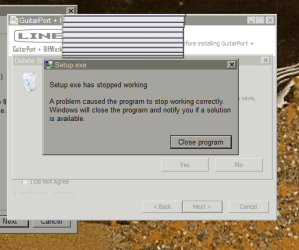
and then suddenly it tells me, "Setup has stopped working. A problem caused the program to stop working correctly." And then it just closes the program.
I bought this software in 2007, so I hope it isn't "too old" for Windows 7 or something...
...Help?
 

My Computer My Computer

OS
Windows 7. 64-bit
Run it in compatibility mode
 

My Computer My Computer

Computer type
PC/Desktop
Computer Manufacturer/Model Number
GIGABYTE Rig (Custom)
OS
Windows 7 Professional (x64/SP1) /Linux Mint 16
CPU
Intel i5-3570k 3.40 GHz @ 4.6 GHz
Motherboard
GIGABYTE Z77X-D3H
Memory
8GB (2133MHz) DDR3
Graphics Card(s)
Asus GTX560 Ti (Nvidia)
Monitor(s) Displays
HP 23", Acer 19" and a Dell 17"
Screen Resolution
1080p, 1440x900 and 1280x1024
Hard Drives
Sandisk Extreme 120GB (SSD), WD 2TB green and 4 other HDDs
PSU
Antec 620w High Current Gamer
Case
Corsair Obsidian 600D
Cooling
CPU - Antec KÜHLER H₂O 920
Keyboard
Steelseries 6Gv2
Mouse
Roccat LUA
Internet Speed
4 - 6mb/s
Antivirus
ESET NOD32
Browser
Chrome/Firefox
Other Info
Intel Gigabit CT (PCIE NIC) and Thinkpad T61p,
My guess is that you are running a 64 bit version of Win 7 and your programs are incompatible.

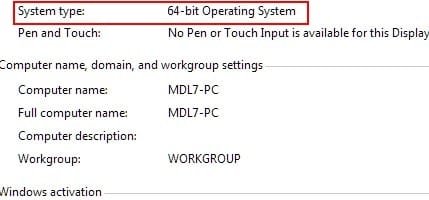
Go to your "Computer" and right click "Properties." It will indicate the "bit" you have installed.

Screenshot_4.jpg

EDIT: Like the Professor mentioned, run the install in compatibility mode. :)

Oh, yeah, welcome to the forums - GREAT PLACE! :D
 

My Computer My Computer

Computer Manufacturer/Model Number
Toshiba L355D
OS
Windows 7 Ultimate x64 SP1
CPU
Core2 Duo
Motherboard
Intel
Memory
4 GB
Graphics Card(s)
GM965 on-board
Sound Card
RealTek on-board
Monitor(s) Displays
19"+17"(laptop)
Screen Resolution
1440x900 (x 2)
Hard Drives
500GB Ext. 200GB Internal
PSU
N/A
Case
N/A
Cooling
N/A
Ah, it IS 64 bit.
How do I do this compatibility mode thing?

And thanks for the welcome:)
 

My Computer My Computer

OS
Windows 7. 64-bit

My Computer My Computer

Computer type
PC/Desktop
Computer Manufacturer/Model Number
GIGABYTE Rig (Custom)
OS
Windows 7 Professional (x64/SP1) /Linux Mint 16
CPU
Intel i5-3570k 3.40 GHz @ 4.6 GHz
Motherboard
GIGABYTE Z77X-D3H
Memory
8GB (2133MHz) DDR3
Graphics Card(s)
Asus GTX560 Ti (Nvidia)
Monitor(s) Displays
HP 23", Acer 19" and a Dell 17"
Screen Resolution
1080p, 1440x900 and 1280x1024
Hard Drives
Sandisk Extreme 120GB (SSD), WD 2TB green and 4 other HDDs
PSU
Antec 620w High Current Gamer
Case
Corsair Obsidian 600D
Cooling
CPU - Antec KÜHLER H₂O 920
Keyboard
Steelseries 6Gv2
Mouse
Roccat LUA
Internet Speed
4 - 6mb/s
Antivirus
ESET NOD32
Browser
Chrome/Firefox
Other Info
Intel Gigabit CT (PCIE NIC) and Thinkpad T61p,
right click on the installer :ar: properties :ar: compatibility ... ;)
 

My Computer My Computer

Computer type
PC/Desktop
Computer Manufacturer/Model Number
LENOVO K450 @3.0GHZ
OS
64-bit Windows 8.1 Pro
CPU
Core(TM) i5 CPU 4330 Haswell @ 3.20GHz
Motherboard
LENOVO
Memory
12.00 GB
Graphics Card(s)
Intel(R) HD Graphics
Sound Card
Intel HD integtrated
Monitor(s) Displays
HP 25' ISP Monitor
Screen Resolution
1900/1020
Hard Drives
(1) ST1000DM003-1CH162 (2) Generic STORAGE DEVICE USB Device (3) Generic STORAGE DEVICE USB Device
Internet Speed
100mb down/10mb up
Right click on the install file and you should see this:

Screenshot_5.jpg

Click it and go from there.

You're gonna love this place. :)


My Computer My Computer

Computer Manufacturer/Model Number
Toshiba L355D
OS
Windows 7 Ultimate x64 SP1
CPU
Core2 Duo
Motherboard
Intel
Memory
4 GB
Graphics Card(s)
GM965 on-board
Sound Card
RealTek on-board
Monitor(s) Displays
19"+17"(laptop)
Screen Resolution
1440x900 (x 2)
Hard Drives
500GB Ext. 200GB Internal
PSU
N/A
Case
N/A
Cooling
N/A

My Computer My Computer

Computer type
PC/Desktop
Computer Manufacturer/Model Number
GIGABYTE Rig (Custom)
OS
Windows 7 Professional (x64/SP1) /Linux Mint 16
CPU
Intel i5-3570k 3.40 GHz @ 4.6 GHz
Motherboard
GIGABYTE Z77X-D3H
Memory
8GB (2133MHz) DDR3
Graphics Card(s)
Asus GTX560 Ti (Nvidia)
Monitor(s) Displays
HP 23", Acer 19" and a Dell 17"
Screen Resolution
1080p, 1440x900 and 1280x1024
Hard Drives
Sandisk Extreme 120GB (SSD), WD 2TB green and 4 other HDDs
PSU
Antec 620w High Current Gamer
Case
Corsair Obsidian 600D
Cooling
CPU - Antec KÜHLER H₂O 920
Keyboard
Steelseries 6Gv2
Mouse
Roccat LUA
Internet Speed
4 - 6mb/s
Antivirus
ESET NOD32
Browser
Chrome/Firefox
Other Info
Intel Gigabit CT (PCIE NIC) and Thinkpad T61p,
Well thanks for the help, guys.
Fortunately, Adobe Audition worked.
Unfortunately, this GuitarPort software is now a $200 piece of garbage.
 

My Computer My Computer

OS
Windows 7. 64-bit
Which version of Win 7 are you running? If you've got Pro or Ultimate you can run it under XP in XP mode.
 

My Computer My Computer

Computer Manufacturer/Model Number
Toshiba L355D
OS
Windows 7 Ultimate x64 SP1
CPU
Core2 Duo
Motherboard
Intel
Memory
4 GB
Graphics Card(s)
GM965 on-board
Sound Card
RealTek on-board
Monitor(s) Displays
19"+17"(laptop)
Screen Resolution
1440x900 (x 2)
Hard Drives
500GB Ext. 200GB Internal
PSU
N/A
Case
N/A
Cooling
N/A
You may need to rightclick the installer to "Run as Administrator"

If you're using Compatibility Mode then you need to tick the Run As Admin box shown below.

Select Compat Mode for All Users as shown below to see more choices.

Check the website for the software to see if there is a Win 7 version which may work with your license, or put in a tech support email to them.
 

Attachments

  • Capture.PNG
    Capture.PNG
    43.7 KB · Views: 15
You may need to rightclick the installer to "Run as Administrator"

If you're using Compatibility Mode then you need to tick the Run As Admin box shown below.

Select Compat Mode for All Users as shown below to see more choices.

Check the website for the software to see if there is a Win 7 version which may work with your license, or put in a tech support email to them.

There's no option for "run as administrator" on that one.
I checked their site. There's some download called the Monkey.
It doesn't work.
I sent them an email.
:(
 

My Computer My Computer

OS
Windows 7. 64-bit
There's no option for "run as administrator" on that one.
I checked their site. There's some download called the Monkey.
It doesn't work.
I sent them an email.
:(

Are you rightclicking on the .exe Setup file within their software package to Run as Admin?

Will it allow you on rightclick Properties box to install in a Compat Mode from the time of software's release?

Post back a screenshot if in doubt.
 
Are you rightclicking on the .exe Setup file within their software package to Run as Admin?

Will it allow you on rightclick Properties box to install in a Compat Mode from the time of software's release?

Post back a screenshot if in doubt.

Yeah I selected the option to run it as admin, but it did the same thing. Then it prompted me to install in compat mode, which I also tried. Same results.
Nothing. Bleh.

Not sure how to post a screenshot.
 

My Computer My Computer

OS
Windows 7. 64-bit
If it prompted you to install in Compat Mode then it should work if it was completed correctly. The wizard should also have suggested the mode to use.

The way to find out is to rightclick on the setup file to see what Compat mode it is currently in, then try others working backward from Vista.

Compat Mode simulates the OS it will install to successfully so try that first, and as Admin.

Take screenshots using Snipping Tool iin Start Menu, attach file using paper clip in reply box.
 
If it prompted you to install in Compat Mode then it should work if it was completed correctly. The wizard should also have suggested the mode to use.

The way to find out is to rightclick on the setup file to see what Compat mode it is currently in, then try others working backward from Vista.

Compat Mode simulates the OS it will install to successfully so try that first, and as Admin.

Take screenshots using Snipping Tool iin Start Menu, attach file using paper clip in reply box.

I bought the software in 2006. Ran it on XP.
In the compatibility thing, I've tried it as everything in between 2008 and Windows NT.

This is what I get:
setup stopped working.PNG
 

My Computer My Computer

OS
Windows 7. 64-bit
I'm guessing a driver incompatibility? Your best bet will be to continue your efforts to reach the developers of the program.

It would certainly be a shame to toss out your investment in the program especially when it helps you enjoy your love of music.
 

My Computer My Computer

Computer Manufacturer/Model Number
Toshiba L355D
OS
Windows 7 Ultimate x64 SP1
CPU
Core2 Duo
Motherboard
Intel
Memory
4 GB
Graphics Card(s)
GM965 on-board
Sound Card
RealTek on-board
Monitor(s) Displays
19"+17"(laptop)
Screen Resolution
1440x900 (x 2)
Hard Drives
500GB Ext. 200GB Internal
PSU
N/A
Case
N/A
Cooling
N/A
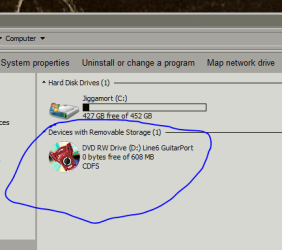
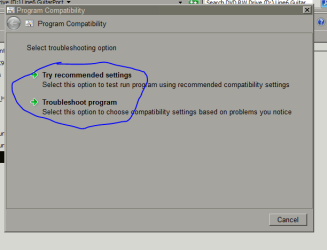
So first I open this (the drive where the CD is):
1.PNG


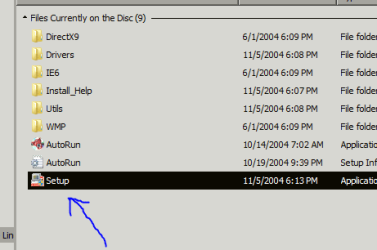
Then right click this dealio and run it in compatibility mode.
2.PNG


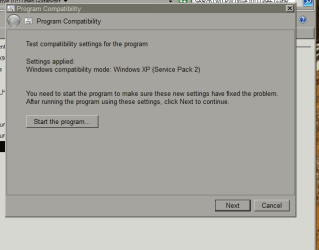
I've tried both of these options:
3.PNG


Then it tells me to run it with the selected settings, so I do.
4.PNG


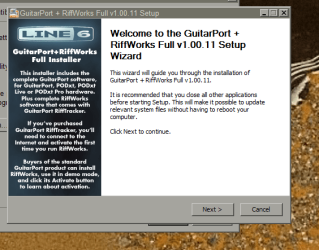
Hit "Next".
5.PNG


Agree...
6.PNG


ANNNNND.... No worky.
setup stopped working.PNG
 

My Computer My Computer

OS
Windows 7. 64-bit
I'm guessing a driver incompatibility? Your best bet will be to continue your efforts to reach the developers of the program.

It would certainly be a shame to toss out your investment in the program especially when it helps you enjoy your love of music.


Yeah. They don't seem to be very reachable. I can't blame 'em though. Gotta get off work sometime.
I downloaded the drivers it said I needed, but it still doesn't work..:(
 

My Computer My Computer

OS
Windows 7. 64-bit
Back
Top