
99problemswithw
New member
- Local time
- 9:25 AM
- Messages
- 1
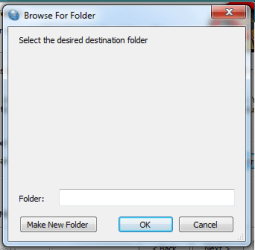
"Browse for Folder" doesn't show anything / is blank when installing
so I just got a refurbished Acer laptop and am trying to install Super Anti-Spyware, but when I try to change the folder it installs to, the Browse for Folder window shows up blank.
(attached pic)
I searched different forums for help on this, and have already tried the command prompt solutions discussed in this thread:
http://www.sevenforums.com/general-discussion/92412-browse-folder-dialogs-appear-blank.html
to no avail
running /sfc scannow found a few problems and fixed them but even after I restarted the Browse for folder still shows up blank
Does anyone have any additional suggestions / ways you fixed this problem if you had it?
thanks a bunch
so I just got a refurbished Acer laptop and am trying to install Super Anti-Spyware, but when I try to change the folder it installs to, the Browse for Folder window shows up blank.
(attached pic)
I searched different forums for help on this, and have already tried the command prompt solutions discussed in this thread:
http://www.sevenforums.com/general-discussion/92412-browse-folder-dialogs-appear-blank.html
to no avail
running /sfc scannow found a few problems and fixed them but even after I restarted the Browse for folder still shows up blank
Does anyone have any additional suggestions / ways you fixed this problem if you had it?
thanks a bunch
Attachments
My Computer
At a glance
Windows 7 Home Premium
- OS
- Windows 7 Home Premium


