
Browser conspiracy theories

I cannot get rid of that bottom Google search bar. I have a lot of stuff up there, and I don't need to see 3 Googles. I've tried left-clicking in the blank space beside it, but nothing seems nothing I uncheck on the drop-down makes it go away.
What do you mean by "bottom Google search bar"?

I see:

  1. A Search box (set to Google) alongside the Address box
  2. A Google bookmark on the Bookmarks toolbar
  3. A Tab indicating that Google is the site that tab is showing (confirmed by the URL shown on the Address bar)
Click on picture for an animation

Pale Moon Google.gif
I got one add-on that makes the type larger, but it doesn't stay larger; it reverts back to microscopic when I leave and come back. I did a re-start, but can't make the larger font permanent.

Suggestions?
Why not set the font size in the Options?

Also you may have to disable "Allow pages to choose their own fonts, instead of my selections above".

  • Click the Advanced button on the Content tab of the Options window shown in the screenshot of my previous post (Options > Options > Content tab > Advanced button).
  • Uncheck "Allow pages to choose their own fonts, instead of my selections above"
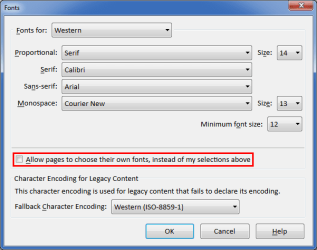
Pale Moon Options Content Advanced.png
Note:
Some web pages will go "berserk" if you choose a sensible sized font.
 

My Computer My Computer

Computer type
PC/Desktop
Computer Manufacturer/Model Number
n/a
OS
W7 Ultimate SP1, LM19.2 MATE, W10 Home 1703, W10 Pro 1703 VM, #All 64 bit
CPU
AMD Phenom II x6 1100T, 3.3 GHz
Motherboard
ASUS M4A88T-M/USB3 (AM3)
Memory
12GB DDR3 1333 G-Skill (4GB x 2), G-Skill (2GB x 2)
Graphics Card(s)
NVIDIA GeForce GTX 660
Sound Card
Realtek?
Monitor(s) Displays
Samsung S23B350
Screen Resolution
1920x1080
Hard Drives
WD Green 2TB (SATA), WD Green 3TB (SATA), WD Blue 4TB (SATA), WD Blue 6TB (SATA)
PSU
Cooler Master
Case
Antec GX300 Tower
Cooling
3x Antec TRICOOL 120mm Fans
Mouse
Wired Optical
Internet Speed
DSL
Antivirus
Avast
Browser
Pale Moon (64 bit)
Other Info
2018-12-27 Upgraded HDDs
2015-12-10 Upgraded case, graphics card, storage
2015-08-15 Upgraded motherboard & RAM
2015-07-15 Upgraded LM17.1 to LM17.2
The fonts trick worked great, lehnerus2000. I just didn't know how to find it, and now I do. Thank you!
The "extra" Google box seems to have disappeared for now. I 'm not sure what I did or didn't do, but it's a lot less cluttered at the top of my page now. I still have four layers of stuff, but I seem to be using all of it.

Now I have to learn "favorites," which I never could figure out in FF. That's one thing I use IE for, but it's a pain to keep switching back and forth. For example, ESPN sortable stats don't work in IE, so I have to go to PM now. I can see why people use several browsers. :confused:
 

My Computer My Computer

Computer type
PC/Desktop
Computer Manufacturer/Model Number
Custom
OS
Windows 7 Home Premium 64-bit, service pack 1
CPU
Intel box core i5 4460
Motherboard
Asus B85MECSM 1150
Memory
Kingston Hyper X Fury BLK 1866 8GB 4x2
Monitor(s) Displays
Samsung 23" wide-screen
Screen Resolution
1920 X 1080
Hard Drives
WD Passport, 1 TB
Case
Win Z583 Mini Tower w/ USB3.0
Keyboard
Microsoft ergo wave
Mouse
Logitech wireless
Antivirus
Bitdefender; Malwarebytes Pro
Browser
IE11
IE Favourites are called Bookmarks in Firefox and Pale Moon.

You can turn off the Bookmarks toolbar if you want more vertical "real estate".
I used to use it all the time, but I now open the Bookmarks Sidebar as required.

The Bookmarks Toolbar can be turned off in the Options pop-out list.
Simply uncheck it.
See the picture in Post #19 (that picture shows that I don't have Bookmarks Toolbar activated):


You can show/hide the Bookmarks Sidebar using the "Ctrl + B" keyboard shortcut.

The Bookmarks Manager can be activated by using the "Ctrl + Shift + B" keyboard shortcut.
 

My Computer My Computer

Computer type
PC/Desktop
Computer Manufacturer/Model Number
n/a
OS
W7 Ultimate SP1, LM19.2 MATE, W10 Home 1703, W10 Pro 1703 VM, #All 64 bit
CPU
AMD Phenom II x6 1100T, 3.3 GHz
Motherboard
ASUS M4A88T-M/USB3 (AM3)
Memory
12GB DDR3 1333 G-Skill (4GB x 2), G-Skill (2GB x 2)
Graphics Card(s)
NVIDIA GeForce GTX 660
Sound Card
Realtek?
Monitor(s) Displays
Samsung S23B350
Screen Resolution
1920x1080
Hard Drives
WD Green 2TB (SATA), WD Green 3TB (SATA), WD Blue 4TB (SATA), WD Blue 6TB (SATA)
PSU
Cooler Master
Case
Antec GX300 Tower
Cooling
3x Antec TRICOOL 120mm Fans
Mouse
Wired Optical
Internet Speed
DSL
Antivirus
Avast
Browser
Pale Moon (64 bit)
Other Info
2018-12-27 Upgraded HDDs
2015-12-10 Upgraded case, graphics card, storage
2015-08-15 Upgraded motherboard & RAM
2015-07-15 Upgraded LM17.1 to LM17.2
Firefox Bookmarks?

Well here's a suggestion regarding FF bookmarks. Personally I find it easier to create user defined folders then use an add on to sort bookmarks into those folders. I find it a lot easier to break down bookmarks into folders rather than scroll down a list of more than 1000 bookmarks!

Bookmark Sorter for Firefox

Should work in PaleMoon but I've only used it in FF Portable and Cyberfox myself.
 

My Computer My Computer

Computer type
Laptop
Computer Manufacturer/Model Number
ASUS
OS
Microsoft Windows 7 Home Premium 64-bit 7601 Multiprocessor Free Service Pack 1
CPU
AMD C-60 APU with Radeon(tm) HD Graphics
Motherboard
ASUSTeK COMPUTER INC. X501U
Memory
4.00 GB
Graphics Card(s)
AMD Radeon HD 6290 Graphics
Sound Card
(1) AMD High Definition Audio Device (2) Realtek High Defi
Screen Resolution
1366 x 768 x 32 bits (4294967296 colors) @ 60 Hz
Hard Drives
Hitachi HTS545050A7E380 SATA Disk Device
Antivirus
Comodo CIS & FW, SecureAplus App Whitelisting, Threatfire
Browser
Cyberfox 64bit, Opera 64bit, Airfox
Other Info
Spy-The-Spy, HitmanPro.Alert, Norton Connect Safe, MJRegWatcher, BitDefender TrafficLight, Voodoo Shield, Zemana AntiMalware
Back
Top