

There is one: open a new tab and enter in the URLOne problem though if anyone knows how to fix it. I use a lot of forums and am constantly using the back button to switch between threads and forums. IE used to refresh the page when the back button was pressed so that I could instantly see new posts and threads. However firefox does not do this and I am having to manually refresh the page each time.
Is there a setting to fix this please. (still finding my way around the program.)
about:config
press enter
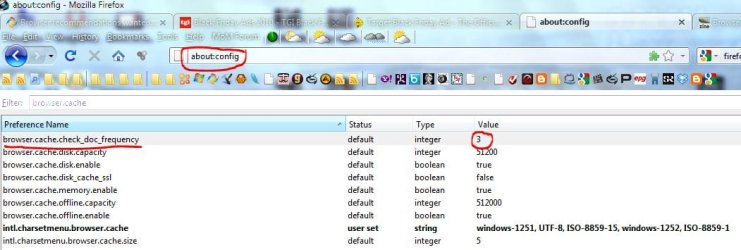
as filter you use browser.cache
look for the line browser.cache.check_doc_frequency
the standard value = 3
The key can have the following settings:
0 : Once per session
1 : Each time
2 : Never
3 : When appropriate/automatically
so double click that line and change it to 1
close that tab, restart Firefox that should do it
-DG
My Computer
- Computer Manufacturer/Model Number
- HP m8000n
- OS
- Windows 7 Ultimate x86
- CPU
- DualCore AMD Athlon 64 X2, 2600 MHz 5200+
- Motherboard
- Asus M2N68-LA (Narra)
- Memory
- Samsung 2GB DDR2
- Graphics Card(s)
- Onboard NVIDIA GeForce 6150SE nForce 430
- Sound Card
- Onboard nVIDIA nForce 6100-430 (MCP61P)
- Monitor(s) Displays
- Westinghouse 19" LED
- Screen Resolution
- 1280x1024
- Hard Drives
- SATA II Seagate Barracuda 500GB
USB II WD Elements 500GB
USB II WD My Book 1TB
USB II WD My Book 2TB
- PSU
- Stock (HP)
- Case
- Stock (HP)
- Cooling
- Stock
- Keyboard
- Logitech Classic KB 200
- Mouse
- Standard HP opticle USB mouse
