Solved Browser won't remain as default

majestic100

New member
Local time
4:39 AM
Messages
22
Getting Frustrated!. I was running IE11 but now running IE9!. I cannot get any version of IE to remain as the default browser. Everytime I open IE I get the request to set IE as the default browser - it never remauns as the default. There are no other broswers installed. As stated, I've reverted to IE9 and on every downsize I've downloaded, from Microsofts own site, the relevant IE version - IE11, IE10 and IE9 to perform a re-install. Every time this fails because it says I've a later version of whatever version installed!. This implies those on Microsofts download website are not the latest versions - why do they bother!

I now assume there is a regustry error/corruption. Really appreciate help in resolving and getting IE to remain default browser.
 

My Computer

OS
windows 7
Hi,
Did you Uninstall another browser ?
I would imagine you might be referring to default search and not default browser,
Open ie and use Alt+TA or Gear symbol and Manage add-ons,
Go to the Search providers section on the left column and see what's listed,
Also go to the Toolbars and extensions section,
On the bottom left change the view option to Show All add-ons,
Post a screen shot of both sections if you want to but the Toolbars... is what I'm most interested in,
Shockwave-disable.JPG
 

My Computer

Computer type
PC/Desktop
Computer Manufacturer/Model Number
Custom assembled by me :}
OS
Win-7-Pro64bit 7-H-Prem-64bit
CPU
i7-5930K 2nd i9-9940x both water blocked VRM's too
Motherboard
ASUS SABERTOOTH X99 2nd ASUS x299 Apex
Memory
Trident-z 3200C14 2nd Trident-z 3600C16
Graphics Card(s)
EVGA 1080ti ftw3 2nd Titan Xp both water blocked
Sound Card
Built-in Realtek
Monitor(s) Displays
1-AOC G2460PG 24"G-Sync 144Hz/ 2nd 1-ASUS VG248QE 24" 144Hz
Screen Resolution
1920 x 1080 144Hz
Hard Drives
2-Samsung M.2 Evo & Evo Plus
2-Samsung 850 EVO 500GB SSD's/ 3-2.5 W.D. Black 1tb-&3-1tb/3-3.5 WD Black 1tb hdd's
PSU
EVGA SuperNOVA 1000-P2 2nd 1200-P2
Case
2-Corsair Obsidian Series 450D Black ATX Mid Tower
Cooling
Custom water loops
Keyboard
Logitech G710+/ 2nd Logitech G910
Mouse
2-RedDragon M901 Perdition 16400 dpi Gaming mouse = wired
Internet Speed
Comcast Ping 19ms 89.31mbps download speed 6.12mbps upload
Antivirus
Malwarebytes Pro/ Superantispyware Pro
Browser
FireFox & Pale moon
Other Info
2nd ASUS X299 Apex/Intel i9-9940x with Custom water loop/7H-Prem-x64/Corsair 450D case/Ram Trident-z 3600C16 4x8gb / Samsung970Evo plus 500gb SSD/Dual ssd EZ swap evo/PSU EVGA SuperNova 1200w-P2 80+Platinum/GPU Titan Xp /8-ML-140 on push-pull on 2-280GTX rads
I do mean default web browser......Tools/Internet Options/Programs Tab; Default web browser section and click on "Make default". This works until you close and reopen IE when you told (everytime) do you want to make IE the default browser.
 

My Computer

OS
windows 7
You can if you want too ;)
But I suspect you have a browser hijacker so it would do little good at this point,
As you said now a couple times the setting does not stick and you have no other browsers installed,
We can just skip to the scanners bit if you don't want to take screen shots of the sections I wanted,
Post the scan results,
Review Jacee’s instructions to run Adwcleaner here on post#7,
Ignore the title of the thread,
http://www.sevenforums.com/system-security/316404-instant-savings-app.html
Or download it from bleepingcomputer.com
Screen shot of the download button to use for Adwcleaner
http://www.bleepingcomputer.com/download/adwcleaner/
 

My Computer

Computer type
PC/Desktop
Computer Manufacturer/Model Number
Custom assembled by me :}
OS
Win-7-Pro64bit 7-H-Prem-64bit
CPU
i7-5930K 2nd i9-9940x both water blocked VRM's too
Motherboard
ASUS SABERTOOTH X99 2nd ASUS x299 Apex
Memory
Trident-z 3200C14 2nd Trident-z 3600C16
Graphics Card(s)
EVGA 1080ti ftw3 2nd Titan Xp both water blocked
Sound Card
Built-in Realtek
Monitor(s) Displays
1-AOC G2460PG 24"G-Sync 144Hz/ 2nd 1-ASUS VG248QE 24" 144Hz
Screen Resolution
1920 x 1080 144Hz
Hard Drives
2-Samsung M.2 Evo & Evo Plus
2-Samsung 850 EVO 500GB SSD's/ 3-2.5 W.D. Black 1tb-&3-1tb/3-3.5 WD Black 1tb hdd's
PSU
EVGA SuperNOVA 1000-P2 2nd 1200-P2
Case
2-Corsair Obsidian Series 450D Black ATX Mid Tower
Cooling
Custom water loops
Keyboard
Logitech G710+/ 2nd Logitech G910
Mouse
2-RedDragon M901 Perdition 16400 dpi Gaming mouse = wired
Internet Speed
Comcast Ping 19ms 89.31mbps download speed 6.12mbps upload
Antivirus
Malwarebytes Pro/ Superantispyware Pro
Browser
FireFox & Pale moon
Other Info
2nd ASUS X299 Apex/Intel i9-9940x with Custom water loop/7H-Prem-x64/Corsair 450D case/Ram Trident-z 3600C16 4x8gb / Samsung970Evo plus 500gb SSD/Dual ssd EZ swap evo/PSU EVGA SuperNova 1200w-P2 80+Platinum/GPU Titan Xp /8-ML-140 on push-pull on 2-280GTX rads
ThrashZone,

Meant to include in last reply that I'd checked IE 'Add-Ons', nothing not expected. I disabled all and issue still there.

Thanks for link to cleaner which I've downloaded and run twice. '...R0.txt' is results of first run and clean. '...R1.txt' is second run; this one, as expected, reports clean system.

Even after running the cleaner, opening IE still asks if you want to make IE the default browser. Any further suggestions that I could look at/try ?

Edit: Perhaps reason why IE won't remain as default is that it can't be set in first place...........I've noticed that the "Apply" button is greyed out i.e. disabled. Assume in this instance nothing can be set. How do I get the "Apply" button functioning?
Edit2: Apply button greyed out by default until you want to do something so this not the problem. "Apply" button functioning correctly.
 

Attachments

Last edited:

My Computer

OS
windows 7
Reinstalling IE

Can someone tell me how I can reinstall a fresh copy of IE?? I've got a currently unresolved problem with IE remaining as the default browser which I feel might be resolved by performing a complete fresh install of IE

I'm currently running IE11 with Windows 7 64bit. I've been to Microsoft's Download Centre and downloaded a new copy of IE11 (IE11-Windows6.1-x64-en-us.exe) but when I come to install I get the window "Internet Explorer didn't finish installing" stating "Setup can't continue as a more recent version is installed on your computer" (???).

I've uninstalled IE11 and reverted to IE10 but my initial problem (default browser) remains and I get same result when trying to perform a fresh install IE10

I've gone back to IE9 but same results. I've now updated back to IE11 via windows update site.

Does anyone know why I can't perform a complete fresh install (of any version) of IE, whether I can, and how ?

Edit: I was trying to re-install IE over itself i.e. re-install IE11 when IE currently installed. Not sure why I get the message as I would of assumed the download centre would have the latest. No problem uninstalling, say IE11, and reinstalling when IE10 current version.
 
Last edited:

My Computer

OS
windows 7
Last edited:

My Computer

Computer type
PC/Desktop
Computer Manufacturer/Model Number
Custom assembled by me :}
OS
Win-7-Pro64bit 7-H-Prem-64bit
CPU
i7-5930K 2nd i9-9940x both water blocked VRM's too
Motherboard
ASUS SABERTOOTH X99 2nd ASUS x299 Apex
Memory
Trident-z 3200C14 2nd Trident-z 3600C16
Graphics Card(s)
EVGA 1080ti ftw3 2nd Titan Xp both water blocked
Sound Card
Built-in Realtek
Monitor(s) Displays
1-AOC G2460PG 24"G-Sync 144Hz/ 2nd 1-ASUS VG248QE 24" 144Hz
Screen Resolution
1920 x 1080 144Hz
Hard Drives
2-Samsung M.2 Evo & Evo Plus
2-Samsung 850 EVO 500GB SSD's/ 3-2.5 W.D. Black 1tb-&3-1tb/3-3.5 WD Black 1tb hdd's
PSU
EVGA SuperNOVA 1000-P2 2nd 1200-P2
Case
2-Corsair Obsidian Series 450D Black ATX Mid Tower
Cooling
Custom water loops
Keyboard
Logitech G710+/ 2nd Logitech G910
Mouse
2-RedDragon M901 Perdition 16400 dpi Gaming mouse = wired
Internet Speed
Comcast Ping 19ms 89.31mbps download speed 6.12mbps upload
Antivirus
Malwarebytes Pro/ Superantispyware Pro
Browser
FireFox & Pale moon
Other Info
2nd ASUS X299 Apex/Intel i9-9940x with Custom water loop/7H-Prem-x64/Corsair 450D case/Ram Trident-z 3600C16 4x8gb / Samsung970Evo plus 500gb SSD/Dual ssd EZ swap evo/PSU EVGA SuperNova 1200w-P2 80+Platinum/GPU Titan Xp /8-ML-140 on push-pull on 2-280GTX rads
As far as re-installing Internet explorer goes,
See a tutorial here to Reset Internet explorer,
Pay close attention to #7 if it doesn't show all green checkmarks the reset will fail because of the Malware you've downloaded most likely included in some other software from CNet........ ?
http://www.sevenforums.com/tutorials/1222-internet-explorer-reset.html
After Resetting ie9 or 10 notice the last process after resetting and re-opening Internet explorer for the first time,
I would add this to the tutorials process
 

My Computer

Computer type
PC/Desktop
Computer Manufacturer/Model Number
Custom assembled by me :}
OS
Win-7-Pro64bit 7-H-Prem-64bit
CPU
i7-5930K 2nd i9-9940x both water blocked VRM's too
Motherboard
ASUS SABERTOOTH X99 2nd ASUS x299 Apex
Memory
Trident-z 3200C14 2nd Trident-z 3600C16
Graphics Card(s)
EVGA 1080ti ftw3 2nd Titan Xp both water blocked
Sound Card
Built-in Realtek
Monitor(s) Displays
1-AOC G2460PG 24"G-Sync 144Hz/ 2nd 1-ASUS VG248QE 24" 144Hz
Screen Resolution
1920 x 1080 144Hz
Hard Drives
2-Samsung M.2 Evo & Evo Plus
2-Samsung 850 EVO 500GB SSD's/ 3-2.5 W.D. Black 1tb-&3-1tb/3-3.5 WD Black 1tb hdd's
PSU
EVGA SuperNOVA 1000-P2 2nd 1200-P2
Case
2-Corsair Obsidian Series 450D Black ATX Mid Tower
Cooling
Custom water loops
Keyboard
Logitech G710+/ 2nd Logitech G910
Mouse
2-RedDragon M901 Perdition 16400 dpi Gaming mouse = wired
Internet Speed
Comcast Ping 19ms 89.31mbps download speed 6.12mbps upload
Antivirus
Malwarebytes Pro/ Superantispyware Pro
Browser
FireFox & Pale moon
Other Info
2nd ASUS X299 Apex/Intel i9-9940x with Custom water loop/7H-Prem-x64/Corsair 450D case/Ram Trident-z 3600C16 4x8gb / Samsung970Evo plus 500gb SSD/Dual ssd EZ swap evo/PSU EVGA SuperNova 1200w-P2 80+Platinum/GPU Titan Xp /8-ML-140 on push-pull on 2-280GTX rads
It shouldn't matter where I run the scanner from; desktop or flash drive, the results would be/are the same. In confirmation of this I've run, as admin, from desktop and report attached. No issues detected.

I noted the Delta (search Toolbar) reference but these were cleaned up after running the scanner the first time and confirmed when run the second time with the "Adwcleaner[R1].txt" report and re-affirmed when run for a third time, this time from the desktop, with current attached report.

I've run full scan using Malwarebytes AntiMalware; report attached, and again, no reported instances of delta entries or any other malware. Doubly confirmed by running Spybot Search & Destroy which found absolutely nothing.

Attached also is your required screen shot of IE "Manage Add-Ons". As stated nothing untoward - browser helper objects or search toolbars. Everything disabled.

I've also run HiJackThis and report also attached. I don't see anything untoward in this.

So, having done all this, I still can't get IE to remain as default browser.

As regards your additional post re IE reset; this has been done numerous times with every version and as regards the comment regarding downloaded malware, the attached files disprove there is any.
 

Attachments

My Computer

OS
windows 7
Hi,
It's more about following instructions than anything,
Via this link,
Delta Search - Virus Removal Guide
Delta Search – Virus Removal Guide

This page is a comprehensive guide, which will remove Delta Search from your Internet Explorer, Firefox and Google Chrome.
Please perform all the steps in the correct order. If you have any questions or doubt at any point STOP and ask for our assistance.
STEP 1: Uninstall Delta Search programs from your computer
STEP 2: Remove Delta Search browser hijacker with AdwCleaner
STEP 3: Remove Delta Search from Internet Explorer, Firefox and Google Chrome with Junkware Removal Tool
STEP 4: Remove Delta Search virus with Malwarebytes Anti-Malware Free
STEP 5: Double-check for the Delta Search infection with HitmanPro
 

My Computer

Computer type
PC/Desktop
Computer Manufacturer/Model Number
Custom assembled by me :}
OS
Win-7-Pro64bit 7-H-Prem-64bit
CPU
i7-5930K 2nd i9-9940x both water blocked VRM's too
Motherboard
ASUS SABERTOOTH X99 2nd ASUS x299 Apex
Memory
Trident-z 3200C14 2nd Trident-z 3600C16
Graphics Card(s)
EVGA 1080ti ftw3 2nd Titan Xp both water blocked
Sound Card
Built-in Realtek
Monitor(s) Displays
1-AOC G2460PG 24"G-Sync 144Hz/ 2nd 1-ASUS VG248QE 24" 144Hz
Screen Resolution
1920 x 1080 144Hz
Hard Drives
2-Samsung M.2 Evo & Evo Plus
2-Samsung 850 EVO 500GB SSD's/ 3-2.5 W.D. Black 1tb-&3-1tb/3-3.5 WD Black 1tb hdd's
PSU
EVGA SuperNOVA 1000-P2 2nd 1200-P2
Case
2-Corsair Obsidian Series 450D Black ATX Mid Tower
Cooling
Custom water loops
Keyboard
Logitech G710+/ 2nd Logitech G910
Mouse
2-RedDragon M901 Perdition 16400 dpi Gaming mouse = wired
Internet Speed
Comcast Ping 19ms 89.31mbps download speed 6.12mbps upload
Antivirus
Malwarebytes Pro/ Superantispyware Pro
Browser
FireFox & Pale moon
Other Info
2nd ASUS X299 Apex/Intel i9-9940x with Custom water loop/7H-Prem-x64/Corsair 450D case/Ram Trident-z 3600C16 4x8gb / Samsung970Evo plus 500gb SSD/Dual ssd EZ swap evo/PSU EVGA SuperNova 1200w-P2 80+Platinum/GPU Titan Xp /8-ML-140 on push-pull on 2-280GTX rads
I really don't understand this fixation with Delta (search toolbar etc)

Step 1:. This was the first thing that I did. There are no extraneous toolbars, Delta other otherwise, to be found under control panel/programs and features. What I'd previously found i.e. bing bar, AVG search, delta, AVG etc I'd removed as unwanted. I've further double checked that there are no leftover folder/files to be found under c:/program files or c:/program files (x86).
Step 2: Adwcleaner has been run (3 times). You have seen the reports
Step 3: IE is the only browser installed. I'd previously run JRT (one of the programs I use and in my utilities folder) This was clean.
Step 4: Malwarebytes has been run and is run regularly as I have it installed. You've seen the report. This is clean.
Step 5: HitmanPro not one of my regular malware programs but this has been run and as I expected it was clear.
Step 6: (not on your list) Spybot Search and Destroy run and clean bill of health given; no issues detected.
Step7; (not on your list) HijackThis ran. You have seen the report. Nothing appears suspicious and certainly no indication of 'Delta'
 

My Computer

OS
windows 7
Thanks,
It's just a process ;)
Just for the record what is your Antivirus ?
If all else fails,
Create a new administrator account and test using it,
Replacing Internet explorer is a bit of a bugger it's much easier to create a new account and test,
Otherwise your looking a repair install to replace Internet explorer if the new admin account shows the same issue,
http://www.sevenforums.com/tutorials/3413-repair-install.html
Cheers.
 

My Computer

Computer type
PC/Desktop
Computer Manufacturer/Model Number
Custom assembled by me :}
OS
Win-7-Pro64bit 7-H-Prem-64bit
CPU
i7-5930K 2nd i9-9940x both water blocked VRM's too
Motherboard
ASUS SABERTOOTH X99 2nd ASUS x299 Apex
Memory
Trident-z 3200C14 2nd Trident-z 3600C16
Graphics Card(s)
EVGA 1080ti ftw3 2nd Titan Xp both water blocked
Sound Card
Built-in Realtek
Monitor(s) Displays
1-AOC G2460PG 24"G-Sync 144Hz/ 2nd 1-ASUS VG248QE 24" 144Hz
Screen Resolution
1920 x 1080 144Hz
Hard Drives
2-Samsung M.2 Evo & Evo Plus
2-Samsung 850 EVO 500GB SSD's/ 3-2.5 W.D. Black 1tb-&3-1tb/3-3.5 WD Black 1tb hdd's
PSU
EVGA SuperNOVA 1000-P2 2nd 1200-P2
Case
2-Corsair Obsidian Series 450D Black ATX Mid Tower
Cooling
Custom water loops
Keyboard
Logitech G710+/ 2nd Logitech G910
Mouse
2-RedDragon M901 Perdition 16400 dpi Gaming mouse = wired
Internet Speed
Comcast Ping 19ms 89.31mbps download speed 6.12mbps upload
Antivirus
Malwarebytes Pro/ Superantispyware Pro
Browser
FireFox & Pale moon
Other Info
2nd ASUS X299 Apex/Intel i9-9940x with Custom water loop/7H-Prem-x64/Corsair 450D case/Ram Trident-z 3600C16 4x8gb / Samsung970Evo plus 500gb SSD/Dual ssd EZ swap evo/PSU EVGA SuperNova 1200w-P2 80+Platinum/GPU Titan Xp /8-ML-140 on push-pull on 2-280GTX rads
I'm running AVG free addition. Same as that used on XP partition and Windows 8.1 disc (multi-boot configuration). I'm having no problem with these. I'm coming to conclusion that I'll have to do a repair install of Windows 7 unless someone knows whereabouts in the registry i.e. what key pertains to this IE feature. I'm sure an object key is corrupt.
 

My Computer

OS
windows 7
Sorry I wish I did know :(

Do you know which program came with delta included with it and where did you download it from ?
I think at this point if someone were looking in on the thread possibly add how exactly you removed delta to begin with besides Adwcleaner,
Which sometimes of adware can also be hidden behind a seemingly wanted program,
I'd be interested in seeing your uninstall a program list ?
Another possibility would be to download another browser use it's recommended install and it might correct the issue ?
Cheers.
I'd say Chrome because it does have a very aggressive install,
But please get it from Google ;)
 

My Computer

Computer type
PC/Desktop
Computer Manufacturer/Model Number
Custom assembled by me :}
OS
Win-7-Pro64bit 7-H-Prem-64bit
CPU
i7-5930K 2nd i9-9940x both water blocked VRM's too
Motherboard
ASUS SABERTOOTH X99 2nd ASUS x299 Apex
Memory
Trident-z 3200C14 2nd Trident-z 3600C16
Graphics Card(s)
EVGA 1080ti ftw3 2nd Titan Xp both water blocked
Sound Card
Built-in Realtek
Monitor(s) Displays
1-AOC G2460PG 24"G-Sync 144Hz/ 2nd 1-ASUS VG248QE 24" 144Hz
Screen Resolution
1920 x 1080 144Hz
Hard Drives
2-Samsung M.2 Evo & Evo Plus
2-Samsung 850 EVO 500GB SSD's/ 3-2.5 W.D. Black 1tb-&3-1tb/3-3.5 WD Black 1tb hdd's
PSU
EVGA SuperNOVA 1000-P2 2nd 1200-P2
Case
2-Corsair Obsidian Series 450D Black ATX Mid Tower
Cooling
Custom water loops
Keyboard
Logitech G710+/ 2nd Logitech G910
Mouse
2-RedDragon M901 Perdition 16400 dpi Gaming mouse = wired
Internet Speed
Comcast Ping 19ms 89.31mbps download speed 6.12mbps upload
Antivirus
Malwarebytes Pro/ Superantispyware Pro
Browser
FireFox & Pale moon
Other Info
2nd ASUS X299 Apex/Intel i9-9940x with Custom water loop/7H-Prem-x64/Corsair 450D case/Ram Trident-z 3600C16 4x8gb / Samsung970Evo plus 500gb SSD/Dual ssd EZ swap evo/PSU EVGA SuperNova 1200w-P2 80+Platinum/GPU Titan Xp /8-ML-140 on push-pull on 2-280GTX rads
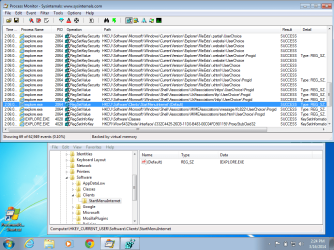
There are quite a few registry keys that get set when you pick a default browser. I could not figure out a way to tell the OS that IE was not the default browser if no other browser was installed... so, I installed Chrome. This is what I captured when I started IE and told it to be the default browser again:

IE-default.png

The Process Monitor results are filtered on operations that contain the letters regset. As you can see, that includes setting security on some of the keys and (for some reason) apps set the same info to the same key multiple times. So, the 69 entries that you see does not mean that there are 69 different keys being set. But there are still quite a few to look thru.

The one that I'm showing in regedit does not seem to matter to IE - in other words, I can change that key to Chrome, then start IE and IE does not ask to be the default browser. I'm not sure which key(s) IE looks at before asking to be the default browser and a quick Google search did not help.

You could install Chrome and see if it will stay as the default browser - then set IE back as the default browser ans see if it stays. You should always have more than one browser installed in case one gets hosed.
 

My Computer

Computer type
Laptop
Computer Manufacturer/Model Number
Employer provided Dell Latitude
OS
W7 Pro SP1 64bit
CPU
i7
Memory
8GB
Graphics Card(s)
Intel HD Graphics
Hard Drives
crappy SSD
Antivirus
Employer mandated Symantec Endpoint Protection
Browser
Pale Moon 64bit, IE11 64bit & Chrome 64bit
Many thanks to all who have responded to my request for help. This is much appreciated. In the end I decided to perform a repair install of Windows 7.

Interesting in that the contents of the Compatibility report indicated

"The following issues are preventing Windows from upgrading. Cancel the upgrade, complete each task, and then restart the upgrade to continue.

  • Windows needs to be restarted so necessary changes to system files can be made before continuing. "
Didn't realise I was upgrading as opposed to repairing. Obviously I had system file corruption . However on completion of repair/upgrade and subsequent update, IE now set as default status and remains as default


My Computer

OS
windows 7
Interesting,
Well at least your fixed :D
Wondering exactly what updated though :confused:
Newer version ? ie11 possibly ?
 

My Computer

Computer type
PC/Desktop
Computer Manufacturer/Model Number
Custom assembled by me :}
OS
Win-7-Pro64bit 7-H-Prem-64bit
CPU
i7-5930K 2nd i9-9940x both water blocked VRM's too
Motherboard
ASUS SABERTOOTH X99 2nd ASUS x299 Apex
Memory
Trident-z 3200C14 2nd Trident-z 3600C16
Graphics Card(s)
EVGA 1080ti ftw3 2nd Titan Xp both water blocked
Sound Card
Built-in Realtek
Monitor(s) Displays
1-AOC G2460PG 24"G-Sync 144Hz/ 2nd 1-ASUS VG248QE 24" 144Hz
Screen Resolution
1920 x 1080 144Hz
Hard Drives
2-Samsung M.2 Evo & Evo Plus
2-Samsung 850 EVO 500GB SSD's/ 3-2.5 W.D. Black 1tb-&3-1tb/3-3.5 WD Black 1tb hdd's
PSU
EVGA SuperNOVA 1000-P2 2nd 1200-P2
Case
2-Corsair Obsidian Series 450D Black ATX Mid Tower
Cooling
Custom water loops
Keyboard
Logitech G710+/ 2nd Logitech G910
Mouse
2-RedDragon M901 Perdition 16400 dpi Gaming mouse = wired
Internet Speed
Comcast Ping 19ms 89.31mbps download speed 6.12mbps upload
Antivirus
Malwarebytes Pro/ Superantispyware Pro
Browser
FireFox & Pale moon
Other Info
2nd ASUS X299 Apex/Intel i9-9940x with Custom water loop/7H-Prem-x64/Corsair 450D case/Ram Trident-z 3600C16 4x8gb / Samsung970Evo plus 500gb SSD/Dual ssd EZ swap evo/PSU EVGA SuperNova 1200w-P2 80+Platinum/GPU Titan Xp /8-ML-140 on push-pull on 2-280GTX rads
Had to reinstall IE11 to work.
 
Last edited:

My Computer

Computer type
PC/Desktop
OS
Windows 7 Ultimate x64
Back
Top