
starsplash
New member
- Local time
- 5:53 PM
- Messages
- 14
Hello.
I have a strange problem with my laptop, Dell XPS17 L702X. Occasionaly (pretty much randomly) I get a BSOD error with the following details extracted with BlueScreenView:
I read somewhere (can't find the source anymore) that BSOD with the check code 0x000000f4 usually indicates that there's a memory or HDD (storage devices) problem.
I created a USB stick with Memtest86+ on it, to test the condition of RAM. After around 1,5 hours of scanning it couldn't find any problems with RAM.
I've also checked the condition of the HDD. Here's the screenshot from the HD Tune's Health Tab:
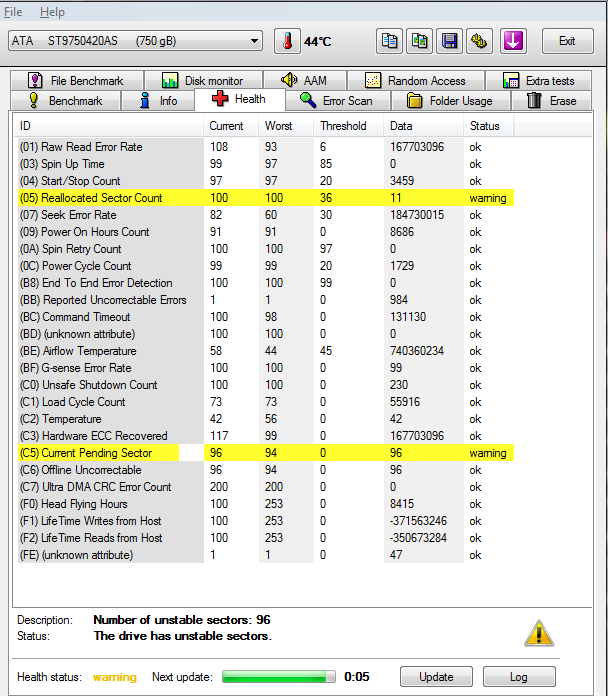
According to Wikipedia's description of the SMART attributes, the condition of the HDD doesn't look promising. Quote from Wiki:
"[A] drive which has had any reallocations at all is significantly more likely to fail in the near future."
So what I'd like to know is that is the BSOD caused by the faulty HDD? I'd like to know this for certain before I start buying another HDD for the laptop.
If there's anything (any logs, etc) that are needed to identify the cause of this BSOD, I'd be happy to provide them.
Thanks for the help,
starsplash
I have a strange problem with my laptop, Dell XPS17 L702X. Occasionaly (pretty much randomly) I get a BSOD error with the following details extracted with BlueScreenView:
Code:
==================================================
Dump File         : 072215-26691-01.dmp
Crash Time        : 22.07.2015 22:43:20
Bug Check String  : CRITICAL_OBJECT_TERMINATION
Bug Check Code    : 0x000000f4
Parameter 1       : 00000000`00000003
Parameter 2       : fffffa80`136a3b10
Parameter 3       : fffffa80`136a3df0
Parameter 4       : fffff800`039dde20
Caused By Driver  : ntoskrnl.exe
Caused By Address : ntoskrnl.exe+748c0
File Description  : NT Kernel & System
Product Name      : Microsoft® Windows® Operating System
Company           : Microsoft Corporation
File Version      : 6.1.7601.18869 (win7sp1_gdr.150525-0603)
Processor         : x64
Crash Address     : ntoskrnl.exe+748c0
Stack Address 1   :
Stack Address 2   :
Stack Address 3   :
Computer Name     :
Full Path         : C:\Windows\Minidump\072215-26691-01.dmp
Processors Count  : 8
Major Version     : 15
Minor Version     : 7601
Dump File Size    : 305 008
Dump File Time    : 22.07.2015 22:45:10
==================================================
I created a USB stick with Memtest86+ on it, to test the condition of RAM. After around 1,5 hours of scanning it couldn't find any problems with RAM.
I've also checked the condition of the HDD. Here's the screenshot from the HD Tune's Health Tab:
According to Wikipedia's description of the SMART attributes, the condition of the HDD doesn't look promising. Quote from Wiki:
"[A] drive which has had any reallocations at all is significantly more likely to fail in the near future."
So what I'd like to know is that is the BSOD caused by the faulty HDD? I'd like to know this for certain before I start buying another HDD for the laptop.
If there's anything (any logs, etc) that are needed to identify the cause of this BSOD, I'd be happy to provide them.
Thanks for the help,
starsplash
My Computer
- Computer type
- PC/Desktop
- OS
- Windows 7 Pro 32bit


